Mouse Lag

djpaige9

New member
Local time
3:53 AM
Messages
14
Brand new computer, Windows 7 Home Premium (replacing an earlier Windows 7 Home Premium computer)

I find that when I move the scroll-wheel on my mouse, or click on something, occasionally there is a lag in time before the action happens (although most of the time there is no lag).

Specifically, I am not seeing the lag moving the mouse left, right, up or down. However, sometimes, I will move the scroll wheel, expecting the browser window or other application window to scroll almost immediately. Sometimes, the window doesn't scroll for 3-4 seconds, and then scrolls the expected amount.

Similarly, on occasion, I will click on something in my browser or other application, and a similar lag appears, where the action doesn't happen until 3-4 seconds after the click.

And then most of the time, it works properly.

The mouse I am using worked properly on my previous computer. To check the possibility that the mouse itself is the problem, I fired up a wireless bluetooth mouse, and the same behavior was observed with the bluetooth mouse.

Please advise me on how to fix this issue.
 

My Computer

Computer Manufacturer/Model Number
CyberPower
OS
Windows 7 Home Premium 64 bit
CPU
AMD Phenom II X6 1055T
Motherboard
Gigabyte GA-870A-UD3
Memory
8GB
Graphics Card(s)
ATI Radeon HD 5570 QGB
Sound Card
Asus Xonar DG
Monitor(s) Displays
Acer X233H
Hard Drives
640 GB SATA III, 1 TB GB SATA III
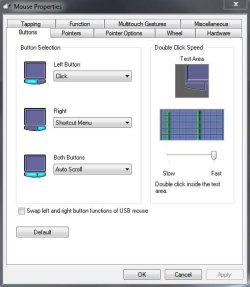
If you haven't already done so you might want to go to Control Panel > Mouse and experiment with the various mouse settings.

Mouse.JPG

You probably have a Synaptics driver installed for the mouse. You could check for latest update and also look through some of the suggested troubleshooting tips.

FAQs and Troubleshooting | Synaptics
 

My Computer

Computer type
Laptop
Computer Manufacturer/Model Number
Sony Vaio VPCEB47GM Laptop
OS
Win 7 Pro 64-bit
CPU
Intel i5 2.4 Ghz
Memory
8GB DDR3
Graphics Card(s)
Intel HD 3000
Sound Card
IDT High Definition
Monitor(s) Displays
15.6 WGXA Anti-Glare LED
Screen Resolution
1280x800
Hard Drives
640Gb 7200rpm
Antivirus
MSE
Browser
Opera (primary) with IE9 backup
Is the rodent wired, wireless, usb, ps2? Current drivers? I would use the latest ms mouse driver, 7.1 I think. It should work with a generic rodent.
 

My Computer

Computer type
PC/Desktop
Computer Manufacturer/Model Number
Custom, Dell and Lenono LT's
OS
Win8/8.1,Win7-U64, Vista U64, uncounted Linux distor's
CPU
AMD and Intell, 9590, 8350, i5 3570k
Motherboard
CFVFZ, GA990FXA, Z77e-itx
Memory
Corsair G Skill
Graphics Card(s)
Crossfired Sapphire HD 7950 Vapor-X, ASUS R9 280X TOP
Sound Card
Realtek ALC889
Monitor(s) Displays
ViewSonic VX2770SMH 27" / ViewSonic VX2433 LCD 24"
Screen Resolution
1080i HD
Hard Drives
Samsung SSD 840 Pro
OCZ Agility 3's
OCZ Vector's
WD's Blue, red, green, Velociraptors
Seagate USB3 & Hybrid's
ASUS Blu-Ray
ASUS DVD
PSU
Corsair AX1200i, Seasonice 850 Gold
Case
Cooler Master HAF 922 & HAF 932, Lian Li Train case.
Cooling
Air, Glacer 240L expanded, custom EK loop with duel D5's
Keyboard
Microsoft SideWinder X4 USB Keyboard / Logitech 250 PS2
Mouse
Logitech G500 / MS wireless 5000
Internet Speed
Best of 5ms / 75+ dn / 12+ up More or less.
Antivirus
MS esentials-MalwareBytes
Browser
Firefox Chromebook
If you haven't already done so you might want to go to Control Panel > Mouse and experiment with the various mouse settings.

View attachment 284845

You probably have a Synaptics driver installed for the mouse. You could check for latest update and also look through some of the suggested troubleshooting tips.

FAQs and Troubleshooting | Synaptics

Which of these settings could cause or eliminate the lag I am seeing?
 

My Computer

Computer Manufacturer/Model Number
CyberPower
OS
Windows 7 Home Premium 64 bit
CPU
AMD Phenom II X6 1055T
Motherboard
Gigabyte GA-870A-UD3
Memory
8GB
Graphics Card(s)
ATI Radeon HD 5570 QGB
Sound Card
Asus Xonar DG
Monitor(s) Displays
Acer X233H
Hard Drives
640 GB SATA III, 1 TB GB SATA III
Is the rodent wired, wireless, usb, ps2? Current drivers? I would use the latest ms mouse driver, 7.1 I think. It should work with a generic rodent.

The mouse is wired. It seems that on this brand new computer, the driver is 6.1 and when I click on "Update Driver", I get the message that the driver is up to date.

I do see when I look in the control panel that there are two mouse drivers listed, both with driver version 6.1. Could that be a problem?
 

Attachments

  • 2013-09-07 08_47_30-.gif
    2013-09-07 08_47_30-.gif
    12.3 KB · Views: 3

My Computer

Computer Manufacturer/Model Number
CyberPower
OS
Windows 7 Home Premium 64 bit
CPU
AMD Phenom II X6 1055T
Motherboard
Gigabyte GA-870A-UD3
Memory
8GB
Graphics Card(s)
ATI Radeon HD 5570 QGB
Sound Card
Asus Xonar DG
Monitor(s) Displays
Acer X233H
Hard Drives
640 GB SATA III, 1 TB GB SATA III
Today, I used the computer in safe mode for a few hours, and no sign of a lag or other mouse problem. So it's not the mouse, and it must be a conflict with some driver somewhere. Now the problem is to identify that driver.
 

My Computer

Computer Manufacturer/Model Number
CyberPower
OS
Windows 7 Home Premium 64 bit
CPU
AMD Phenom II X6 1055T
Motherboard
Gigabyte GA-870A-UD3
Memory
8GB
Graphics Card(s)
ATI Radeon HD 5570 QGB
Sound Card
Asus Xonar DG
Monitor(s) Displays
Acer X233H
Hard Drives
640 GB SATA III, 1 TB GB SATA III
Back
Top