
Mouse Pointer - Snap To Default Button

How to Set Mouse Pointer to Automatically Move to Default Button in Windows 7 and Windows 8

   Information
This tutorial will show you how to set the mouse pointer to automatically move (snap) to the default button in a pop-up dialog box to make it easier to select in Windows 7 and Windows 8.


OPTION ONE

To Turn "Snap To" On or Off in Mouse Properties


1. Open the Control Panel (icons view) in Windows 7 or Windows 8.

2. Click/tap on the Mouse icon.

3. Click/tap on the Pointer Options tab. (See screenshot below) Mouse_Properties.jpg
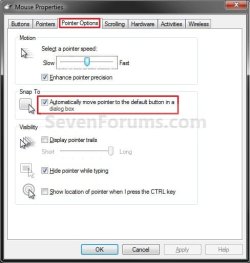
4. To Turn Snap To On A) Check the Automatically move pointer to the default button in a dialog box button, and click/tap on OK. (See screenshot above)
5. To Turn Snap To Off
NOTE: This is the default setting. A) Uncheck the Automatically move pointer to the default button in a dialog box button, and click/tap on OK. (See screenshot below step 3)
6. When finished, you can close the Control Panel if you like.


OPTION TWO

To Turn "Snap To" On or Off using a REG File Download


1. Do step 2 or 3 below for what you would like to do.

2. To Turn Snap To On A) Click/tap on the Download button below to download the file below, and go to step 4 below. Turn_On_Snap_To.reg


Download

3. To Turn Snap To Off
NOTE: This is the default setting. A) Click/tap on the Download button below to download the file below, and go to step 4 below.
Turn_Off_Snap_To.reg


Download

4. Save the REG file to you desktop.

5. Double click/tap on the downloaded REG file to merge it.

6. Click/tap on Run, Yes (UAC), Yes, and OK when prompted to approve the merge.

7. Log out and log in, or restart the computer to apply.

8. When done, you can delete the downloaded .reg file if you like.


That's it,
Shawn


Attachments

Last edited:
automatically move pointer to the default button in the dialogue box

The box gets unclicked every now and then, what to do?
 

My Computer

OS
Windows XP
Hello Dr. Chaita, and welcome to Seven Forums.

Not sure what you mean, but it may reset if you have installed a new mouse driver version.

Shawn
 

My Computer

Computer type
PC/Desktop
Computer Manufacturer/Model Number
Self built custom
OS
64-bit Windows 11 Pro for Workstations
CPU
Intel i7-8700K OC'd to 5 GHz
Motherboard
ASUS ROG Maximus XI Formula Z390
Memory
64 GB (4x16GB) G.SKILL TridentZ RGB DDR4 3600 MHz
Graphics Card(s)
ASUS ROG-STRIX-GTX1080TI-O11G-GAMING
Sound Card
Integrated
Monitor(s) Displays
2 x Samsung Odyssey G7 27"
Screen Resolution
2560x1440
Hard Drives
1TB Samsung 990 PRO M.2,
4TB Samsung 990 PRO PRO M.2,
TerraMaster F8 SSD Plus NAS
PSU
Seasonic Prime Titanium 850W
Case
Thermaltake Core P3
Cooling
Corsair Hydro H115i
Keyboard
Logitech wireless K800
Mouse
Logitech MX Master 4
Internet Speed
2 Gb/s Download and 100 Mb/s Upload
Antivirus
Malwarebyte Anti-Malware Premium
Browser
Google Chrome
Other Info
Logitech Z625 speaker system,
Logitech BRIO 4K Pro webcam,
HP Color LaserJet Pro MFP M477fdn,
APC SMART-UPS RT 1000 XL - SURT1000XLI,
Galaxy S23 Plus phone
Thanks for ur reply Shawn, yes the problem did start after I had installed a new driver as my mouse touchpad had started behaving erratically. Once I saw that the snap to function got uncheck automatically inspite of checking it several times in a day, I uninstalled the driver and starting using the native drivers, however, the problems still persists. I then tried installing the drivers that came with the dell laptop with no change in status. I am very used to the mouse snapping to the default button as there are many in my line of work. Its just very irritating that this mouse property doesn't work fine anymore inspite of checking the box in the CP
 

My Computer

OS
Windows XP
If it has not been to long a go, you might try a System Restore using a restore point dated when it did work properly to see if that may help.
 

My Computer

Computer type
PC/Desktop
Computer Manufacturer/Model Number
Self built custom
OS
64-bit Windows 11 Pro for Workstations
CPU
Intel i7-8700K OC'd to 5 GHz
Motherboard
ASUS ROG Maximus XI Formula Z390
Memory
64 GB (4x16GB) G.SKILL TridentZ RGB DDR4 3600 MHz
Graphics Card(s)
ASUS ROG-STRIX-GTX1080TI-O11G-GAMING
Sound Card
Integrated
Monitor(s) Displays
2 x Samsung Odyssey G7 27"
Screen Resolution
2560x1440
Hard Drives
1TB Samsung 990 PRO M.2,
4TB Samsung 990 PRO PRO M.2,
TerraMaster F8 SSD Plus NAS
PSU
Seasonic Prime Titanium 850W
Case
Thermaltake Core P3
Cooling
Corsair Hydro H115i
Keyboard
Logitech wireless K800
Mouse
Logitech MX Master 4
Internet Speed
2 Gb/s Download and 100 Mb/s Upload
Antivirus
Malwarebyte Anti-Malware Premium
Browser
Google Chrome
Other Info
Logitech Z625 speaker system,
Logitech BRIO 4K Pro webcam,
HP Color LaserJet Pro MFP M477fdn,
APC SMART-UPS RT 1000 XL - SURT1000XLI,
Galaxy S23 Plus phone
Hey thanks Brink, it worked and is still working. Cant tell u you have relieved I am that the snap to function is working fine now.
 

My Computer

OS
Windows XP
You're welcome Dr. Chaitra. I'm happy to hear that you got it sorted. :)
 

My Computer

Computer type
PC/Desktop
Computer Manufacturer/Model Number
Self built custom
OS
64-bit Windows 11 Pro for Workstations
CPU
Intel i7-8700K OC'd to 5 GHz
Motherboard
ASUS ROG Maximus XI Formula Z390
Memory
64 GB (4x16GB) G.SKILL TridentZ RGB DDR4 3600 MHz
Graphics Card(s)
ASUS ROG-STRIX-GTX1080TI-O11G-GAMING
Sound Card
Integrated
Monitor(s) Displays
2 x Samsung Odyssey G7 27"
Screen Resolution
2560x1440
Hard Drives
1TB Samsung 990 PRO M.2,
4TB Samsung 990 PRO PRO M.2,
TerraMaster F8 SSD Plus NAS
PSU
Seasonic Prime Titanium 850W
Case
Thermaltake Core P3
Cooling
Corsair Hydro H115i
Keyboard
Logitech wireless K800
Mouse
Logitech MX Master 4
Internet Speed
2 Gb/s Download and 100 Mb/s Upload
Antivirus
Malwarebyte Anti-Malware Premium
Browser
Google Chrome
Other Info
Logitech Z625 speaker system,
Logitech BRIO 4K Pro webcam,
HP Color LaserJet Pro MFP M477fdn,
APC SMART-UPS RT 1000 XL - SURT1000XLI,
Galaxy S23 Plus phone
Mouse snap function lost

I have had problems with my mouse snap function since going from W7 Beta to RC, as well as a lot of other items stopped working or were incompatible.
I have set the mouse to snap to the default in the control panel, installed the latest drivers (Microsoft Deskset 4000 wireless/USB) but it has not worked to date, while the rest of the functions are fine.
Any comments on how and why this might not work and what to do about it?:(

Backdoc52
 

My Computer

Computer Manufacturer/Model Number
Self built
OS
Windows 7 RC
CPU
P4 - 3.2GHz HT
Motherboard
ABIT AG8
Memory
3Gbyte DDR OCZ gold
Graphics Card(s)
NVidia GeForce 8500 GT
Sound Card
Realtek AC'97 (On Mother Board)
Monitor(s) Displays
HP w2007
Screen Resolution
1680x1050
Hard Drives
80Gb Maxtor ATA/133
(for testing purposes only, to be replaced with 500Gb SATA on final RTM)
PSU
Enermax SFCA EG425P-VE
Case
n/a
Cooling
n/a
Keyboard
MS Deskset 4000 wireless (Wireless Comfort Keyboard 1.0A)
Mouse
MS Deskset 4000 wireless (Wireless Optical Mouse 2)
Internet Speed
14000/1000 Cable
Other Info
Gigabit LAN (RTL 8169 family, On Mother Board)
Hello Backdoc52, and welcome to Seven Forums.

It may be your mouse movement (motion) sensitivity settings. I noticed that if you move the mouse when it is suppose to snap, that it will not snap. If you click on the item and wait without moving the mouse it may snap then.

Hope this helps some,
Shawn
 

My Computer

Computer type
PC/Desktop
Computer Manufacturer/Model Number
Self built custom
OS
64-bit Windows 11 Pro for Workstations
CPU
Intel i7-8700K OC'd to 5 GHz
Motherboard
ASUS ROG Maximus XI Formula Z390
Memory
64 GB (4x16GB) G.SKILL TridentZ RGB DDR4 3600 MHz
Graphics Card(s)
ASUS ROG-STRIX-GTX1080TI-O11G-GAMING
Sound Card
Integrated
Monitor(s) Displays
2 x Samsung Odyssey G7 27"
Screen Resolution
2560x1440
Hard Drives
1TB Samsung 990 PRO M.2,
4TB Samsung 990 PRO PRO M.2,
TerraMaster F8 SSD Plus NAS
PSU
Seasonic Prime Titanium 850W
Case
Thermaltake Core P3
Cooling
Corsair Hydro H115i
Keyboard
Logitech wireless K800
Mouse
Logitech MX Master 4
Internet Speed
2 Gb/s Download and 100 Mb/s Upload
Antivirus
Malwarebyte Anti-Malware Premium
Browser
Google Chrome
Other Info
Logitech Z625 speaker system,
Logitech BRIO 4K Pro webcam,
HP Color LaserJet Pro MFP M477fdn,
APC SMART-UPS RT 1000 XL - SURT1000XLI,
Galaxy S23 Plus phone
Hello Backdoc52, and welcome to Seven Forums.

It may be your mouse movement (motion) sensitivity settings. I noticed that if you move the mouse when it is suppose to snap, that it will not snap. If you click on the item and wait without moving the mouse it may snap then.

Hope this helps some,
Shawn

Thanks for the info, Shawn, but I have set the speed and sensitivity low, switched off any additional functions, but no good, it still will not "snap-to" . This is the first operating system I have played with, where I have had this problem. (and I have been playing with windows since Version 1.0, and with DOS since Version 1.0.)
There must be something wrong with the RC, since it never had this problem.:cry:

Backdoc52
 

My Computer

Computer Manufacturer/Model Number
Self built
OS
Windows 7 RC
CPU
P4 - 3.2GHz HT
Motherboard
ABIT AG8
Memory
3Gbyte DDR OCZ gold
Graphics Card(s)
NVidia GeForce 8500 GT
Sound Card
Realtek AC'97 (On Mother Board)
Monitor(s) Displays
HP w2007
Screen Resolution
1680x1050
Hard Drives
80Gb Maxtor ATA/133
(for testing purposes only, to be replaced with 500Gb SATA on final RTM)
PSU
Enermax SFCA EG425P-VE
Case
n/a
Cooling
n/a
Keyboard
MS Deskset 4000 wireless (Wireless Comfort Keyboard 1.0A)
Mouse
MS Deskset 4000 wireless (Wireless Optical Mouse 2)
Internet Speed
14000/1000 Cable
Other Info
Gigabit LAN (RTL 8169 family, On Mother Board)

My Computer

Computer type
PC/Desktop
Computer Manufacturer/Model Number
Self built custom
OS
64-bit Windows 11 Pro for Workstations
CPU
Intel i7-8700K OC'd to 5 GHz
Motherboard
ASUS ROG Maximus XI Formula Z390
Memory
64 GB (4x16GB) G.SKILL TridentZ RGB DDR4 3600 MHz
Graphics Card(s)
ASUS ROG-STRIX-GTX1080TI-O11G-GAMING
Sound Card
Integrated
Monitor(s) Displays
2 x Samsung Odyssey G7 27"
Screen Resolution
2560x1440
Hard Drives
1TB Samsung 990 PRO M.2,
4TB Samsung 990 PRO PRO M.2,
TerraMaster F8 SSD Plus NAS
PSU
Seasonic Prime Titanium 850W
Case
Thermaltake Core P3
Cooling
Corsair Hydro H115i
Keyboard
Logitech wireless K800
Mouse
Logitech MX Master 4
Internet Speed
2 Gb/s Download and 100 Mb/s Upload
Antivirus
Malwarebyte Anti-Malware Premium
Browser
Google Chrome
Other Info
Logitech Z625 speaker system,
Logitech BRIO 4K Pro webcam,
HP Color LaserJet Pro MFP M477fdn,
APC SMART-UPS RT 1000 XL - SURT1000XLI,
Galaxy S23 Plus phone
Mouse behaving erratically again

The mouse pointer is behaving erratically again, please help...:cry: It was working fine till a few days back. Now it does what it feels like. Is it a problem with the mouse pad?
 

My Computer

OS
Windows XP
I would try a different USB port to connect the mouse to, or a different mouse to see how it may work.
 

My Computer

Computer type
PC/Desktop
Computer Manufacturer/Model Number
Self built custom
OS
64-bit Windows 11 Pro for Workstations
CPU
Intel i7-8700K OC'd to 5 GHz
Motherboard
ASUS ROG Maximus XI Formula Z390
Memory
64 GB (4x16GB) G.SKILL TridentZ RGB DDR4 3600 MHz
Graphics Card(s)
ASUS ROG-STRIX-GTX1080TI-O11G-GAMING
Sound Card
Integrated
Monitor(s) Displays
2 x Samsung Odyssey G7 27"
Screen Resolution
2560x1440
Hard Drives
1TB Samsung 990 PRO M.2,
4TB Samsung 990 PRO PRO M.2,
TerraMaster F8 SSD Plus NAS
PSU
Seasonic Prime Titanium 850W
Case
Thermaltake Core P3
Cooling
Corsair Hydro H115i
Keyboard
Logitech wireless K800
Mouse
Logitech MX Master 4
Internet Speed
2 Gb/s Download and 100 Mb/s Upload
Antivirus
Malwarebyte Anti-Malware Premium
Browser
Google Chrome
Other Info
Logitech Z625 speaker system,
Logitech BRIO 4K Pro webcam,
HP Color LaserJet Pro MFP M477fdn,
APC SMART-UPS RT 1000 XL - SURT1000XLI,
Galaxy S23 Plus phone
Mouse pad

I don't use a mouse, I use the mouse pad. I noticed that this erratic behavior is more when I have used the USB port for a pen drive or external hard drive. Could it be due to a virus in any of this devices?
 

My Computer

OS
Windows XP
I don't use a mouse, I use the mouse pad. I noticed that this erratic behavior is more when I have used the USB port for a pen drive or external hard drive. Could it be due to a virus in any of this devices?

Check your Mouse "Device settings" tab from the Control Panel. It sounds like your "Tap" and/or "Vertical Scrolling" (off) setting may need to be adjusted or turned off. It may be called something different in Mouse settings for you, but it should be similar.
 

My Computer

Computer type
PC/Desktop
Computer Manufacturer/Model Number
Self built custom
OS
64-bit Windows 11 Pro for Workstations
CPU
Intel i7-8700K OC'd to 5 GHz
Motherboard
ASUS ROG Maximus XI Formula Z390
Memory
64 GB (4x16GB) G.SKILL TridentZ RGB DDR4 3600 MHz
Graphics Card(s)
ASUS ROG-STRIX-GTX1080TI-O11G-GAMING
Sound Card
Integrated
Monitor(s) Displays
2 x Samsung Odyssey G7 27"
Screen Resolution
2560x1440
Hard Drives
1TB Samsung 990 PRO M.2,
4TB Samsung 990 PRO PRO M.2,
TerraMaster F8 SSD Plus NAS
PSU
Seasonic Prime Titanium 850W
Case
Thermaltake Core P3
Cooling
Corsair Hydro H115i
Keyboard
Logitech wireless K800
Mouse
Logitech MX Master 4
Internet Speed
2 Gb/s Download and 100 Mb/s Upload
Antivirus
Malwarebyte Anti-Malware Premium
Browser
Google Chrome
Other Info
Logitech Z625 speaker system,
Logitech BRIO 4K Pro webcam,
HP Color LaserJet Pro MFP M477fdn,
APC SMART-UPS RT 1000 XL - SURT1000XLI,
Galaxy S23 Plus phone
Back
Top