Solved Mouse Wheel Erratic, Lines / Click Changes after Reboot

QuadrillionX

New member
Local time
9:52 PM
Messages
8
I have had this problem for quite a while and I just noticed that after reboot, my wheel settings jumps to 14 lines per click. I can set it back to 1,2,3 etc, and it slows, but it has no affect on the REAL problem.

I've seen this problem discussed on the web, but no real resolution without jumping through hoops. I think I know how to fix it, but I need this forum's guidance. This is not a cleaning problem, there seems to be some kind of interference. Here's what happens. In Firefox, I might wheel down a page, but when new lines are about to appear from below, all of a sudden, lines that I've already wheeled past appear at the bottom of the page and start to scroll up. Or.....

In Paint Shop Pro, I might wheel to make the image smaller, it doesn't seem to change and all of a sudden, after further scrolling it snaps to significantly smaller. Same for using the mouse to increase the size of an image on the screen

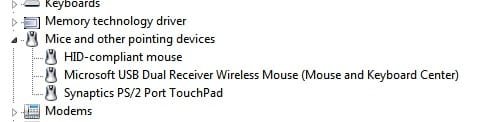
I've attached an image of the Device Manager. It shows both the microsoft mouse and a "HID Compliant Mouse." If I disable the latter, nothing changes, the problem persists. If I disable the first one, the mouse completely stops working. I don't think this is the problem, I think it is the USB listing.

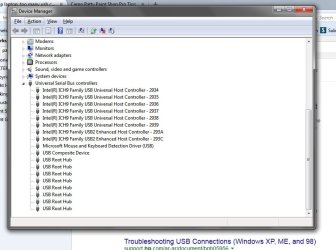
I attached a pic of the Device Manager listing of USB ports. There are far too many. My HP Entertainment laptop (which I love, BTW) has 3 USB 2 ports and a USB/SATA port (faster than the USB 2s). But look at the Device Manager. It looks like I have between eight and sixteen. That looks real fishy.

Any suggestions? Is there an easy way that isn't too complicated to get those USBs back in line?
 

Attachments
  • mice.jpg
    mice.jpg
    9.4 KB · Views: 15
  • USBs.jpg
    USBs.jpg
    65.3 KB · Views: 0

My Computer

OS
Windows 7 64-bit
Have you tried disabling the Synaptics Touch Pad. Perhaps there is some interference between the mouse & the touch pad.
 

My Computer

Computer type
PC/Desktop
Computer Manufacturer/Model Number
Self built using existing case
OS
Windows 7 Home Premium 64 bit sp1
CPU
Intel i5 3570 3.4Ghz Ivy Bridge SKT 1155 quad core
Motherboard
Gigabyte Z77-HD3 SKT 1155 2xSata 3, 4x USB 3.0
Memory
G-Skill Rip Jaws 16Gb (8x2) DDR3 -1600 PC3 12800 CL 10 red
Graphics Card(s)
Gigabyte NVIDIA GT610 1Gb DDR3 810/1200 PCI-E 2.0 Silent
Sound Card
NVIDIA High Definition & Realtech High Definition Audio
Monitor(s) Displays
2 x Philips 226V4L 16:9 aspect ratio
Screen Resolution
1920 x 1080 HD
Hard Drives
Samsung 840 Pro 256gb SSD, SATA 3.
Hitachi Touro Portable 1tb, USB 3.0 HDD used for image b/ups.
PSU
Corsair VS450
Case
Codeng
Cooling
PSU fan & CPU fan
Keyboard
Logitech
Mouse
Logitech Wireless trackball M570
Internet Speed
Wireless 3G. 3mg down & 550kb up.
Antivirus
Bitdefender Internet Security 2020
Browser
Opera (Current Version) & Firefox
Other Info
MS Office 2013 Pro. Davis weather station software. MGE Nova 600 avr UPS.
Have you tried disabling the Synaptics Touch Pad. Perhaps there is some interference between the mouse & the touch pad.

Unlike the other two mice, you can't disable the touchpad by right clicking on it in the Device Manager. You have to uninstall it. So there needs to be another solution, because I use that daily.

So the USB configuration doesn't look out of the ordinary?
 

My Computer

OS
Windows 7 64-bit
In the screen shot you posted there in Microsoft Mouse & Keyboard Driver (USB). You could check to see if you have the latest driver for that, or uninstall it & reinstall it.

Otherwise I don't see anything wrong with the USB configuration, there are no coloured warnings showing.
 

My Computer

Computer type
PC/Desktop
Computer Manufacturer/Model Number
Self built using existing case
OS
Windows 7 Home Premium 64 bit sp1
CPU
Intel i5 3570 3.4Ghz Ivy Bridge SKT 1155 quad core
Motherboard
Gigabyte Z77-HD3 SKT 1155 2xSata 3, 4x USB 3.0
Memory
G-Skill Rip Jaws 16Gb (8x2) DDR3 -1600 PC3 12800 CL 10 red
Graphics Card(s)
Gigabyte NVIDIA GT610 1Gb DDR3 810/1200 PCI-E 2.0 Silent
Sound Card
NVIDIA High Definition & Realtech High Definition Audio
Monitor(s) Displays
2 x Philips 226V4L 16:9 aspect ratio
Screen Resolution
1920 x 1080 HD
Hard Drives
Samsung 840 Pro 256gb SSD, SATA 3.
Hitachi Touro Portable 1tb, USB 3.0 HDD used for image b/ups.
PSU
Corsair VS450
Case
Codeng
Cooling
PSU fan & CPU fan
Keyboard
Logitech
Mouse
Logitech Wireless trackball M570
Internet Speed
Wireless 3G. 3mg down & 550kb up.
Antivirus
Bitdefender Internet Security 2020
Browser
Opera (Current Version) & Firefox
Other Info
MS Office 2013 Pro. Davis weather station software. MGE Nova 600 avr UPS.
In the screen shot you posted there in Microsoft Mouse & Keyboard Driver (USB). You could check to see if you have the latest driver for that, or uninstall it & reinstall it.

Otherwise I don't see anything wrong with the USB configuration, there are no coloured warnings showing.

Cool. Latest drivers on everything. Good news on the USB config. Although the mouse is just a year or so old, I guess I've used the hell out of it. So I'll go over to Wal-Mart and shell out $20 for a new one. I might try cleaning this one first. On second though, just found out that cleaning it requires a special screwdriver.

Thanks all. If I find the solution, I'll post it.
 

My Computer

OS
Windows 7 64-bit
Okay. Frustrated because Microsoft doesn't want you to clean your mouse, they want you to buy another, which is what I did. Seems to have solved the problem. My bad. The malfunctioning mouse wasn't that old, but the good news is that they're only $20. Let's hear it for competition!
 

My Computer

OS
Windows 7 64-bit
Glad to hear you have the problem sorted. The cleaning cost would probably be more than a new one at $20.
 

My Computer

Computer type
PC/Desktop
Computer Manufacturer/Model Number
Self built using existing case
OS
Windows 7 Home Premium 64 bit sp1
CPU
Intel i5 3570 3.4Ghz Ivy Bridge SKT 1155 quad core
Motherboard
Gigabyte Z77-HD3 SKT 1155 2xSata 3, 4x USB 3.0
Memory
G-Skill Rip Jaws 16Gb (8x2) DDR3 -1600 PC3 12800 CL 10 red
Graphics Card(s)
Gigabyte NVIDIA GT610 1Gb DDR3 810/1200 PCI-E 2.0 Silent
Sound Card
NVIDIA High Definition & Realtech High Definition Audio
Monitor(s) Displays
2 x Philips 226V4L 16:9 aspect ratio
Screen Resolution
1920 x 1080 HD
Hard Drives
Samsung 840 Pro 256gb SSD, SATA 3.
Hitachi Touro Portable 1tb, USB 3.0 HDD used for image b/ups.
PSU
Corsair VS450
Case
Codeng
Cooling
PSU fan & CPU fan
Keyboard
Logitech
Mouse
Logitech Wireless trackball M570
Internet Speed
Wireless 3G. 3mg down & 550kb up.
Antivirus
Bitdefender Internet Security 2020
Browser
Opera (Current Version) & Firefox
Other Info
MS Office 2013 Pro. Davis weather station software. MGE Nova 600 avr UPS.
Just for the knowledge base, I thought it interesting that the download and install of the new driver for the 3500 took a bit longer than one would think - maybe a minute or two. Of note is that I went straight to the Control Panel, where the mouse wheel "lines per click" is set at 14. All is working fine with that setting.
 

My Computer

OS
Windows 7 64-bit
Back
Top