
WIN7x64 Mouse Wheel Randomly Not Responding

Quexoz

New member
Local time
9:48 PM
Messages
7
Problem: Mouse (any mouse) wheel scrolling action randomly doesn't work. Meaning it sort of works but only about one out of five ticks of the wheel has any input effect. Sometimes it works fine for a while then stops again, sometimes it will barely scroll at all and only registers about one tick out of 15. Very random. Very annoying. This is with all of my 5 or 6 mouses? mice? I have laying around.

If I run Windows 7 32 bit configured exactly the same with all the exact same programs and drivers (64 bit versions vs 32 of course)...no more problem with the very same mouse. It is only Windows 7 64 bit. The only USB device connected is the mouse. It does it if I install Logitech mouse driver or just run Windows default driver. Has anyone else heard of this problem before, or have any ideas? I am stumped on this one. These are all corded mice, all USB. Logitech MX310, and Gigabyte M6800.
 
Last edited:

My Computer My Computer

Computer type
PC/Desktop
Computer Manufacturer/Model Number
Custom Build
OS
Windows 7 Pro x64 x32
CPU
AMD Phenom II X4 955
Motherboard
Gigabyte MA785GT-UD3H
Memory
4 GB A-DATA DDR3 1600
Graphics Card(s)
MSI Cyclone GTX460
Sound Card
Realtek ALC889A / Focusrite Scarlett 2i4
Monitor(s) Displays
AOC 2436Vw
Screen Resolution
1920x1080
Hard Drives
2x300 GB SATA
PSU
Antec TP-750 750W
Case
Big old tower
Cooling
Plenty of air
Internet Speed
25/5 Cable
Antivirus
None
Browser
Firefox
This can happen when a lot of things boot with Windows 7 and run in the background.
These things running in the background can use enough resources to slow things like a gaming mouse.
By chance would this problem happen when using a torrent?
 

My Computer My Computer

Computer type
PC/Desktop
Computer Manufacturer/Model Number
Home made Desktop
OS
Windows 10 Pro. 64/ version 1709 Windows 7 Pro/64
CPU
Intel i7-6800K @ 4.3
Motherboard
ASUS X-99 Deluxe II
Memory
Corsair Platinum 16 gig @2400
Graphics Card(s)
EVGA GTX 1070 OC
Monitor(s) Displays
Asus 27" LED LCD/VE278Q
Screen Resolution
1920-1080 or 1280-720 HDMI
Hard Drives
INTEL SSD 730-240 Gb Sata 3.0/
PSU
EVGA Platium 1200W
Case
Phanteks Luxe Tempered Glass 8 fans/ one radiator
Cooling
XSPC/ Water Cooled CPU
Keyboard
Das 4 Professional
Mouse
Logitech M705/MX Anywhere 2-S
Internet Speed
100 mbits
Antivirus
Microsoft Security Essentials/ Malwarebytes Premium 3.0/ SAS
Browser
I.E. 11 default/Firefox/ ISP Time Warner Cable/Spectrum
Other Info
LG BluRay Burner/
Sound system-KLipsch-THX/
Icy Dock ssd Hot Swap bays.
No torrents, and only 28 Processes running in Task Manager right at this moment. I'm a clean freak and have very minimal things installed (and always disable "start with Windows" type stuff) and nothing other than nvidia drivers starting with windows. No virus scanner, no malware, spyware, Skype, updaters, etc. etc. It's just minimal MS services, and video drivers. Task Manager almost always shows CPU 99% idle. No BSODs, no crashing, no stuttering, everything runs smooth and fast...except the mouse wheel.
 

My Computer My Computer

Computer type
PC/Desktop
Computer Manufacturer/Model Number
Custom Build
OS
Windows 7 Pro x64 x32
CPU
AMD Phenom II X4 955
Motherboard
Gigabyte MA785GT-UD3H
Memory
4 GB A-DATA DDR3 1600
Graphics Card(s)
MSI Cyclone GTX460
Sound Card
Realtek ALC889A / Focusrite Scarlett 2i4
Monitor(s) Displays
AOC 2436Vw
Screen Resolution
1920x1080
Hard Drives
2x300 GB SATA
PSU
Antec TP-750 750W
Case
Big old tower
Cooling
Plenty of air
Internet Speed
25/5 Cable
Antivirus
None
Browser
Firefox
Cpu at idle using 99% with 28 processes running is a clue.
You mouse does not want to work when your cpu is at 99%.

Now the next thing to find out is why is your cpu at 99%.

What causes this many times is a infection/s of some kind.

Your System don't show what security programs you use and it should. It helps others help you.
It has also been known that some security programs will do this after a bad update.

If you do or ever have used programs from IObit you can all kinds of goofy things happen.
When I doing nothing more that on this forum and my active security programs my cpu is around 1 %.
Memory 10%
Process 43
 

My Computer My Computer

Computer type
PC/Desktop
Computer Manufacturer/Model Number
Home made Desktop
OS
Windows 10 Pro. 64/ version 1709 Windows 7 Pro/64
CPU
Intel i7-6800K @ 4.3
Motherboard
ASUS X-99 Deluxe II
Memory
Corsair Platinum 16 gig @2400
Graphics Card(s)
EVGA GTX 1070 OC
Monitor(s) Displays
Asus 27" LED LCD/VE278Q
Screen Resolution
1920-1080 or 1280-720 HDMI
Hard Drives
INTEL SSD 730-240 Gb Sata 3.0/
PSU
EVGA Platium 1200W
Case
Phanteks Luxe Tempered Glass 8 fans/ one radiator
Cooling
XSPC/ Water Cooled CPU
Keyboard
Das 4 Professional
Mouse
Logitech M705/MX Anywhere 2-S
Internet Speed
100 mbits
Antivirus
Microsoft Security Essentials/ Malwarebytes Premium 3.0/ SAS
Browser
I.E. 11 default/Firefox/ ISP Time Warner Cable/Spectrum
Other Info
LG BluRay Burner/
Sound system-KLipsch-THX/
Icy Dock ssd Hot Swap bays.
99% idle, not 99% at idle :eek:, meaning only 1% in use while browsing the internet to make that post. Sorry, I wrote that the way I read it in Task Manager. If it was 99% in use I would simply restore a backup image immediately figuring I somehow got infected. I don't use any security programs. They are usually the cause of slow downs and poor performance.
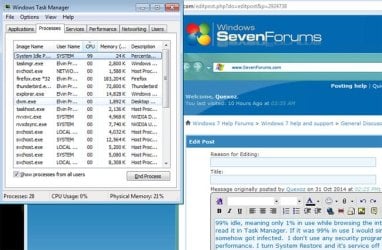
I turn System Restore and it's service off (use Acronis from a boot CD), Windows Firewall and service Off, Gadgets, all that. I am behind a hardware firewall/router, and browse carefully. The only time I have ever had a virus, I infected my own computer on purpose to test virus scanners....and they failed to detect it. Never used them before or since.

There is one thing I thought of to try last night before shutting down, and that is to set "USB Selective Suspend" back to "Enabled" in advanced power management. It became part of my install routine to disable that because it caused some other problem, I have forgotten what (shutting down USB wireless adapters?), a long time ago. We'll see if that helps, though I can't imagine why it would, but this is Windows after all. So far today, it has not happened though...
 

Attachments

  • idle.jpg
    idle.jpg
    86.5 KB · Views: 8
Last edited:

My Computer My Computer

Computer type
PC/Desktop
Computer Manufacturer/Model Number
Custom Build
OS
Windows 7 Pro x64 x32
CPU
AMD Phenom II X4 955
Motherboard
Gigabyte MA785GT-UD3H
Memory
4 GB A-DATA DDR3 1600
Graphics Card(s)
MSI Cyclone GTX460
Sound Card
Realtek ALC889A / Focusrite Scarlett 2i4
Monitor(s) Displays
AOC 2436Vw
Screen Resolution
1920x1080
Hard Drives
2x300 GB SATA
PSU
Antec TP-750 750W
Case
Big old tower
Cooling
Plenty of air
Internet Speed
25/5 Cable
Antivirus
None
Browser
Firefox
It must be noted that System Idle Process SHOULD be a high percentage, especially when not doing anything. Idle means just that, same as a car idling when not going down the road.
 

My Computer My Computer

Computer type
PC/Desktop
Computer Manufacturer/Model Number
Customs, Dell, Gateway, HP, Toshiba, Acer, ASUS
OS
Windows 7 Ultimate 64-bit, Windows 8.1 64-bit, Mac OS X 10.10, Linux Mint 17, Windows 10 Pro TP
Keyboard
Microsoft
Mouse
Microsoft
It must be noted that System Idle Process SHOULD be a high percentage *snip*
Exactly, that was my point in mentioning it, but I wasn't real clear I guess.
 

My Computer My Computer

Computer type
PC/Desktop
Computer Manufacturer/Model Number
Custom Build
OS
Windows 7 Pro x64 x32
CPU
AMD Phenom II X4 955
Motherboard
Gigabyte MA785GT-UD3H
Memory
4 GB A-DATA DDR3 1600
Graphics Card(s)
MSI Cyclone GTX460
Sound Card
Realtek ALC889A / Focusrite Scarlett 2i4
Monitor(s) Displays
AOC 2436Vw
Screen Resolution
1920x1080
Hard Drives
2x300 GB SATA
PSU
Antec TP-750 750W
Case
Big old tower
Cooling
Plenty of air
Internet Speed
25/5 Cable
Antivirus
None
Browser
Firefox
Back
Top