

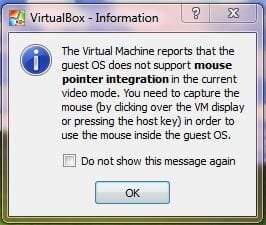
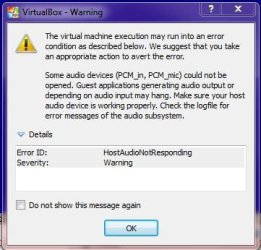
OK, I am very very new to the whole virutlaization thing. And by new, I mean litterally with in the hour of me posting this. I installed XP 32 bit Professional, SP3 through the setup on the VM (I am using VirtualBox on Windows 7 64 bit Home Premium, SP1). Well, I can click on the mouse to enable it and when I use it it acts like there's walls blocking it where I am wanting it to go. I am sorry if I am being very unclear, but this is the best way to describe this and like I said, very new. I managed to run it through the set up until it asks you to configure the automatic updates. I got tired of messing with it so I closed VirtualBox as if the computer shut down and reopened it. This did not fix it. I also managed to set the screen resolution to that of the monitor that I was using and installed the driver for the keyboard and mouse combo. I am using the Logitech Wireless Wave combo MK550 (it consists of the Logitech K350 for the keyboard and the Logitech M510 for the mouse). Can anyone please help? I don't know if any of these screen shots will help, but here you go.
Attachments
My Computer
- Computer Manufacturer/Model Number
- Gateway DX4600-15e
- OS
- Windows 7 Home Premium 64-bit SP1 Build 7601
- CPU
- AMD Phenom II X4 810 Deneb 45mm Technology
- Motherboard
- Gateway RS780 (AM2)
- Memory
- 8GB Dual-Channel DDR2 @ 399MHz
- Graphics Card(s)
- ATI Radeon HD 3200 Graphics, GeForce GT 220
- Sound Card
- Realteck High Definition Audio
- Hard Drives
- 1TB Western Digital SATA
- Keyboard
- Logitech Wave Keyboard K350
- Mouse
- Logitech Mouse M510
- Internet Speed
- 3Mb/s

