Move an unmovable window?

datapod

New member
Member
Local time
4:57 AM
Messages
49
Wasn't sure where to put this. It's not a Windows 7 Problem Per Se... So many truly brilliant regulars here though I thought I'd give it a (long?) shot.

I have a surveillance system which uses a remote viewing app that appears to be an active X component.

The app loads in the top left corner of the monitor (see screenshot) and is not resizeable or movable. The only manipulation it will allow is minimize to task bar. I do not like this :mad:

I have looked for registry entries and/or *.ini files that would govern screen position but have not found such. I've also looked for third party workarounds that would allow me to reposition or resize this window. I've not found anything.

The surveillance package is run from this card Product Detail The software is called Super DVR. Remote Viewing Software for the QSDT4PCRC-BNC and QSDT42DPCRC PCI Cards

TIA for any ideas.

Doug
 

Attachments

  • Screenshot.jpg
    Screenshot.jpg
    125.9 KB · Views: 30

My Computer

Computer type
PC/Desktop
Computer Manufacturer/Model Number
Dell XPS 8700 SE
OS
Windows 10 Professional 64bit.
CPU
Intel(R) Core(TM) i7-4770 CPU @ 3.40GHz
Motherboard
Dell Inc. Model 0KWVT8
Memory
16 GB Micron DDR3 [PC3-12800]
Graphics Card(s)
NVIDIA GeForce GTX 650 Ti
Sound Card
SB Recon3D PCIe
Monitor(s) Displays
Dell 2707WFP
Screen Resolution
1920 x 1200
Hard Drives
Manufacturer Seagate
Model ST2000DM001-1CH SCSI Disk Device
Size 2000 GB with SAMSUNG SSD PM830 mSATA 32GB Cache drive.

Seagate
Model ST1000DM003-1CH162
Size 1000 GB

Western Digital
Model WDC WD2500JS-22MHB0
Size 250 GB
Try this, hover your mouse over the taskbar icon until the preview pops up. Right click the preview and see if the Move option isn't grayed out. This will allow the arrow keys on the keyboard to move the window.

OR

Highlight (hover over) the taskbar icon. Press Alt+Space bar, then M. Now use the keyboard arrows to move. Press the Shift key when you close it might very well save that location.

A Guy
 

My Computer

Computer type
PC/Desktop
OS
Windows 10 Home x64
CPU
INTEL Core i5-750 Quad-Core 3.37GHz
Motherboard
ASUS P7P55D
Memory
HyperX Fury Black Series 8GB (2 x 4GB) 1866Mhz
Graphics Card(s)
EVGA GeForce GTX 750 Superclocked 1GB 128-Bit GDDR5
Monitor(s) Displays
LG 32MA68HY 32" IPS
Screen Resolution
1920 x 1080
Hard Drives
Samsung 840 Evo 120GB, SEAGATE 500GB Barracuda® 7200.12, SATA 3 Gb/s, 7200 RPM, 16MB cache
PSU
ANTEC TruePower New TP-550, 80 PLUS, 550W
Case
ANTEC Three Hundred Illusion
Cooling
COOLER MASTER Hyper 212 Plus, 4 x 120mm 1 x 140mm Noctua's
Internet Speed
85 + Mbps
Antivirus
Avast
Browser
Vivaldi
Yeah Guy Sorry. I should have mentioned. There are no right click options from the Task Bar Preview. Right clicking the Task Bar Preview simply returns focus to the program.

Similarly the only context options from the Task Bar icon itself are Pin to Task Bar and close. There are no right click options anywhere in the program's window either.

I honestly think that short of a third party workaround (which I'd be glad to try if anybody knows of one) the only option would be to decompile and rewrite the program. Well beyond my skill level.

Thank You for your time. Much appreciated.

Doug
 

My Computer

Computer type
PC/Desktop
Computer Manufacturer/Model Number
Dell XPS 8700 SE
OS
Windows 10 Professional 64bit.
CPU
Intel(R) Core(TM) i7-4770 CPU @ 3.40GHz
Motherboard
Dell Inc. Model 0KWVT8
Memory
16 GB Micron DDR3 [PC3-12800]
Graphics Card(s)
NVIDIA GeForce GTX 650 Ti
Sound Card
SB Recon3D PCIe
Monitor(s) Displays
Dell 2707WFP
Screen Resolution
1920 x 1200
Hard Drives
Manufacturer Seagate
Model ST2000DM001-1CH SCSI Disk Device
Size 2000 GB with SAMSUNG SSD PM830 mSATA 32GB Cache drive.

Seagate
Model ST1000DM003-1CH162
Size 1000 GB

Western Digital
Model WDC WD2500JS-22MHB0
Size 250 GB
You tried the 2nd option?

Highlight (hover over) the taskbar icon. Press Alt+Space bar, then M. Now use the keyboard arrows to move. Press the Shift key when you close it might very well save that location.

Bad coding on the programmers part. I guess they assumed the monitor would be dedicated to the display. A Guy
 

My Computer

Computer type
PC/Desktop
OS
Windows 10 Home x64
CPU
INTEL Core i5-750 Quad-Core 3.37GHz
Motherboard
ASUS P7P55D
Memory
HyperX Fury Black Series 8GB (2 x 4GB) 1866Mhz
Graphics Card(s)
EVGA GeForce GTX 750 Superclocked 1GB 128-Bit GDDR5
Monitor(s) Displays
LG 32MA68HY 32" IPS
Screen Resolution
1920 x 1080
Hard Drives
Samsung 840 Evo 120GB, SEAGATE 500GB Barracuda® 7200.12, SATA 3 Gb/s, 7200 RPM, 16MB cache
PSU
ANTEC TruePower New TP-550, 80 PLUS, 550W
Case
ANTEC Three Hundred Illusion
Cooling
COOLER MASTER Hyper 212 Plus, 4 x 120mm 1 x 140mm Noctua's
Internet Speed
85 + Mbps
Antivirus
Avast
Browser
Vivaldi
Yeah tried the second option as well. Any keypress while hovering returns focus to the program. It's just plain stuck in that corner. :confused:

Your mentioning the programmer ASSumed the monitor would be dedicated to the task (probably correct ) gave me an idea though. Perhaps I'll hook up a second small monitor to the system and see if I can dedicate it to the Webcam app.

Thanks again for your time.

Doug
 

My Computer

Computer type
PC/Desktop
Computer Manufacturer/Model Number
Dell XPS 8700 SE
OS
Windows 10 Professional 64bit.
CPU
Intel(R) Core(TM) i7-4770 CPU @ 3.40GHz
Motherboard
Dell Inc. Model 0KWVT8
Memory
16 GB Micron DDR3 [PC3-12800]
Graphics Card(s)
NVIDIA GeForce GTX 650 Ti
Sound Card
SB Recon3D PCIe
Monitor(s) Displays
Dell 2707WFP
Screen Resolution
1920 x 1200
Hard Drives
Manufacturer Seagate
Model ST2000DM001-1CH SCSI Disk Device
Size 2000 GB with SAMSUNG SSD PM830 mSATA 32GB Cache drive.

Seagate
Model ST1000DM003-1CH162
Size 1000 GB

Western Digital
Model WDC WD2500JS-22MHB0
Size 250 GB
No problem, was worth a shot ;)

A Guy
 

My Computer

Computer type
PC/Desktop
OS
Windows 10 Home x64
CPU
INTEL Core i5-750 Quad-Core 3.37GHz
Motherboard
ASUS P7P55D
Memory
HyperX Fury Black Series 8GB (2 x 4GB) 1866Mhz
Graphics Card(s)
EVGA GeForce GTX 750 Superclocked 1GB 128-Bit GDDR5
Monitor(s) Displays
LG 32MA68HY 32" IPS
Screen Resolution
1920 x 1080
Hard Drives
Samsung 840 Evo 120GB, SEAGATE 500GB Barracuda® 7200.12, SATA 3 Gb/s, 7200 RPM, 16MB cache
PSU
ANTEC TruePower New TP-550, 80 PLUS, 550W
Case
ANTEC Three Hundred Illusion
Cooling
COOLER MASTER Hyper 212 Plus, 4 x 120mm 1 x 140mm Noctua's
Internet Speed
85 + Mbps
Antivirus
Avast
Browser
Vivaldi
Yeah it was.

I was mostly hoping somebody might know of a third party "make any window moveable" sort of a thing.

I've been looking for a while so I wasn't too hopeful but hey, thanks anyway.

Doug
 

My Computer

Computer type
PC/Desktop
Computer Manufacturer/Model Number
Dell XPS 8700 SE
OS
Windows 10 Professional 64bit.
CPU
Intel(R) Core(TM) i7-4770 CPU @ 3.40GHz
Motherboard
Dell Inc. Model 0KWVT8
Memory
16 GB Micron DDR3 [PC3-12800]
Graphics Card(s)
NVIDIA GeForce GTX 650 Ti
Sound Card
SB Recon3D PCIe
Monitor(s) Displays
Dell 2707WFP
Screen Resolution
1920 x 1200
Hard Drives
Manufacturer Seagate
Model ST2000DM001-1CH SCSI Disk Device
Size 2000 GB with SAMSUNG SSD PM830 mSATA 32GB Cache drive.

Seagate
Model ST1000DM003-1CH162
Size 1000 GB

Western Digital
Model WDC WD2500JS-22MHB0
Size 250 GB
If you put the Taskbar at the top before running the program, does it still position in Top Left or does it allow room for the Taskbar? I'm trying to find out if it pays attention to the "work area". For the test to mean anything you must have Taskbar AutoHide disabled. Right click Taskbar click Properties and make sure AutoHide is not checked. Also before trying to drag the Taskbar to the top make sure Lock the Taskbar is not checked.
 

My Computer

Computer Manufacturer/Model Number
HP Media Center
OS
Windows 7 32 bit
CPU
AMD 5200+ dual core
Memory
2 GB
Graphics Card(s)
NVidia GeForce 6150SE 128 MB
Monitor(s) Displays
CRT
Screen Resolution
1280x1024
Hard Drives
500 GB Sata internal :

SIIG USB 3.0 docking stations w/WD Caviar Black 6 Gb/s drives
Keyboard
PS/2
Mouse
PS/2 Wheel Mouse
Other Info
SIIG USB 3.0 PCIexpress card.

My Computer

Computer type
PC/Desktop
Computer Manufacturer/Model Number
Gateway DX4831-01e (Mid-Tower Desktop)
OS
Originally Win 7 Hm Prem x64 Ver 6.1.7600 Build 7601-SP1 | Upgraded to Windows 10 December 14, 2019
CPU
Intel i3 530 2.93GHz, 2933MHz 2 Cores 4 Logical Processors
Motherboard
Gateway H57M01 133 megahertz
Memory
6GB of 1,333MHz DDR3 SDRAM
Graphics Card(s)
32MB Intel Graphics Media Accelerator HD IGChip
Sound Card
Realtek High Definition Audio
Monitor(s) Displays
Gateway HX2000 20inch TFT active matrix TN
Screen Resolution
1600 x 900 x 59 hertz
Hard Drives
WDC WD10EADS-00M2B0 [HDD] (1000.20 GB) -- drive 0,
HL-DT-ST DVDRAM GH41N [CD-ROM dr]
Four card readers, and Four USB 2.0
PSU
300watts.
Case
Mid-Tower Desktop
Cooling
Stock from Gateway
Keyboard
Natural Ergonomic Keyboard 4000, see Other Info
Mouse
Orig. Gateway wore out now using Insignia USB wired optical
Internet Speed
Vz FIOS 10ms png 57.64Mbps down 65.53Mbps up Speedtest.org
Antivirus
Zamana Anti-logger with Anti-malware, MSE, Windows Firewall,
Browser
IE11.0.9600.19399-Upd ver11.0.135, Firefox 68.0.1 x64
Other Info
System Specs by Belarc.

BIOS: American Megatrends Inc. P01-A0 11/17/2009

Replaced the MS 'Natural' Standard PS/2 Enhanced 101-102 Keyboard with a new Natural Ergonomic Keyboard 4000 on August 1st 2014.

Canon Pixma MG3222 Printer.

Updated to IE11 on 12102015 | Fios Quantum Router g1100

Additional AV: SpywareBlaster, manual Mbam, SAS
I also wrote a window mover sizer. MoveIt

But a program can ignore WM_MOVE messages. I'm trying to find out if it cares anything about the system settings, such as work area. If it ignores WM_MOVE and insists on being anchored at 0,0 there's nothing you can do about it except kill it.

Sometimes a window that won't allow itself to be moved will still accommodate the taskbar. In that case you may be able to "fool" it by setting the work area:
Adjust Work Area
 

My Computer

Computer Manufacturer/Model Number
HP Media Center
OS
Windows 7 32 bit
CPU
AMD 5200+ dual core
Memory
2 GB
Graphics Card(s)
NVidia GeForce 6150SE 128 MB
Monitor(s) Displays
CRT
Screen Resolution
1280x1024
Hard Drives
500 GB Sata internal :

SIIG USB 3.0 docking stations w/WD Caviar Black 6 Gb/s drives
Keyboard
PS/2
Mouse
PS/2 Wheel Mouse
Other Info
SIIG USB 3.0 PCIexpress card.
Miles I understood where you were going with your previous post.

Your right, your test would be a good one to find out if a window could be moved, and your last post explains why, when I tried to move, and set windows like Calculator, and Notepad with a third-party app to my preferred spot it failed.
 

My Computer

Computer type
PC/Desktop
Computer Manufacturer/Model Number
Gateway DX4831-01e (Mid-Tower Desktop)
OS
Originally Win 7 Hm Prem x64 Ver 6.1.7600 Build 7601-SP1 | Upgraded to Windows 10 December 14, 2019
CPU
Intel i3 530 2.93GHz, 2933MHz 2 Cores 4 Logical Processors
Motherboard
Gateway H57M01 133 megahertz
Memory
6GB of 1,333MHz DDR3 SDRAM
Graphics Card(s)
32MB Intel Graphics Media Accelerator HD IGChip
Sound Card
Realtek High Definition Audio
Monitor(s) Displays
Gateway HX2000 20inch TFT active matrix TN
Screen Resolution
1600 x 900 x 59 hertz
Hard Drives
WDC WD10EADS-00M2B0 [HDD] (1000.20 GB) -- drive 0,
HL-DT-ST DVDRAM GH41N [CD-ROM dr]
Four card readers, and Four USB 2.0
PSU
300watts.
Case
Mid-Tower Desktop
Cooling
Stock from Gateway
Keyboard
Natural Ergonomic Keyboard 4000, see Other Info
Mouse
Orig. Gateway wore out now using Insignia USB wired optical
Internet Speed
Vz FIOS 10ms png 57.64Mbps down 65.53Mbps up Speedtest.org
Antivirus
Zamana Anti-logger with Anti-malware, MSE, Windows Firewall,
Browser
IE11.0.9600.19399-Upd ver11.0.135, Firefox 68.0.1 x64
Other Info
System Specs by Belarc.

BIOS: American Megatrends Inc. P01-A0 11/17/2009

Replaced the MS 'Natural' Standard PS/2 Enhanced 101-102 Keyboard with a new Natural Ergonomic Keyboard 4000 on August 1st 2014.

Canon Pixma MG3222 Printer.

Updated to IE11 on 12102015 | Fios Quantum Router g1100

Additional AV: SpywareBlaster, manual Mbam, SAS
I gotcha'. Guess I'm just curious what's going on since I never heard of the app in question. :)
 

My Computer

Computer Manufacturer/Model Number
HP Media Center
OS
Windows 7 32 bit
CPU
AMD 5200+ dual core
Memory
2 GB
Graphics Card(s)
NVidia GeForce 6150SE 128 MB
Monitor(s) Displays
CRT
Screen Resolution
1280x1024
Hard Drives
500 GB Sata internal :

SIIG USB 3.0 docking stations w/WD Caviar Black 6 Gb/s drives
Keyboard
PS/2
Mouse
PS/2 Wheel Mouse
Other Info
SIIG USB 3.0 PCIexpress card.
Alrighty :D For the sake of convention I will refer to my unmovable window as "The Program."

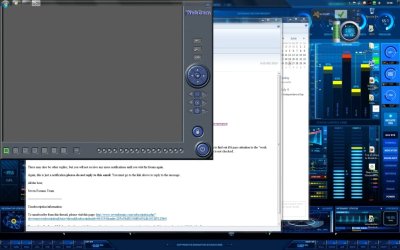
If I move the Task Bar to the top of the screen and then run The Program it opens in it's usual position with the top edge behind the Task Bar. (1st. image)


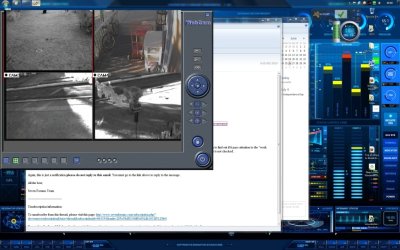
Interestingly if I run The Program first and then move the Task Bar to the top it pushes the *overlay* down the width of the Task Bar + pad but leaves the actual camera images in the same "stuck" location. (2nd. image) I don't think this helps me any but, it is the first time I've gotten any portion of the thing to move. :cool:

I did give MoveIt and WindowPad a shot at it. They don't even recognize the presence of a window.

I really think I'm going to try giving the thing it's own 15" monitor as soon as I get the gumption to drag one out and hook it up.

I really appreciate everybody's thoughts and input. You guys on this forum are the best of what *used* to make Usenet great. You know before the WWW? (Did I just date myself or what?)

Thanks again...

Doug
 

Attachments

  • Taskbar moved first.jpg
    Taskbar moved first.jpg
    286.8 KB · Views: 8
  • Webcam First..jpg
    Webcam First..jpg
    380.3 KB · Views: 10

My Computer

Computer type
PC/Desktop
Computer Manufacturer/Model Number
Dell XPS 8700 SE
OS
Windows 10 Professional 64bit.
CPU
Intel(R) Core(TM) i7-4770 CPU @ 3.40GHz
Motherboard
Dell Inc. Model 0KWVT8
Memory
16 GB Micron DDR3 [PC3-12800]
Graphics Card(s)
NVIDIA GeForce GTX 650 Ti
Sound Card
SB Recon3D PCIe
Monitor(s) Displays
Dell 2707WFP
Screen Resolution
1920 x 1200
Hard Drives
Manufacturer Seagate
Model ST2000DM001-1CH SCSI Disk Device
Size 2000 GB with SAMSUNG SSD PM830 mSATA 32GB Cache drive.

Seagate
Model ST1000DM003-1CH162
Size 1000 GB

Western Digital
Model WDC WD2500JS-22MHB0
Size 250 GB
Yeah, it looks like the video output is hard wired to be at 0 0 no matter what. Dedicated monitor is likely the only option.

edit: Just for the hell of it you might try this other app I wrote TicClick

MoveIt ignores windows that don't have a resizeable border, since it resizes as well as moves. TicClick only moves. So it doesn't care if the border is resizeable or not. If it doesn't work it only takes a few seconds to delete the folder. It does not need to be installed. TicClick works on the active window. So it should work even if the window does not have a window title or caption bar. But if the video app has its own window routine that ignores WM_MOVE then there's nothing that can be done as far as I know.
 
Last edited:

My Computer

Computer Manufacturer/Model Number
HP Media Center
OS
Windows 7 32 bit
CPU
AMD 5200+ dual core
Memory
2 GB
Graphics Card(s)
NVidia GeForce 6150SE 128 MB
Monitor(s) Displays
CRT
Screen Resolution
1280x1024
Hard Drives
500 GB Sata internal :

SIIG USB 3.0 docking stations w/WD Caviar Black 6 Gb/s drives
Keyboard
PS/2
Mouse
PS/2 Wheel Mouse
Other Info
SIIG USB 3.0 PCIexpress card.
The final option

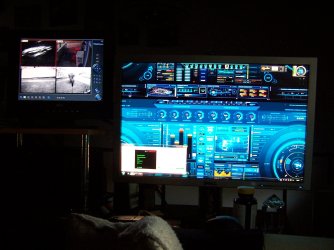
Hooked up a second monitor and along with Display Fusion DisplayFusion: Multi-Monitor Taskbar, Multi-Monitor Screen Savers, HotKeys, Multi-Monitor Wallpaper, Windows Logon Changer and more... all is well.

In case it means anything I did give TickClick a try. None of the "grid" buttons did anything but the "mouse" button did move the window (the only thing that has so far) but, with very unpredictable results. Sometimes the images would move with the overlay. Sometimes just the overlay would move. Sometimes the images would appear "askew" in the overlay.

Anywho happy with the dedicated monitor and thanks to all for givin' it some grey cells.

Doug
 

Attachments

  • 100_6165.JPG
    100_6165.JPG
    674 KB · Views: 8

My Computer

Computer type
PC/Desktop
Computer Manufacturer/Model Number
Dell XPS 8700 SE
OS
Windows 10 Professional 64bit.
CPU
Intel(R) Core(TM) i7-4770 CPU @ 3.40GHz
Motherboard
Dell Inc. Model 0KWVT8
Memory
16 GB Micron DDR3 [PC3-12800]
Graphics Card(s)
NVIDIA GeForce GTX 650 Ti
Sound Card
SB Recon3D PCIe
Monitor(s) Displays
Dell 2707WFP
Screen Resolution
1920 x 1200
Hard Drives
Manufacturer Seagate
Model ST2000DM001-1CH SCSI Disk Device
Size 2000 GB with SAMSUNG SSD PM830 mSATA 32GB Cache drive.

Seagate
Model ST1000DM003-1CH162
Size 1000 GB

Western Digital
Model WDC WD2500JS-22MHB0
Size 250 GB
That's good news, glad you could sort it out!

Doug, if you don't mind me asking. What is the Theme of the display on your main monitor, Astronomy?

A couple of the smaller images look to have orbital elements.
 

My Computer

Computer type
PC/Desktop
Computer Manufacturer/Model Number
Gateway DX4831-01e (Mid-Tower Desktop)
OS
Originally Win 7 Hm Prem x64 Ver 6.1.7600 Build 7601-SP1 | Upgraded to Windows 10 December 14, 2019
CPU
Intel i3 530 2.93GHz, 2933MHz 2 Cores 4 Logical Processors
Motherboard
Gateway H57M01 133 megahertz
Memory
6GB of 1,333MHz DDR3 SDRAM
Graphics Card(s)
32MB Intel Graphics Media Accelerator HD IGChip
Sound Card
Realtek High Definition Audio
Monitor(s) Displays
Gateway HX2000 20inch TFT active matrix TN
Screen Resolution
1600 x 900 x 59 hertz
Hard Drives
WDC WD10EADS-00M2B0 [HDD] (1000.20 GB) -- drive 0,
HL-DT-ST DVDRAM GH41N [CD-ROM dr]
Four card readers, and Four USB 2.0
PSU
300watts.
Case
Mid-Tower Desktop
Cooling
Stock from Gateway
Keyboard
Natural Ergonomic Keyboard 4000, see Other Info
Mouse
Orig. Gateway wore out now using Insignia USB wired optical
Internet Speed
Vz FIOS 10ms png 57.64Mbps down 65.53Mbps up Speedtest.org
Antivirus
Zamana Anti-logger with Anti-malware, MSE, Windows Firewall,
Browser
IE11.0.9600.19399-Upd ver11.0.135, Firefox 68.0.1 x64
Other Info
System Specs by Belarc.

BIOS: American Megatrends Inc. P01-A0 11/17/2009

Replaced the MS 'Natural' Standard PS/2 Enhanced 101-102 Keyboard with a new Natural Ergonomic Keyboard 4000 on August 1st 2014.

Canon Pixma MG3222 Printer.

Updated to IE11 on 12102015 | Fios Quantum Router g1100

Additional AV: SpywareBlaster, manual Mbam, SAS

My Computer

Computer type
PC/Desktop
Computer Manufacturer/Model Number
Dell XPS 8700 SE
OS
Windows 10 Professional 64bit.
CPU
Intel(R) Core(TM) i7-4770 CPU @ 3.40GHz
Motherboard
Dell Inc. Model 0KWVT8
Memory
16 GB Micron DDR3 [PC3-12800]
Graphics Card(s)
NVIDIA GeForce GTX 650 Ti
Sound Card
SB Recon3D PCIe
Monitor(s) Displays
Dell 2707WFP
Screen Resolution
1920 x 1200
Hard Drives
Manufacturer Seagate
Model ST2000DM001-1CH SCSI Disk Device
Size 2000 GB with SAMSUNG SSD PM830 mSATA 32GB Cache drive.

Seagate
Model ST1000DM003-1CH162
Size 1000 GB

Western Digital
Model WDC WD2500JS-22MHB0
Size 250 GB
Thanks Doug.

I should of explained earlier that I have an interest in Astronomy, and associated programs. I have a 6" Bausch&Lomb reflector with motorized German equatorial mount.
 

My Computer

Computer type
PC/Desktop
Computer Manufacturer/Model Number
Gateway DX4831-01e (Mid-Tower Desktop)
OS
Originally Win 7 Hm Prem x64 Ver 6.1.7600 Build 7601-SP1 | Upgraded to Windows 10 December 14, 2019
CPU
Intel i3 530 2.93GHz, 2933MHz 2 Cores 4 Logical Processors
Motherboard
Gateway H57M01 133 megahertz
Memory
6GB of 1,333MHz DDR3 SDRAM
Graphics Card(s)
32MB Intel Graphics Media Accelerator HD IGChip
Sound Card
Realtek High Definition Audio
Monitor(s) Displays
Gateway HX2000 20inch TFT active matrix TN
Screen Resolution
1600 x 900 x 59 hertz
Hard Drives
WDC WD10EADS-00M2B0 [HDD] (1000.20 GB) -- drive 0,
HL-DT-ST DVDRAM GH41N [CD-ROM dr]
Four card readers, and Four USB 2.0
PSU
300watts.
Case
Mid-Tower Desktop
Cooling
Stock from Gateway
Keyboard
Natural Ergonomic Keyboard 4000, see Other Info
Mouse
Orig. Gateway wore out now using Insignia USB wired optical
Internet Speed
Vz FIOS 10ms png 57.64Mbps down 65.53Mbps up Speedtest.org
Antivirus
Zamana Anti-logger with Anti-malware, MSE, Windows Firewall,
Browser
IE11.0.9600.19399-Upd ver11.0.135, Firefox 68.0.1 x64
Other Info
System Specs by Belarc.

BIOS: American Megatrends Inc. P01-A0 11/17/2009

Replaced the MS 'Natural' Standard PS/2 Enhanced 101-102 Keyboard with a new Natural Ergonomic Keyboard 4000 on August 1st 2014.

Canon Pixma MG3222 Printer.

Updated to IE11 on 12102015 | Fios Quantum Router g1100

Additional AV: SpywareBlaster, manual Mbam, SAS
As a last resort you can try using
AutoHotkey_L

to set the Window "Style" and add a SysMenu style. That's the box in the upper left corner of a window that has the menu with a Move command. If the window is set to that style the Windows system default window procedure may react to WM_MOVE messages. It's a long shot. But that scripting language is great to have anyway. It's the best way to do hotkey Tray Icon type apps to customize your own stuff. There's plenty of easy stuff even a non-programmer can do to run a certain program or open a certain folder or some other action when you press a hotkey. Also you can mess with windows like setting Stay On Top attribute etc..

See the help file for WinSet command. That's the one where you can change the style and exstyle of windows that already exist.
 

My Computer

Computer Manufacturer/Model Number
HP Media Center
OS
Windows 7 32 bit
CPU
AMD 5200+ dual core
Memory
2 GB
Graphics Card(s)
NVidia GeForce 6150SE 128 MB
Monitor(s) Displays
CRT
Screen Resolution
1280x1024
Hard Drives
500 GB Sata internal :

SIIG USB 3.0 docking stations w/WD Caviar Black 6 Gb/s drives
Keyboard
PS/2
Mouse
PS/2 Wheel Mouse
Other Info
SIIG USB 3.0 PCIexpress card.
Much appreciated Miles. I'll file that one away for future reference. Might come in handy.

I'm quite happy with my second monitor solution which BTW is now running off a generator from my backyard. Had storms roll through Central Ohio yesterday. Power out to 600,000. May be 5-7 days power company is saying and we're wayyyyyyyyy down on the priority list I'm sure.

Oh well C'est la vie.

D
 

My Computer

Computer type
PC/Desktop
Computer Manufacturer/Model Number
Dell XPS 8700 SE
OS
Windows 10 Professional 64bit.
CPU
Intel(R) Core(TM) i7-4770 CPU @ 3.40GHz
Motherboard
Dell Inc. Model 0KWVT8
Memory
16 GB Micron DDR3 [PC3-12800]
Graphics Card(s)
NVIDIA GeForce GTX 650 Ti
Sound Card
SB Recon3D PCIe
Monitor(s) Displays
Dell 2707WFP
Screen Resolution
1920 x 1200
Hard Drives
Manufacturer Seagate
Model ST2000DM001-1CH SCSI Disk Device
Size 2000 GB with SAMSUNG SSD PM830 mSATA 32GB Cache drive.

Seagate
Model ST1000DM003-1CH162
Size 1000 GB

Western Digital
Model WDC WD2500JS-22MHB0
Size 250 GB
Back
Top