
Solved Move System Sector to Another Drive

DeweyDog

New member
Local time
8:08 PM
Messages
4
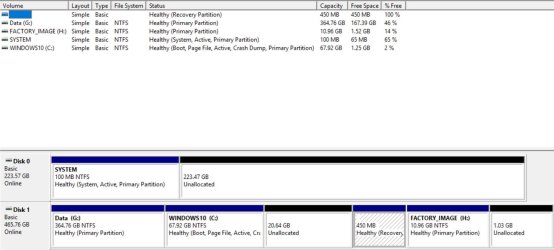
My computer came with Windows 7 loaded. later I moved Windows 7 from the hard drive to a new SSD. Still later I upgraded to Windows 10 when it came out. I used the computer in dual-boot until a few days ago.

Now, having no further use for Windows 7, I deleted its sector from the SSD. But the system files remain on the SSD. I would like to use the SSD on another computer, but I need to get the system files back to the hard drive where they were to begin with so I can boot from the hard drive again. Thanks for any help.
 

Attachments
  • Disk Management.jpg
    Disk Management.jpg
    69.1 KB · Views: 1

My Computer

Computer type
PC/Desktop
Computer Manufacturer/Model Number
HP Pavilion Elite HPE 127c
OS
Windows 10 Home (x64) Version 1607 (build 14393.1066)
CPU
2.67 gigahertz Intel Core i5 750
Motherboard
Board: IONA 1.0
Memory
8152 Megabytes Usable Installed Memory
Graphics Card(s)
NVIDIA GeForce GT 220
Hard Drives
Crucial_CT240M500SSD1 [Hard drive] (240.06 GB) -- drive 0
WDC WD5000AADS-00S9B0 [Hard drive] (500.11 GB) -- drive 1
Antivirus
Norton Security
Browser
Chrome or I.E. 11
Where do you want to put win7 on the HD?

That 20.64gb unallocated is a little small, unless you mean the contents of the 100mb sys partition?
 

My Computers

System One System Two

  • Computer type
    PC/Desktop
    OS
    7 X64
    CPU
    i5 8400
    Motherboard
    gigabyte b365m ds3h
    Memory
    2x8gb 3200mhz
    Hard Drives
    various
    PSU
    pure power 11 400w cm
    Case
    Coolermaster
    Cooling
    cryorig m9i
  • Computer type
    PC/Desktop
    OS
    7x64
    CPU
    g5400
    Motherboard
    ga b365m ds3h
    Memory
    8gb ddr4 2400
    PSU
    xfx pro 450w
In win 10 open an admin command prompt.

Type:

bcdboot c:\windows /s c:

(press enter )


Should be ok to remove the ssd after that.

Your win10 part is a bit tight for space. You could extend it to include the 26gb unallocated.
 

My Computers

System One System Two

  • Computer type
    PC/Desktop
    OS
    7 X64
    CPU
    i5 8400
    Motherboard
    gigabyte b365m ds3h
    Memory
    2x8gb 3200mhz
    Hard Drives
    various
    PSU
    pure power 11 400w cm
    Case
    Coolermaster
    Cooling
    cryorig m9i
  • Computer type
    PC/Desktop
    OS
    7x64
    CPU
    g5400
    Motherboard
    ga b365m ds3h
    Memory
    8gb ddr4 2400
    PSU
    xfx pro 450w
Thanks. I will give that a try.

I did try to add space to the Win 10 C:\ drive, but the program I was using couldn't do it. The tool was MiniTool Partition Wizard. Maybe I didn't do it right.
 

My Computer

Computer type
PC/Desktop
Computer Manufacturer/Model Number
HP Pavilion Elite HPE 127c
OS
Windows 10 Home (x64) Version 1607 (build 14393.1066)
CPU
2.67 gigahertz Intel Core i5 750
Motherboard
Board: IONA 1.0
Memory
8152 Megabytes Usable Installed Memory
Graphics Card(s)
NVIDIA GeForce GT 220
Hard Drives
Crucial_CT240M500SSD1 [Hard drive] (240.06 GB) -- drive 0
WDC WD5000AADS-00S9B0 [Hard drive] (500.11 GB) -- drive 1
Antivirus
Norton Security
Browser
Chrome or I.E. 11
You should be able to rt click the win10 part in disk management and select extend.
 

My Computers

System One System Two

  • Computer type
    PC/Desktop
    OS
    7 X64
    CPU
    i5 8400
    Motherboard
    gigabyte b365m ds3h
    Memory
    2x8gb 3200mhz
    Hard Drives
    various
    PSU
    pure power 11 400w cm
    Case
    Coolermaster
    Cooling
    cryorig m9i
  • Computer type
    PC/Desktop
    OS
    7x64
    CPU
    g5400
    Motherboard
    ga b365m ds3h
    Memory
    8gb ddr4 2400
    PSU
    xfx pro 450w
Dang! That was just too easy! Boot files have been created, and partition has been extended.

Thank you very much!
 

My Computer

Computer type
PC/Desktop
Computer Manufacturer/Model Number
HP Pavilion Elite HPE 127c
OS
Windows 10 Home (x64) Version 1607 (build 14393.1066)
CPU
2.67 gigahertz Intel Core i5 750
Motherboard
Board: IONA 1.0
Memory
8152 Megabytes Usable Installed Memory
Graphics Card(s)
NVIDIA GeForce GT 220
Hard Drives
Crucial_CT240M500SSD1 [Hard drive] (240.06 GB) -- drive 0
WDC WD5000AADS-00S9B0 [Hard drive] (500.11 GB) -- drive 1
Antivirus
Norton Security
Browser
Chrome or I.E. 11
One more thing. Will I have to move the Drive 1 into the Drive 0 position when I remove the SSD?
 

My Computer

Computer type
PC/Desktop
Computer Manufacturer/Model Number
HP Pavilion Elite HPE 127c
OS
Windows 10 Home (x64) Version 1607 (build 14393.1066)
CPU
2.67 gigahertz Intel Core i5 750
Motherboard
Board: IONA 1.0
Memory
8152 Megabytes Usable Installed Memory
Graphics Card(s)
NVIDIA GeForce GT 220
Hard Drives
Crucial_CT240M500SSD1 [Hard drive] (240.06 GB) -- drive 0
WDC WD5000AADS-00S9B0 [Hard drive] (500.11 GB) -- drive 1
Antivirus
Norton Security
Browser
Chrome or I.E. 11
No.
 

My Computers

System One System Two

  • Computer type
    PC/Desktop
    OS
    7 X64
    CPU
    i5 8400
    Motherboard
    gigabyte b365m ds3h
    Memory
    2x8gb 3200mhz
    Hard Drives
    various
    PSU
    pure power 11 400w cm
    Case
    Coolermaster
    Cooling
    cryorig m9i
  • Computer type
    PC/Desktop
    OS
    7x64
    CPU
    g5400
    Motherboard
    ga b365m ds3h
    Memory
    8gb ddr4 2400
    PSU
    xfx pro 450w
Back
Top