
bobmartien
New member
- Local time
- 5:55 PM
- Messages
- 5
Hi guys.
I have a SSD called C: (Disk0) where windows 7 is installed.
and I have another HD Called E: (Disk1).
Basicly, My HD called E is dying. So, I can still use it but it's crashing often etc.
I want to remove it but before this, I need to move the "System Reserved partition" on my SSD C:.
So, I saw this post on your forums: http://www.sevenforums.com/installa...ystem-reserved-partition-different-drive.html
But it doesnt work since my partition has "no letter".
Here is a screenshot.
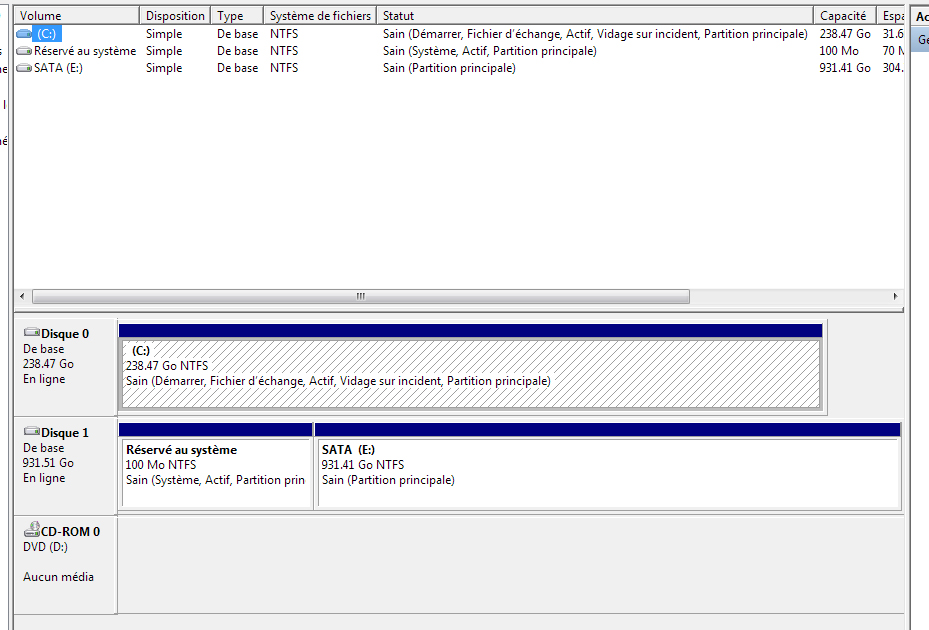
Basicly, I just want to move "System Reserved Partition" on my Disk 0 C:.
I hope you can help me !
Thank you and sorry for my english
I have a SSD called C: (Disk0) where windows 7 is installed.
and I have another HD Called E: (Disk1).
Basicly, My HD called E is dying. So, I can still use it but it's crashing often etc.
I want to remove it but before this, I need to move the "System Reserved partition" on my SSD C:.
So, I saw this post on your forums: http://www.sevenforums.com/installa...ystem-reserved-partition-different-drive.html
But it doesnt work since my partition has "no letter".
Here is a screenshot.
Basicly, I just want to move "System Reserved Partition" on my Disk 0 C:.
I hope you can help me !
Thank you and sorry for my english
My Computer
At a glance
Windows 7 Ultimate x64
- Computer type
- PC/Desktop
- OS
- Windows 7 Ultimate x64


