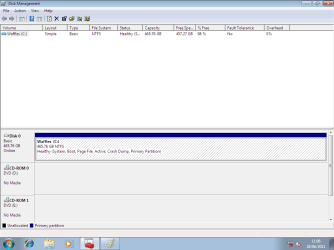
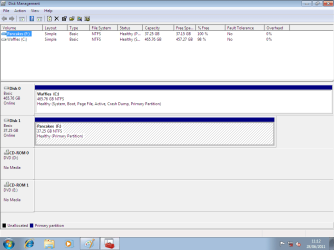
Moved boot manager, 7 drive still refuses to boot without old drive.

DO NOT PUT PANCaKES BACK IN THE PC AS DISK0
DISK0 MUST BE WAFFLES & FIRST BOOT IN BIOS.
 

My Computer My Computer

At a glance

ME/XP/Vista/Win7
OS
ME/XP/Vista/Win7
DO NOT PUT PANCaKES BACK IN THE PC AS DISK0
DISK0 MUST BE WAFFLES & FIRST BOOT IN BIOS.
You know just because it's been a while since you posted this doesn't mean it's suddenly disappeared from the thread and needs to be re-added. That post was only describing what I did before I posted here, it's not representative of my method every time I try the fix. Trust me, I get it.

And if a fix fails I do need to set everything back the way it was to get back on here. I can't afford to just leave it like that, or I can't even respond here.
 

My Computer My Computer

At a glance

Windows 7 Ultimate x64AMD Phenom II x34GB DDR2Nvidia GeForce GTX 470
Computer Manufacturer/Model Number
Self-built
OS
Windows 7 Ultimate x64
CPU
AMD Phenom II x3
Motherboard
Biostar TF 720
Memory
4GB DDR2
Graphics Card(s)
Nvidia GeForce GTX 470
Sound Card
Sound Blaster Audigy 2
Monitor(s) Displays
DVI, VGA secondary
Hard Drives
Western Digital Caviar Black 600gb
Seagate Barracuda 300gb
PSU
Rosewill 650w
Boot PW CD, rightclick on D to Modify>Set to Inactive, OK.

Making sure C is still set Active, click on it's HD to highlight it, from PW Disk tab select Rebuild MBR, Apply all steps. Restart.

If this fails, unplug D to run Startup Repair up to 3 separate times or until Win7 starts, regardless of what it reports.

If repairs will not rewrite the System boot files then the config was likely messed up beyond repair in something else which was done outside these automated steps.

You can try with PW CD Resizing C from the left by 200mb, to create a Primary partition labeled System Reserved, mark it Active, no letter. Then with D unplugged run 3 Startup Repairs to see if it will create a boot partition for you which also places the Repair Console on F8.
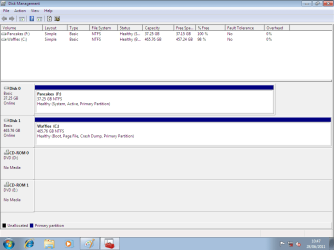
I have one more question about this. If I resize to create a separate partition on Waffles, what happens to my data? I'm sure it's not entirely contiguous on the disk, and I have a matter of a few gigabytes free on the disk. Space is why I want to format Pancakes in the first place.
 

My Computer My Computer

At a glance

Windows 7 Ultimate x64AMD Phenom II x34GB DDR2Nvidia GeForce GTX 470
Computer Manufacturer/Model Number
Self-built
OS
Windows 7 Ultimate x64
CPU
AMD Phenom II x3
Motherboard
Biostar TF 720
Memory
4GB DDR2
Graphics Card(s)
Nvidia GeForce GTX 470
Sound Card
Sound Blaster Audigy 2
Monitor(s) Displays
DVI, VGA secondary
Hard Drives
Western Digital Caviar Black 600gb
Seagate Barracuda 300gb
PSU
Rosewill 650w
Resizing moves the data over to free up the space, checking the disk as it goes. Only Disk Mgmt and PW CD are failsafe, only PW CD can REsize from the left.

Formatting is not the best way to free up space. Uninstall unwanted programs, clean out temporary files, delete unwanted files, run CCleaner, Defrag Disk with a good defragger like Puran's Boot Time defrag with full Disk Check (enabling Intelligent Optimizer on Operations tab).
 
Pancakes is the drive I want to format. It contains an old install of WinXP and a bunch of useless programs and files that are completely redundant. I want to free that disk up as a data drive, and be able to run Windows 7 self-contained on Waffles. I don't like my install drive relying on another drive to boot for no reason.
 

My Computer My Computer

At a glance

Windows 7 Ultimate x64AMD Phenom II x34GB DDR2Nvidia GeForce GTX 470
Computer Manufacturer/Model Number
Self-built
OS
Windows 7 Ultimate x64
CPU
AMD Phenom II x3
Motherboard
Biostar TF 720
Memory
4GB DDR2
Graphics Card(s)
Nvidia GeForce GTX 470
Sound Card
Sound Blaster Audigy 2
Monitor(s) Displays
DVI, VGA secondary
Hard Drives
Western Digital Caviar Black 600gb
Seagate Barracuda 300gb
PSU
Rosewill 650w
Right, unfortunately Win7 places the boot files on the first Active Partition even if you then select another HD to install the OS. It will prompt that it is about to do this but many don't fully understand the message.

Have you tried running Startup Repair 3 times on C, with D both marked Inactive and unplugged? What are the exact results?

There are other things that can be tried if Repair will not write the System boot files to C, such as constructing the System Reserved boot partition as given earlier.
 
Still haven't done it. I'm in the middle of a project right now, and I can't really afford to be tinkering with the machine I need to be working on all day. Don't feel pressured to keep responding at the moment, I'll post again when I've tried it.
 

My Computer My Computer

At a glance

Windows 7 Ultimate x64AMD Phenom II x34GB DDR2Nvidia GeForce GTX 470
Computer Manufacturer/Model Number
Self-built
OS
Windows 7 Ultimate x64
CPU
AMD Phenom II x3
Motherboard
Biostar TF 720
Memory
4GB DDR2
Graphics Card(s)
Nvidia GeForce GTX 470
Sound Card
Sound Blaster Audigy 2
Monitor(s) Displays
DVI, VGA secondary
Hard Drives
Western Digital Caviar Black 600gb
Seagate Barracuda 300gb
PSU
Rosewill 650w
1) Copy & paste Boot files.
2) Do a Startup Repair once.
3) Mark Data Hd inactive.

Move boot 001.png

Move boot 002.png

Move boot 003.png
 

My Computer My Computer

At a glance

ME/XP/Vista/Win7
OS
ME/XP/Vista/Win7
You must mark Win7 active and unplug or mark Inactive any other partition before running the Repairs or it will simply reinstate the existing System flag.

Manually copying the files is unnecessary in Win7 as Startup Repair will write new boot files to the Active partition once it determines they are not presaent, or are not reparable if present.
 
No, need to mark active, Startup Repair can do that.
 

My Computer My Computer

At a glance

ME/XP/Vista/Win7
OS
ME/XP/Vista/Win7
Greg, question. Should I delete the existing Boot folder and bootmgr file from Waffles before running the startup repair?
 

My Computer My Computer

At a glance

Windows 7 Ultimate x64AMD Phenom II x34GB DDR2Nvidia GeForce GTX 470
Computer Manufacturer/Model Number
Self-built
OS
Windows 7 Ultimate x64
CPU
AMD Phenom II x3
Motherboard
Biostar TF 720
Memory
4GB DDR2
Graphics Card(s)
Nvidia GeForce GTX 470
Sound Card
Sound Blaster Audigy 2
Monitor(s) Displays
DVI, VGA secondary
Hard Drives
Western Digital Caviar Black 600gb
Seagate Barracuda 300gb
PSU
Rosewill 650w
What I would do is waht I posted several days ago:

Boot free Partition Wizard bootable CD, rightclick on D to Modify>Set to Inactive, OK.

Then click on C WIn7 HD to highlight it, from DIsk tab select Rebuild MBR, Apply both steps.

If WIn7 doesn't start, boot WIn7 DVD Repair console or Repair CD to run Startup Repair up to 3 separate times with reboots until WIn7 starts.

The Repair should write the System boot files to the first Active partition. If D is still marked System, unplug it and repeat Rebuild MBR from PW CD. Then if necessary run the REpairs again.

Only if these fail would I delete the boot files you copied over and start over again.
 
I'm tired, somehow got confused. Yeah, that's what I'll do.
 

My Computer My Computer

At a glance

Windows 7 Ultimate x64AMD Phenom II x34GB DDR2Nvidia GeForce GTX 470
Computer Manufacturer/Model Number
Self-built
OS
Windows 7 Ultimate x64
CPU
AMD Phenom II x3
Motherboard
Biostar TF 720
Memory
4GB DDR2
Graphics Card(s)
Nvidia GeForce GTX 470
Sound Card
Sound Blaster Audigy 2
Monitor(s) Displays
DVI, VGA secondary
Hard Drives
Western Digital Caviar Black 600gb
Seagate Barracuda 300gb
PSU
Rosewill 650w
C is already marked Active.

Startup Repair will not write System Boot files to an Inactive partition.

If D is still attached and not marked Inactive then Startup Repair will not move the boot files or System flag from it - how would it know?

It may not do so even if marked Inactive, so may be need to be unplugged.
 
Take look at the screenshots in post 29 of the test install & repair.
The Hd has been unplugged.
 

My Computer My Computer

At a glance

ME/XP/Vista/Win7
OS
ME/XP/Vista/Win7
Back
Top