Solved Moving 100MB 'System Reserved' partition to regain unallocated space

chrisp9au

New member
Local time
10:58 PM
Messages
17
Location
SE Australia
I'm running Windows 7 Home 64bit on a Compaq Presario CQ61 laptop.
I have a 120GB SSD drive (C) with only Windows operating system and program files.
I have a 320GB HDD drive (D) in place of my DVD drive which holds all my documents.

Following a foolish adventure with Linux which forced me to re-install Windows,
I find my 320GB drive partitions are no longer optimal.

When setting up Linux I reduced the size of my documents partition to provide for Linux partitions.
When re-installing Windows, the installation setup a 100mb System Reserved partition immediately after my documents partition. This leaves a 42GB unallocated portion of my HDD.

I understand that I cannot delete the 100mb System Reserved partition as that is required for boot files etc.
However, I would like to move the System Reserved partition to the end of the HDD so that I can resize my documents partition using the 42GB of unallocated space.

Partition Wizard does not allow me to touch the System Reserved partition, how do I move it?

Thank you,

Chris
 

Attachments

  • screenshot.1.jpg
    screenshot.1.jpg
    56.8 KB · Views: 198
Last edited:

My Computer My Computer

At a glance

Windows 7 Home Premium 32bitIntel(R) Pentium(R) 4 CPU 2.80GHz, 2793 Mhz, ...4GBGeForce 6200
Computer Manufacturer/Model Number
Dell Optiplex GX270
OS
Windows 7 Home Premium 32bit
CPU
Intel(R) Pentium(R) 4 CPU 2.80GHz, 2793 Mhz, 1 Cor
Motherboard
X86-based PC
Memory
4GB
Graphics Card(s)
GeForce 6200
Sound Card
Creative Labs Audigy 2
Monitor(s) Displays
Dell 1901
Hard Drives
2 x 250gb Western Digital
PSU
?
Case
GX270 small
Cooling
Fan
"system reserved" is not on the win7 physical drive!! Since you have one 1 OS... It is very good thing to move it to same disk as WIN7. even better merge the boot filles and boot menu to the C-drive . Wanna know how?
 

My Computer My Computer

At a glance

Microsoft Windows 7 Home Premium 64-bits 7601...Intel(R) Core(TM) i3 CPU M 370 @ 2.40GHz4,00 GBATI Mobility Radeon HD 5400 Series
Computer type
Laptop
Computer Manufacturer/Model Number
ACER ASPIRE 5742G
OS
Microsoft Windows 7 Home Premium 64-bits 7601 Multiprocessor Free Service Pack 1
CPU
Intel(R) Core(TM) i3 CPU M 370 @ 2.40GHz
Motherboard
Acer Aspire 5742G
Memory
4,00 GB
Graphics Card(s)
ATI Mobility Radeon HD 5400 Series
Sound Card
(1) AMD High Definition Audio Device (2) Realtek High Defi
Screen Resolution
1366 x 768 x 32 bits (4294967296 colors) @ 60 Hz
Hard Drives
WDC WD5000BEVT-22ZAT0

My Computer My Computer

At a glance

Microsoft Windows 7 Home Premium 64-bits 7601...Intel(R) Core(TM) i3 CPU M 370 @ 2.40GHz4,00 GBATI Mobility Radeon HD 5400 Series
Computer type
Laptop
Computer Manufacturer/Model Number
ACER ASPIRE 5742G
OS
Microsoft Windows 7 Home Premium 64-bits 7601 Multiprocessor Free Service Pack 1
CPU
Intel(R) Core(TM) i3 CPU M 370 @ 2.40GHz
Motherboard
Acer Aspire 5742G
Memory
4,00 GB
Graphics Card(s)
ATI Mobility Radeon HD 5400 Series
Sound Card
(1) AMD High Definition Audio Device (2) Realtek High Defi
Screen Resolution
1366 x 768 x 32 bits (4294967296 colors) @ 60 Hz
Hard Drives
WDC WD5000BEVT-22ZAT0
Thank you, what would you advise?

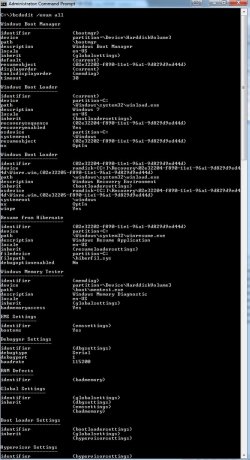
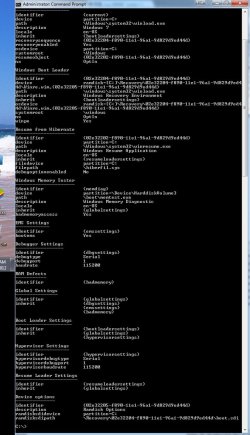
I couldn't remember the 'pipe' command to direct output to a file,
so attached are screenshots of the output from the bcdedit function.

Cheers

Chris
 

Attachments

  • screenshot.1.jpg
    screenshot.1.jpg
    100.7 KB · Views: 112
  • screenshot.2.jpg
    screenshot.2.jpg
    112.8 KB · Views: 36

My Computer My Computer

At a glance

Windows 7 Home Premium 32bitIntel(R) Pentium(R) 4 CPU 2.80GHz, 2793 Mhz, ...4GBGeForce 6200
Computer Manufacturer/Model Number
Dell Optiplex GX270
OS
Windows 7 Home Premium 32bit
CPU
Intel(R) Pentium(R) 4 CPU 2.80GHz, 2793 Mhz, 1 Cor
Motherboard
X86-based PC
Memory
4GB
Graphics Card(s)
GeForce 6200
Sound Card
Creative Labs Audigy 2
Monitor(s) Displays
Dell 1901
Hard Drives
2 x 250gb Western Digital
PSU
?
Case
GX270 small
Cooling
Fan
Pre-Partition

I always pre-partition my HDDs (using Gparted) so that wretched 100 MB partition is never created.

If you have everything backed up, I'd just reformat the entire HDD and create the new partitions that you want (using a program that you can boot from a CD/USB, like Gparted on a Linux Live CD).

I'd then reinstall everything in the desired locations/partitions.

I'm not sure what program is best for SSDs though. :(

Just out of curiosity:

  • What Linux distro did you try?
  • What problem(s) did you experience?
 

My Computer My Computer

At a glance

W7 Ultimate SP1, LM19.2 MATE, W10 Home 1703, ...AMD Phenom II x6 1100T, 3.3 GHz12GB DDR3 1333 G-Skill (4GB x 2), G-Skill (2G...NVIDIA GeForce GTX 660
Computer type
PC/Desktop
Computer Manufacturer/Model Number
n/a
OS
W7 Ultimate SP1, LM19.2 MATE, W10 Home 1703, W10 Pro 1703 VM, #All 64 bit
CPU
AMD Phenom II x6 1100T, 3.3 GHz
Motherboard
ASUS M4A88T-M/USB3 (AM3)
Memory
12GB DDR3 1333 G-Skill (4GB x 2), G-Skill (2GB x 2)
Graphics Card(s)
NVIDIA GeForce GTX 660
Sound Card
Realtek?
Monitor(s) Displays
Samsung S23B350
Screen Resolution
1920x1080
Hard Drives
WD Green 2TB (SATA), WD Green 3TB (SATA), WD Blue 4TB (SATA), WD Blue 6TB (SATA)
PSU
Cooler Master
Case
Antec GX300 Tower
Cooling
3x Antec TRICOOL 120mm Fans
Mouse
Wired Optical
Internet Speed
DSL
Antivirus
Avast
Browser
Pale Moon (64 bit)
Other Info
2018-12-27 Upgraded HDDs
2015-12-10 Upgraded case, graphics card, storage
2015-08-15 Upgraded motherboard & RAM
2015-07-15 Upgraded LM17.1 to LM17.2
This is why you should always disable or unplug all other HD's and peripherals during install. SysReserved will otherwise write itself to the first HD.

To move the System boot files to C so you can delete the System Reserved partition first Mark SysReserved as Inactive,

next Mark C Partition Active,

reboot into BIOS setup to disable DISK0 or physically unplug it (whichever is easiest),

then boot into Win7 installer to run Startup Repair - Run 3 Separate Times until C starts on its own and is marked System Active.

Now you can re-enable Disk0 and delete System Reserved in Disk Mgmt to extend Documents.
 
Thanks gregrocker, all fixed!

Your help is much appreciated.

Chris
 

My Computer My Computer

At a glance

Windows 7 Home Premium 32bitIntel(R) Pentium(R) 4 CPU 2.80GHz, 2793 Mhz, ...4GBGeForce 6200
Computer Manufacturer/Model Number
Dell Optiplex GX270
OS
Windows 7 Home Premium 32bit
CPU
Intel(R) Pentium(R) 4 CPU 2.80GHz, 2793 Mhz, 1 Cor
Motherboard
X86-based PC
Memory
4GB
Graphics Card(s)
GeForce 6200
Sound Card
Creative Labs Audigy 2
Monitor(s) Displays
Dell 1901
Hard Drives
2 x 250gb Western Digital
PSU
?
Case
GX270 small
Cooling
Fan
Back
Top