Solved Moving a hard drive with OA key to new motherboard, new retail key?

Yes, if your iso is the same version of 7, then there should be no problems.
 

My Computer My Computer

At a glance

Windows 7 Home Premium 64 bit sp1Intel i5 3570 3.4Ghz Ivy Bridge SKT 1155 quad...G-Skill Rip Jaws 16Gb (8x2) DDR3 -1600 PC3 12...Gigabyte NVIDIA GT610 1Gb DDR3 810/1200 PCI-E...
Computer type
PC/Desktop
Computer Manufacturer/Model Number
Self built using existing case
OS
Windows 7 Home Premium 64 bit sp1
CPU
Intel i5 3570 3.4Ghz Ivy Bridge SKT 1155 quad core
Motherboard
Gigabyte Z77-HD3 SKT 1155 2xSata 3, 4x USB 3.0
Memory
G-Skill Rip Jaws 16Gb (8x2) DDR3 -1600 PC3 12800 CL 10 red
Graphics Card(s)
Gigabyte NVIDIA GT610 1Gb DDR3 810/1200 PCI-E 2.0 Silent
Sound Card
NVIDIA High Definition & Realtech High Definition Audio
Monitor(s) Displays
2 x Philips 226V4L 16:9 aspect ratio
Screen Resolution
1920 x 1080 HD
Hard Drives
Samsung 840 Pro 256gb SSD, SATA 3.
Hitachi Touro Portable 1tb, USB 3.0 HDD used for image b/ups.
PSU
Corsair VS450
Case
Codeng
Cooling
PSU fan & CPU fan
Keyboard
Logitech
Mouse
Logitech Wireless trackball M570
Internet Speed
Wireless 3G. 3mg down & 550kb up.
Antivirus
Bitdefender Internet Security 2020
Browser
Opera (Current Version) & Firefox
Other Info
MS Office 2013 Pro. Davis weather station software. MGE Nova 600 avr UPS.
OK, I made the USB stick using the directions on this site,I downloaded the .iso from Digital River and checked the MD5 checksum then made the stick using Rufus.

I ASSUMED that since this was an i3-4005u that it would be 64 bit. I also ASSUMED I could use an .iso that had SP1.

The stick only works if I put the BIOS into legacy mode, is that correct?

After it boots up I choose my language and keyboard and then choose "Repair Computer"

the message I get is that the version of System Recovery Options on the stick doesn't match the HD. OK, fair enough, maybe it's not 64 bit or maybe it's not SP1

SO... is there a way of finding out what is on the hard drive? The COA label that came with it only says "Windows 7 Home Premium OA"

I don't want to have to download .iso torrents one after another until I find one that matches, that last one took a couple of hours to download and then put onto the stick.

I can throw the drive back into my desktop and read the file structure using a Linux rescue disk, is there a file somewhere on the hard drive that will tell me which .iso to download to repair it?
 

My Computer My Computer

At a glance

Windows 7 home premium OAi3-4010U4GIntel HD graphics 4400
Computer type
Laptop
Computer Manufacturer/Model Number
Acer
OS
Windows 7 home premium OA
CPU
i3-4010U
Motherboard
LA9532P
Memory
4G
Graphics Card(s)
Intel HD graphics 4400
Hard Drives
500GB
The COA Label does not reflect the bit rate.

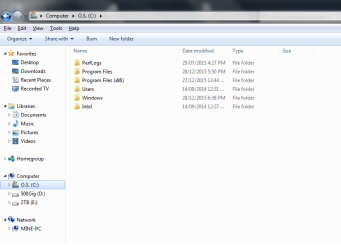
Put it into another machine and look at program files, if you have 2 folders then you have x64 if 1x then x86.

As far as I am aware the COA is only compatible with the sp1 or not if it came that way.
i.e. if the COA is for non sp1 then you need to install non sp1 how to find out I am not sure. (perhaps the number its self)
 

My Computer My Computer

At a glance

Windows 7 Ultimate x64 SP1 OEMIntel i7 3930KKingston Genesis KHX2133C11D3K4/32GAsus RTX 2070 Ti Turbo fan series
Computer type
PC/Desktop
Computer Manufacturer/Model Number
Owner Builder
OS
Windows 7 Ultimate x64 SP1 OEM
CPU
Intel i7 3930K
Motherboard
Asus X79 Deluxe
Memory
Kingston Genesis KHX2133C11D3K4/32G
Graphics Card(s)
Asus RTX 2070 Ti Turbo fan series
Sound Card
Creative Sound Blaster ZXR
Monitor(s) Displays
Samsung U32J39 UHD
Screen Resolution
3840 x 2160
Hard Drives
Samsung 860 Pro 256 GB
OCZ Vertex 4 512GB
Western Digital Black 4TB
PSU
Corsair AX850
Case
Gigabyte
Cooling
Push - Pull 120 mm Noctua PWM, Scythe Big Shuriken 2 Rev. B
Keyboard
Logitech K800 Backlit
Mouse
Logitech MX2 Master
Internet Speed
NBN 25 Mbps
Antivirus
Kaspersky Internet Security
Browser
Mozilla FireFox
Other Info
TP-Link Archer VR600v
Sennheiser TR220 WiFi Head Phones.
OK, I mounted the file system in Linux and I have a Program Files x86 and a sysWOW64 folder so it's a 64 bit installation.
 

My Computer My Computer

At a glance

Windows 7 home premium OAi3-4010U4GIntel HD graphics 4400
Computer type
Laptop
Computer Manufacturer/Model Number
Acer
OS
Windows 7 home premium OA
CPU
i3-4010U
Motherboard
LA9532P
Memory
4G
Graphics Card(s)
Intel HD graphics 4400
Hard Drives
500GB
Mine is x64 I have 2 x program folders.
 

Attachments

  • X64.png
    X64.png
    23 KB · Views: 0

My Computer My Computer

At a glance

Windows 7 Ultimate x64 SP1 OEMIntel i7 3930KKingston Genesis KHX2133C11D3K4/32GAsus RTX 2070 Ti Turbo fan series
Computer type
PC/Desktop
Computer Manufacturer/Model Number
Owner Builder
OS
Windows 7 Ultimate x64 SP1 OEM
CPU
Intel i7 3930K
Motherboard
Asus X79 Deluxe
Memory
Kingston Genesis KHX2133C11D3K4/32G
Graphics Card(s)
Asus RTX 2070 Ti Turbo fan series
Sound Card
Creative Sound Blaster ZXR
Monitor(s) Displays
Samsung U32J39 UHD
Screen Resolution
3840 x 2160
Hard Drives
Samsung 860 Pro 256 GB
OCZ Vertex 4 512GB
Western Digital Black 4TB
PSU
Corsair AX850
Case
Gigabyte
Cooling
Push - Pull 120 mm Noctua PWM, Scythe Big Shuriken 2 Rev. B
Keyboard
Logitech K800 Backlit
Mouse
Logitech MX2 Master
Internet Speed
NBN 25 Mbps
Antivirus
Kaspersky Internet Security
Browser
Mozilla FireFox
Other Info
TP-Link Archer VR600v
Sennheiser TR220 WiFi Head Phones.
OK, mine looks basically like that so I'm going to try the x64 install .iso without the _u suffix next.

JayArr
 

My Computer My Computer

At a glance

Windows 7 home premium OAi3-4010U4GIntel HD graphics 4400
Computer type
Laptop
Computer Manufacturer/Model Number
Acer
OS
Windows 7 home premium OA
CPU
i3-4010U
Motherboard
LA9532P
Memory
4G
Graphics Card(s)
Intel HD graphics 4400
Hard Drives
500GB
As far as I am aware the COA is only compatible with the sp1 or not if it came that way.
i.e. if the COA is for non sp1 then you need to install non sp1 how to find out I am not sure. (perhaps the number its self)

Actually, that doesn't really matter on installation, you don't have to install the exact same version that was shipped.

The COA is for that version, (Home Premium, Pro, etc.) both x86 or x64 are valid as long as only one is used at a time, the build number is irrelevant since it will change over time with certain updates or in this scenario a service pack.
 

My Computer My Computer

At a glance

Win 10 Pro x64Intel I5-2500K @3.3GHz16GB G.Skill Ripjaws X (4x4GB)EVGA GeForce 750 Ti SC 2GB
Computer type
PC/Desktop
Computer Manufacturer/Model Number
Self Built
OS
Win 10 Pro x64
CPU
Intel I5-2500K @3.3GHz
Motherboard
Asrock P67 Extreme4
Memory
16GB G.Skill Ripjaws X (4x4GB)
Graphics Card(s)
EVGA GeForce 750 Ti SC 2GB
Sound Card
ASUS Xonar DG 5.1 Channels 24-bit 96KHz PCI Interface Sound
Monitor(s) Displays
auria eq2367
Screen Resolution
1920 x 1080
Hard Drives
250GB Samsung 850 EVO SSD
1TB WD Blue
1TB Hitachi
PSU
SeaSonic X 650W 80 Plus Gold
Case
Corsair Obsidian 750D
Cooling
Corsair H60, Three 140mm case fans
Keyboard
Logitech Wireless Keyboard K520
Mouse
Logitech Wireless Mouse M310
Internet Speed
Wave Broadband ~ 100 dn 5 up
Antivirus
Windows Defender, Malwarebytes Premium
Browser
Edge, IE11, Chrome
Other Info
Laptop specs: HP g7-1365dx /
CPU: AMD A6-3420M APU with Radeon(tm) HD Graphics /
RAM: Crucial 8Gb (2x4Gb) /
SSD: Crucial M4-CT128M4SSD2 ATA Device/ FW 000F /
GFX: AMD Radeon HD 6520G /
OS: Windows 10 Pro x64
Exactly, the key has nothing to do with the Service Pack or 32 or 64 bit, only the version of Windows.
 

My Computer My Computer

At a glance

Windows 10 Pro x64Intel Core i7 6700KGSkill TridentZ RGB 16GB 3600 16-16-16-36EVGA GTX 980 Ti SC x2
Computer type
PC/Desktop
Computer Manufacturer/Model Number
Skylake Special #666
OS
Windows 10 Pro x64
CPU
Intel Core i7 6700K
Motherboard
Asus Sabertooth Z170 Mark 1
Memory
GSkill TridentZ RGB 16GB 3600 16-16-16-36
Graphics Card(s)
EVGA GTX 980 Ti SC x2
Sound Card
Realtek High Definition
Monitor(s) Displays
AOC G2460PG
Screen Resolution
1920 x 1080 144Hz
Hard Drives
Samsung 860 Pro 256GB, Seagate Barracuda 4TB x2
PSU
EVGA 1000 P2, EVGA White Custom Braided Cables
Case
Corsair Vengeance C70 Gunmetal Black
Cooling
Corsair H100i v2, Corsair ML120 x2, Thermal Grizzly Kryonaut
Keyboard
Logitech G910 Orion Spectrum
Mouse
Logitech G700s
Internet Speed
Verizon Fios Quantum Gateway 75/75
Antivirus
Windows Defender, Malwarebytes Free 3.8.3
Browser
Chrome
Other Info
Corsair SP120 x4, LG Blu-ray Drive, Durabrand HT-395 100 Watt Dolby Digital Amp, Corsair H2100 Wireless 7.1 Headset
OK guys, all fixed!

I made a USB stick with Win7 X64 SP1 using Rufus

I received my replacement motherboard from eBay and installed it in the failed laptop.

I cloned the drive using a Linux rescue cd and the dd command

I set the boot to legacy in the BIOS.

I booted up and hit F12 to get a boot menu and then selected the stick.

The stick found the hard drive and fixed it!

Everything is working now as long as I leave "Safe Boot" disabled, I believe that's because of the replacement motherboard.

Once everything was working with the cloned drive I shutdown, removed it and inserted the original drive and repeated the process with the same results. So now the laptop is back together with it's original HD and everything is running.

I'll just re-sell the replacement laptop, Windows 7 DVD, 1TB hard drive and call it a day.

I really wish it would have been possible to move the hard drive to the new laptop, it shouldn't be that hard to recover from a hardware failure.

Thanks for all the help and advice! everyone.

JayArr
 

My Computer My Computer

At a glance

Windows 7 home premium OAi3-4010U4GIntel HD graphics 4400
Computer type
Laptop
Computer Manufacturer/Model Number
Acer
OS
Windows 7 home premium OA
CPU
i3-4010U
Motherboard
LA9532P
Memory
4G
Graphics Card(s)
Intel HD graphics 4400
Hard Drives
500GB
Back
Top