Transferring hard drive with OEM 7 to new motherboard/build

Frosst

New member
Local time
4:07 PM
Messages
53
I don't know a whole lot about computers, so I thought I would ask for help concerning my OEM version of Windows 7 Home Premium 64 bit.

I have a Small Form Factor Acer computer that I am wanting to strip for parts (the CPU, memory, optical drive) for my new build. So I bought a case, a PSU, a GPU, more RAM, and a motherboard. Then, before I actually started taking things apart, it occurred to me that I might not be able to just "plug and play", so to speak. I thought that perhaps there could be driver conflicts, or worse yet because then a friend told me that OEM means that my OS is "tied" to my mini-ITX motherboard and that that I will have to buy a whole new Windows 7.

Is this true? I was hoping that I could just leave my current installation as is and just move the HDD over to the new build, but it seems that my version of Windows 7 will not allow this.

I hope this is the right place for this thread. Thank you very much for any help you can provide.
 

My Computer My Computer

At a glance

Microsoft Windows 7 Home Premium 64-bit 7601 ...AMD FX-6300 3.5GHz8.00 GBAMD Radeon 270x
Computer type
PC/Desktop
OS
Microsoft Windows 7 Home Premium 64-bit 7601 Multiprocessor Free Service Pack 1
CPU
AMD FX-6300 3.5GHz
Motherboard
AsRock 970 Extreme3 R2.0
Memory
8.00 GB
Graphics Card(s)
AMD Radeon 270x
Sound Card
(1) High Definition Audio Device (2) Envy24 Family Audio C
Screen Resolution
1920 x 1080
Hard Drives
ST3500418AS ATA Device
PSU
Thermaltake 600w
Unfortunately, OEM licenses of Windows 7 can only be installed on one motherboard. Unless the reason for the new motherboard is a defect of some sort, the OS will be unable to be licensed on the new motherboard. For more information, read the following excerpt from the Microsoft Licensing FAQ.

Q. Can a PC with an OEM Windows operating system have its motherboard upgraded and keep the same license? What if it was replaced because it was defective?

A. Generally, an end user can upgrade or replace all of the hardware components on a computer—except the motherboard—and still retain the license for the original Microsoft OEM operating system software. If the motherboard is upgraded or replaced for reasons other than a defect, then a new computer has been created. Microsoft OEM operating system software cannot be transferred to the new computer, and the license of new operating system software is required. If the motherboard is replaced because it is defective, you do not need to acquire a new operating system license for the PC as long as the replacement motherboard is the same make/model or the same manufacturer's replacement/equivalent, as defined by the manufacturer's warranty.

The reason for this licensing rule primarily relates to the End User Software License Terms and the support of the software covered by that End User Software License Terms. The End User Software License Terms is a set of usage rights granted to the end user by the PC manufacturer and relates only to rights for that software as installed on that particular PC. The system builder is required to support the software on the original PC. Understanding that end users, over time, upgrade their PCs with different components, Microsoft needed to have one base component "left standing" that would still define the original PC. Since the motherboard contains the CPU and is the "heart and soul" of the PC, when the motherboard is replaced (for reasons other than defect) a new PC is essentially created. The original system builder did not manufacture this new PC, and therefore cannot be expected to support it.
 

My Computer My Computer

At a glance

Windows 7 Ultimate x64/Windows 8 Consumer Pre...Intel Pentium Dual Core E6700 3.2GHzStrontium 8192MB DDR3 1333Mhzmsi GeForce N560GTX-M2D1GD5 1GB
Computer Manufacturer/Model Number
Custom Build
OS
Windows 7 Ultimate x64/Windows 8 Consumer Preview x64/Ubuntu 11.04
CPU
Intel Pentium Dual Core E6700 3.2GHz
Motherboard
ASUS P5G41T-M LX
Memory
Strontium 8192MB DDR3 1333Mhz
Graphics Card(s)
msi GeForce N560GTX-M2D1GD5 1GB
Sound Card
Realtek HD Audio
Monitor(s) Displays
CHIMEI CMV 221D 22"
Screen Resolution
1680x1050
Hard Drives
Seagate Barracuda LP Green 3.5'' 2TB Internal HDD 5900RPM + WD Elements Desktop 1TB External HDD 7200RPM
PSU
SHAW Viper-1500w Gaming PSU
Case
Black eMaxx ATX Mini Tower Case
Keyboard
Microsoft Wireless Keyboard 1000
Mouse
Microsoft Wireless Optical Mouse 2000
Internet Speed
100GB @ 4.76Mbps
Thank you very much for responding with this helpful information.

The OS costs around $200, right?

What about if for now, due to financial constraints, I simply took the mini-ITX motherboard with all of its components and simply put them into the new ATX case, and then added my other new components? Then I would just let the new ATX motherboard sit for a while until I can buy a new copy of Windows 7? From that Q&A, it sounds like that would work?
 

My Computer My Computer

At a glance

Microsoft Windows 7 Home Premium 64-bit 7601 ...AMD FX-6300 3.5GHz8.00 GBAMD Radeon 270x
Computer type
PC/Desktop
OS
Microsoft Windows 7 Home Premium 64-bit 7601 Multiprocessor Free Service Pack 1
CPU
AMD FX-6300 3.5GHz
Motherboard
AsRock 970 Extreme3 R2.0
Memory
8.00 GB
Graphics Card(s)
AMD Radeon 270x
Sound Card
(1) High Definition Audio Device (2) Envy24 Family Audio C
Screen Resolution
1920 x 1080
Hard Drives
ST3500418AS ATA Device
PSU
Thermaltake 600w
Sure, that will work fine. Microsoft allows all hardware upgrades except motherboards. So as long as you keep the original motherboard, you should be right.
 

My Computer My Computer

At a glance

Windows 7 Ultimate x64/Windows 8 Consumer Pre...Intel Pentium Dual Core E6700 3.2GHzStrontium 8192MB DDR3 1333Mhzmsi GeForce N560GTX-M2D1GD5 1GB
Computer Manufacturer/Model Number
Custom Build
OS
Windows 7 Ultimate x64/Windows 8 Consumer Preview x64/Ubuntu 11.04
CPU
Intel Pentium Dual Core E6700 3.2GHz
Motherboard
ASUS P5G41T-M LX
Memory
Strontium 8192MB DDR3 1333Mhz
Graphics Card(s)
msi GeForce N560GTX-M2D1GD5 1GB
Sound Card
Realtek HD Audio
Monitor(s) Displays
CHIMEI CMV 221D 22"
Screen Resolution
1680x1050
Hard Drives
Seagate Barracuda LP Green 3.5'' 2TB Internal HDD 5900RPM + WD Elements Desktop 1TB External HDD 7200RPM
PSU
SHAW Viper-1500w Gaming PSU
Case
Black eMaxx ATX Mini Tower Case
Keyboard
Microsoft Wireless Keyboard 1000
Mouse
Microsoft Wireless Optical Mouse 2000
Internet Speed
100GB @ 4.76Mbps
Thanks so much for your help! I'll mark this one as solved. I will get Windows 7 in a couple of months, but this is a workable solution until that time.
 

My Computer My Computer

At a glance

Microsoft Windows 7 Home Premium 64-bit 7601 ...AMD FX-6300 3.5GHz8.00 GBAMD Radeon 270x
Computer type
PC/Desktop
OS
Microsoft Windows 7 Home Premium 64-bit 7601 Multiprocessor Free Service Pack 1
CPU
AMD FX-6300 3.5GHz
Motherboard
AsRock 970 Extreme3 R2.0
Memory
8.00 GB
Graphics Card(s)
AMD Radeon 270x
Sound Card
(1) High Definition Audio Device (2) Envy24 Family Audio C
Screen Resolution
1920 x 1080
Hard Drives
ST3500418AS ATA Device
PSU
Thermaltake 600w
No worries. If you need any more help just come back and post again.

Good luck! :)
 

My Computer My Computer

At a glance

Windows 7 Ultimate x64/Windows 8 Consumer Pre...Intel Pentium Dual Core E6700 3.2GHzStrontium 8192MB DDR3 1333Mhzmsi GeForce N560GTX-M2D1GD5 1GB
Computer Manufacturer/Model Number
Custom Build
OS
Windows 7 Ultimate x64/Windows 8 Consumer Preview x64/Ubuntu 11.04
CPU
Intel Pentium Dual Core E6700 3.2GHz
Motherboard
ASUS P5G41T-M LX
Memory
Strontium 8192MB DDR3 1333Mhz
Graphics Card(s)
msi GeForce N560GTX-M2D1GD5 1GB
Sound Card
Realtek HD Audio
Monitor(s) Displays
CHIMEI CMV 221D 22"
Screen Resolution
1680x1050
Hard Drives
Seagate Barracuda LP Green 3.5'' 2TB Internal HDD 5900RPM + WD Elements Desktop 1TB External HDD 7200RPM
PSU
SHAW Viper-1500w Gaming PSU
Case
Black eMaxx ATX Mini Tower Case
Keyboard
Microsoft Wireless Keyboard 1000
Mouse
Microsoft Wireless Optical Mouse 2000
Internet Speed
100GB @ 4.76Mbps
Oh! One quick question! Since I am wanting to put my mini-ITX motherboard into a new case, do ATX cases that are compatible with ATX and Micro-ATX motherboards also always mount mini-ITX boards? If so, that greatly softens the blow of this whole Windows 7 fiasco haha.
 

My Computer My Computer

At a glance

Microsoft Windows 7 Home Premium 64-bit 7601 ...AMD FX-6300 3.5GHz8.00 GBAMD Radeon 270x
Computer type
PC/Desktop
OS
Microsoft Windows 7 Home Premium 64-bit 7601 Multiprocessor Free Service Pack 1
CPU
AMD FX-6300 3.5GHz
Motherboard
AsRock 970 Extreme3 R2.0
Memory
8.00 GB
Graphics Card(s)
AMD Radeon 270x
Sound Card
(1) High Definition Audio Device (2) Envy24 Family Audio C
Screen Resolution
1920 x 1080
Hard Drives
ST3500418AS ATA Device
PSU
Thermaltake 600w
No problem, if you choose to believe this:

Mini ITX Specifications | eHow.com

Mini-ITX motherboards can fit into ATX, Micro-ATX and FlexATX cases, as the mounting holes, I/O (Input/Output) panel and expansion slot are in the same locations as ATX specifications. ATX and ITX power supplies can also work with the Mini-ITX form factor.
 

My Computer My Computer

At a glance

Windows 7 Home Premium SP1, 64-bitIntel Skylake i5-6600K, not overclocked8 GB HyperX DDR4-2666 (2 x 4 GB)none; graphics are integrated on CPU
Computer type
PC/Desktop
Computer Manufacturer/Model Number
Ignatz Special; 4 speed manual gearbox; factory air conditioning; one of one
OS
Windows 7 Home Premium SP1, 64-bit
CPU
Intel Skylake i5-6600K, not overclocked
Motherboard
AsRock Z170M Extreme 4, micro ATX
Memory
8 GB HyperX DDR4-2666 (2 x 4 GB)
Graphics Card(s)
none; graphics are integrated on CPU
Sound Card
onboard: Realtek ALC1150; external: USB Behringer UF0-202
Monitor(s) Displays
Dell S2340M 23 inch IPS
Screen Resolution
1600 x 900
Hard Drives
System: Crucial MX100 series SSD, 128 GB;
Data: Samsung Spinpoint 103SJ, 1 TB;
Backup: WD Caviar Green WD30EZRX-00D8PB0, 3 TB
PSU
Rosewill SilentNight 500 watt fanless, semi-modular
Case
Antec Solo II
Cooling
Noctua NH-U12S; Noctua F12 intake, Noctua S12A exhaust
Keyboard
Microsoft 200 6JH-00001 USB
Mouse
Dell or Microsoft optical wired; USB
Antivirus
Microsoft Security Essentials and Malwarebytes Premium
Browser
Pale Moon
Other Info
All fans PWM; speeds at idle: CPU circa 500 rpm; intake circa 600 rpm; exhaust circa 600 rpm; CPU temps 27 idle and 47 C load in a warm room (27 C/81 F) when running Intel Extreme Tuning Utility stress test.
Interesting. Thanks!

Unfortunately I realized that my mini-ITX motherboard doesn't have a PCI-E 16 slot. It sounds like I'm going to have to get Windows 7 Home Premium before I should bother to touch anything.

On a positive note, I have learned some very valuable things about computers and software. Ultimately...build from the ground up.
 

My Computer My Computer

At a glance

Microsoft Windows 7 Home Premium 64-bit 7601 ...AMD FX-6300 3.5GHz8.00 GBAMD Radeon 270x
Computer type
PC/Desktop
OS
Microsoft Windows 7 Home Premium 64-bit 7601 Multiprocessor Free Service Pack 1
CPU
AMD FX-6300 3.5GHz
Motherboard
AsRock 970 Extreme3 R2.0
Memory
8.00 GB
Graphics Card(s)
AMD Radeon 270x
Sound Card
(1) High Definition Audio Device (2) Envy24 Family Audio C
Screen Resolution
1920 x 1080
Hard Drives
ST3500418AS ATA Device
PSU
Thermaltake 600w
Thanks so much for your help! I'll mark this one as solved. I will get Windows 7 in a couple of months, but this is a workable solution until that time.

Hi there
another solution is that you could try the FREE windows 8 developer edition -- download from the ms site --it's pre beta but from my own tests and looking at the companion Forum to this one (windows 8) it's stable and fast.

Most drivers work -- and you can run this on as many different hardware combinations you want -- W8 is already pre-activated.

Personally this is what I would do in this case -- licensed software such as OFFICE can be moved to another machine -- no problem it's just the OEM W7 os that can't be moved from the original machine.

Cheers
jimbo
 

My Computer My Computer

At a glance

Linux CENTOS 7 / various Windows OS'es and se...Intel i7 Intel i58GB, 16GBOn Motherboard
Computer type
PC/Desktop
Computer Manufacturer/Model Number
Custom built, several laptops HP/ASUS
OS
Linux CENTOS 7 / various Windows OS'es and servers
CPU
Intel i7 Intel i5
Memory
8GB, 16GB
Graphics Card(s)
On Motherboard
Sound Card
Realtek HD audio
Monitor(s) Displays
Apple Cinema display, Samsung LCD
Screen Resolution
1920 X 1080
Hard Drives
4 X 1TB SATA
Mouse
Toshiba wireless laser
Internet Speed
> 20MB up
Thanks so much for your help! I'll mark this one as solved. I will get Windows 7 in a couple of months, but this is a workable solution until that time.

Hi there
another solution is that you could try the FREE windows 8 developer edition -- download from the ms site --it's pre beta but from my own tests and looking at the companion Forum to this one (windows 8) it's stable and fast.

Most drivers work -- and you can run this on as many different hardware combinations you want -- W8 is already pre-activated.

Personally this is what I would do in this case -- licensed software such as OFFICE can be moved to another machine -- no problem it's just the OEM W7 os that can't be moved from the original machine.

Cheers
jimbo

Wow! Okay, I will do that then. I will need help though! haha

Can I burn discs of W8 so that I can install it on the new build, or do I install it now and then transfer the hard drive?

I greatly appreciate this information!

Edit: I'm downloading it now. I was wondering, is there some way to install 8 without overwriting my 7 installation? I assume I would have to create a partition?
 
Last edited:

My Computer My Computer

At a glance

Microsoft Windows 7 Home Premium 64-bit 7601 ...AMD FX-6300 3.5GHz8.00 GBAMD Radeon 270x
Computer type
PC/Desktop
OS
Microsoft Windows 7 Home Premium 64-bit 7601 Multiprocessor Free Service Pack 1
CPU
AMD FX-6300 3.5GHz
Motherboard
AsRock 970 Extreme3 R2.0
Memory
8.00 GB
Graphics Card(s)
AMD Radeon 270x
Sound Card
(1) High Definition Audio Device (2) Envy24 Family Audio C
Screen Resolution
1920 x 1080
Hard Drives
ST3500418AS ATA Device
PSU
Thermaltake 600w
That's probably a good option. I'm using Windows 8 in dual boot at the moment, and it runs just fine. There's a couple of bugs that surface every now and then but for a free OS, it's great.

You can dual boot Windows 8 and Windows 7. Over on EF, we have a tutorial on how to do so. I've linked it below, give it a read and try it out.
Dual Boot Installation - Windows 8 and Windows 7 or Vista - Windows 8 Forums
 

My Computer My Computer

At a glance

Windows 7 Ultimate x64/Windows 8 Consumer Pre...Intel Pentium Dual Core E6700 3.2GHzStrontium 8192MB DDR3 1333Mhzmsi GeForce N560GTX-M2D1GD5 1GB
Computer Manufacturer/Model Number
Custom Build
OS
Windows 7 Ultimate x64/Windows 8 Consumer Preview x64/Ubuntu 11.04
CPU
Intel Pentium Dual Core E6700 3.2GHz
Motherboard
ASUS P5G41T-M LX
Memory
Strontium 8192MB DDR3 1333Mhz
Graphics Card(s)
msi GeForce N560GTX-M2D1GD5 1GB
Sound Card
Realtek HD Audio
Monitor(s) Displays
CHIMEI CMV 221D 22"
Screen Resolution
1680x1050
Hard Drives
Seagate Barracuda LP Green 3.5'' 2TB Internal HDD 5900RPM + WD Elements Desktop 1TB External HDD 7200RPM
PSU
SHAW Viper-1500w Gaming PSU
Case
Black eMaxx ATX Mini Tower Case
Keyboard
Microsoft Wireless Keyboard 1000
Mouse
Microsoft Wireless Optical Mouse 2000
Internet Speed
100GB @ 4.76Mbps
That's probably a good option. I'm using Windows 8 in dual boot at the moment, and it runs just fine. There's a couple of bugs that surface every now and then but for a free OS, it's great.

You can dual boot Windows 8 and Windows 7. Over on EF, we have a tutorial on how to do so. I've linked it below, give it a read and try it out.
Dual Boot Installation - Windows 8 and Windows 7 or Vista - Windows 8 Forums

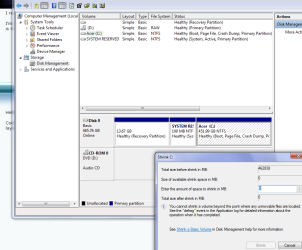
I have been reading this and a number of other tutorials. However, I am having an issue with partitions.

I'm trying to do the dual boot with 7 and 8, but I can't shrink the volume because it just says the available value is 0 MB. This has something to do with unmovable files, right? How do I remedy this?

Untitled4443222.png

I just downloaded Paragon Partition Manager by the way, in case that could somehow be of help to me.
 

My Computer My Computer

At a glance

Microsoft Windows 7 Home Premium 64-bit 7601 ...AMD FX-6300 3.5GHz8.00 GBAMD Radeon 270x
Computer type
PC/Desktop
OS
Microsoft Windows 7 Home Premium 64-bit 7601 Multiprocessor Free Service Pack 1
CPU
AMD FX-6300 3.5GHz
Motherboard
AsRock 970 Extreme3 R2.0
Memory
8.00 GB
Graphics Card(s)
AMD Radeon 270x
Sound Card
(1) High Definition Audio Device (2) Envy24 Family Audio C
Screen Resolution
1920 x 1080
Hard Drives
ST3500418AS ATA Device
PSU
Thermaltake 600w

My Computer My Computer

At a glance

Windows 7 Ultimate SP1 64-BitIntel Core i7 870 @ 2.93GHz8Gb Dual-Channel DDR3 @ 664MHznVidia GeForce GTX 460 1024MB dedicated RAM
Computer Manufacturer/Model Number
HP Pavilion Elite 495UK
OS
Windows 7 Ultimate SP1 64-Bit
CPU
Intel Core i7 870 @ 2.93GHz
Motherboard
MSI 2A9C (CPU1)
Memory
8Gb Dual-Channel DDR3 @ 664MHz
Graphics Card(s)
nVidia GeForce GTX 460 1024MB dedicated RAM
Sound Card
Realtek HD Audio
Monitor(s) Displays
HP2310i
Screen Resolution
1920 x 1080
Hard Drives
1x1954GB Hitachi HDS22020ALA 330 (RAID), 1x1954GB Hitachi External for backup and storage
PSU
460W
Case
HP Elite
Cooling
Air cooled
Keyboard
Logitech K750 solar-powered keyboard
Mouse
Logitech Wireless M180 mouse
Internet Speed
2Mb
Other Info
Pure Avanti Flow Internet Radio with iPod Dock, 64Gb iPod, HP USB Speakers, Sony MDR-V500 Headphones, Sony Vaio F-Series Laptop
Thanks!

Do I have to use that program, or will Paragon work instead?
 

My Computer My Computer

At a glance

Microsoft Windows 7 Home Premium 64-bit 7601 ...AMD FX-6300 3.5GHz8.00 GBAMD Radeon 270x
Computer type
PC/Desktop
OS
Microsoft Windows 7 Home Premium 64-bit 7601 Multiprocessor Free Service Pack 1
CPU
AMD FX-6300 3.5GHz
Motherboard
AsRock 970 Extreme3 R2.0
Memory
8.00 GB
Graphics Card(s)
AMD Radeon 270x
Sound Card
(1) High Definition Audio Device (2) Envy24 Family Audio C
Screen Resolution
1920 x 1080
Hard Drives
ST3500418AS ATA Device
PSU
Thermaltake 600w
Paragon should work but Partition Wizard in my opinion, is more reliable and efficient. Also, if you use PW, you can follow tutorial provided by Andrew (seavixen32).
 

My Computer My Computer

At a glance

Windows 7 Ultimate x64/Windows 8 Consumer Pre...Intel Pentium Dual Core E6700 3.2GHzStrontium 8192MB DDR3 1333Mhzmsi GeForce N560GTX-M2D1GD5 1GB
Computer Manufacturer/Model Number
Custom Build
OS
Windows 7 Ultimate x64/Windows 8 Consumer Preview x64/Ubuntu 11.04
CPU
Intel Pentium Dual Core E6700 3.2GHz
Motherboard
ASUS P5G41T-M LX
Memory
Strontium 8192MB DDR3 1333Mhz
Graphics Card(s)
msi GeForce N560GTX-M2D1GD5 1GB
Sound Card
Realtek HD Audio
Monitor(s) Displays
CHIMEI CMV 221D 22"
Screen Resolution
1680x1050
Hard Drives
Seagate Barracuda LP Green 3.5'' 2TB Internal HDD 5900RPM + WD Elements Desktop 1TB External HDD 7200RPM
PSU
SHAW Viper-1500w Gaming PSU
Case
Black eMaxx ATX Mini Tower Case
Keyboard
Microsoft Wireless Keyboard 1000
Mouse
Microsoft Wireless Optical Mouse 2000
Internet Speed
100GB @ 4.76Mbps
I tried Paragon just to see if it would work so that I could speed the process along, and it worked. I created a large partition to put Windows 8 on.

I used Nero to burn the Windows 8 disc. Hope that worked out alright. I'm gonna try installing the OS now! I'm following tutorials to make sure I'm doing exactly what I'm supposed to.
 

My Computer My Computer

At a glance

Microsoft Windows 7 Home Premium 64-bit 7601 ...AMD FX-6300 3.5GHz8.00 GBAMD Radeon 270x
Computer type
PC/Desktop
OS
Microsoft Windows 7 Home Premium 64-bit 7601 Multiprocessor Free Service Pack 1
CPU
AMD FX-6300 3.5GHz
Motherboard
AsRock 970 Extreme3 R2.0
Memory
8.00 GB
Graphics Card(s)
AMD Radeon 270x
Sound Card
(1) High Definition Audio Device (2) Envy24 Family Audio C
Screen Resolution
1920 x 1080
Hard Drives
ST3500418AS ATA Device
PSU
Thermaltake 600w
Objective Completed

Achievement Unlocked

Now that I've gotten Windows 8 up and running, how do I go about installing my hard drive in my new build without any problems arising? Could the fact that Windows 7 OEM is on the drive cause any problems even though I would only be accessing Windows 8?

Keep in mind that I am 100% going to put the parts from this PC back into it in a couple of months. I just need to take the CPU and memory out for now so that I can use it until I get my new CPU (and more memory). At that point I would be able to swap the hard drive back in, access the Windows 7 OEM that is on it, and then delete the partition that it is on to retrieve my space, right? For now, assuming that checks out on a technical level, 200GB on this new partition will be enough for me.

The reason that I'd prefer not to delete my 7 installation right now is because I'd rather be dual booting instead of relying on just the 8 developer preview as my only OS. But I'll do whatever you guys say is necessary!!
 

My Computer My Computer

At a glance

Microsoft Windows 7 Home Premium 64-bit 7601 ...AMD FX-6300 3.5GHz8.00 GBAMD Radeon 270x
Computer type
PC/Desktop
OS
Microsoft Windows 7 Home Premium 64-bit 7601 Multiprocessor Free Service Pack 1
CPU
AMD FX-6300 3.5GHz
Motherboard
AsRock 970 Extreme3 R2.0
Memory
8.00 GB
Graphics Card(s)
AMD Radeon 270x
Sound Card
(1) High Definition Audio Device (2) Envy24 Family Audio C
Screen Resolution
1920 x 1080
Hard Drives
ST3500418AS ATA Device
PSU
Thermaltake 600w
It would have been best to install Win8 once you'd moved the HD to the new hardware. It may start up, but then again it might not. The only way to be sure is to first SysPrep to move HD to another computer or use Paragon Adaptive Restore CD on the target installation once moved.

Then again it might start up on the new hardware if you want to chance it, if not you'll just have to reinstall.

While the boot files were likely updated and remain on Win7 partition, it will not otherwise come into play if you don't attempt to start it. If you do you'll likely get a prompt to reactivate soon. This might be something you want to try, though, since MS phone activation has been known to make exceptions for good cause.
 
It would have been best to install Win8 once you'd moved the HD to the new hardware. It may start up, but then again it might not. The only way to be sure is to first SysPrep to move HD to another computer or use Paragon Adaptive Restore CD on the target installation once moved.

Worst comes to worst, what if I just uninstalled Windows 7 OEM completely and then just kept the W8 install? Or if I uninstalled both of them and installed W8 from scratch once I finish the new build?

But before something like that, is Paragon Adaptive Restore CD free? Is there an evaluation version that would work?

Then again it might start up on the new hardware if you want to chance it, if not you'll just have to reinstall.
Reinstall as in reinstall W8? I'm sorry, this is extremely foreign territory for me. Anyway, if so, I guess that wouldn't be difficult since I have the disc burned.


While the boot files were likely updated and remain on Win7 partition, it will not otherwise come into play if you don't attempt to start it. If you do you'll likely get a prompt to reactivate soon. This might be something you want to try, though, since MS phone activation has been known to make exceptions for good cause.
Attempting to start it as in trying to boot into 7 at the dual boot screen?

If it asks me to reactive and I call MS, I had thought they would say that my version is OEM and therefore I cannot use it with the new PC (i.e motherboard), but that sounds interesting. Do they just give you a product key that that nullifies the OEM? What should I tell them? Where do I find the number for their service center in my area?

Thank you so much for bearing with my lack of experience in this regard. It's all very new...
 
Last edited:

My Computer My Computer

At a glance

Microsoft Windows 7 Home Premium 64-bit 7601 ...AMD FX-6300 3.5GHz8.00 GBAMD Radeon 270x
Computer type
PC/Desktop
OS
Microsoft Windows 7 Home Premium 64-bit 7601 Multiprocessor Free Service Pack 1
CPU
AMD FX-6300 3.5GHz
Motherboard
AsRock 970 Extreme3 R2.0
Memory
8.00 GB
Graphics Card(s)
AMD Radeon 270x
Sound Card
(1) High Definition Audio Device (2) Envy24 Family Audio C
Screen Resolution
1920 x 1080
Hard Drives
ST3500418AS ATA Device
PSU
Thermaltake 600w
Back
Top