
Moving all hard drive files 4 folders up.

olivierth

New member
Local time
9:34 PM
Messages
4
Hi,

I have 465gb of files and folders on a 500Gb hard drive that needs to be cut/pasted higher in the folder hierarchy.

Here's a visual:
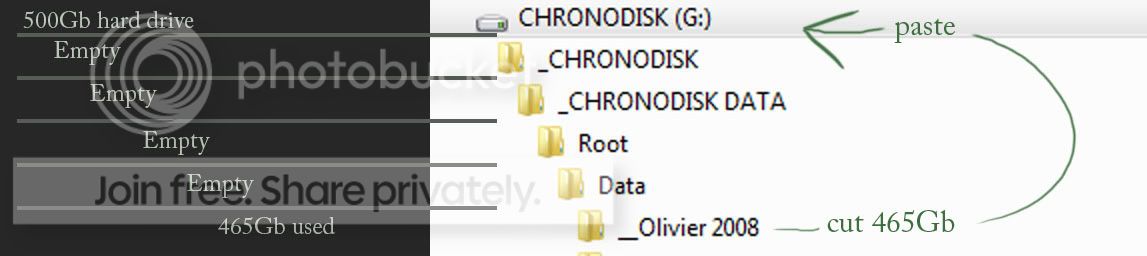
Move465Gb.jpg


The reason this happened is my HD broke down and I had to send it to a company (ChronoDisk) to extract the information to another HD. This is how they sent it.

I need to move those files because the path used by many programs/files are broken.

Is it possible to do this without actually cut/pasting? My guess is it might crash half way or simply not work at all because there is not enough empty space to make a cut.

Please help!
 

My Computer My Computer

At a glance

Windows 7 home 64bit
OS
Windows 7 home 64bit
Do you have another HDD available? You could also make a new directory and cut+paste sub directories individually until you've made up the entirety of the folder.
 

My Computer My Computer

At a glance

Windows 8 Pro x64i7 3820 @ 4.68GHzF3-12800CL9D-8GBXL (32GB)GTX 480 SLI
Computer type
PC/Desktop
OS
Windows 8 Pro x64
CPU
i7 3820 @ 4.68GHz
Motherboard
ASUS Rampage IV Extreme RoG BF3
Memory
F3-12800CL9D-8GBXL (32GB)
Graphics Card(s)
GTX 480 SLI
Sound Card
Auzentech X-Fi HomeTheater HD
Monitor(s) Displays
Sony 32V5500
Screen Resolution
1920 x 1080
Hard Drives
LSI MR9260-4i (RAID10):
Toshiba DT01ACA300 x 4
iaStorA:
OCZ Vertex Enterprise 120GB
ST3500320AS 500GB
Intel 520 Series 120GB
PSU
OCZ ZX 1250W
Case
HAF X
Cooling
H80
Keyboard
Cyborg V.7
Mouse
Razer Lachesis 3.5G 5600dpi
Internet Speed
23296kbps ds / 812kbps us ADSL2+
Browser
Mozilla/5.0 (Windows NT 6.3; Win64; x64; rv:32.0) Gecko/2010
Other Info
AverMedia C127 Game Broadcaster HD
...
 

My Computer My Computer

At a glance

W10 Pro desktop, W11 laptop, W11 Pro tablet (...3.7Ghz 8700K i7, i7-11800H, i7-1065G716G desktop, 16G laptop, 4G tabletAMD Radeon RX580, RTX 3060, Intel Iris Plus
Computer type
PC/Desktop
Computer Manufacturer/Model Number
Home Built desktop, Dell G15 5511 Gaming laptop,MS Surface Pro 7 tablet
OS
W10 Pro desktop, W11 laptop, W11 Pro tablet (all 64-bit)
CPU
3.7Ghz 8700K i7, i7-11800H, i7-1065G7
Motherboard
ASUS TUF Z370-Pro Gaming in desktop
Memory
16G desktop, 16G laptop, 4G tablet
Graphics Card(s)
AMD Radeon RX580, RTX 3060, Intel Iris Plus
Sound Card
High Definition Audio (Built-in to mobo)
Monitor(s) Displays
Samsung U32J59 32" (2x), 15.6", 12"
Screen Resolution
3840x2160, 3840x2160, 1920x1080, 2160x1440
Hard Drives
500G SSD for OS; 2T, 10T & 15T HDDs for Data on Desktop, 1TB SSD laptop, 128G SSD tablet.
PSU
Corsair CX 750M
Case
Antec 100
Cooling
CM 212+
Keyboard
IBM Model M - used continuously since 1986
Mouse
Microsoft Pro IntelliMouse
Internet Speed
400M down 8M up
Antivirus
Windows Defender
Browser
FireFox
Other Info
Built my first computer (8Mhz 8088cpu, 640K RAM, 20MB HDD, 2 360K floppy drives) in 1985 and have been building them for myself, relatives and friends ever since.
To be honest the company should have done this for you, eliminating the hassle for you, i would go back to the company and raise a query big time.

Sorry i have to post that advice but i feel it is needed.
 

My Computer My Computer

At a glance

Windows 7 Ultimate x64AMD turion 64x2 TL-64 2.2GhzSodimm DDR2 4GBATI Radeon 1250 128MB IGP
Computer Manufacturer/Model Number
HP Compaq 6715B
OS
Windows 7 Ultimate x64
CPU
AMD turion 64x2 TL-64 2.2Ghz
Motherboard
HC030
Memory
Sodimm DDR2 4GB
Graphics Card(s)
ATI Radeon 1250 128MB IGP
Hard Drives
Fujitsu Siemens 500GB sata 3.0 Gb/s
Thanks LuzTeTT but I'll wait to see if there's an easier way to do it.

Nice trollin' strollin. When you "cut/paste" in windows, what it actually does is "copy/paste/delete original". That means if you cut/paste 465Gb, you need at least 465Gb free on your hard drive.

Thanks TheCyberMan. It sucks but I've lost enough time with that company.
 

My Computer My Computer

At a glance

Windows 7 home 64bit
OS
Windows 7 home 64bit
You will need to COPY that data to Another drive. There is NOT enough space left on that drive to move anything.
 

My Computer My Computer

At a glance

7 x64
OS
7 x64
Alright, thanks for the help. I posted in case there was way to trick windows into just changing the path without the copy/paste aspect. I'm supposed to get another drive anyways...
 

My Computer My Computer

At a glance

Windows 7 home 64bit
OS
Windows 7 home 64bit
...
Nice trollin' strollin. When you "cut/paste" in windows, what it actually does is "copy/paste/delete original". That means if you cut/paste 465Gb, you need at least 465Gb free on your hard drive. ...
Nice trollin yourself olivierth, after I realized you only had a 500G hdd to deal with, I removed my post 2 hours BEFORE you responded with your snide remark!

After thinking about it, I realized my original post was the actually the correct solution since when moving files around ON THE SAME DISK only the location is updated, the files are NOT ACTUALLY MOVED.
 

My Computer My Computer

At a glance

W10 Pro desktop, W11 laptop, W11 Pro tablet (...3.7Ghz 8700K i7, i7-11800H, i7-1065G716G desktop, 16G laptop, 4G tabletAMD Radeon RX580, RTX 3060, Intel Iris Plus
Computer type
PC/Desktop
Computer Manufacturer/Model Number
Home Built desktop, Dell G15 5511 Gaming laptop,MS Surface Pro 7 tablet
OS
W10 Pro desktop, W11 laptop, W11 Pro tablet (all 64-bit)
CPU
3.7Ghz 8700K i7, i7-11800H, i7-1065G7
Motherboard
ASUS TUF Z370-Pro Gaming in desktop
Memory
16G desktop, 16G laptop, 4G tablet
Graphics Card(s)
AMD Radeon RX580, RTX 3060, Intel Iris Plus
Sound Card
High Definition Audio (Built-in to mobo)
Monitor(s) Displays
Samsung U32J59 32" (2x), 15.6", 12"
Screen Resolution
3840x2160, 3840x2160, 1920x1080, 2160x1440
Hard Drives
500G SSD for OS; 2T, 10T & 15T HDDs for Data on Desktop, 1TB SSD laptop, 128G SSD tablet.
PSU
Corsair CX 750M
Case
Antec 100
Cooling
CM 212+
Keyboard
IBM Model M - used continuously since 1986
Mouse
Microsoft Pro IntelliMouse
Internet Speed
400M down 8M up
Antivirus
Windows Defender
Browser
FireFox
Other Info
Built my first computer (8Mhz 8088cpu, 640K RAM, 20MB HDD, 2 360K floppy drives) in 1985 and have been building them for myself, relatives and friends ever since.
If moving files within the same partition, Windows doesn't actually copy the files themselves over, just updates a reference on a directory table saying that those files are in a different location now. Not only you DON'T need any free space to perform the operation, but it also will be blazing fast, regardless of the amount of data there. Copying to a different disk is another matter. So, the simple cut-paste is the way to go.
 

My Computer My Computer

At a glance

Windows 7 Ultimate x64Intel Core i7-740QM8 GB DDR3NVIDIA GeForce 330GT
Computer type
Laptop
Computer Manufacturer/Model Number
Toshiba Sattelite A665-S6092
OS
Windows 7 Ultimate x64
CPU
Intel Core i7-740QM
Memory
8 GB DDR3
Graphics Card(s)
NVIDIA GeForce 330GT
Screen Resolution
1366x768
Hard Drives
Samsung 840 SSD 500GB
1TB USB3 external HD
Cooling
Coolermaster Notepal U3 notebook cooling pad
Internet Speed
3mbps ASDL
Antivirus
ClamWin 0.98.7
Browser
Opera 12.17 x86 (main), Firefox 38 (sec), IE11 (last resort)
Alejandro is right (also strollin is right). The cut-paste process within the same HDD is actually pretty friggin faster than actually moving the files (as it just alters the file's "position" in indexes not its physical HDD location).
 

My Computer My Computer

At a glance

Win 7 Pro 64-bit 7601AMD Phenom 9650 QuadCore, revision DR-B35 GB yes I run 2x 2GB and 1x 1GB, different b...NVIDIA GeForce 9800 GT 512 Mb, unknown manufa...
Computer type
PC/Desktop
Computer Manufacturer/Model Number
custom built
OS
Win 7 Pro 64-bit 7601
CPU
AMD Phenom 9650 QuadCore, revision DR-B3
Motherboard
ASUS M4A78
Memory
5 GB yes I run 2x 2GB and 1x 1GB, different brand, spank me.
Graphics Card(s)
NVIDIA GeForce 9800 GT 512 Mb, unknown manufacturer.
Sound Card
Crappy Realtek Integrated Audio
Monitor(s) Displays
Fujitsu Siemens P19-3P
Screen Resolution
1280 x 1024 x 32 bits @ 60 Hz Oh yeah, 4:3 rocks!
Hard Drives
(1) MAXTOR S TM3320613AS SATA Disk Device (2) STM35004 18AS SATA Disk Device (3) TOSHIBA USB 2.5"-HDD
PSU
whatever, around 450w
Case
Scavenged from old company PC, 10+ years old
Cooling
CPU fan, GPU fan, case fan, nothing fancy
Keyboard
Microsoft, PS/2, white.
Mouse
Optical, logitec.
Internet Speed
effective max speeds: 70-ish kB/s down 30-ish kB/s up
Antivirus
Avira, free edition.
Browser
Firefox with FXChrome to make it look like Google Chrome :P
Other Info
Was discarded by previous owner due to "horrible performance".
Was running Win Xp from a IDE drive. Yeah. Was a pain.
SATA II drive and Win7 and it zips away! Yay!
My apologies to strollin.

Past experiences had lead me to believe I needed free space to move files around. Also, you're reply had no explanations tied it so I hope you will understand why I thought you were joking around. On top of that you removed your reply because you thought you were wrong.

(I didn't see your reply on the forum, I saw it in my emails)

I couldn't risk jeopardizing such valuable data with any doubt. It took over a month and a lot of money to get the data extracted from my hard drive. The company I was dealing with had to send my HDD to a white room somewhere in France to get the data out.

Once again my apologies. I was only disrespectful because I thought you were doing the same to me.
 

My Computer My Computer

At a glance

Windows 7 home 64bit
OS
Windows 7 home 64bit
Back
Top