Moving data from PC to Laptop

prowler

New member
Member
Local time
5:54 PM
Messages
42
For home use, I have a PC with Win7 Professional and a Laptop with Win7 Home Premium. I installed the same MS Office 07 on each unit and hoped to be able to move data from one computer to the other as needed.

The PC is my primary unit and I want to keep some of the Office data (documents from Word & Exel) current on the laptop for those times when I travel and need some of that new and current information with me.

Question: When I plug my flash drive (32GB) into the PC and transfer MS Word "documents" into that flash drive everything seems to work as planned. I'm able to see the data present on the flash drive and open it accordingly before I unplug it and move to the Laptop. However, when get to the laptop and open the contents of the flash drive, no data is present. When going to the Laptop's Start/Computer/Drive E, I notice highlighted data present in the flash drive but I'm unable to open it for viewing or for transferring into the laptop's Office program.

Note: I recently transferred a single Excel worksheet from my PC to my Laptop using the same [above] process in order to import and update my Laptop's address book and everything worked fine. Moving data via an Office "folder" hasn't been as successful.

Thanks.
 

My Computer

Computer type
PC/Desktop
Computer Manufacturer/Model Number
Dell
OS
Windows 7 Professional 32 bit O.S.
CPU
AMD Athlon Dual Core 5000B 2.60 Ghz
Monitor(s) Displays
Acer

My Computer

Computer Manufacturer/Model Number
Lenovo Desktop/Samsung Laptop
OS
Win7 & Win8 64bit
CPU
Intel i5
Internet Speed
Charter-20 Mbps
Antivirus
Avast
Browser
FF, IE9 and Chrome
Hello, and thank you for reply. No, I did not get any error messages.

When I use Start/Control Panel there is no "folder options" dropdown box as indicated on the directions provided. The info you provided is clear enough to understand, but my system is not configured accordingly. Please advise.
 

My Computer

Computer type
PC/Desktop
Computer Manufacturer/Model Number
Dell
OS
Windows 7 Professional 32 bit O.S.
CPU
AMD Athlon Dual Core 5000B 2.60 Ghz
Monitor(s) Displays
Acer
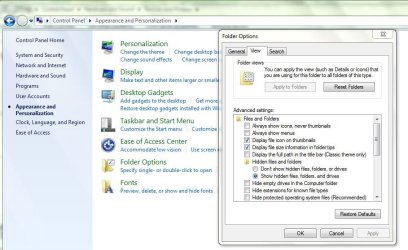
Edited: No worries..... lets try it again... Go to Control Panel then Appearance and Personalization then Folder Options, click on the View Tab, see image attached on what you need to uncheck.
 

Attachments

  • Folder Options.JPG
    Folder Options.JPG
    82.5 KB · Views: 3

My Computer

Computer Manufacturer/Model Number
Lenovo Desktop/Samsung Laptop
OS
Win7 & Win8 64bit
CPU
Intel i5
Internet Speed
Charter-20 Mbps
Antivirus
Avast
Browser
FF, IE9 and Chrome

My Computer

Computer type
PC/Desktop
Computer Manufacturer/Model Number
Custom Build
OS
Windows 7 Home Premium 64 bit
CPU
Intel Core i7-4790
Motherboard
GA-Z87X-D3H
Memory
G.SKILL 8GB (2 x 4GB) DDR3 F3-10666CL9D-8GBNT
Graphics Card(s)
AMD Radeon R7 250
Sound Card
Realtek ALC892
Monitor(s) Displays
Samsung UN32EH5000, Dell 1703FPT
Screen Resolution
1920 x 1080, 1280 x 1024
Hard Drives
WD5003AZEX
WD10EZEX
Samsung HD103SJ
Samsung 128 GB 840 PRO
PSU
SeaSonic M12II SS-500GM
Case
Fractal Design Define R4
Cooling
Zalman CNPS9900ALED
Keyboard
Logitech K800
Mouse
Logitech M705
Internet Speed
16 Mbps
Antivirus
Avast
Browser
Firefox
Other Info
Bose Companion 2 Multimedia Speakers
Edited: No worries..... lets try it again... Go to Control Panel then Appearance and Personalization then Folder Options, click on the View Tab, see image attached on what you need to uncheck.

I want to thank you for this resolution. My problem is fixed as a result of your thoughtful reply. I was able to view the contents of my flash drive on the lap top and was able to "save" that document folder to my lap top. Now my current data has been successfully transferred to my laptop which is important to me. You made my day!
 

My Computer

Computer type
PC/Desktop
Computer Manufacturer/Model Number
Dell
OS
Windows 7 Professional 32 bit O.S.
CPU
AMD Athlon Dual Core 5000B 2.60 Ghz
Monitor(s) Displays
Acer
Glad that it worked for you. You're quite Welcome! :)
Happy to help....

Edited: No worries..... lets try it again... Go to Control Panel then Appearance and Personalization then Folder Options, click on the View Tab, see image attached on what you need to uncheck.

I want to thank you for this resolution. My problem is fixed as a result of your thoughtful reply. I was able to view the contents of my flash drive on the lap top and was able to "save" that document folder to my lap top. Now my current data has been successfully transferred to my laptop which is important to me. You made my day!
 

My Computer

Computer Manufacturer/Model Number
Lenovo Desktop/Samsung Laptop
OS
Win7 & Win8 64bit
CPU
Intel i5
Internet Speed
Charter-20 Mbps
Antivirus
Avast
Browser
FF, IE9 and Chrome
Edited: No worries..... lets try it again... Go to Control Panel then Appearance and Personalization then Folder Options, click on the View Tab, see image attached on what you need to uncheck.

I want to thank you for this resolution. My problem is fixed as a result of your thoughtful reply. I was able to view the contents of my flash drive on the lap top and was able to "save" that document folder to my lap top. Now my current data has been successfully transferred to my laptop which is important to me. You made my day!
Hi I just wanted to point you to the excellent suggestion to use Skydrive (soon to be renamed) to do these tasks for you,
Overview - Microsoft Windows
 

My Computer

Computer type
PC/Desktop
Computer Manufacturer/Model Number
Custom assembled by me :}
OS
Win-7-Pro64bit 7-H-Prem-64bit
CPU
i7-5930K 2nd i9-9940x both water blocked VRM's too
Motherboard
ASUS SABERTOOTH X99 2nd ASUS x299 Apex
Memory
Trident-z 3200C14 2nd Trident-z 3600C16
Graphics Card(s)
EVGA 1080ti ftw3 2nd Titan Xp both water blocked
Sound Card
Built-in Realtek
Monitor(s) Displays
1-AOC G2460PG 24"G-Sync 144Hz/ 2nd 1-ASUS VG248QE 24" 144Hz
Screen Resolution
1920 x 1080 144Hz
Hard Drives
2-Samsung M.2 Evo & Evo Plus
2-Samsung 850 EVO 500GB SSD's/ 3-2.5 W.D. Black 1tb-&3-1tb/3-3.5 WD Black 1tb hdd's
PSU
EVGA SuperNOVA 1000-P2 2nd 1200-P2
Case
2-Corsair Obsidian Series 450D Black ATX Mid Tower
Cooling
Custom water loops
Keyboard
Logitech G710+/ 2nd Logitech G910
Mouse
2-RedDragon M901 Perdition 16400 dpi Gaming mouse = wired
Internet Speed
Comcast Ping 19ms 89.31mbps download speed 6.12mbps upload
Antivirus
Malwarebytes Pro/ Superantispyware Pro
Browser
FireFox & Pale moon
Other Info
2nd ASUS X299 Apex/Intel i9-9940x with Custom water loop/7H-Prem-x64/Corsair 450D case/Ram Trident-z 3600C16 4x8gb / Samsung970Evo plus 500gb SSD/Dual ssd EZ swap evo/PSU EVGA SuperNova 1200w-P2 80+Platinum/GPU Titan Xp /8-ML-140 on push-pull on 2-280GTX rads
Hello -

Thank you for the suggestion regarding Skydrive, but would that have changed my hidden folders issue setting and allowed me to see my transferred data more clearly?
 

My Computer

Computer type
PC/Desktop
Computer Manufacturer/Model Number
Dell
OS
Windows 7 Professional 32 bit O.S.
CPU
AMD Athlon Dual Core 5000B 2.60 Ghz
Monitor(s) Displays
Acer

My Computer

Computer Manufacturer/Model Number
Hewlett packard/p6512uk
OS
Microsoft Windows 7 Home Premium 64-bit 7600
CPU
IIx4 amd athelon 635 processor
Motherboard
FOXCONN 2AA9
Memory
2x2gb
Graphics Card(s)
ati radeon HD 5450
Sound Card
(1) Realtek High Definition Audio (2) AMD High Definition
Monitor(s) Displays
samsung lcd tv 32"
Screen Resolution
1360x 768
Hard Drives
(1) WDC WD10 01FAES-60Z2A0 SATA Disk Device (2) Maxtor OneTouch USB Device (3) ST310003 33AS USB Device (4) WD My Book 1111 USB Device
PSU
?
Cooling
air!
Keyboard
wireless hp
Mouse
wireless Hp,optical
Internet Speed
1.10mb/s
Antivirus
MSE
Browser
Firefox
  • Like
Reactions: 2xg
Back
Top