
Solved Moving Factory Image Partition, shrinking boot disk size

denisl

New member
Member
Local time
6:53 PM
Messages
52
Hello,
I have a HP HPE-210f with a factory 1TB HDD.
I just installed an Intel 320 series 80GB HDD to move my OS over to.
My first attempt to copy disk0 to disk1 failed because there was not enough space on the target disk. This is a new PC with harldy any downloads on it.

I moved 6GB off to my USB HDD and then retried and it worked. I was totally shocked that 80GB was right on the edge of capacity to move the OS over to.

It looks like I could free up some space on my boot disk if I were able to move the Factory Image partition over to the old 1TB drive (it's actually still there since I copied it over to the SSD).

Can I delete the FACTORY_IMAGE partition form my SSD and have Windows 7 Home Premium point to the FACTORY_IMAGE partition on the 1TB non-boot drive?

Any other tips to skinny down the SSD drive?

Thanks
 

My Computer My Computer

Computer Manufacturer/Model Number
HP HPE-210f
OS
Windows 7 64bit Home Premium
CPU
AMD Phenom II X4 945 3.0GHz
Memory
8GB
Hard Drives
Intel 320 Series SSD - 80GB
WD Green - 1TB
It may be better if you post a full picture of your Disk management so that we see what the situation is.

There is absolutely no need to transfer the recovery partition to the SSD. But I would make a recovery disk from it (type recovery into start/search and the recovery disc creator will show up).

Before you redo the OS transfer, you should do 3 things:

1. Create a data partition on your big HDD and move all the user folders (Documents, Pictures, etc.) Here is how.

2. Create an aligned partition on the SSD. If the SSD is not aligned, you will have a serious performance degradation - up to 300%. Here is how. Since you now already have stuff on the SSD, add a Clean command. So your commands look like this:

Diskpart
List disk
Select disk n (where n is the number that was given for your SSD in List disk)
Clean
Create partition primary align=1024
Active (assuming you want to install an OS)
Exit

3. If you have the 100MB active partition, move the bootmgr to C. Do that whilst booted from the big HDD. Then you can ignore that 100MB partition and move only C to the SSD. Here is how.

If you have questions, post back.

PS: Once you have C on the SSD, there are a few other tricks how to reduce the size of C. Ask for that when you have the OS on the SSD.
 

My Computer My Computer

Computer Manufacturer/Model Number
HP, Dell, Gateway, Toshiba - 4 laptops and 2 desktops
OS
Vista, Windows7, Mint Mate, Zorin, Windows 8
CPU
from 1.6GHz Duo to i7
Monitor(s) Displays
2x HP w2207
Hard Drives
5x HDD, 7x SSD, 12x Externals
Keyboard
with trackball - no mices
Mouse
Trackball mice
Internet Speed
DSL 6000
Here is my current disk layout.
diskinfo.jpg


I used Intel SSD migration tool, which is Acronis.
I think I'm going to switch back to my 1TB as my boot drive and erase the SSD and start over following WHS's recommendation above.

Is that the right approach?
 

My Computer My Computer

Computer Manufacturer/Model Number
HP HPE-210f
OS
Windows 7 64bit Home Premium
CPU
AMD Phenom II X4 945 3.0GHz
Memory
8GB
Hard Drives
Intel 320 Series SSD - 80GB
WD Green - 1TB
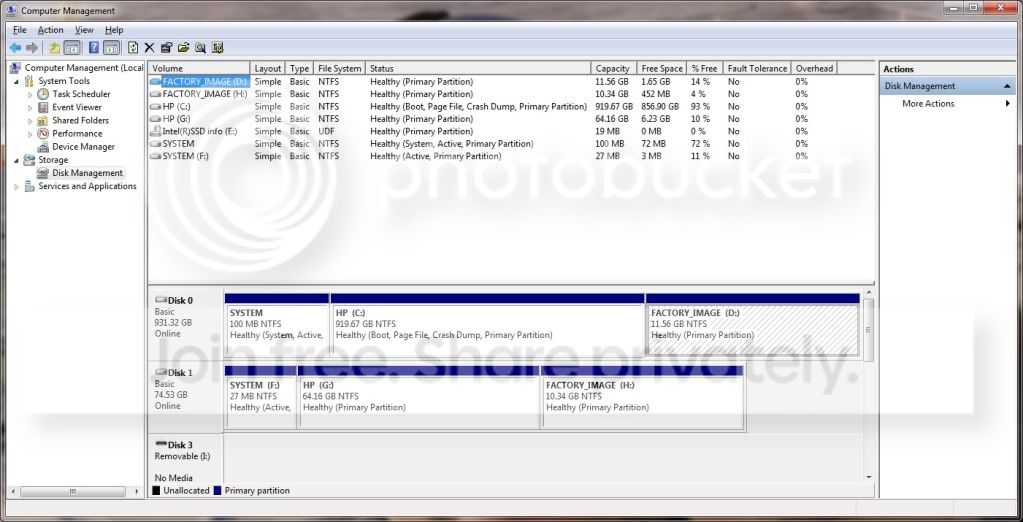
Yeah, I think you are best off to start anew. If you follow my instructions above (but do not skip anything, LOL), you should end up with a nice clean and performing SSD. If you have questions, ask.
 

My Computer My Computer

Computer Manufacturer/Model Number
HP, Dell, Gateway, Toshiba - 4 laptops and 2 desktops
OS
Vista, Windows7, Mint Mate, Zorin, Windows 8
CPU
from 1.6GHz Duo to i7
Monitor(s) Displays
2x HP w2207
Hard Drives
5x HDD, 7x SSD, 12x Externals
Keyboard
with trackball - no mices
Mouse
Trackball mice
Internet Speed
DSL 6000
Great, thanks guys. I'll starting now :)
 

My Computer My Computer

Computer Manufacturer/Model Number
HP HPE-210f
OS
Windows 7 64bit Home Premium
CPU
AMD Phenom II X4 945 3.0GHz
Memory
8GB
Hard Drives
Intel 320 Series SSD - 80GB
WD Green - 1TB
I completed all the steps above and am now ready to copy my C partition to my SSD.
I was going to use the Intel SSD Migration tool (which is Acronis) but it does not let me select just the C partition from the source disk - I have to select the entire disk. I'm going to give Macrium a shot. I watched the video tutorial on moving "Test Images" between partitions. I'm not sure from the tutorial how I would copy a C partition from the big HDD to the SSD but hope the interface is intuitive enought to walk me through it.

Any tips?
 

My Computer My Computer

Computer Manufacturer/Model Number
HP HPE-210f
OS
Windows 7 64bit Home Premium
CPU
AMD Phenom II X4 945 3.0GHz
Memory
8GB
Hard Drives
Intel 320 Series SSD - 80GB
WD Green - 1TB
I'm not sure from the tutorial how I would copy a C partition from the big HDD to the SSD but hope the interface is intuitive enought to walk me through it.

Any tips?

I'm not sure I am following you, but if you are referring to an imaging process you don't "copy a C partition from the big HDD to the SSD".

Instead, you make an image file of C, store it on some other drive, and then "restore" that image file to the SSD, via booting from a previously burned CD boot disc.


But you may be talking about "cloning".

In which case, look at this recent thread by DeaconFrost, an experienced member who successfully used Acronis to clone:

http://www.sevenforums.com/hardware-devices/209521-best-method-clone-ssds.html
 

My Computer My Computer

Computer type
PC/Desktop
Computer Manufacturer/Model Number
Ignatz Special; 4 speed manual gearbox; factory air conditioning; one of one
OS
Windows 7 Home Premium SP1, 64-bit
CPU
Intel Skylake i5-6600K, not overclocked
Motherboard
AsRock Z170M Extreme 4, micro ATX
Memory
8 GB HyperX DDR4-2666 (2 x 4 GB)
Graphics Card(s)
none; graphics are integrated on CPU
Sound Card
onboard: Realtek ALC1150; external: USB Behringer UF0-202
Monitor(s) Displays
Dell S2340M 23 inch IPS
Screen Resolution
1600 x 900
Hard Drives
System: Crucial MX100 series SSD, 128 GB;
Data: Samsung Spinpoint 103SJ, 1 TB;
Backup: WD Caviar Green WD30EZRX-00D8PB0, 3 TB
PSU
Rosewill SilentNight 500 watt fanless, semi-modular
Case
Antec Solo II
Cooling
Noctua NH-U12S; Noctua F12 intake, Noctua S12A exhaust
Keyboard
Microsoft 200 6JH-00001 USB
Mouse
Dell or Microsoft optical wired; USB
Antivirus
Microsoft Security Essentials and Malwarebytes Premium
Browser
Pale Moon
Other Info
All fans PWM; speeds at idle: CPU circa 500 rpm; intake circa 600 rpm; exhaust circa 600 rpm; CPU temps 27 idle and 47 C load in a warm room (27 C/81 F) when running Intel Extreme Tuning Utility stress test.
For free Macrium, you must first shrink your C partition to the size of the SSD. If it is bigger, it will not work regardles of the amount of data in it. With Disk Management you will not be able to do it because it is an active partition. You must use the bootable CD of Partition Wizard. But make sure you make an image of C first - in case something happens.

If you used free Paragon, you can start with a larger partition than the SSD - provided the data on the partition is less than the size of the SSD.

If you want to make your life real easy, get this program. It costs $19.95, but it gets the job done with 3 clicks.
 

My Computer My Computer

Computer Manufacturer/Model Number
HP, Dell, Gateway, Toshiba - 4 laptops and 2 desktops
OS
Vista, Windows7, Mint Mate, Zorin, Windows 8
CPU
from 1.6GHz Duo to i7
Monitor(s) Displays
2x HP w2207
Hard Drives
5x HDD, 7x SSD, 12x Externals
Keyboard
with trackball - no mices
Mouse
Trackball mice
Internet Speed
DSL 6000
Paragon it is. 3 clicks for $19.95 works for me... downloading it now.
 

My Computer My Computer

Computer Manufacturer/Model Number
HP HPE-210f
OS
Windows 7 64bit Home Premium
CPU
AMD Phenom II X4 945 3.0GHz
Memory
8GB
Hard Drives
Intel 320 Series SSD - 80GB
WD Green - 1TB
That was easy!
Here's my disk layout now.
disklayout.jpg


Couple of questions...
1. Can I delete the F: partition? I used EasyBCD to move it to the C: partition before the Paragon clone
2. I don't need my "HP (G:)" partition any longer. I plan to update my data location properties from K: to G: then delete K: and extend G:. Is that the right way to go about getting the space back under a single drive letter?
3. Is the FACTORY_IMAGE D: partition still usable? I created recovery dvd's but it would be nice to have the D: partition usable if I need to restore my system.
4. Here is the partition offset of my SSD - 1024KB. That's good right?
DISKPART> list partition
Partition ### Type Size Offset
------------- ---------------- ------- -------
Partition 1 Primary 74 GB 1024 KB

Thank you all for your help. Really appreciated.
 

My Computer My Computer

Computer Manufacturer/Model Number
HP HPE-210f
OS
Windows 7 64bit Home Premium
CPU
AMD Phenom II X4 945 3.0GHz
Memory
8GB
Hard Drives
Intel 320 Series SSD - 80GB
WD Green - 1TB
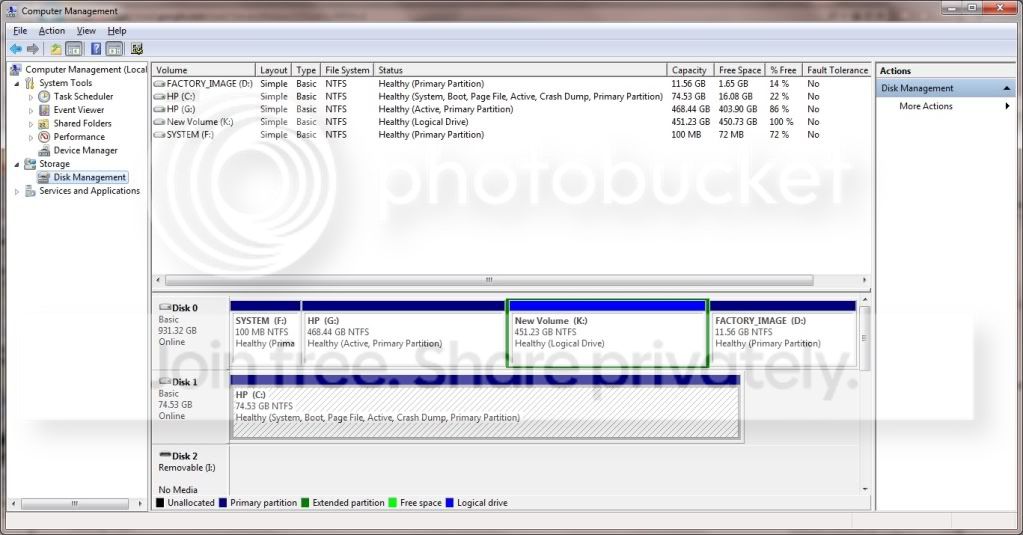
I'd think you can delete F, but as a test I would disconnect the entire disc 0 from inside the case and confirm that you can boot to the new C OK without assistance from any other drive or partition.

K is a logical partition within an extended partition. If deleted, I'm not sure how easily you can expand G into that space--I don't use logical/extended. You would likely have to delete both the logical and the extended---it needs to become "unallocated space" so you can expand G.

The offset is just what you want.


You done good.
 

My Computer My Computer

Computer type
PC/Desktop
Computer Manufacturer/Model Number
Ignatz Special; 4 speed manual gearbox; factory air conditioning; one of one
OS
Windows 7 Home Premium SP1, 64-bit
CPU
Intel Skylake i5-6600K, not overclocked
Motherboard
AsRock Z170M Extreme 4, micro ATX
Memory
8 GB HyperX DDR4-2666 (2 x 4 GB)
Graphics Card(s)
none; graphics are integrated on CPU
Sound Card
onboard: Realtek ALC1150; external: USB Behringer UF0-202
Monitor(s) Displays
Dell S2340M 23 inch IPS
Screen Resolution
1600 x 900
Hard Drives
System: Crucial MX100 series SSD, 128 GB;
Data: Samsung Spinpoint 103SJ, 1 TB;
Backup: WD Caviar Green WD30EZRX-00D8PB0, 3 TB
PSU
Rosewill SilentNight 500 watt fanless, semi-modular
Case
Antec Solo II
Cooling
Noctua NH-U12S; Noctua F12 intake, Noctua S12A exhaust
Keyboard
Microsoft 200 6JH-00001 USB
Mouse
Dell or Microsoft optical wired; USB
Antivirus
Microsoft Security Essentials and Malwarebytes Premium
Browser
Pale Moon
Other Info
All fans PWM; speeds at idle: CPU circa 500 rpm; intake circa 600 rpm; exhaust circa 600 rpm; CPU temps 27 idle and 47 C load in a warm room (27 C/81 F) when running Intel Extreme Tuning Utility stress test.
Paragon Migrate - great idea & I bought it. I found it had deficiencies, which I consider serious, and wrote it off as a bad loss. I carried out the process manually and everything works fine.
The problem I experienced may be due to some quirky system configuration but my specs look pretty average.
 

My Computer My Computer

Computer type
PC/Desktop
Computer Manufacturer/Model Number
Own build
OS
Windows 7x64 Home Premium SP1
CPU
Intel i7 2600k
Motherboard
ASUS P8Z68 Deluxe
Memory
G.Skill Ripjaws (DDR3-1600) 2x4GB
Graphics Card(s)
Nvidia GeForce GTS 450; Intel HD Graphics 3000(GT2+)
Monitor(s) Displays
Dell Ultrasharp IPS panel U2311H, Samsung SyncMaster P2350
Screen Resolution
1920x1080
Hard Drives
Samsung 850 Pro SSD 256GB, Samsung SSD 840 120GB, Seagates 1TB Barracuda ST31000528AS x2
PSU
Seasonic M12II 520W
Case
Lian Li Lancool PC-K60
Cooling
Case: 1x120mm, 3x140mm CPU: Hyper 212+
Keyboard
Logitech MK520 (wireless)
Mouse
Logitech MK520
Internet Speed
6-7 Mbps
Antivirus
Norton Security Premium, Malwarebytes on 2 (MSE on 3rd PC)
Browser
FireFox
Other Info
Audio: Logitech Z523 2.1
In Disk Mgmt delete K and then rightclick on what's left and Delete Volume. This should allow you to Extend G into the space: Partition or Volume - Extend

If this fails use free Partition Wizard bootable CD which is failsafe and will Resize into Logical Free Space or Primary Unallocated space interchangeably.

Newer HP's will still boot factory Recovery even if C is reinstalled, however I don't think you can count on it and may want to reuse your HD more flexibly. But you can test cueing it up at any time: HP Recover Windows 7 Operating System Using HP Recovery - HP Customer Care (United States - English)

Have you considered clean reinstall at some future point to get best performance from Win7 without the factory bloatware or useless factory utilties which have much better versions built into Win7? Here's how to get it perfect: Reinstalling Windows 7
 
ad 1. yes

ad 2. I would do that differently. Once you deleted F and G, you can extend K into that unallocated space. But you need to use this program

ad 3. it should be, but I would rely more on my images

ad 4. perfect
 

My Computer My Computer

Computer Manufacturer/Model Number
HP, Dell, Gateway, Toshiba - 4 laptops and 2 desktops
OS
Vista, Windows7, Mint Mate, Zorin, Windows 8
CPU
from 1.6GHz Duo to i7
Monitor(s) Displays
2x HP w2207
Hard Drives
5x HDD, 7x SSD, 12x Externals
Keyboard
with trackball - no mices
Mouse
Trackball mice
Internet Speed
DSL 6000
Paragon Migrate - great idea & I bought it. I found it had deficiencies, which I consider serious, and wrote it off as a bad loss. I carried out the process manually and everything works fine.
The problem I experienced may be due to some quirky system configuration but my specs look pretty average.
Michael, can you remind us what those problems were.
 

My Computer My Computer

Computer Manufacturer/Model Number
HP, Dell, Gateway, Toshiba - 4 laptops and 2 desktops
OS
Vista, Windows7, Mint Mate, Zorin, Windows 8
CPU
from 1.6GHz Duo to i7
Monitor(s) Displays
2x HP w2207
Hard Drives
5x HDD, 7x SSD, 12x Externals
Keyboard
with trackball - no mices
Mouse
Trackball mice
Internet Speed
DSL 6000
Sure,
the problem(s) were centered around the RACTask (MS Reliability Analysis Task) and a total failure of the Reliability Monitor.
I searched for every possible remedy to no avail and Paragon support said "never heard of the problem....". Another member on some post reported basically the same problem but I don't know if they used Paragon.

Cutting to the chase: I'm technically savvy and had problems. Given the product is targeted as a turn key solution I just raise a level of caution.
 

My Computer My Computer

Computer type
PC/Desktop
Computer Manufacturer/Model Number
Own build
OS
Windows 7x64 Home Premium SP1
CPU
Intel i7 2600k
Motherboard
ASUS P8Z68 Deluxe
Memory
G.Skill Ripjaws (DDR3-1600) 2x4GB
Graphics Card(s)
Nvidia GeForce GTS 450; Intel HD Graphics 3000(GT2+)
Monitor(s) Displays
Dell Ultrasharp IPS panel U2311H, Samsung SyncMaster P2350
Screen Resolution
1920x1080
Hard Drives
Samsung 850 Pro SSD 256GB, Samsung SSD 840 120GB, Seagates 1TB Barracuda ST31000528AS x2
PSU
Seasonic M12II 520W
Case
Lian Li Lancool PC-K60
Cooling
Case: 1x120mm, 3x140mm CPU: Hyper 212+
Keyboard
Logitech MK520 (wireless)
Mouse
Logitech MK520
Internet Speed
6-7 Mbps
Antivirus
Norton Security Premium, Malwarebytes on 2 (MSE on 3rd PC)
Browser
FireFox
Other Info
Audio: Logitech Z523 2.1
Yeah, I now remeber. You even sent me a PM on the problem. That is pretty strange though because nobody else has reported that. Don't know what to say. Maybe other people are like me and never look at the Reliability Monitor. But mine was OK as you might recall.
 

My Computer My Computer

Computer Manufacturer/Model Number
HP, Dell, Gateway, Toshiba - 4 laptops and 2 desktops
OS
Vista, Windows7, Mint Mate, Zorin, Windows 8
CPU
from 1.6GHz Duo to i7
Monitor(s) Displays
2x HP w2207
Hard Drives
5x HDD, 7x SSD, 12x Externals
Keyboard
with trackball - no mices
Mouse
Trackball mice
Internet Speed
DSL 6000
Hopalong X reported an issue I believe. I don't think it bothered him and I don't even know if he used the Paragon product.
Problems with the MS Reliability task (RACTask) and the reliability monitor crop up a lot.
Now when I use Paragon Migrate I get the problem.
When I do it all manually - you know

  • SSD prep - align, partition
  • Macrium reimage,
  • change disk signatures
  • Bootrec ..... to fix up boot files
  • Check Trim & other things
It all goes well. RACTask remains totally functioning. But it's not turnkey.
If the Reliability analysis task isn't working I think what else.

If Paragon come back with an answer then I'll report back because in principle it's a good turn key solution.

I'll do it manually from now on. I'm just trying to be a good Corporate Citizen:D
 

My Computer My Computer

Computer type
PC/Desktop
Computer Manufacturer/Model Number
Own build
OS
Windows 7x64 Home Premium SP1
CPU
Intel i7 2600k
Motherboard
ASUS P8Z68 Deluxe
Memory
G.Skill Ripjaws (DDR3-1600) 2x4GB
Graphics Card(s)
Nvidia GeForce GTS 450; Intel HD Graphics 3000(GT2+)
Monitor(s) Displays
Dell Ultrasharp IPS panel U2311H, Samsung SyncMaster P2350
Screen Resolution
1920x1080
Hard Drives
Samsung 850 Pro SSD 256GB, Samsung SSD 840 120GB, Seagates 1TB Barracuda ST31000528AS x2
PSU
Seasonic M12II 520W
Case
Lian Li Lancool PC-K60
Cooling
Case: 1x120mm, 3x140mm CPU: Hyper 212+
Keyboard
Logitech MK520 (wireless)
Mouse
Logitech MK520
Internet Speed
6-7 Mbps
Antivirus
Norton Security Premium, Malwarebytes on 2 (MSE on 3rd PC)
Browser
FireFox
Other Info
Audio: Logitech Z523 2.1
Have you considered clean reinstall at some future point to get best performance from Win7 without the factory bloatware or useless factory utilties which have much better versions built into Win7? Here's how to get it perfect: Reinstalling Windows 7

Yes I definitely want to get a clean non-HP bloated Win7 install. I didn't realize it was possible with my current HP build. I though I would have to buy Win7. I read through the link you provided and I still don't understand how I get a clean copy of Win7 out of my recovery DVD's or the FACTORY_IMAGE partition. My desktop did not come with any installation CD's.

Am I missing something in the link you provided?

Thanks
 

My Computer My Computer

Computer Manufacturer/Model Number
HP HPE-210f
OS
Windows 7 64bit Home Premium
CPU
AMD Phenom II X4 945 3.0GHz
Memory
8GB
Hard Drives
Intel 320 Series SSD - 80GB
WD Green - 1TB
Back
Top