Mozilla launches Firefox 4

When I awoke and came to the computer a bit ago, I was greeted by a firewall dialog asking whether to allow a process named mpsigstub.exe. Somewhat thoughtlessly, I let it. Wondering if I should have done so, I Googled it, and found that it is some kind of updater associated with Windows Defender, but since I had never seen that before, I continued looking and found that it is sometimes malware.

This caused me to run Malwarebytes (which found nothing to squawk about) and SpyBot (which quickly listed a registry key belonging to MTC.MakeMeSearch.com). SpyBot listed that as a browser hyjacker. Further reading, this seemed to be related to a search toolbar. Searching my computer, I found an installed program in the root of Program Files (x86), which was named search toolbar. I uninstalled this, but the fact that it's folder was dated 3-21-2011, and the firewall dialogs that I had to clear, listed Firefox as it's target, and that Firefox was the only program of this type that I had installed in that time frame, makes me believe that Firefox installed it.

I had opted for the custom install of Firefox, as I always do with any program that I can, and I always opt out of anything of this kind, if given a choice. Therefore I either wasn't given the choice, or Firefox ignored me and installed it anyway. I'm now curious if anyone else has found this problem, or if it is just me?
I did not opt for the custom install, but as of yet nothing popped up. SO now I am running full scans with Superantispyware and MSE, and running a Hitman Pro scan too.....so we'll see what happens.

Edit:Hitman turned up only one tracking cookie. Other scans are ongoing....

Nope.
I did a full scan with Malwarebytes before yesterday. Result: "clean".
As I said, Malwarebytes didn't find anything on my computer either...SpyBot did. However, you probably don't need to run that, just check in Program Files (x86) for a folder named Search Toolbar, and also in Programs and Features for the same. If not in either place, then no program is going to detect it.
Well, all my scans came up negative, and after reading this post^^ I looked in those locations, so apparently I'm clean.
 

My Computer

Computer type
PC/Desktop
Computer Manufacturer/Model Number
Gigabyte Technology Co., Ltd.
OS
Win 7 Ultimate 64-bit SP1 (desktop)
CPU
Intel Core 2 Duo E8400
Motherboard
Gigabyte GA-EP35-DS3R
Memory
2x 2GB OCZ DDR II SDRAM PC2-6400
Graphics Card(s)
NVIDIA GeForce 9400GT
Monitor(s) Displays
HP 2009m(primary), Acer P191W
Screen Resolution
1600x900, 1440x900
Hard Drives
Internal:WD Caviar Black 640GB 32MB cache 7200RPM
External:Samsung Story Station 1TB HDD desktop drive
500GB Toshiba portable drive
PSU
Antec Earthwatts EA500D
Case
Antec Sonata III
Cooling
4 fans
Keyboard
Logitech Wave
Mouse
Logitech M-SBF90
Internet Speed
Slow due to home Wireless-G router
Antivirus
MSE, Hitman Pro, Malwarebytes
Browser
Chrome and Palemoon
Other Info
Laptop....Acer 5750Z-4835
15.6" HD Widescreen CineCrystal™ LED-backlit LCD Display: (1366x768 resolution, 16:9 aspect ratio)
Intel® Pentium® Processor B940 (2.0GHz, 2MB L3 cache)
Windows® 7 Home Premium,500GB Hard Drive,4GB DDR3 RAM, Intel® HD Graphics,8X DVD-Super Multi Double-Layer Drive
Multi-in-1 Digital Media Card Reader,802.11b/g/n Wi-Fi
Chrome and Palemoon, MSE, Hitman Pro
I've never, ever, seen or had this happen with the Firefox install, you must have picked it up somewhere else or don't have noscript installed (As Magus said.)

When I awoke and came to the computer a bit ago, I was greeted by a firewall dialog asking whether to allow a process named mpsigstub.exe. Somewhat thoughtlessly, I let it. Wondering if I should have done so, I Googled it, and found that it is some kind of updater associated with Windows Defender, but since I had never seen that before, I continued looking and found that it is sometimes malware.

This caused me to run Malwarebytes (which found nothing to squawk about) and SpyBot (which quickly listed a registry key belonging to MTC.MakeMeSearch.com). SpyBot listed that as a browser hyjacker. Further reading, this seemed to be related to a search toolbar. Searching my computer, I found an installed program in the root of Program Files (x86), which was named search toolbar. I uninstalled this, but the fact that it's folder was dated 3-21-2011, and the firewall dialogs that I had to clear, listed Firefox as it's target, and that Firefox was the only program of this type that I had installed in that time frame, makes me believe that Firefox installed it.

I had opted for the custom install of Firefox, as I always do with any program that I can, and I always opt out of anything of this kind, if given a choice. Therefore I either wasn't given the choice, or Firefox ignored me and installed it anyway. I'm now curious if anyone else has found this problem, or if it is just me?

Anything is possible, but considering how little that I have used Firefox in the very few days that it has been installed, I would be very surprised if that is so. Since I have installed Firefox, I have only been to a handful of websites, with which I am very familiar, and have never had anything injected previously. Of course, previously I didn't use Firefox at all.
 

My Computer

Computer Manufacturer/Model Number
DIY
OS
W7x64 Pro, SuSe 12.1/** W7 x64 Pro, XP MCE
CPU
Phenom II 1090T w/Noctua NH-D14 /**4400+ X2 w/CM Hyper TX 3
Motherboard
ASRock 890FX Deluxe 4/**A8N-SLI
Memory
2 x 2GB Patriot PGS34g1600LLKA/**4x1GB Corsair VS
Graphics Card(s)
EVGA GTX460 SC/**EVGA 8800GTS
Sound Card
Asus Xonar D2X/**Xonar D1
Monitor(s) Displays
Acer X233H, Dell E152FPc /**LG M237-WD
Screen Resolution
1920x1080 & 1024x768/**1980x1080
Hard Drives
WDC 2TB, 1.5TB, 1TB, 500GB,Seagate 500GB , Maxtor 80GB /**500GB Seagate & WDC 1TB Black
PSU
CM RS600 w/ APC BX1000G/**Antec 500 TP w/ APC BX1000
Case
HAF922/**Antec 1040IIB
Cooling
3x200mm, 1x140 and 1x120mm/**5x80mm fans
Keyboard
Logitech Media USB/**Saitek Eclipse
Mouse
Cordless Trackman Wheel/**Ditto
Internet Speed
3.3Mbps
Other Info
SB 560 5.1 w/ Sennheiser RS140/**Creative T20 speakers, Dvico FusionHDTV7 Gold RT, Cisco E3000, HP 5510V AIO, Linksys E3000, Belkin F5U237 hub and **F5D8055 adapter
(** = 2nd rig)
Use noscript with firefox, it will prevent anything being injected without your permission.

I just installed noscript, and when it asked to restart FF, I let it, but instead of restarting, it popped a couple of dialogs saying that there was a problem with the program, and when I then tried to start FF again, it continues to pop similar errors. How do I uninstall noscript when FF won't start?
 

My Computer

Computer Manufacturer/Model Number
DIY
OS
W7x64 Pro, SuSe 12.1/** W7 x64 Pro, XP MCE
CPU
Phenom II 1090T w/Noctua NH-D14 /**4400+ X2 w/CM Hyper TX 3
Motherboard
ASRock 890FX Deluxe 4/**A8N-SLI
Memory
2 x 2GB Patriot PGS34g1600LLKA/**4x1GB Corsair VS
Graphics Card(s)
EVGA GTX460 SC/**EVGA 8800GTS
Sound Card
Asus Xonar D2X/**Xonar D1
Monitor(s) Displays
Acer X233H, Dell E152FPc /**LG M237-WD
Screen Resolution
1920x1080 & 1024x768/**1980x1080
Hard Drives
WDC 2TB, 1.5TB, 1TB, 500GB,Seagate 500GB , Maxtor 80GB /**500GB Seagate & WDC 1TB Black
PSU
CM RS600 w/ APC BX1000G/**Antec 500 TP w/ APC BX1000
Case
HAF922/**Antec 1040IIB
Cooling
3x200mm, 1x140 and 1x120mm/**5x80mm fans
Keyboard
Logitech Media USB/**Saitek Eclipse
Mouse
Cordless Trackman Wheel/**Ditto
Internet Speed
3.3Mbps
Other Info
SB 560 5.1 w/ Sennheiser RS140/**Creative T20 speakers, Dvico FusionHDTV7 Gold RT, Cisco E3000, HP 5510V AIO, Linksys E3000, Belkin F5U237 hub and **F5D8055 adapter
(** = 2nd rig)
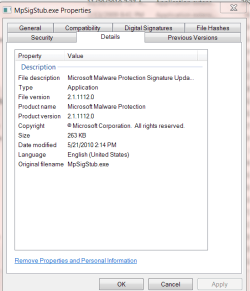
I have the MpSigStub.exe in my widows/system folder and this is what it shows.

MP.PNG

I don't show anything about the search toolbar. Maybe some other program installed it.

Jim :geek:
 

My Computer

Computer type
PC/Desktop
Computer Manufacturer/Model Number
Home Built
OS
Windows 8.1 Pro w/Media Center 64bit, Windows 7 HP 64bit
CPU
Phenom II X6 1100T
Motherboard
ASUS M5A99X EVO
Memory
Crucial Balistic 8gb DDR3-1866 CL9
Graphics Card(s)
MSI R6850 Cyclone IGD5 PE
Sound Card
On Board
Monitor(s) Displays
ASUS VE258Q 25" LED with DVI-HDMI-DisplayPort
Screen Resolution
1920 x 1080
Hard Drives
Two WD Cavier Black 2TB Sata III, WD My Book Essential 2TB USB 3.0
PSU
Seasonic X650 80 Plus GOLD Modular
Case
Corsair 400R
Cooling
Antec Kuhler H2O 620, Two 120mm and four 140mm
Keyboard
Logitech K120
Mouse
Logitech Marble Mouse USB, Logitech Precision Game Pad
Internet Speed
15MB
Antivirus
Norton IS 2013, Malwarebytes Pro Beta 2
Browser
IE-11, FF-27
Other Info
APC UPS ES 750, Netgear WNR3500L Gigabit & Wireless N Router with SamKnows Test Program, Motorola SB6120 Gigabit Cable Modem. Brother HL-2170W Laser Printer, Epson V300 Scanner
I probably shouldn't have mentioned MpSigStub.exe, because I never really thought that it related to the search toolbar aspect, it was simply my way of describing the path that my mind traveled.
 

My Computer

Computer Manufacturer/Model Number
DIY
OS
W7x64 Pro, SuSe 12.1/** W7 x64 Pro, XP MCE
CPU
Phenom II 1090T w/Noctua NH-D14 /**4400+ X2 w/CM Hyper TX 3
Motherboard
ASRock 890FX Deluxe 4/**A8N-SLI
Memory
2 x 2GB Patriot PGS34g1600LLKA/**4x1GB Corsair VS
Graphics Card(s)
EVGA GTX460 SC/**EVGA 8800GTS
Sound Card
Asus Xonar D2X/**Xonar D1
Monitor(s) Displays
Acer X233H, Dell E152FPc /**LG M237-WD
Screen Resolution
1920x1080 & 1024x768/**1980x1080
Hard Drives
WDC 2TB, 1.5TB, 1TB, 500GB,Seagate 500GB , Maxtor 80GB /**500GB Seagate & WDC 1TB Black
PSU
CM RS600 w/ APC BX1000G/**Antec 500 TP w/ APC BX1000
Case
HAF922/**Antec 1040IIB
Cooling
3x200mm, 1x140 and 1x120mm/**5x80mm fans
Keyboard
Logitech Media USB/**Saitek Eclipse
Mouse
Cordless Trackman Wheel/**Ditto
Internet Speed
3.3Mbps
Other Info
SB 560 5.1 w/ Sennheiser RS140/**Creative T20 speakers, Dvico FusionHDTV7 Gold RT, Cisco E3000, HP 5510V AIO, Linksys E3000, Belkin F5U237 hub and **F5D8055 adapter
(** = 2nd rig)
Process name: MpSigStub
Application using this process: Microsoft Malware Protection
Process author: Microsoft Corporation

just fyi.
 

My Computer

Computer Manufacturer/Model Number
Insane hobo technologies. ;-)
OS
Windows 7 x64
CPU
Intel i7 2600k
Motherboard
Asrock z68 extreme 4 gen 3
Memory
G.skill Ripjaw 16gigs @ 1866
Graphics Card(s)
Nvidia gtx580 (evga)
Sound Card
Integrated HD audio + hdmi
Monitor(s) Displays
24" ASUS widescreen + 42" insignia
Screen Resolution
1080p (1920x1080)
Hard Drives
128 Samsung 830
256 Samsung 840
3 x 1tb storage drive (various)
1 western digital 1tb (eSATA)
1 Seagate 1tb (eSATA)
PSU
1 kilowatt SLI/Crossfire rated Silverstone modular
Case
NZXT Phantom + additional 220 fan
Cooling
Zalmann
Keyboard
Microsoft wireless 3000 (v2)
Mouse
MS - wireless 5000 (bluetrack)
Internet Speed
depends on if you ask me or my provider.
Other Info
The above information is provided as is, and the author assumes no responsibility for issues it may cause with your sanity or fanboyism.
So far i like it! Visualy look's great. No crashes etc so far.
 

My Computer

Computer type
PC/Desktop
Computer Manufacturer/Model Number
HP
OS
Windows 7 64Bit
CPU
Intel (R) Core (TM) 2 Duo CPU 2.80GHz
Memory
4,00 GB
Graphics Card(s)
NVIDIA Geforce GT 220
Monitor(s) Displays
Samsung
Screen Resolution
1280x1024
Hard Drives
1t
Use noscript with firefox, it will prevent anything being injected without your permission.

I just installed noscript, and when it asked to restart FF, I let it, but instead of restarting, it popped a couple of dialogs saying that there was a problem with the program, and when I then tried to start FF again, it continues to pop similar errors. How do I uninstall noscript when FF won't start?

Since there was no response to this question, I went ahead an ran a System Restore, which appears to have taken care of the problem...at least FF does now open. Obviously, I know nothing about noscript, except the general purpose of the program. However, when I now go to Hulu, it complains that Java Script is not enabled, and since noscript also appears to block the Flash Player, I'm trying to decide whether to just white list Hulu, or disable noscript. I'm not particularly fond of anything that I have to contend with to do what I want. Before making a decision, I wanted to see if I might get some input on this here?
 

My Computer

Computer Manufacturer/Model Number
DIY
OS
W7x64 Pro, SuSe 12.1/** W7 x64 Pro, XP MCE
CPU
Phenom II 1090T w/Noctua NH-D14 /**4400+ X2 w/CM Hyper TX 3
Motherboard
ASRock 890FX Deluxe 4/**A8N-SLI
Memory
2 x 2GB Patriot PGS34g1600LLKA/**4x1GB Corsair VS
Graphics Card(s)
EVGA GTX460 SC/**EVGA 8800GTS
Sound Card
Asus Xonar D2X/**Xonar D1
Monitor(s) Displays
Acer X233H, Dell E152FPc /**LG M237-WD
Screen Resolution
1920x1080 & 1024x768/**1980x1080
Hard Drives
WDC 2TB, 1.5TB, 1TB, 500GB,Seagate 500GB , Maxtor 80GB /**500GB Seagate & WDC 1TB Black
PSU
CM RS600 w/ APC BX1000G/**Antec 500 TP w/ APC BX1000
Case
HAF922/**Antec 1040IIB
Cooling
3x200mm, 1x140 and 1x120mm/**5x80mm fans
Keyboard
Logitech Media USB/**Saitek Eclipse
Mouse
Cordless Trackman Wheel/**Ditto
Internet Speed
3.3Mbps
Other Info
SB 560 5.1 w/ Sennheiser RS140/**Creative T20 speakers, Dvico FusionHDTV7 Gold RT, Cisco E3000, HP 5510V AIO, Linksys E3000, Belkin F5U237 hub and **F5D8055 adapter
(** = 2nd rig)
Using commonsense will be required with noscript, if you want the level of protection it provides you are going to have to offer input, all you need to do is allow the item it is a tad annoying at first while you allow all your regular sites. It saves the settings you chose though so it's only on a first time basis.

I hold to it because I've been using it for 3 years now, in that time I haven't gotten the slightest bug despite having visited many questionable sites during that time. I don't even run a active antivirus I just scan once a week out of habit, have not found anything in a long time though.
 

My Computer

Computer Manufacturer/Model Number
Insane hobo technologies. ;-)
OS
Windows 7 x64
CPU
Intel i7 2600k
Motherboard
Asrock z68 extreme 4 gen 3
Memory
G.skill Ripjaw 16gigs @ 1866
Graphics Card(s)
Nvidia gtx580 (evga)
Sound Card
Integrated HD audio + hdmi
Monitor(s) Displays
24" ASUS widescreen + 42" insignia
Screen Resolution
1080p (1920x1080)
Hard Drives
128 Samsung 830
256 Samsung 840
3 x 1tb storage drive (various)
1 western digital 1tb (eSATA)
1 Seagate 1tb (eSATA)
PSU
1 kilowatt SLI/Crossfire rated Silverstone modular
Case
NZXT Phantom + additional 220 fan
Cooling
Zalmann
Keyboard
Microsoft wireless 3000 (v2)
Mouse
MS - wireless 5000 (bluetrack)
Internet Speed
depends on if you ask me or my provider.
Other Info
The above information is provided as is, and the author assumes no responsibility for issues it may cause with your sanity or fanboyism.
Flash also requires Javascript enabled to operate.

Jim :geek:
 

My Computer

Computer type
PC/Desktop
Computer Manufacturer/Model Number
Home Built
OS
Windows 8.1 Pro w/Media Center 64bit, Windows 7 HP 64bit
CPU
Phenom II X6 1100T
Motherboard
ASUS M5A99X EVO
Memory
Crucial Balistic 8gb DDR3-1866 CL9
Graphics Card(s)
MSI R6850 Cyclone IGD5 PE
Sound Card
On Board
Monitor(s) Displays
ASUS VE258Q 25" LED with DVI-HDMI-DisplayPort
Screen Resolution
1920 x 1080
Hard Drives
Two WD Cavier Black 2TB Sata III, WD My Book Essential 2TB USB 3.0
PSU
Seasonic X650 80 Plus GOLD Modular
Case
Corsair 400R
Cooling
Antec Kuhler H2O 620, Two 120mm and four 140mm
Keyboard
Logitech K120
Mouse
Logitech Marble Mouse USB, Logitech Precision Game Pad
Internet Speed
15MB
Antivirus
Norton IS 2013, Malwarebytes Pro Beta 2
Browser
IE-11, FF-27
Other Info
APC UPS ES 750, Netgear WNR3500L Gigabit & Wireless N Router with SamKnows Test Program, Motorola SB6120 Gigabit Cable Modem. Brother HL-2170W Laser Printer, Epson V300 Scanner
So far I like FF4 and IE9 both so much, I really can't decide on one.

The only thing I've noticed, FF4 seems to prefer using the Cpu for most work, while IE9 shoots for the Gpu whenever possible, this is especially true for video, be it flash, html5 or whatever. I've been bored, and monitoring with AMD System Monitor, which shows how much workload is x86, and how much is GPGPU.

In the end, it really doesn't matter :) Just me being bored and wanting to know how they behave. I guess maybe IE9 is accellerating more content than FF4, however, performance is always identical, except for one thing: When watching video, regardless of what type, so long as it's being rendered by the browser, IE9 certainly handles it better and doesn't get bogged down. For example, when watching a youtube video with FF4, Gpu load is very minimal (All of this done on both of my PC's btw) but when scrolling up and down, it gets choppy and Cpu usage flies up, with IE9, it's perfectly smooth regardless and Gpu usage simply rises, and Cpu usage rises just slightly.

It seems IE9 is very liberal with the hardware accelleration, and FF4 only partial, however there is a good reason I think. FF4 uses far less resources, both Cpu and Memory (Gpu load IMO doesn't matter since it would otherwise be idling doing nothing anyway, because both browsers bring each of my Gpu's out of their idle state, both only a slight bump in voltage and clock speed, core clock that is), while IE9 uses a bit more, and naturally when the going gets tough, IE9 copes better.

In the end, it doesn't matter, I can't see any difference as far as in-page performance between the two, other than some choppyness with FF4, but only in situations that really don't matter; such as, how often must I scroll up and down a page which has video playing lol.

I will say, as far as pure browsing and loading of content, FF4 and IE9 x86 are so close I can't tell, however IE9 x64 is a complete dog, as all benchmarks have shown. Hopefully one day IE9 x64 will get the newer engine and tweaks that IE9 x86 has, until then I don't use it as often. I 'do' use it when trying to access websites I'm not very comfortable with, but only because I assume it's slightly more secure.

Forgive the length, just trying to summarize the last few weeks of usage.
 

My Computer

Computer Manufacturer/Model Number
HPE-112y Custom + Custom Build
OS
HP Win7 Pro x64 | Custom Win7 Pro x64
CPU
HP PhII X4 965 Black Ed. 3.4Ghz | PhII X6 1100T 3.3/3.7
Motherboard
OEM HP | ASUS Crosshair IV Extreme 890FX
Memory
8GB DDR3 1333 OC Black Edition x2
Graphics Card(s)
HP XFX Radeon HD4890 1GB | AMD Radeon HD 6990
Sound Card
Realtek 7.1 Digital HDMI x2
Monitor(s) Displays
HP 20" 1680x1050 LCD | Samsung 23" 2ms 1920x1200 LED
Screen Resolution
1680x1050 + 1920x1200 & HDTV for Gaming/TV
Hard Drives
1TB WD "Green" 5,400 RPM SCSI W/ AMD RAID/Xpert
Custom 2x 128GB OCZ Enyo SSD
PSU
Thermaltake Black Widow 850watt Modular x2
Case
HP HPE- 112y OEM Modded | Custom Xclio A380S
Cooling
HP Antec120mm | Custom Antec 360mm/250mm/200mm/120mm
Keyboard
HP G15 | G19
Mouse
G500 x2
Internet Speed
15mb down, 2mb up
Other Info
2x DVD-RAM | 2x BD-ROM
As I was just telling someone in a pm all the tiny differences don't really matter to me, as it stands all the plugins and add-ons I like are on FF. If it's half a second slower loading a page because of it, I don't really care.

My refusal to use IE has a lot less to do with its performance but rather with the fact that in the past it was nothing but a virus factory for both me and my friends.

As it stand internet explorer is not even installed on my system. I have removed it. The only reason I kept it in the past is because windows update refused to work without it.
 

My Computer

Computer Manufacturer/Model Number
Insane hobo technologies. ;-)
OS
Windows 7 x64
CPU
Intel i7 2600k
Motherboard
Asrock z68 extreme 4 gen 3
Memory
G.skill Ripjaw 16gigs @ 1866
Graphics Card(s)
Nvidia gtx580 (evga)
Sound Card
Integrated HD audio + hdmi
Monitor(s) Displays
24" ASUS widescreen + 42" insignia
Screen Resolution
1080p (1920x1080)
Hard Drives
128 Samsung 830
256 Samsung 840
3 x 1tb storage drive (various)
1 western digital 1tb (eSATA)
1 Seagate 1tb (eSATA)
PSU
1 kilowatt SLI/Crossfire rated Silverstone modular
Case
NZXT Phantom + additional 220 fan
Cooling
Zalmann
Keyboard
Microsoft wireless 3000 (v2)
Mouse
MS - wireless 5000 (bluetrack)
Internet Speed
depends on if you ask me or my provider.
Other Info
The above information is provided as is, and the author assumes no responsibility for issues it may cause with your sanity or fanboyism.
Before Windows Vista came along, I felt the same way, it was beyond awful, just seeing the little blue E struck fear in me...lol.

However, since Vista and IE8, and protected mode along with many other enhancements, mostly OS related, I've done a complete 180*.

But I can certainly understand why you might feel that way, and wouldn't bother trying to talk you out of it. ;)
 

My Computer

Computer Manufacturer/Model Number
HPE-112y Custom + Custom Build
OS
HP Win7 Pro x64 | Custom Win7 Pro x64
CPU
HP PhII X4 965 Black Ed. 3.4Ghz | PhII X6 1100T 3.3/3.7
Motherboard
OEM HP | ASUS Crosshair IV Extreme 890FX
Memory
8GB DDR3 1333 OC Black Edition x2
Graphics Card(s)
HP XFX Radeon HD4890 1GB | AMD Radeon HD 6990
Sound Card
Realtek 7.1 Digital HDMI x2
Monitor(s) Displays
HP 20" 1680x1050 LCD | Samsung 23" 2ms 1920x1200 LED
Screen Resolution
1680x1050 + 1920x1200 & HDTV for Gaming/TV
Hard Drives
1TB WD "Green" 5,400 RPM SCSI W/ AMD RAID/Xpert
Custom 2x 128GB OCZ Enyo SSD
PSU
Thermaltake Black Widow 850watt Modular x2
Case
HP HPE- 112y OEM Modded | Custom Xclio A380S
Cooling
HP Antec120mm | Custom Antec 360mm/250mm/200mm/120mm
Keyboard
HP G15 | G19
Mouse
G500 x2
Internet Speed
15mb down, 2mb up
Other Info
2x DVD-RAM | 2x BD-ROM
FF4 is great,but................................

Just installed. Awesome. Now the waiting game for extensions to get updated...
Even old extensions will work if you disable compatibility check ;)
Can you tell me what you do to disable this? I've found through all of my web searching that disabling compatibility checks, doesn't allow my add-ons to function in FF4 RC.
I was forced to purchase Roboform 7 because version 6 doesn't work with it. :sarc:
 

My Computer

OS
Windows 7
Using commonsense will be required with noscript, if you want the level of protection it provides you are going to have to offer input, all you need to do is allow the item it is a tad annoying at first while you allow all your regular sites. It saves the settings you chose though so it's only on a first time basis.

I hold to it because I've been using it for 3 years now, in that time I haven't gotten the slightest bug despite having visited many questionable sites during that time. I don't even run a active antivirus I just scan once a week out of habit, have not found anything in a long time though.

No quibble that a person should use what they are comfortable with, but I will add that I have used Opera a lot longer than 3 years, and never got anything like we are discussing. I won't say that is entirely due to the browser's security, but it helped. It was due primarily due to my use in "common sense" regarding where I browsed on the web.

I'm certain that many people need a cyber prophylactic to protect their computer's purity, but I haven't had much use for one. Despite this, I continually run a battery of security programs anyway, so I kind of feel that noscript is somewhat redundant. Still, I will keep it for a while, until I can make a more insightful decision about it than I can now.
 

My Computer

Computer Manufacturer/Model Number
DIY
OS
W7x64 Pro, SuSe 12.1/** W7 x64 Pro, XP MCE
CPU
Phenom II 1090T w/Noctua NH-D14 /**4400+ X2 w/CM Hyper TX 3
Motherboard
ASRock 890FX Deluxe 4/**A8N-SLI
Memory
2 x 2GB Patriot PGS34g1600LLKA/**4x1GB Corsair VS
Graphics Card(s)
EVGA GTX460 SC/**EVGA 8800GTS
Sound Card
Asus Xonar D2X/**Xonar D1
Monitor(s) Displays
Acer X233H, Dell E152FPc /**LG M237-WD
Screen Resolution
1920x1080 & 1024x768/**1980x1080
Hard Drives
WDC 2TB, 1.5TB, 1TB, 500GB,Seagate 500GB , Maxtor 80GB /**500GB Seagate & WDC 1TB Black
PSU
CM RS600 w/ APC BX1000G/**Antec 500 TP w/ APC BX1000
Case
HAF922/**Antec 1040IIB
Cooling
3x200mm, 1x140 and 1x120mm/**5x80mm fans
Keyboard
Logitech Media USB/**Saitek Eclipse
Mouse
Cordless Trackman Wheel/**Ditto
Internet Speed
3.3Mbps
Other Info
SB 560 5.1 w/ Sennheiser RS140/**Creative T20 speakers, Dvico FusionHDTV7 Gold RT, Cisco E3000, HP 5510V AIO, Linksys E3000, Belkin F5U237 hub and **F5D8055 adapter
(** = 2nd rig)
Well my issue here is something installed to your system, wrote files outside of the browser's space in appdata. That couldn't have happened without user input, unless you've disabled uac.
 

My Computer

Computer Manufacturer/Model Number
Insane hobo technologies. ;-)
OS
Windows 7 x64
CPU
Intel i7 2600k
Motherboard
Asrock z68 extreme 4 gen 3
Memory
G.skill Ripjaw 16gigs @ 1866
Graphics Card(s)
Nvidia gtx580 (evga)
Sound Card
Integrated HD audio + hdmi
Monitor(s) Displays
24" ASUS widescreen + 42" insignia
Screen Resolution
1080p (1920x1080)
Hard Drives
128 Samsung 830
256 Samsung 840
3 x 1tb storage drive (various)
1 western digital 1tb (eSATA)
1 Seagate 1tb (eSATA)
PSU
1 kilowatt SLI/Crossfire rated Silverstone modular
Case
NZXT Phantom + additional 220 fan
Cooling
Zalmann
Keyboard
Microsoft wireless 3000 (v2)
Mouse
MS - wireless 5000 (bluetrack)
Internet Speed
depends on if you ask me or my provider.
Other Info
The above information is provided as is, and the author assumes no responsibility for issues it may cause with your sanity or fanboyism.
Yes, I have disabled UAC, and it is going to remain that way. Despite your belief that the fault is due to something that I did other than that, it simply is not the case. One way or another, that search toolbar was installed by FF.
 

My Computer

Computer Manufacturer/Model Number
DIY
OS
W7x64 Pro, SuSe 12.1/** W7 x64 Pro, XP MCE
CPU
Phenom II 1090T w/Noctua NH-D14 /**4400+ X2 w/CM Hyper TX 3
Motherboard
ASRock 890FX Deluxe 4/**A8N-SLI
Memory
2 x 2GB Patriot PGS34g1600LLKA/**4x1GB Corsair VS
Graphics Card(s)
EVGA GTX460 SC/**EVGA 8800GTS
Sound Card
Asus Xonar D2X/**Xonar D1
Monitor(s) Displays
Acer X233H, Dell E152FPc /**LG M237-WD
Screen Resolution
1920x1080 & 1024x768/**1980x1080
Hard Drives
WDC 2TB, 1.5TB, 1TB, 500GB,Seagate 500GB , Maxtor 80GB /**500GB Seagate & WDC 1TB Black
PSU
CM RS600 w/ APC BX1000G/**Antec 500 TP w/ APC BX1000
Case
HAF922/**Antec 1040IIB
Cooling
3x200mm, 1x140 and 1x120mm/**5x80mm fans
Keyboard
Logitech Media USB/**Saitek Eclipse
Mouse
Cordless Trackman Wheel/**Ditto
Internet Speed
3.3Mbps
Other Info
SB 560 5.1 w/ Sennheiser RS140/**Creative T20 speakers, Dvico FusionHDTV7 Gold RT, Cisco E3000, HP 5510V AIO, Linksys E3000, Belkin F5U237 hub and **F5D8055 adapter
(** = 2nd rig)
No quibble that a person should use what they are comfortable with, but I will add that I have used Opera a lot longer than 3 years, and never got anything like we are discussing. I won't say that is entirely due to the browser's security, but it helped. It was due primarily due to my use in "common sense" regarding where I browsed on the web.

You have no evidence at all that you got anything because of Firefox. You are heaping undeserved FUD on Firefox here. FF4 has been installed 25+ million times already now. If it contained Malware it would be a top story on every tech site in the world by now.

It isn't necessary to use noscript. I used Firefox for 7 years on insecure WindowsXP, without no script, and never picked up any viruses or Mal-ware. Not because FF is insecure.

It is extremely unlikey that you even picked up anything visiting a suspect site with FF4 because the malware writers likely don't even have an exploit yet.

Given how secure Windows7 is these days, you have to work hard to pick up malware. You likely installed something with a extra toolbar and forgot to uncheck it. This shouldn't have happened if you get your software from trusted sources.

Did you perhaps grab extensions from other than Mozilla?
 

My Computer

OS
Windows 7 x64 Home Premium
CPU
Intel Q9400 @ 3.2 GHz
Motherboard
Gigabyte DS3L
Memory
6GB PC 6400
Graphics Card(s)
Nvidia 8800GT
Screen Resolution
1920x1200
Hard Drives
Dual WD Green 1TB
Internet Speed
10 Mb/s
Font Blurriness in FF 4.0

If you are having problems with fonts being a bit blurry in FF 4.0 try this FF addon.

https://addons.mozilla.org/de/firefo...=all&x=17&y=20


I used:
  • Enhanced contrast 50%
  • Clear Type Level 50%
  • Anti-aliaising mode = Clear Type
  • Rendering mode GDI Classic
It produced a huge improvement in FF4 font rendering on my machine.:)

Thanks to Mike Connnor for recommending the addon.
 
Last edited:

My Computer

Computer type
PC/Desktop
Computer Manufacturer/Model Number
Me
OS
Windows 7 Ultimate 64-bit
CPU
Intel Core i7 3770K
Motherboard
Asus P8Z77-V PRO
Memory
G.Skill ARES DDR3 1600 - 3 x 4GB
Graphics Card(s)
ASUS HD7770-DC-1GD5-V2
Sound Card
on board
Monitor(s) Displays
ASUS PB278Q PLS LED LCD 6ms
Screen Resolution
2560 x 1440
Hard Drives
Samsung 840 EVO SSD 500GB
2 x Seagate SATA3 2TB 64Mb Cache (ST2000DM001)
PSU
Corsair HX-650
Case
Coolermaster Centurion 5 II
Cooling
Coolermaster Hyper 212 Plus
Keyboard
Logitech K290
Mouse
MS Wireless Laser Mouse 5000
Internet Speed
100Mb down / 2.5Mb up
Other Info
Leadtek DTV2000DS Dual HD TV Tuner
USB3 kit for 2 front panel USB3 ports
I'm not here for an argument, I'm dropping my sub to this thread, sorry I apparently offended you.
 

My Computer

Computer Manufacturer/Model Number
Insane hobo technologies. ;-)
OS
Windows 7 x64
CPU
Intel i7 2600k
Motherboard
Asrock z68 extreme 4 gen 3
Memory
G.skill Ripjaw 16gigs @ 1866
Graphics Card(s)
Nvidia gtx580 (evga)
Sound Card
Integrated HD audio + hdmi
Monitor(s) Displays
24" ASUS widescreen + 42" insignia
Screen Resolution
1080p (1920x1080)
Hard Drives
128 Samsung 830
256 Samsung 840
3 x 1tb storage drive (various)
1 western digital 1tb (eSATA)
1 Seagate 1tb (eSATA)
PSU
1 kilowatt SLI/Crossfire rated Silverstone modular
Case
NZXT Phantom + additional 220 fan
Cooling
Zalmann
Keyboard
Microsoft wireless 3000 (v2)
Mouse
MS - wireless 5000 (bluetrack)
Internet Speed
depends on if you ask me or my provider.
Other Info
The above information is provided as is, and the author assumes no responsibility for issues it may cause with your sanity or fanboyism.
Back
Top