

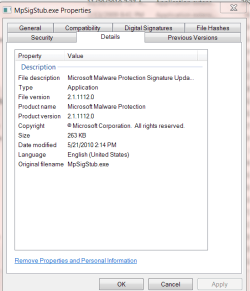
I did not opt for the custom install, but as of yet nothing popped up. SO now I am running full scans with Superantispyware and MSE, and running a Hitman Pro scan too.....so we'll see what happens.When I awoke and came to the computer a bit ago, I was greeted by a firewall dialog asking whether to allow a process named mpsigstub.exe. Somewhat thoughtlessly, I let it. Wondering if I should have done so, I Googled it, and found that it is some kind of updater associated with Windows Defender, but since I had never seen that before, I continued looking and found that it is sometimes malware.
This caused me to run Malwarebytes (which found nothing to squawk about) and SpyBot (which quickly listed a registry key belonging to MTC.MakeMeSearch.com). SpyBot listed that as a browser hyjacker. Further reading, this seemed to be related to a search toolbar. Searching my computer, I found an installed program in the root of Program Files (x86), which was named search toolbar. I uninstalled this, but the fact that it's folder was dated 3-21-2011, and the firewall dialogs that I had to clear, listed Firefox as it's target, and that Firefox was the only program of this type that I had installed in that time frame, makes me believe that Firefox installed it.
I had opted for the custom install of Firefox, as I always do with any program that I can, and I always opt out of anything of this kind, if given a choice. Therefore I either wasn't given the choice, or Firefox ignored me and installed it anyway. I'm now curious if anyone else has found this problem, or if it is just me?
Edit:Hitman turned up only one tracking cookie. Other scans are ongoing....
Well, all my scans came up negative, and after reading this post^^ I looked in those locations, so apparently I'm clean.As I said, Malwarebytes didn't find anything on my computer either...SpyBot did. However, you probably don't need to run that, just check in Program Files (x86) for a folder named Search Toolbar, and also in Programs and Features for the same. If not in either place, then no program is going to detect it.Nope.
I did a full scan with Malwarebytes before yesterday. Result: "clean".
My Computer
At a glance
Win 7 Ultimate 64-bit SP1 (desktop)Intel Core 2 Duo E84002x 2GB OCZ DDR II SDRAM PC2-6400NVIDIA GeForce 9400GT
- Computer type
- PC/Desktop
- Computer Manufacturer/Model Number
- Gigabyte Technology Co., Ltd.
- OS
- Win 7 Ultimate 64-bit SP1 (desktop)
- CPU
- Intel Core 2 Duo E8400
- Motherboard
- Gigabyte GA-EP35-DS3R
- Memory
- 2x 2GB OCZ DDR II SDRAM PC2-6400
- Graphics Card(s)
- NVIDIA GeForce 9400GT
- Monitor(s) Displays
- HP 2009m(primary), Acer P191W
- Screen Resolution
- 1600x900, 1440x900
- Hard Drives
- Internal:WD Caviar Black 640GB 32MB cache 7200RPM
External:Samsung Story Station 1TB HDD desktop drive
500GB Toshiba portable drive
- PSU
- Antec Earthwatts EA500D
- Case
- Antec Sonata III
- Cooling
- 4 fans
- Keyboard
- Logitech Wave
- Mouse
- Logitech M-SBF90
- Internet Speed
- Slow due to home Wireless-G router
- Antivirus
- MSE, Hitman Pro, Malwarebytes
- Browser
- Chrome and Palemoon
- Other Info
- Laptop....Acer 5750Z-4835
15.6" HD Widescreen CineCrystal™ LED-backlit LCD Display: (1366x768 resolution, 16:9 aspect ratio)
Intel® Pentium® Processor B940 (2.0GHz, 2MB L3 cache)
Windows® 7 Home Premium,500GB Hard Drive,4GB DDR3 RAM, Intel® HD Graphics,8X DVD-Super Multi Double-Layer Drive
Multi-in-1 Digital Media Card Reader,802.11b/g/n Wi-Fi
Chrome and Palemoon, MSE, Hitman Pro




 Just me being bored and wanting to know how they behave. I guess maybe IE9 is accellerating more content than FF4, however, performance is always identical, except for one thing: When watching video, regardless of what type, so long as it's being rendered by the browser, IE9 certainly handles it better and doesn't get bogged down. For example, when watching a youtube video with FF4, Gpu load is very minimal (All of this done on both of my PC's btw) but when scrolling up and down, it gets choppy and Cpu usage flies up, with IE9, it's perfectly smooth regardless and Gpu usage simply rises, and Cpu usage rises just slightly.


