Mozilla launches Firefox 4

No quibble that a person should use what they are comfortable with, but I will add that I have used Opera a lot longer than 3 years, and never got anything like we are discussing. I won't say that is entirely due to the browser's security, but it helped. It was due primarily due to my use in "common sense" regarding where I browsed on the web.

You have no evidence at all that you got anything because of Firefox. You are heaping undeserved FUD on Firefox here. FF4 has been installed 25+ million times already now. If it contained Malware it would be a top story on every tech site in the world by now.

It isn't necessary to use noscript. I used Firefox for 7 years on insecure WindowsXP, without no script, and never picked up any viruses or Mal-ware. I use noscript mainly to keep a lot of ad tracking shut down. Not because FF is insecure.

It is extremely unlikey that you even picked up anything visiting a suspect site with FF4 because the malware writers likely didn't even switch over yet.

Given how secure Windows7 is these days, you have to work hard to pick up malware. You likely installed something with a extra toolbar and forgot to uncheck it. This shouldn't have happened if you get your software from trusted sources.

Did you perhaps grab extensions from other than Mozilla?

My original intent on posting as I have on this thread, was not to accuse FF of anything. It was only to ask if anyone had had any similar experience with it. You say that I have no evidence, and I say that I do, but my evidence is not sufficient to determine the exact nature of how or why this occurred. I can only state what I know is true, but that truth does not cover all bases.

If this forum is for serving the purpose of exchanging information and ideas that have bearing on the personal and common good of users, you should not chide me for what I have posted. To ask a question is not equal to making an accusation.

EDIT: For further clarification, I never said nor implied that the search toolbar came from some unknown source on the web, nor has the topic of noscript anything to do with the subject, except that a previous poster suggested it because he felt that the toolbar did come from somewhere else. The discussion of it is somewhat tangential to what I originally want to discuss, yet it was something that I didn't want to ignore offhand.
 

My Computer

Computer Manufacturer/Model Number
DIY
OS
W7x64 Pro, SuSe 12.1/** W7 x64 Pro, XP MCE
CPU
Phenom II 1090T w/Noctua NH-D14 /**4400+ X2 w/CM Hyper TX 3
Motherboard
ASRock 890FX Deluxe 4/**A8N-SLI
Memory
2 x 2GB Patriot PGS34g1600LLKA/**4x1GB Corsair VS
Graphics Card(s)
EVGA GTX460 SC/**EVGA 8800GTS
Sound Card
Asus Xonar D2X/**Xonar D1
Monitor(s) Displays
Acer X233H, Dell E152FPc /**LG M237-WD
Screen Resolution
1920x1080 & 1024x768/**1980x1080
Hard Drives
WDC 2TB, 1.5TB, 1TB, 500GB,Seagate 500GB , Maxtor 80GB /**500GB Seagate & WDC 1TB Black
PSU
CM RS600 w/ APC BX1000G/**Antec 500 TP w/ APC BX1000
Case
HAF922/**Antec 1040IIB
Cooling
3x200mm, 1x140 and 1x120mm/**5x80mm fans
Keyboard
Logitech Media USB/**Saitek Eclipse
Mouse
Cordless Trackman Wheel/**Ditto
Internet Speed
3.3Mbps
Other Info
SB 560 5.1 w/ Sennheiser RS140/**Creative T20 speakers, Dvico FusionHDTV7 Gold RT, Cisco E3000, HP 5510V AIO, Linksys E3000, Belkin F5U237 hub and **F5D8055 adapter
(** = 2nd rig)

My Computer

OS
Windows 7 x64 Home Premium
CPU
Intel Q9400 @ 3.2 GHz
Motherboard
Gigabyte DS3L
Memory
6GB PC 6400
Graphics Card(s)
Nvidia 8800GT
Screen Resolution
1920x1200
Hard Drives
Dual WD Green 1TB
Internet Speed
10 Mb/s
So it overcompensates on kearning?

now I gotta admit - after my initial reaction I got FF4 straightened out (both font and tandem issues)

but now I wonder - why do the add-ons drop off?

I installed some add-ons/exts while in 4 and then the next time I ran 3 it asked me to install them - but yet my 3 is "optimized" right now and my 4 lost all it's stuff.
 

My Computer

OS
Windows 7
It totally messes up kerning. The same word written twice will have different spacing. It is completely unacceptable.

I am not sure what you are talking about with add ons dropping off. I am not losing my addons.

If you keep switching between FF3.6 and FF4 and you have addons that don't work with FF3.6, it will discard them so when you go back FF4 they will still be gone.

Once you decide to go with FF4, and stop switching on the same profile, you will stop losing addons. Or if you feel you must keep FF3.6 around Google how to run it with a separate profile.
 

My Computer

OS
Windows 7 x64 Home Premium
CPU
Intel Q9400 @ 3.2 GHz
Motherboard
Gigabyte DS3L
Memory
6GB PC 6400
Graphics Card(s)
Nvidia 8800GT
Screen Resolution
1920x1200
Hard Drives
Dual WD Green 1TB
Internet Speed
10 Mb/s
yup they are both (apparently) on different profiles - FF4 exe is also running from my ext drive.

concerning the exts - I'll install an ext (ForecastFox) on 4 which I also have on 3.6.16. After closing both browsers - when opening 3.6.16 it asks to install and I cancel, 3.6.16 opens fine with all the exts but 4 reverts back to it's standard format (oddly cooliris is sticking with it though).

And a theme compatible with 4 will pop up on 3.6.16 as incompatible.

So even though both are seemingly running from different profiles, the add-ons are still somehow intermingled.
 

My Computer

OS
Windows 7
I think you getting your profiles crossed sometimes... I tested this and I have nothing shared between them and it isn't deleting my FF4 only extensions like Status-4-Evar. That only happens if I use the same profile.
 

My Computer

OS
Windows 7 x64 Home Premium
CPU
Intel Q9400 @ 3.2 GHz
Motherboard
Gigabyte DS3L
Memory
6GB PC 6400
Graphics Card(s)
Nvidia 8800GT
Screen Resolution
1920x1200
Hard Drives
Dual WD Green 1TB
Internet Speed
10 Mb/s
yeah something is crossed but how so evades me

I'm pretty sure my FF3 is on default and my FF4 is on it's own profile - but something is wonky
 

My Computer

OS
Windows 7
Running 2 versions of Firefox from the same profile is just asking for trouble with stability, performance and extension conflicts. The following link provides a procedure for running multiple versions from different profiles (in the case provided a stable version and a development version) and also describes how to run both versions simultaneously. Also note the 2nd message in the thread has an additional link that may provide useful information even though it is written for older versions of Firefox.

Installing multiple versions of Firefox
 

My Computer

OS
Win 7 Pro x64
CPU
Q9550 running at 3.4 GHz
Motherboard
Asus Maximus Formula
Memory
2x2GB Corsair Dominator CM2X2048-8500C5D
Graphics Card(s)
EVGA GeForce GTX 260 Core 216 SuperClocked - 55nm
Monitor(s) Displays
Samsung SyncMaster 244T
Screen Resolution
1920x1200
Hard Drives
1 - 160 GB Intel X-25M SSD
3 - 1000 GB WD1001FALS
PSU
PC Power & Cooling Silencer 750 Watt Quad Red
Case
Cooler Master CM Stacker STC-T01
Cooling
CPU: Thermalright Ultra-120 eXtreme, Case: 3 120mm, 3 80mm
Keyboard
Logitech Illuminated Keyboard
Mouse
Logitech Cordless Optical Trackman trackball
Internet Speed
25 Mbps down/ 25 Mbps up
No other browser does this to me but Firefox and this new version is no better: Surfing around and then get a server error. Simple refresh and the page loads, but it's unacceptable when no other browser does it. Oh well, another version of Firefox deleted from my system.
 

My Computer

OS
Windows 7
No other browser does this to me but Firefox and this new version is no better: Surfing around and then get a server error. Simple refresh and the page loads, but it's unacceptable when no other browser does it. Oh well, another version of Firefox deleted from my system.

I never got this issue, it might be some issue on your system itself
 

My Computer

Computer type
PC/Desktop
Computer Manufacturer/Model Number
Custom Build
OS
Windows 10 Pro x64, Arch Linux
CPU
Intel Core 2 Quad Q8200 OC'd 3.08GHz
Motherboard
Asus Rampage formula LGA775
Memory
8GB DDR2 900Mhz
Graphics Card(s)
MSI GT730 2GB GDDR5 (Kepler)
Sound Card
Supreme FX2
Monitor(s) Displays
Samsung LS22F350 LED
Screen Resolution
1080P
Hard Drives
Kingston SSDNow UV400 120GB, 500GB Hitachi, 2TB Samsung, 500GB Seagate FreeAgent, 640GB Samsung, 160GB Toshiba (Arch)
PSU
AeroCool 500W Bronze
Cooling
Cooler Master V6 + 3X fans
Keyboard
Prolink keyboard
Mouse
Logitech M705
Internet Speed
1MiB/s
Browser
Chrome Beta
Well they must be running separately somehow considering FF4 no longer attempts to
import my exts from 3.6.16 when launching - as it did originally when I tried to just launch it from another drive.

Both browsers retain their themes (FF4 only keeps it standard skin) when launched separately - FF3 has all add-ons intact whereas FF4 goes back to default (besides cooliris)

so not too sure as to what is causing this impotence to configure FF4 and keep the settings.

regardless I will eventually move to FF4, but I'll miss my Chromifox basic :(
 

Attachments

  • FF tandem.jpg
    FF tandem.jpg
    773.6 KB · Views: 39

My Computer

OS
Windows 7
seekermeister Yes I did. It would not accept the changes. Went back to ff 3.5.18 and everything works fine.
 

My Computer

Computer type
PC/Desktop
Computer Manufacturer/Model Number
Home made Desktop
OS
Windows 10 Pro. 64/ version 1709 Windows 7 Pro/64
CPU
Intel i7-6800K @ 4.3
Motherboard
ASUS X-99 Deluxe II
Memory
Corsair Platinum 16 gig @2400
Graphics Card(s)
EVGA GTX 1070 OC
Monitor(s) Displays
Asus 27" LED LCD/VE278Q
Screen Resolution
1920-1080 or 1280-720 HDMI
Hard Drives
INTEL SSD 730-240 Gb Sata 3.0/
PSU
EVGA Platium 1200W
Case
Phanteks Luxe Tempered Glass 8 fans/ one radiator
Cooling
XSPC/ Water Cooled CPU
Keyboard
Das 4 Professional
Mouse
Logitech M705/MX Anywhere 2-S
Internet Speed
100 mbits
Antivirus
Microsoft Security Essentials/ Malwarebytes Premium 3.0/ SAS
Browser
I.E. 11 default/Firefox/ ISP Time Warner Cable/Spectrum
Other Info
LG BluRay Burner/
Sound system-KLipsch-THX/
Icy Dock ssd Hot Swap bays.
Well they must be running separately somehow considering FF4 no longer attempts to
import my exts from 3.6.16 when launching - as it did originally when I tried to just launch it from another drive.

Did you create the new profile by copying the old one? That might have created some dependencies. I have two profiles and they are completely distinct they share nothing, at all.

But even if your profiles are separate, you have to make sure you don't ever accidentally launch with the wrong one.

Anyway nothing I want to to dwell on. Profiles work for me and keeping two copies is a very temporary situation.
 

My Computer

OS
Windows 7 x64 Home Premium
CPU
Intel Q9400 @ 3.2 GHz
Motherboard
Gigabyte DS3L
Memory
6GB PC 6400
Graphics Card(s)
Nvidia 8800GT
Screen Resolution
1920x1200
Hard Drives
Dual WD Green 1TB
Internet Speed
10 Mb/s
Thanks, I downloaded this and I prefer it to the older versions, GUI wise.
 

My Computer

Computer Manufacturer/Model Number
Acer Extensa
OS
Windows 7 Ultimate 32 Bit
CPU
Intel Celeron
Motherboard
Not sure.
Memory
1GB
Graphics Card(s)
Built in.
Sound Card
Built in.
Monitor(s) Displays
'ink spill' laptop screen. Using LG TV/Monitor 22" 1080p.
Hard Drives
136GB.
PSU
/
Case
/
Cooling
/
the GUI reminds me of Opera for some reason - but I quite can't place it

anyways - I am a FF fan and will eventually move to 4
 

My Computer

OS
Windows 7
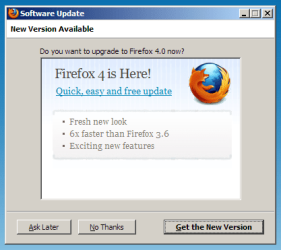
Went through Help > Check for updates, and look what popped up! I think this is pretty funny--seems a bit overdone. And 6x as fast?:sarc:
 

Attachments

  • firefox4.png
    firefox4.png
    27.2 KB · Views: 5

My Computer

Computer type
PC/Desktop
Computer Manufacturer/Model Number
Dell Studio XPS 8100, Dell XPS 15 laptop
OS
Windows 10 Home, 64 bit
CPU
Intel Core i7 860 @ 2.8 GHz
Motherboard
Dell 0T568R (CPU1)
Memory
8.0 GB Dual Channel DDR3 @ 664 MHz (9-9-9-24)
Graphics Card(s)
nVidia GeForce GTS 240
Sound Card
M-Audio Delta Audiophile 2496
Monitor(s) Displays
Dell 2407WFP
Screen Resolution
1920x1200
Hard Drives
977 GB Western Digital WDC WD1001FAES-75W7A0 (SCSI)
Antivirus
Windows Defender, MalwareBytes Anti-Malware, AdwCleaner
Browser
Firefox, occasionally IE and Edge
Other Info
Mozilla Firefox, Mozilla Thunderbird. Western Digital Passport 250 GB external HD, two Mushkin Enhanced Mulholland 32GB USB flash drives, AKG K240 Studio headphones, Asus AC-1900 dual band wireless router.
the GUI reminds me of Opera for some reason - but I quite can't place it

They are nothing alike - one ribbon says Menu, the other says Firefox :p

Seriously, both of these browsers have been 'borrowing' ideas from each other for quite awhile now. And since I swap between both alternatively as my main browser, someone must be doing something right.


And 6x as fast?:sarc:

* In select synthetic benchmarks ;)

Marketing - what a wonderful thing :rolleyes:


In the real world however, while it it does feel quicker than 3.6 - it's nowhere near x6 , or x4 , or even x2...
 

My Computer

Computer type
PC/Desktop
Computer Manufacturer/Model Number
Systems by SmartEyeball
OS
8 Pro x64
CPU
i7 3770K 4.6GHz
Motherboard
ASUS P8Z77 WS
Memory
16GB G.Skill Trident X 2666mhz
Graphics Card(s)
x2 EVGA 780 Ti Superclocked SLI
Sound Card
SB X-FI Surround 5.1 PRO USB / ATH-AD900 Headphones
Monitor(s) Displays
x3 Dell U2410 / 58" Samsung
Screen Resolution
5760*1200/ 1920*1200
Hard Drives
2x Intel 520 240GB (RAID 0) * 2x WD Caviar Blacks 2TB (RAID 0) * 2TB WD Caviar Black * Sony Optirac DVD
PSU
Silverstone Strider Evolution 1200W
Case
Thermaltake Level 10 GT Snow Edition
Cooling
Noctua NH-D14
Keyboard
Topre Realforce // Ducky Shine MX Black // Filco Ninja TKL
Mouse
Thermaltake Theron (Highly Recommended) + Razer Imperator
Antivirus
MSE
Browser
IE, FF, WaterFox
Other Info
GT Extreme V2 Sim Racing Cockpit + 40" LCD and K/B Mouse stand ▼
Fanatec CSR Elite Wheel + Clubsport V1 Pedals + CSR shifter/7G-H ▼Saitek X52 Pro ▼ TrackIR 5 Pro
Buttkicker v2 Seat Rumbler with Dedicated 5.1 and Sub Woofer attached to frame ▼
=
Bloody Big Grin
Right. Well, I'm sticking with 3.6.16 for now.
 

My Computer

Computer type
PC/Desktop
Computer Manufacturer/Model Number
Dell Studio XPS 8100, Dell XPS 15 laptop
OS
Windows 10 Home, 64 bit
CPU
Intel Core i7 860 @ 2.8 GHz
Motherboard
Dell 0T568R (CPU1)
Memory
8.0 GB Dual Channel DDR3 @ 664 MHz (9-9-9-24)
Graphics Card(s)
nVidia GeForce GTS 240
Sound Card
M-Audio Delta Audiophile 2496
Monitor(s) Displays
Dell 2407WFP
Screen Resolution
1920x1200
Hard Drives
977 GB Western Digital WDC WD1001FAES-75W7A0 (SCSI)
Antivirus
Windows Defender, MalwareBytes Anti-Malware, AdwCleaner
Browser
Firefox, occasionally IE and Edge
Other Info
Mozilla Firefox, Mozilla Thunderbird. Western Digital Passport 250 GB external HD, two Mushkin Enhanced Mulholland 32GB USB flash drives, AKG K240 Studio headphones, Asus AC-1900 dual band wireless router.
Just a footnote to this, I found all but one of the plugins I was using previously to installing ff4 work just fine with it, I had to download this add-on to make them active again though.
https://addons.mozilla.org/en-US/firefox/addon/add-on-compatibility-reporter/

It was supposed to be a beta tool apparently, but it still serves it's purpose just fine for reactiving all the plugins ff4 is shutting down for no apparent reason.
 

My Computer

Computer Manufacturer/Model Number
Insane hobo technologies. ;-)
OS
Windows 7 x64
CPU
Intel i7 2600k
Motherboard
Asrock z68 extreme 4 gen 3
Memory
G.skill Ripjaw 16gigs @ 1866
Graphics Card(s)
Nvidia gtx580 (evga)
Sound Card
Integrated HD audio + hdmi
Monitor(s) Displays
24" ASUS widescreen + 42" insignia
Screen Resolution
1080p (1920x1080)
Hard Drives
128 Samsung 830
256 Samsung 840
3 x 1tb storage drive (various)
1 western digital 1tb (eSATA)
1 Seagate 1tb (eSATA)
PSU
1 kilowatt SLI/Crossfire rated Silverstone modular
Case
NZXT Phantom + additional 220 fan
Cooling
Zalmann
Keyboard
Microsoft wireless 3000 (v2)
Mouse
MS - wireless 5000 (bluetrack)
Internet Speed
depends on if you ask me or my provider.
Other Info
The above information is provided as is, and the author assumes no responsibility for issues it may cause with your sanity or fanboyism.
Back
Top