MS-DOS Bootable Flash Drive - Create

How to Make a MS-DOS Bootable Flash Drive

   Information
This will show you how to create a flash drive that is able to boot your computer into a MS-DOS environment. This will be accomplished by using the HP Flash Utility and the Windows 98 MS-DOS System Files
   Warning
The flash drive being used in this process will be formatted. Please backup all of your data on the drive beforehand!


Here's How:
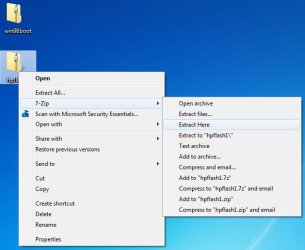
1. Download the HP Flash Utility View attachment hpflash1.zip and also download the Windows 98 MS-DOS System Files View attachment win98boot.zip. Extract hpflash1 to a location readily accessible
Pic1.jpg
Pic1-1.jpg
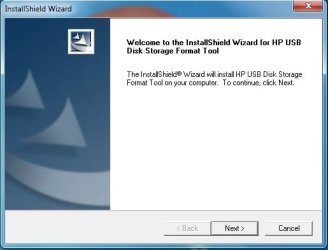
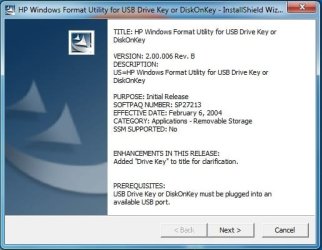
2. Run the installer and follow the simple on-screen instructions
Pic2.jpg


Pic3.jpg
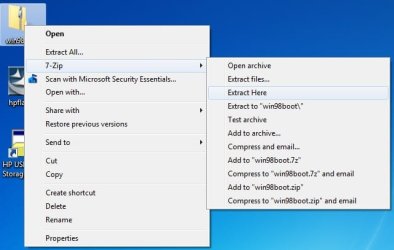
3. Extract the contents of "win98boot" to a location readily accessible
Pic4.jpg
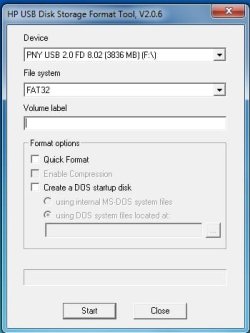
4. Run the HP USB Disk Storage Format Tool that was just installed. Choose your flash drive from the drop down list at the top. Also make sure that the file system is set to FAT32.
Pic5.jpg
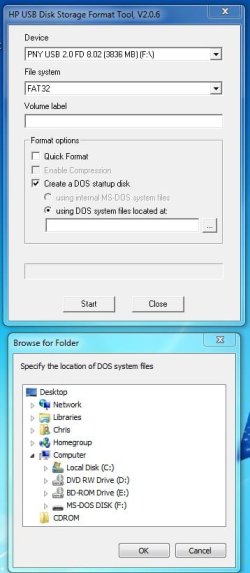
5. Under Format Options tick the "Create a DOS startup disk" option. Click the "..." button near the empty text box to browse to the location of where you extracted the Windows 98 MS-DOS System Files (see step 3).

   Tip
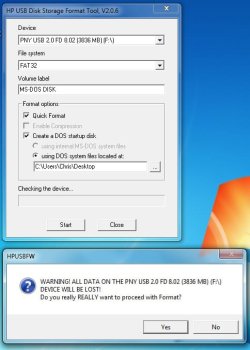
Tick "Quick Format" under Format Options to speed the process up (if you don't want a comprehensive format). You may also want to give the drive a label by typing one in the Volume Label text field
Pic6.jpg
6. Click the "Start" button.

   Warning
After you click the "Start" button , you will be given one final prompt that warns you that the flash drive selected will be formatted. This is your last chance to backup data on the drive; after you click yes it will be too late
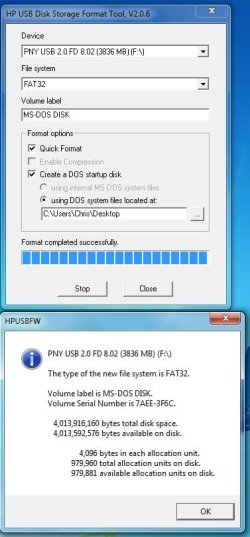
Pic7.jpg
Pic8.jpg

   Tip
You may remove the files extracted from the archive "win98boot", they are not needed anymore

Frequently Asked Questions

Q: Why would a MS-DOS USB Drive be useful today? Wasn't that included in older Operating Systems?
A: MS-DOS was the underlying layer of the Windows 9x series of Operating Systems (Windows 1-ME) that was the "functionality" of the system. A MS-DOS bootable disc can be used to run many recovery tools (still used today) and also update the BIOS of the computer. If you are running an x64 system with no floppy drive and a manufactuer who only provides a 16-bit BIOS updater, this method is the only way to update your BIOS.

Q: I checked my flash drive after applying the steps above and it is empty? What gives?!
A: Unless the option to show protected operating system files is checked in folder options, Windows will hide these files due to their attributes matching that of system files. Don't worry, the relevant files are still there

Q: Alright I successfully completed the steps above, now what do I do?
A: Now you can download the tool you wanted to run (such as CHKDSK) or your BIOS update application (from the manufactuer) and place the files on to the root of the flash drive. You can find most tools by doing a simple google search

   Tip
The Windows 98 MS-DOS System Files archive (win98boot) above has some system tools already included (ex. FORMAT, FDISK, SYS). Just drag and drop these files onto your flash drive


Q: My flash drive has been converted to the MS-DOS System Disc and I have some tools/BIOS revisions on the drive as well, how do I boot up MS-DOS?
A: This will largely depend on your model of computer but you will need to restart you computer with the flash drive plugged in and boot to the drive by means of a boot menu or by modifying your BIOS to boot to the flash drive first. Consult the manual of your computer or the respective manufactuer's website for further details.

Q: I have no further need for the MS-DOS System Disc, how can I remove it from my flash drive?
A: You may format the flash drive with the built in Windows format utility or you may format it by using the HP USB Disk Storage Format Tool that was used above.

Hope it helps,
Chris


Last edited by a moderator:
I have a Dos Boot CD, but this sounds great. I will have to try this Science Experiment on some of my "Dinosaur" computers :geek:


" Doc "
 

My Computer

Computer type
PC/Desktop
Computer Manufacturer/Model Number
Built them myself, Science Experiments !
OS
Win7 Enterprise, Win7 x86 (Ult 7600), Win7 x64 Ult 7600, TechNet RTM on AMD x64 (2.8Ghz)
CPU
AMD fx8350 4ghz, AMD-32 2400mhz, AMD-64 3200mhz, AMDx64 2.8G
Motherboard
SIS 755, ECS-K8M890M-M (Ult 7600), GigaByte & others
Memory
2gb, 4gb on the Ult 7600, 4gb on Technet RTM, 32gb on FX8350
Graphics Card(s)
Draw my own Graphics, several nVidia cards
Sound Card
on motherboard
Monitor(s) Displays
19" flat scr, 28" I-Inc widescr,22" Emprex Widescr, 23" Acer
Screen Resolution
1280 x 1024, 1440 x 900, 1920 x 1080
Hard Drives
6 pata Ide HD's & 2 Sata HD's
added 80gb external on Ult 7600 computer,
numerous extra 1tb, 2TB, 3Tb SATA HD's
A collection of ext HD Docks w/ HDs
PSU
430w, 550w, 600w, 700, 800, etc
Case
All Generic Full Towers
Cooling
Open Air & a few fans, some w/ colored LEDs
Keyboard
Compaq & Dell recycled from GoodWill
Mouse
Made in China Optical Wired Mouse
Internet Speed
Fast Cable InterNet
Antivirus
AVG Free on 24 different Desktops, NO Problems!
Browser
IE 8 is preferred, but use FireFox sometimes
Other Info
Linksys Routers, switches, & Hubs
Too Many USB Flash Drives to count, Biggest is 64GB !
Eight computers in my home network.
Sixteen computers at my business network.
Linked via TeamViewer !
Lots of old used spare computer parts everywhere!
Nice tut, thanks for the info, this will be handy :)
 

My Computer

Computer type
PC/Desktop
Computer Manufacturer/Model Number
76~2.0
OS
Windows 7 Ult x64 - SP1/ Windows 8 Pro x64
CPU
Intel Core i5-3570K 4.6GHz
Motherboard
Gigabyte GA-Z77X UD3H, f18
Memory
8GB (2X4GB) DDR3 1600 Corsair Vengeance CL8 1.5v
Graphics Card(s)
Sapphire HD 7770 Vapor-X OC 1GB DDR5
Sound Card
Onboard VIA VT2021
Monitor(s) Displays
22" LCD Dell
Screen Resolution
1680x1050
Hard Drives
Samsung 840Pro 128GB SSD,
Seagate Barracuda 500GB SATA2 7200rpm 32MB cache, Seagate Barracuda 1TB SATA2 7200rpm 32MB cache,
PSU
Corsair HX650W
Case
Cooler Master Storm Scout
Cooling
Corsair H80 2x12cm Noctua NF P12 , 2x14cm case fans
Keyboard
Logitech Wave
Mouse
CM Sentinel
Internet Speed
Dismal
Antivirus
Avast
Browser
Opera Next
Other Info
Haswell laptop: HP Envy 17t-j, i7-4700MQ, GeForce 740M 2GB DDR3, 17.3" Full HD 1920x1080, 16GB RAM, Samsung 840 Pro 128GB, 1TB Hitachi 7200 HDD,
Desktop: eSATA ports,
External eSATA Seagate 500GB SATA2 7200rpm,
External WD USB 500GB
Windows 7 shows Error, Device media is write-protected. But it isn't. Using a 4 gig Patriot flash drive. Help!
 

My Computer

Computer Manufacturer/Model Number
Dale's Hummer built and changed many times over the past years
OS
Windows 7 64 Home Premium
CPU
AMD Phenom-II X4 970
Motherboard
Gigabyte 890GPA-UD3H Vers 2.1
Memory
4 gig
Graphics Card(s)
Nvidia GeForce 9400 GT
Sound Card
mb
Monitor(s) Displays
Samsung 245bw
Screen Resolution
1920x1200
Hard Drives
1 SSD 120 gig Corsair C: & E:
2 HDD 500gigs each F: &
PSU
450w
Case
Thermaltake many fans
Cooling
many fans
Keyboard
Microsoft 1031
Mouse
Logitech Wireless
Internet Speed
Cox Cable
Windows 7 shows Error, Device media is write-protected. But it isn't. Using a 4 gig Patriot flash drive. Help!
Huh...write-protected...

Was the drive involved in any activity besides being used for the tutorial when the error occurred?

Try restarting the computer and thn try again...
 

My Computer

Computer Manufacturer/Model Number
Compal JFT02 (Custom Build Laptop)
OS
Windows 7 Home Premium x64 - Mac OS X 10.6.4 x64
CPU
Intel Core 2 Duo T9300 2.5 GHz
Motherboard
JFT02
Memory
4GB Kingston DDR2-800
Graphics Card(s)
NVIDIA Geforce 8600M GT (512MB Model)
Sound Card
Realtek HD Audio
Monitor(s) Displays
WUXGA Standard Laptop Display
Screen Resolution
1680*1050
Hard Drives
Toshiba 320GB 5400RPM Laptop HD
PSU
Standard Laptop Power Supply
Case
Standard Laptop Case
Cooling
Standard Laptop Cooling
Keyboard
Standard Laptop 105 Key-Keyboard
Mouse
Synaptics Touchpad
Internet Speed
Verizion Online DSL 3360/864 kbs (dl/up)
USB Flash drive bootable

Never got the Patriot 4 gig to work...always "write protected". I can write to this chip otherwise.

Tried an HP 8 gig and a 16 meg SD chip and they both worked OK. Something to do with this particular Flash drive.
 

My Computer

Computer Manufacturer/Model Number
Dale's Hummer built and changed many times over the past years
OS
Windows 7 64 Home Premium
CPU
AMD Phenom-II X4 970
Motherboard
Gigabyte 890GPA-UD3H Vers 2.1
Memory
4 gig
Graphics Card(s)
Nvidia GeForce 9400 GT
Sound Card
mb
Monitor(s) Displays
Samsung 245bw
Screen Resolution
1920x1200
Hard Drives
1 SSD 120 gig Corsair C: & E:
2 HDD 500gigs each F: &
PSU
450w
Case
Thermaltake many fans
Cooling
many fans
Keyboard
Microsoft 1031
Mouse
Logitech Wireless
Internet Speed
Cox Cable
Thank you for finally showing me how to use that HP tool. I knew it would be useful for something.

Little did I know I could have copied many apps like memtest and gwscan right in on top of Win98 DOS hidden files.

I wonder if they can then be deleted and replaced with another DOS app without wrecking the formatting?

This is a great find. Kudos :D
 
Thanks

Thank you very much. This guide was a big help setting up win7 with no floppy drive.
 

My Computer

OS
xp pro

My Computer

Computer type
PC/Desktop
Computer Manufacturer/Model Number
Custom Built
OS
Windows 8.1 Pro x64
CPU
Intel Core i7 4790k
Motherboard
MSI Z97S Krait Edition
Memory
8GB Corsair Dominator 1600MHz
Graphics Card(s)
MSI TwinFrozr GeForce GTX770
Sound Card
ASUS Xonar DX/XD 7.1
Monitor(s) Displays
Dell 24" S2409W + Dell 20" E207WFP
Screen Resolution
1920x1080 + 1680x1050
Hard Drives
1x 120GB OCZ Agility 3, 1x 750GB Western Digital Caviar Black, 1x 1TB Western Digital Caviar Blue
PSU
Corsair HX850 modular
Case
Fractal Design Define R4
Cooling
Corsair H60 w/ twin Corsair SP120 fans
Keyboard
Logitech G510S Keyboard
Mouse
Logitech G500S Laser Mouse
Internet Speed
40Mbps
Antivirus
Microsoft Security Essentials
Browser
Google Chrome
Other Info
LG Blu-Ray player
Question - I have unused flash drives from 2 GB to 32 GB - 2,4,8,16,32. There's no point in wasting a large capacity flash drive if a smaller one will do. How large a flash drive will I need?
 

My Computer

Computer Manufacturer/Model Number
Home Made
OS
Windows 7 Home Premium
CPU
Intel I5Core750
Motherboard
Gigabyte P55A-UD3
Memory
6 GB Corsair DDR3 1600
Graphics Card(s)
Zotac GeForce 9600 GT
Sound Card
7:1 on otherboard
Monitor(s) Displays
ViewSonic VG2030m (one of the last 4 by 3 monitors)
Screen Resolution
1400 by 1050 (Native Resolution)
Hard Drives
2 500 GB Western Digital SATA
PSU
Thermaltake TR2 500W
Case
Cooler Master Elite 332
Cooling
Thermaltake SpinQ
Keyboard
400 v1.0
Mouse
Logitech LX-8
Internet Speed
9.82 Mbs download speed 1.87 Mbs Upload speed
Other Info
Monochrome Laser Printer -HP 1020
Ink-Jet color all in one without fax - Canon Pixma MP 170
500GB external portable hard drive - Iomega
Hell Gerry,

I do not know the exact size, but these files will not take up much space at all. You should be more than fine using the smallest 2GB USB stick.

Hope this helps,
Shawn
 

My Computer

Computer type
PC/Desktop
Computer Manufacturer/Model Number
Self built custom
OS
64-bit Windows 11 Pro for Workstations
CPU
Intel i7-8700K OC'd to 5 GHz
Motherboard
ASUS ROG Maximus XI Formula Z390
Memory
64 GB (4x16GB) G.SKILL TridentZ RGB DDR4 3600 MHz
Graphics Card(s)
ASUS ROG-STRIX-GTX1080TI-O11G-GAMING
Sound Card
Integrated
Monitor(s) Displays
2 x Samsung Odyssey G7 27"
Screen Resolution
2560x1440
Hard Drives
1TB Samsung 990 PRO M.2,
4TB Samsung 990 PRO PRO M.2,
TerraMaster F8 SSD Plus NAS
PSU
Seasonic Prime Titanium 850W
Case
Thermaltake Core P3
Cooling
Corsair Hydro H115i
Keyboard
Logitech wireless K800
Mouse
Logitech MX Master 4
Internet Speed
2 Gb/s Download and 100 Mb/s Upload
Antivirus
Malwarebyte Anti-Malware Premium
Browser
Google Chrome
Other Info
Logitech Z625 speaker system,
Logitech BRIO 4K Pro webcam,
HP Color LaserJet Pro MFP M477fdn,
APC SMART-UPS RT 1000 XL - SURT1000XLI,
Galaxy S23 Plus phone
Thanks Brink,

I have discovered, assuming that my source is correct, that one can actually use a 256 MB flash drive. To my knowledge, flash drives of that size haven't been manufactured recently.

Gerry
 

My Computer

Computer Manufacturer/Model Number
Home Made
OS
Windows 7 Home Premium
CPU
Intel I5Core750
Motherboard
Gigabyte P55A-UD3
Memory
6 GB Corsair DDR3 1600
Graphics Card(s)
Zotac GeForce 9600 GT
Sound Card
7:1 on otherboard
Monitor(s) Displays
ViewSonic VG2030m (one of the last 4 by 3 monitors)
Screen Resolution
1400 by 1050 (Native Resolution)
Hard Drives
2 500 GB Western Digital SATA
PSU
Thermaltake TR2 500W
Case
Cooler Master Elite 332
Cooling
Thermaltake SpinQ
Keyboard
400 v1.0
Mouse
Logitech LX-8
Internet Speed
9.82 Mbs download speed 1.87 Mbs Upload speed
Other Info
Monochrome Laser Printer -HP 1020
Ink-Jet color all in one without fax - Canon Pixma MP 170
500GB external portable hard drive - Iomega
Thanks Brink,

I have discovered, assuming that my source is correct, that one can actually use a 256 MB flash drive. To my knowledge, flash drives of that size haven't been manufactured recently.

Gerry

You might search eBay for them. I bought 20 of them when the Fry's electronic's store was closing them out for $ 1.99 each :geek: Gave a bunch away to friends with some of my favorite Free Utilities on them. ;)
 

My Computer

Computer type
PC/Desktop
Computer Manufacturer/Model Number
Built them myself, Science Experiments !
OS
Win7 Enterprise, Win7 x86 (Ult 7600), Win7 x64 Ult 7600, TechNet RTM on AMD x64 (2.8Ghz)
CPU
AMD fx8350 4ghz, AMD-32 2400mhz, AMD-64 3200mhz, AMDx64 2.8G
Motherboard
SIS 755, ECS-K8M890M-M (Ult 7600), GigaByte & others
Memory
2gb, 4gb on the Ult 7600, 4gb on Technet RTM, 32gb on FX8350
Graphics Card(s)
Draw my own Graphics, several nVidia cards
Sound Card
on motherboard
Monitor(s) Displays
19" flat scr, 28" I-Inc widescr,22" Emprex Widescr, 23" Acer
Screen Resolution
1280 x 1024, 1440 x 900, 1920 x 1080
Hard Drives
6 pata Ide HD's & 2 Sata HD's
added 80gb external on Ult 7600 computer,
numerous extra 1tb, 2TB, 3Tb SATA HD's
A collection of ext HD Docks w/ HDs
PSU
430w, 550w, 600w, 700, 800, etc
Case
All Generic Full Towers
Cooling
Open Air & a few fans, some w/ colored LEDs
Keyboard
Compaq & Dell recycled from GoodWill
Mouse
Made in China Optical Wired Mouse
Internet Speed
Fast Cable InterNet
Antivirus
AVG Free on 24 different Desktops, NO Problems!
Browser
IE 8 is preferred, but use FireFox sometimes
Other Info
Linksys Routers, switches, & Hubs
Too Many USB Flash Drives to count, Biggest is 64GB !
Eight computers in my home network.
Sixteen computers at my business network.
Linked via TeamViewer !
Lots of old used spare computer parts everywhere!
Thanks Brink,

I have discovered, assuming that my source is correct, that one can actually use a 256 MB flash drive. To my knowledge, flash drives of that size haven't been manufactured recently.

Gerry

You're welcome Gerry. Yeah, it will be harder to find those sizes anymore.
 

My Computer

Computer type
PC/Desktop
Computer Manufacturer/Model Number
Self built custom
OS
64-bit Windows 11 Pro for Workstations
CPU
Intel i7-8700K OC'd to 5 GHz
Motherboard
ASUS ROG Maximus XI Formula Z390
Memory
64 GB (4x16GB) G.SKILL TridentZ RGB DDR4 3600 MHz
Graphics Card(s)
ASUS ROG-STRIX-GTX1080TI-O11G-GAMING
Sound Card
Integrated
Monitor(s) Displays
2 x Samsung Odyssey G7 27"
Screen Resolution
2560x1440
Hard Drives
1TB Samsung 990 PRO M.2,
4TB Samsung 990 PRO PRO M.2,
TerraMaster F8 SSD Plus NAS
PSU
Seasonic Prime Titanium 850W
Case
Thermaltake Core P3
Cooling
Corsair Hydro H115i
Keyboard
Logitech wireless K800
Mouse
Logitech MX Master 4
Internet Speed
2 Gb/s Download and 100 Mb/s Upload
Antivirus
Malwarebyte Anti-Malware Premium
Browser
Google Chrome
Other Info
Logitech Z625 speaker system,
Logitech BRIO 4K Pro webcam,
HP Color LaserJet Pro MFP M477fdn,
APC SMART-UPS RT 1000 XL - SURT1000XLI,
Galaxy S23 Plus phone
Doc Brown,

Thanks fpr the info, but it's easier to pop over to my local MicroCenter and spend $5.99 on 2GB's, of which I now have quite a few. That kind of sounds like a one-timer.

Gerry :)
 

My Computer

Computer Manufacturer/Model Number
Home Made
OS
Windows 7 Home Premium
CPU
Intel I5Core750
Motherboard
Gigabyte P55A-UD3
Memory
6 GB Corsair DDR3 1600
Graphics Card(s)
Zotac GeForce 9600 GT
Sound Card
7:1 on otherboard
Monitor(s) Displays
ViewSonic VG2030m (one of the last 4 by 3 monitors)
Screen Resolution
1400 by 1050 (Native Resolution)
Hard Drives
2 500 GB Western Digital SATA
PSU
Thermaltake TR2 500W
Case
Cooler Master Elite 332
Cooling
Thermaltake SpinQ
Keyboard
400 v1.0
Mouse
Logitech LX-8
Internet Speed
9.82 Mbs download speed 1.87 Mbs Upload speed
Other Info
Monochrome Laser Printer -HP 1020
Ink-Jet color all in one without fax - Canon Pixma MP 170
500GB external portable hard drive - Iomega
Nice tut, very usefull for me :)
 

My Computer

OS
Windows 7 Ultimate X64 SP1
CPU
Phenom B55
Motherboard
DFI lanparty M2RS
Memory
Corsair XMS2 8GB
Graphics Card(s)
zotac 9800 GTX
Sound Card
-
Monitor(s) Displays
LG W2253S
Screen Resolution
1920 x 1080
Hard Drives
WDC 1TB Master, WDC 2TB Slave
PSU
Seasonic M12 520
Case
Simbadda :p
Cooling
Thermaltake Frio
Keyboard
-
Mouse
A4tech Glazer :p
The "Cteate an MS-DOS startup disk" option is disabled for me. I have been searching like crazy, but it seems no-one else has encountered this issue.

EDIT:

Just tried on my Win7 32 Laptop - same thing, the option is greyed out.
 
Last edited:

My Computer

OS
Win7 Home Premuim 64
I doubt this will get any replies, and I bet this is a very stupid question, but will any of this threaten the version of Windows 7 installed on my computer?
 

My Computer

Computer Manufacturer/Model Number
HP Mini 210-1100
OS
Windows 7 Starter 32bit
CPU
Intel Atom
Memory
1024
Monitor(s) Displays
Acer
Screen Resolution
1600x900
Hard Drives
250GB
Keyboard
Logitech MK320
Mouse
Logitech
Internet Speed
802.11 b/g/n
Hello Matt,

No, since you will only be creating a bootable USB flash drive that is used to boot into MS-DOS with.

Now, what you do after you boot into MS-DOS with the bootable USB flash drive could very well affect your installed Windows 7. Say if you format your Windows 7 drive while in MS-DOS. ;)

Hope this helps,
Shawn
 

My Computer

Computer type
PC/Desktop
Computer Manufacturer/Model Number
Self built custom
OS
64-bit Windows 11 Pro for Workstations
CPU
Intel i7-8700K OC'd to 5 GHz
Motherboard
ASUS ROG Maximus XI Formula Z390
Memory
64 GB (4x16GB) G.SKILL TridentZ RGB DDR4 3600 MHz
Graphics Card(s)
ASUS ROG-STRIX-GTX1080TI-O11G-GAMING
Sound Card
Integrated
Monitor(s) Displays
2 x Samsung Odyssey G7 27"
Screen Resolution
2560x1440
Hard Drives
1TB Samsung 990 PRO M.2,
4TB Samsung 990 PRO PRO M.2,
TerraMaster F8 SSD Plus NAS
PSU
Seasonic Prime Titanium 850W
Case
Thermaltake Core P3
Cooling
Corsair Hydro H115i
Keyboard
Logitech wireless K800
Mouse
Logitech MX Master 4
Internet Speed
2 Gb/s Download and 100 Mb/s Upload
Antivirus
Malwarebyte Anti-Malware Premium
Browser
Google Chrome
Other Info
Logitech Z625 speaker system,
Logitech BRIO 4K Pro webcam,
HP Color LaserJet Pro MFP M477fdn,
APC SMART-UPS RT 1000 XL - SURT1000XLI,
Galaxy S23 Plus phone
Back
Top