MS is trying to eff us over!

GRoston

Member
Power User
VIP
Local time
9:47 AM
Messages
379
I have a legitimate Office 2010 bundle which I have been using for years, and have no intention to update. However, a while ago, the following window would pop up when I ran an Office program.
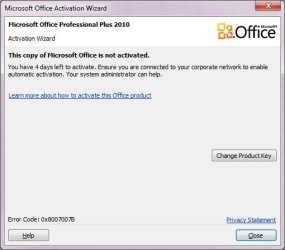
OfficeError.jpg

I asked about this and was told:
  • Goto C:\Program Files (x86)\Common Files\microsoft shared\OfficeSoftwareProtectionPlatform
  • right click on: OSPPREARM.EXE and 'Run as Adminstrator'

and this resolved the issue (though I had to do this occasionally). However, the warning window showed up today, so I did as shown above, but nothing. I rebooted my computer, tried again, and again nothing.

MS is clearly trying to eff us over since they will provide zero support to address this issue. Any suggestions as to what I can try to make this crap go away?
 

My Computer My Computer

At a glance

Windows 7 x64 ProCore i7 860 @ 3.8 GHz16 GB F3-12800CL7D (DDR3 1600 7-7-7-24)Sapphire Vapor-X 100283VXL Radeon HD 5770
Computer type
PC/Desktop
OS
Windows 7 x64 Pro
CPU
Core i7 860 @ 3.8 GHz
Motherboard
MSI P55-GD80
Memory
16 GB F3-12800CL7D (DDR3 1600 7-7-7-24)
Graphics Card(s)
Sapphire Vapor-X 100283VXL Radeon HD 5770
Monitor(s) Displays
NEC LCD3090WQXi-BK
Hi

not sure if this will work, can you goto Programs & Features then Features, (top left)
in the window that pops up scroll to TLS ensure 1.2 is enabled

that error code tends to imply a networking setup error, hence the above
and i read your previous networking problem posts

notes
for your info you run these scripts, from an admin command mode
cscript "C:\Program Files\Microsoft Office\Office10\OSPP.VBS" /dstatusall
cscript "C:\Program Files\Microsoft Office\Office10\OSPP.VBS" /[FONT=&quot]dhistoryacterr

[/FONT]
it would not hurt to run SFC /SCANNOW
 
Last edited:

My Computer My Computer

At a glance

W7 home premium 32bit/W7HP 64bit/w10 tp insid...E5300 dual core3gbNvidia Geforce 7100 Nforce 630i
Computer type
PC/Desktop
Computer Manufacturer/Model Number
medionl/Aspire 6930G/acer x55a
OS
W7 home premium 32bit/W7HP 64bit/w10 tp insider ring
CPU
E5300 dual core
Motherboard
medion MS7366
Memory
3gb
Graphics Card(s)
Nvidia Geforce 7100 Nforce 630i
Monitor(s) Displays
avixc
Internet Speed
n (isp resticted to 72)
Antivirus
mse/pands
Browser
palemoon
Other Info
Belkin Fd7050 n USB using Railink RT2870 drivers, more upto date
Torchwood,

Thanks for replying.

I assume by ‘Programs & Features’, you mean the Control Panel called ‘Programs & Features’. However, once there, I do not see anything called Features. Note that I am running Windows 7. Also, I do not believe that I have any networking issues and the problem described just started happening yesterday (and there have been no changes to anything system related in months or years).

I found the file ospp.vbs in my C:\Program Files (x86)\Microsoft Office\Office14 folder. I assume that this is the same file and can be run, but before so doing, I want to check your first point.

I recently did a SFC /scannow and nothing was found.
 

My Computer My Computer

At a glance

Windows 7 x64 ProCore i7 860 @ 3.8 GHz16 GB F3-12800CL7D (DDR3 1600 7-7-7-24)Sapphire Vapor-X 100283VXL Radeon HD 5770
Computer type
PC/Desktop
OS
Windows 7 x64 Pro
CPU
Core i7 860 @ 3.8 GHz
Motherboard
MSI P55-GD80
Memory
16 GB F3-12800CL7D (DDR3 1600 7-7-7-24)
Graphics Card(s)
Sapphire Vapor-X 100283VXL Radeon HD 5770
Monitor(s) Displays
NEC LCD3090WQXi-BK
HI

Correct--- as i said the features option is in the top left hand corner.... click on it...
(all versions of 7/8/10/11 have this option - ControlPanel>Programs & Features - Turn features on/off)

As your running and having problems with Office 10..... do you also have Office 14 instaIled, now i'm confused
(could be a multiple version over-ride problem)
please list Office versions your running

The 2 scripts are Office 10 dedicated
 

My Computer My Computer

At a glance

W7 home premium 32bit/W7HP 64bit/w10 tp insid...E5300 dual core3gbNvidia Geforce 7100 Nforce 630i
Computer type
PC/Desktop
Computer Manufacturer/Model Number
medionl/Aspire 6930G/acer x55a
OS
W7 home premium 32bit/W7HP 64bit/w10 tp insider ring
CPU
E5300 dual core
Motherboard
medion MS7366
Memory
3gb
Graphics Card(s)
Nvidia Geforce 7100 Nforce 630i
Monitor(s) Displays
avixc
Internet Speed
n (isp resticted to 72)
Antivirus
mse/pands
Browser
palemoon
Other Info
Belkin Fd7050 n USB using Railink RT2870 drivers, more upto date
What I found, and that about which I believe you are writing, is 'Turn Windows features on or off'. Correct? Once that is open, I do not see TLS or anything with those initials. I have several things turned off, and based on your comment, I wonder if any of these matter: Internet Information Services, RIP Listener, SNMP?

In terms of version: When I go to the help menu of any of the Office apps, I see MS Office Pro 2010. I do have Map Point 2013 installed - maybe that messed things up? I also have Visio 2010 installed and that program has had some issues for a couple of years but it used to be bullet proof. It is possible that at some point in the past I had installed a later version of Office, but I do not remember doing so. When I look in the control panel, I see nothing by Office 2010. I hesitate to uninstall and reinstall given the current licensing issue.
 

My Computer My Computer

At a glance

Windows 7 x64 ProCore i7 860 @ 3.8 GHz16 GB F3-12800CL7D (DDR3 1600 7-7-7-24)Sapphire Vapor-X 100283VXL Radeon HD 5770
Computer type
PC/Desktop
OS
Windows 7 x64 Pro
CPU
Core i7 860 @ 3.8 GHz
Motherboard
MSI P55-GD80
Memory
16 GB F3-12800CL7D (DDR3 1600 7-7-7-24)
Graphics Card(s)
Sapphire Vapor-X 100283VXL Radeon HD 5770
Monitor(s) Displays
NEC LCD3090WQXi-BK

My Computer My Computer

At a glance

W7 home premium 32bit/W7HP 64bit/w10 tp insid...E5300 dual core3gbNvidia Geforce 7100 Nforce 630i
Computer type
PC/Desktop
Computer Manufacturer/Model Number
medionl/Aspire 6930G/acer x55a
OS
W7 home premium 32bit/W7HP 64bit/w10 tp insider ring
CPU
E5300 dual core
Motherboard
medion MS7366
Memory
3gb
Graphics Card(s)
Nvidia Geforce 7100 Nforce 630i
Monitor(s) Displays
avixc
Internet Speed
n (isp resticted to 72)
Antivirus
mse/pands
Browser
palemoon
Other Info
Belkin Fd7050 n USB using Railink RT2870 drivers, more upto date
I think you are onto something. First, the easy part:
Control Panel -> Internet Options -> Advanced
Use TLS 1.0, 1.1, and 1.2: all checked.
Use SSL 2.0, and 3.0: also all checked

I then ran the script as you indicated. I won't copy/paste everything here, but this is one example:

C:\Windows\system32>cscript "C:\Program Files (x86)\Microsoft Office\Office14\OSPP.VBS" /dstatusall
Microsoft (R) Windows Script Host Version 5.8
Copyright (C) Microsoft Corporation. All rights reserved.

---Processing--------------------------
---------------------------------------
SKU ID: 0993043d-664f-4b2e-a7f1-fd92091fa81f
LICENSE NAME: Office 14, OfficeVisioPro-Retail2 edition
LICENSE DESCRIPTION: Office 14, RETAIL channel
LICENSE STATUS: ---UNLICENSED---
ERROR CODE: 0xC004F014
ERROR DESCRIPTION: The Software Licensing Service reported that the product key is not available.

This suggests that the versions got screwed up or something similar. Note that this is running from the Office14 folder. How can this be fixed?
 

My Computer My Computer

At a glance

Windows 7 x64 ProCore i7 860 @ 3.8 GHz16 GB F3-12800CL7D (DDR3 1600 7-7-7-24)Sapphire Vapor-X 100283VXL Radeon HD 5770
Computer type
PC/Desktop
OS
Windows 7 x64 Pro
CPU
Core i7 860 @ 3.8 GHz
Motherboard
MSI P55-GD80
Memory
16 GB F3-12800CL7D (DDR3 1600 7-7-7-24)
Graphics Card(s)
Sapphire Vapor-X 100283VXL Radeon HD 5770
Monitor(s) Displays
NEC LCD3090WQXi-BK
Hi

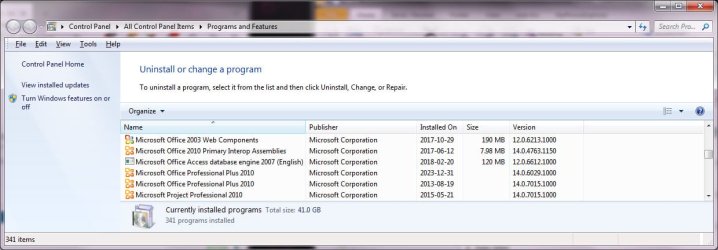
PLEASE list(copy/paste) from the >>lnstalled programs window<< what is present Office wise
i REALLY need to see it

The script you ran, was changed
WAS NOT what i asked for

Product keys are Program/version >SPECIFIC<
hence the Office 14 UNLICENCED report

The version of 14 is 32bit, as shown via program files(x86) script
You must have installed it at some stage or it would'nt be there.
 

My Computer My Computer

At a glance

W7 home premium 32bit/W7HP 64bit/w10 tp insid...E5300 dual core3gbNvidia Geforce 7100 Nforce 630i
Computer type
PC/Desktop
Computer Manufacturer/Model Number
medionl/Aspire 6930G/acer x55a
OS
W7 home premium 32bit/W7HP 64bit/w10 tp insider ring
CPU
E5300 dual core
Motherboard
medion MS7366
Memory
3gb
Graphics Card(s)
Nvidia Geforce 7100 Nforce 630i
Monitor(s) Displays
avixc
Internet Speed
n (isp resticted to 72)
Antivirus
mse/pands
Browser
palemoon
Other Info
Belkin Fd7050 n USB using Railink RT2870 drivers, more upto date
The following is from the Installed Programs control panel:
OfficeVersion.jpg

The ospp.vbs script that I ran is the only one on my computer.

Are you suggesting that if I can find a product key for version 14 that might resolve the issue? What is the marketing name of V14, i.e., MS Office 20??.

- - - Updated - - -

I had the crazy idea that if I used the installation file on a different computer, it would install everything in the Office10 folder as you indicated, and I could simply copy them to my machine. For reasons that I cannot understand, it put everything into the Office14 folder! Note that Office has never before been installed on this other machine.

- - - Updated - - -

Out of desperation, I finally did this: uninstall Office, reboot, delete various Office folders, reboot, re-install Office. Everything seems to be working properly now.
 

My Computer My Computer

At a glance

Windows 7 x64 ProCore i7 860 @ 3.8 GHz16 GB F3-12800CL7D (DDR3 1600 7-7-7-24)Sapphire Vapor-X 100283VXL Radeon HD 5770
Computer type
PC/Desktop
OS
Windows 7 x64 Pro
CPU
Core i7 860 @ 3.8 GHz
Motherboard
MSI P55-GD80
Memory
16 GB F3-12800CL7D (DDR3 1600 7-7-7-24)
Graphics Card(s)
Sapphire Vapor-X 100283VXL Radeon HD 5770
Monitor(s) Displays
NEC LCD3090WQXi-BK
Back
Top