Solved MS Office Click to Run ?

t-4-2

Banned
Local time
8:08 AM
Messages
997
I recently downloaded a MS Office 2010 Home and Business trial version.

Subsequently another drive shows up on my Computer window ( see screenshot ).

I'd like to know :
1. What is it for or how to use it ? I tried to google for answer but found none.

2. If I uninstall the trial version, this Q drive will go away too. Yes ?

MS Office Click to Run.png
 

My Computer My Computer

Computer Manufacturer/Model Number
Acer Aspire 7741Z
OS
Windows 7 Home Premium 64-bit, SP1
CPU
Intel Pentium P6200, Cores 2, 2.13 GHz
Memory
4 GB
Graphics Card(s)
Intel HD
Sound Card
unknown
Monitor(s) Displays
17.3 inches
Screen Resolution
1600 x 900
Hard Drives
640 GB, 5400 PRM
Here is an explanation from MicroSoft:
An overview of Microsoft Office Click-to-Run for Office 2010

.
Frequently asked questions (FAQ)

When you try to install a product of Office 2010 by using Office Click-to-Run, the user encounters the following error:
"This product must be installed to Q:. Ensure that Q: is unused and try again"

This error means that the Q: drive letter is already being used by something else on your computer. However, the installation of Office Click-to-Run requires this drive letter for Office 2010.

How to resolve this error in Office Starter 2010

If the Q: drive letter is not available, the installation does not install Office Starter2010.

To resolve this error, determine which application or which hardware uses the Q: drive letter, and then move it off the Q: drive by referring to the documentation from the manufacturer or to a support channel of the manufacturer for help. After the Q: drive is made available, the installation does not display the error.

How to resolve this error in Office Home and Student 2010 or in Office Home and Business 2010

In order to successfully use the Office Click-to-Run version of Office Home and Business 2010 or of Office Home and Student 2010, use one of the following methods:
  • Determine which application or which hardware uses the Q: drive letter, and then move it off the Q: drive by referring to the documentation from the manufacturer or to a support channel of the manufacturer for help. After the Q: drive is made available, the installation does not display the error.
  • Download a version of Office 2010 that is not an Office Click-to-Run product. To do this, visit the site where you purchased Office 2010, and sign in by using your Live ID. Then, click My Account at the top of the home page to access your Office 2010 downloads. Click Download for the suite that you purchased, and then click Advanced Options under Download Now. A version of Office 2010 is listed that is not an Office Click-to-Run product and that does not require the Q: drive to be available.
Why do I receive the "This product must be installed to Q:. Ensure that Q: is unused and try again" error when I try to use Office Starter To-Go on my computer?

This error means that the Q: drive letter is already being used by something else on your computer. However, the installation of Office Click-to-Run requires this drive letter for Office 2010. If the Q: drive letter cannot be made available, you cannot use Office Starter To-Go on your computer.

Why do I have a "Q:" drive when I use Office Starter To-Go?

Office Starter To-Go uses the Office Click-to-Run technology that must use a virtual application drive. This virtual application drive is why you have the Q: drive.

What is the "Q:" drive?

Office 2010 Click-to-Run suite such as Office Starter 2010, Office Starter To-Go, Office Home and Student 2010, and Office Home and Business 2010 are based on some application virtualization technology. The Q: drive is the virtual file system drive where virtualized applications are located in the file system namespace. This Q: drive is not a typical drive. The Q: drive has no space that the user can access directly and is inaccessible from Windows Explorer or My Computer.


Are my Office documents also stored in this "Q:" drive?

By default, Office saves your documents in the My Documents folder.

Caution We strongly recommend that you do not save any Office documents on the Q: drive for the following reasons:
  • The Q: drive cannot be accessed from Windows Explorer directly.
  • If the Office installation files have to be repaired, the Q: drive may be removed and recreated. Therefore, any Office documents that are stored on the Q: drive are lost.
Can I hide or delete the "Q:" drive?

No. Any access to hide or to delete the Q: drive is removed.

I hope that helps. :)
 

My Computer My Computer

Computer type
PC/Desktop
Computer Manufacturer/Model Number
Packard Bell
OS
Windows 7 Home Premium 64bit
CPU
Intel(R) Core(TM) i3-2120 CPU @ 3.30GHz
Motherboard
Packard Bell IPISB-AG
Memory
3.00 GB
Graphics Card(s)
(1) Intel(R) HD Graphics (2) VNC Mirror Driver
Sound Card
Realtek High Definition Audio
Monitor(s) Displays
AIO LCD
Screen Resolution
1920 x 1080
Hard Drives
WDC WD10EADX-22TDHB0 ATA Device
Fixed hard disk media
4 partitions
931.51 GB
Keyboard
Wireless
Mouse
Wireless
Antivirus
Microsoft Security Essentials
Browser
IE; Firefox
Other Info
Also:
Samsung N220 Plus Netbook - Windows 7 Home
HP laptop
iPad 5
Thank you.

Question #2 remains unanswered........

If 2010 Home and Business trail version is uninstalled, will the Click-to-run Q drive also disappeared ?
 

My Computer My Computer

Computer Manufacturer/Model Number
Acer Aspire 7741Z
OS
Windows 7 Home Premium 64-bit, SP1
CPU
Intel Pentium P6200, Cores 2, 2.13 GHz
Memory
4 GB
Graphics Card(s)
Intel HD
Sound Card
unknown
Monitor(s) Displays
17.3 inches
Screen Resolution
1600 x 900
Hard Drives
640 GB, 5400 PRM
Pardon me.
I fell into the usual trap .... asking for answers instead of searching for answers myself.

I have found the MS Office Click-to-run appl in Programs and Features.
I could uninstall it any time I want.

Please disregard my question #2.

Thank you.
 

My Computer My Computer

Computer Manufacturer/Model Number
Acer Aspire 7741Z
OS
Windows 7 Home Premium 64-bit, SP1
CPU
Intel Pentium P6200, Cores 2, 2.13 GHz
Memory
4 GB
Graphics Card(s)
Intel HD
Sound Card
unknown
Monitor(s) Displays
17.3 inches
Screen Resolution
1600 x 900
Hard Drives
640 GB, 5400 PRM
That's not a problem. Thanks for letting us know.
 

My Computer My Computer

Computer Manufacturer/Model Number
HP Pavilion Elite 495UK
OS
Windows 7 Ultimate SP1 64-Bit
CPU
Intel Core i7 870 @ 2.93GHz
Motherboard
MSI 2A9C (CPU1)
Memory
8Gb Dual-Channel DDR3 @ 664MHz
Graphics Card(s)
nVidia GeForce GTX 460 1024MB dedicated RAM
Sound Card
Realtek HD Audio
Monitor(s) Displays
HP2310i
Screen Resolution
1920 x 1080
Hard Drives
1x1954GB Hitachi HDS22020ALA 330 (RAID), 1x1954GB Hitachi External for backup and storage
PSU
460W
Case
HP Elite
Cooling
Air cooled
Keyboard
Logitech K750 solar-powered keyboard
Mouse
Logitech Wireless M180 mouse
Internet Speed
2Mb
Other Info
Pure Avanti Flow Internet Radio with iPod Dock, 64Gb iPod, HP USB Speakers, Sony MDR-V500 Headphones, Sony Vaio F-Series Laptop
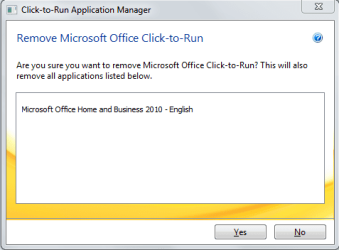
Update : re - MS Office click-to-run

Uninstalling click to run will also uninstall MS Office Home and Business 2010.

ms office click to run.png
 

My Computer My Computer

Computer Manufacturer/Model Number
Acer Aspire 7741Z
OS
Windows 7 Home Premium 64-bit, SP1
CPU
Intel Pentium P6200, Cores 2, 2.13 GHz
Memory
4 GB
Graphics Card(s)
Intel HD
Sound Card
unknown
Monitor(s) Displays
17.3 inches
Screen Resolution
1600 x 900
Hard Drives
640 GB, 5400 PRM
Included in the FAQ within my previous link:
.
.

What if Office Click-to-Run does not meet my needs? How can I obtain the traditional MSI-based installation for Office Home and Student 2010 or Office Home and Business 2010?

If Office Click-to-Run does not meet your needs, you can uninstall it, and obtain the MSI-based Office product. To do this, follow these steps:

  1. Uninstall the Office Click-to-Run version of Office 2010 by using Control Panel.
  2. Visit the site where you purchased Office 2010, and sign in by using your Live ID.
  3. Then, click My Account at the top of the home page to access your Office 2010 downloads.
  4. Click Download for the suite you purchased, and then click Advanced Options under Download Now.
    A version of Office 2010 is listed that is not an Office Click-to-Run product and that does not require the Q: drive to be available.
 

My Computer My Computer

Computer type
PC/Desktop
Computer Manufacturer/Model Number
Packard Bell
OS
Windows 7 Home Premium 64bit
CPU
Intel(R) Core(TM) i3-2120 CPU @ 3.30GHz
Motherboard
Packard Bell IPISB-AG
Memory
3.00 GB
Graphics Card(s)
(1) Intel(R) HD Graphics (2) VNC Mirror Driver
Sound Card
Realtek High Definition Audio
Monitor(s) Displays
AIO LCD
Screen Resolution
1920 x 1080
Hard Drives
WDC WD10EADX-22TDHB0 ATA Device
Fixed hard disk media
4 partitions
931.51 GB
Keyboard
Wireless
Mouse
Wireless
Antivirus
Microsoft Security Essentials
Browser
IE; Firefox
Other Info
Also:
Samsung N220 Plus Netbook - Windows 7 Home
HP laptop
iPad 5
Here is the Microsoft tool to remove the Click-2-Run App-V virtual drive, and also the original MS tool to completely remove the latest Office installations from Windows computers without re-installing or restoring the OS to a previous date.

http://sdrv.ms/11hV2PR

This download is comprised of several tools to remove the latest versions of Microsoft Office and the App-V virtual drives. Run the offcln.exe tool to delete all traces of Office, then reboot, and run the CleanC2R.exe tool to delete the virtual drive Q: and R: from your system. A second reboot will be required. This package also includes the msizap.exe tool and the oclncore.opc resource file.

And yes, I joined this forum to post this information, as I have never had the need to do so before here. I am frustrated with the plethora of useless and round-about resolutions for many articles on tech forums. I have decided to try and resolve issues as I become aware of them. Time permitting. ;)


My Computer My Computer

Computer Manufacturer/Model Number
HP, Asus, and Custom
OS
XP Pro, Vista Business, 7 Pro, 8 Pro, Server 2003, Linux, and DOS
CPU
Various Intel and AMD
Motherboard
Intel, Asus, and various others
Memory
Various
Graphics Card(s)
nVidia
Sound Card
Hardware, and onboard
Monitor(s) Displays
Multiple display with remote, KVMs and other sharing devices
Hard Drives
Various internal, external, and NAS
PSU
various and custom built
Case
Desktop, slim, Server, and custom. Mostly ATX, and EATX
Cooling
Air
Back
Top