MS Office Word : Set Default Save Location

How to Set the Default Save Location for Microsoft Office Word

   Information

The procedure is the same to set the save default in the other Office programs.

It also works the same in Office 2007 and Office 2010


Let's get started!


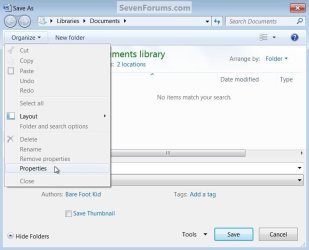
1) Open a Word doc, click the Windows button / "File" menu select "Save", at the top left select "Organize" then "Properties".
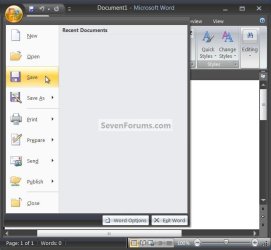
Save.jpg


Properties.jpg
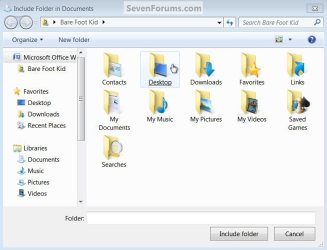
2) In the "Documents Properties" dialog box select "Include a Folder" Choose the new file location, for this tutorial mine is on the desktop.
Include a Folder.jpg
Choose Desktop.jpg
3) In the window that opens select the file you want to use, mine is named "Change Default Save" for this.
Include Folder.jpg
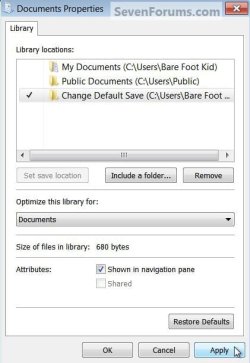
4) Select "Change Default Save" and click "Set Save Location" then click "Apply" then "OK" to finish.
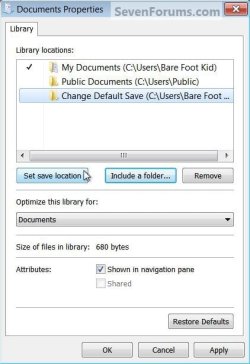
Set Save Location.jpgApply.jpg
5) Now when you "Save" a Word doc it'll default to the new location.
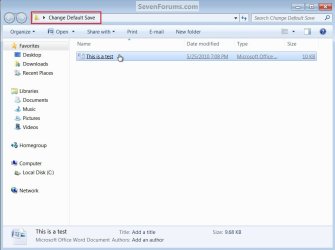
Save.jpg
New Default.jpg


Enjoy! :)


Last edited by a moderator:
excellent tutorial! this would really come in handy!
 

My Computer

Computer Manufacturer/Model Number
Dell Inspiron 1440, Apple macbook pro
OS
Windows 7 32bit, Snow leopard
CPU
Intel Core 2 Duo 2.2GHz
Motherboard
IDK LOL
Memory
2GB DDR2 RAM
Graphics Card(s)
Intel GMA X4500MHD
Sound Card
NONE
Monitor(s) Displays
14" WLED-backlit display :: resolution 1366x768
Hard Drives
320GB HDD
PSU
Stock
Case
Stock
Cooling
Stock
Hello theog and iphone, thank you both.
 

My Computer

Computer Manufacturer/Model Number
* BFK Customs *
OS
W 7 64-bit Ultimate
CPU
Intel Q9550 Yorkfield
Motherboard
ASUS P5Q Pro
Memory
8GB Dominator 8500C5D
Graphics Card(s)
ATI : XFX 5870
Sound Card
Realtek HD Audio 7-1
Monitor(s) Displays
1x 47" LCD HDMI & 3x 26" LCD HDMI
Screen Resolution
1920x1080P & 1920x1200
Hard Drives
1x 80GB Intel X25-M G2 SSD : 1x 500GB & 1x 640GB WD Caviar Black(s)
PSU
Corsair 620HX
Case
Cooler Master RC-690
Cooling
Tuniq Tower 120, 2x 140mm and 3x 120mm case fans
Keyboard
Microsoft 500
Mouse
Razer Diamondback 3G
Internet Speed
14 Mb/s
Other Info
1x Koutech 3Gb/s SATA HDD Hot Swap Rack
I can definitely use this one. Ted, keep cranking those tutorials out! No sleep for you, 'till you hit 100 tutorials!!! :D
 

My Computer

Computer Manufacturer/Model Number
"WartHog Wonder"
OS
Windows 7 Ultimate x64 SP1
CPU
AMD Phenom II X4, 945, Quad Core, 3.0 GHz
Motherboard
Gigabyte MA785GM-US2H
Memory
8GB G.Skill PI Black PC2 6400 * 4-4-4-12 @1.9v
Graphics Card(s)
NVIDIA 512MB 9600GT
Sound Card
Realtek ALC889A Chipset (onboard)
Monitor(s) Displays
2 x 22" Hans-G LCD
Screen Resolution
1680x1050
Hard Drives
650GB 7200RPM WD Caviar Black
PSU
OCZ 700w GameXstream
Case
Cooler Master CM 690 Midtower
Cooling
Xigmatek Gaia SD1283 CPU Cooler, Assorted 120mm case fans
Keyboard
Dell SK-8115
Mouse
Microsoft Comfort Optical Mouse 3000
Other Info
Liteon iHAS 424-98B 24x DVD/CD Writer
I can definitely use this one. Ted, keep cranking those tutorials out! No sleep for you, 'till you hit 100 tutorials!!! :D


I'm working on it, thanks! :)
 

My Computer

Computer Manufacturer/Model Number
* BFK Customs *
OS
W 7 64-bit Ultimate
CPU
Intel Q9550 Yorkfield
Motherboard
ASUS P5Q Pro
Memory
8GB Dominator 8500C5D
Graphics Card(s)
ATI : XFX 5870
Sound Card
Realtek HD Audio 7-1
Monitor(s) Displays
1x 47" LCD HDMI & 3x 26" LCD HDMI
Screen Resolution
1920x1080P & 1920x1200
Hard Drives
1x 80GB Intel X25-M G2 SSD : 1x 500GB & 1x 640GB WD Caviar Black(s)
PSU
Corsair 620HX
Case
Cooler Master RC-690
Cooling
Tuniq Tower 120, 2x 140mm and 3x 120mm case fans
Keyboard
Microsoft 500
Mouse
Razer Diamondback 3G
Internet Speed
14 Mb/s
Other Info
1x Koutech 3Gb/s SATA HDD Hot Swap Rack
I can't find your "Change default setting" file on my Desktop

Am I supposed to download a file onto my desktop before trying this? I can't find any file to download in your tutorial, and the file mentioned doesn't show up on my desktop.
 

My Computer

OS
Windows 7 home premium 32 bit
Hello Cdorsey, and welcome to Seven Forums.

There's nothing to download in the tutorial. "Change default setting" is just an example used in the tutorial to help explain how to do this in Office Word. That's all. :)
 

My Computer

Computer type
PC/Desktop
Computer Manufacturer/Model Number
Self built custom
OS
64-bit Windows 11 Pro for Workstations
CPU
Intel i7-8700K OC'd to 5 GHz
Motherboard
ASUS ROG Maximus XI Formula Z390
Memory
64 GB (4x16GB) G.SKILL TridentZ RGB DDR4 3600 MHz
Graphics Card(s)
ASUS ROG-STRIX-GTX1080TI-O11G-GAMING
Sound Card
Integrated
Monitor(s) Displays
2 x Samsung Odyssey G7 27"
Screen Resolution
2560x1440
Hard Drives
1TB Samsung 990 PRO M.2,
4TB Samsung 990 PRO PRO M.2,
TerraMaster F8 SSD Plus NAS
PSU
Seasonic Prime Titanium 850W
Case
Thermaltake Core P3
Cooling
Corsair Hydro H115i
Keyboard
Logitech wireless K800
Mouse
Logitech MX Master 4
Internet Speed
2 Gb/s Download and 100 Mb/s Upload
Antivirus
Malwarebyte Anti-Malware Premium
Browser
Google Chrome
Other Info
Logitech Z625 speaker system,
Logitech BRIO 4K Pro webcam,
HP Color LaserJet Pro MFP M477fdn,
APC SMART-UPS RT 1000 XL - SURT1000XLI,
Galaxy S23 Plus phone
Back
Top