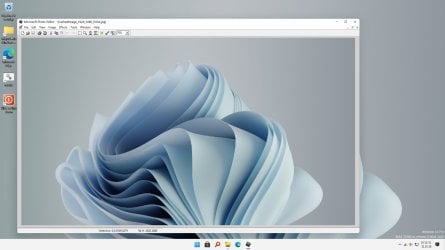
MS Photo Editor

Hi again, yes, I have done the Google search. No, I have not found a way of getting XP that I'm comfortable of doing with my limited skills. The link above says it's a confirmed useless copy of a disk version.

Anybody else? Is there a way for me to install Photo Editor on Windows 10 from the download that was posted in this thread? Something that does not involve XP and advanced computer skills?

I'd be ever so grateful if someone could help me.

Thanks!
 

My Computers

System One System Two

  • Computer type
    Laptop
    Computer Manufacturer/Model Number
    Dell
    OS
    Windows 10
  • Computer type
    PC/Desktop
Ok 1. You don't need XP at all: get that out of your head. 2. You do need to. Find & install Microsoft 97-2003 Office then restart your computer. (quick and easiest fix) IT should work fine from there. 3. Sorry but that's what has to be done for it to work now days. You are right Google's not much help, most of the links are gone or not working, sorry I can't help with that. But find someone who has an old cd / computer you can borrow or copy from, or who can torrent a copy for you. Iv'e been using it on WIN10 since day one, only had to reinstall it once after a major update. Still works great!
 

My Computer

Computer type
PC/Desktop
Computer Manufacturer/Model Number
PDS
OS
Windows 7 Ultimate x64
CPU
3.4 Ghz Pentium D
Motherboard
PDS/Intel
Memory
4gb
Graphics Card(s)
1GB Pegatron
Hard Drives
2 TB Seagate
All righty... I have ordered a copy of Office 2003 on eBay and will install as soon as it gets here. Thank you so much for all your help - I hope this will work! It's just so weird that my other laptop which also runs on Windows 10 has no problem with PhotoEditor. That machine, however, started out as Windows 8 and then I upgraded to Windows 10 so that may have something to do with it? Anyway, I'll check back in after I install Office 2003! Thanks again!!
 

My Computers

System One System Two

  • Computer type
    Laptop
    Computer Manufacturer/Model Number
    Dell
    OS
    Windows 10
  • Computer type
    PC/Desktop
Hello again, I have installed MS Office 2003 and restarted my computer.
I need step-by-step instructions on what to do next. I've tried my best but I still can't get Photo Editor to work.
Please help. I'm so grateful for any assistance I might get. Thanks!
 

My Computers

System One System Two

  • Computer type
    Laptop
    Computer Manufacturer/Model Number
    Dell
    OS
    Windows 10
  • Computer type
    PC/Desktop
Microsoft has killed any hope of using MS PhotoEd it seems.

I found windows installer files of MS Photo Editor v3.0.2.3 for both 32bit and 64bit versions for Windows 7. It seems someone took all the information provided in this thread and put it together into an installer.

It seems Filedropper wasn't the greatest of choices to host the files. Some people mentioned having to download an EXE to access the zip files which I DID NOT upload. I've uploaded the files to my own server for safer downloading:

https://dstealth.com/7forums/MSPhotoEditorv3.zip


Includes:
- MS Photo Editor 32bit (18.3 MB)
- MS Photo Editor 64bit (18.8 MB)
- MS Photo Editor patched EXE for large files + 64bit registry patch (the \Wow6432node) (309 kb)

Latest update to Win 10 has messed up this app, installed 64 bit version to suit my system and it treats it like the 32 bit version and it doesn't recognise file formats anymore.
 

My Computer

Computer type
Laptop
Computer Manufacturer/Model Number
LENOVO_MT_20JJ_BU_Think_FM_ThinkPad Yoga 370
OS
SA
CPU
Intel(R) Core(TM) i3-7100U CPU @ 2.40GHz, 2400 Mhz
Motherboard
BaseBoard Version SDK0J40700 WIN
Memory
4.0 GB
Antivirus
Avast Internet Security
Browser
Google Chrome
Latest update to Win 10 has messed up this app, installed 64 bit version to suit my system and it treats it like the 32 bit version and it doesn't recognise file formats anymore.

Microsoft updates frequently their old apps making them useless, to make new programming tendences run over them.

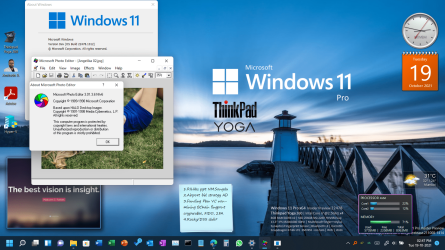
But I have great news for you. I installed in the morning Windows 11, and, sadly, I found that my old and beloved PhotoEd.exe didn't work. I remembered this forum, that talked about this problem... and, and angel, DStealth, shared two installers of x32 and x64 versions of the installers of PhotoEd. I unzipped, run the x64 version... and voilá, Microsoft Photo Editor running as new as when I Installed Office XP toooo many years ago...! Thanks, DStealth, I confirm that: Photo Editor runs IN WINDOWS 11 PRO 21H2 22000.194 Experience Pack 64 bit!
 

My Computer

Computer type
PC/Desktop
Computer Manufacturer/Model Number
Dell
OS
NL
CPU
i5
Motherboard
Dell
Memory
8GB
Graphics Card(s)
embedded
Hard Drives
250g
Antivirus
several, i change freq.
Browser
chrome, edge, firefox

My Computer

Computer type
PC/Desktop
Computer Manufacturer/Model Number
Dell
OS
NL
CPU
i5
Motherboard
Dell
Memory
8GB
Graphics Card(s)
embedded
Hard Drives
250g
Antivirus
several, i change freq.
Browser
chrome, edge, firefox
:roflmao: Ya I don't know why i like this old PhotoEd so much. All other stuff I run insider/beta etc :)

Mainly i cant do without photoed to just quickly convert png jpg or resize or crop.
Have tried 100's of other apps and usually have 4-5 always installed but this is the most convenient. Else i tend to use powerpoint and manipulate and save the image back. Rarely i open up photoshop to remove background or such.

Have downloaded a context menu app for resize/crop/convert for images, maybe that will get me off this addiction. Will update if its good !

Win11 22478 2021 H2 and PhotoEd 1989 v3 ! That's like 32 years apart ! Although i didn't use photoed till 2009 i think, that's only 12 years apart.

There should be a wayback machine / archive of all applications somewhere.

Screenshot (24).png

- - - Updated - - -

FYI, installing photoed results in Windows update wanting to install old Office XP sp3 patch & silverlight > which then seems to make winupdate keep crashing or disappearing (logs show that its running but the UI isnt there). Maybe microsoft's hide update utility will work else might uninstall
 

My Computer

OS
Windows 7
Resurrecting the Phoenix from the ashes

Okay before you all tell me that there are better photo editors out there, I will agree. But I prefer my MS Photo Editor, and up until yesterday it was working great,
I had a system crash and have to reinstall Windows 11. Tried all the processes listed in the thread and nothing all I get when I select PhotoEd,exe is this error message.

No file format information can be found in the Registry.

So what have I tried
Post #1 RAS230 (All this files were on the original drive copied over to new drive.. Then used the patch as per instruction. No change)
Post#13 Papageno (When checking out the registry "HKLM\SOFTWARE\Wow6432Node\Microsoft\Shared Tools\Graphics Filters\Export\" I found no Graphics Filters, in HKLM I did find PHOTOED.EXE in HKEY_CLASSES_ROOT\Applications\PHOTOED.EXE. "ab (Default) REG_SZ (value not set)"(Should I remove this or can some suggest a setting or a manual registry edit)
Post #14 DStealth (For me and many others this was our saviour. Worked without a hitch... Until now.)
Post #25 JohnZ (Have tried this in the past using MS Office XP, MS office 2000... Sadly still nothing)
Post #55 trebor58 (Yes as above I ripped a copy of Office XP and it worked... Sadly not any more)
Post #76 rlbrinkman "OK, I tried one last thing - to see if I could remove PhotoEd and start over. I turned out that there was a Repair option, and amazingly it worked!" (Can I ask what you mean by a repair option?)

I will wait and see if any one can help?
 

My Computer

Computer type
PC/Desktop
OS
windows 7 64bit
@trebor58 I just tried installing the MS Photo Editor v3.0.2.3_64bit.msi version from my zip file in Post#14 and it works just fine in Windows 11 Pro - I didn't even need the patched EXE and the PATCH.reg, just the 64bit installer did the trick for me testing it on a PNG file.

But seriously, many better alternatives out there lol. My personal favourite now is Paint.Net
 

My Computer

OS
Windows 7 Ultimate x64
Thanks DStealth and yes you are right, there are better alternatives, but I just prefer Photo Editor.

From what I can see when I install the 64bit or even the 32bit, nothing is being installed in to the registry. So could you possibly have a look on you windows 11 system and see what and where is installed maybe I can replicate the entries and see if that works.
 

My Computer

Computer type
PC/Desktop
OS
windows 7 64bit
FYI, after many years (decades ?) of needing MS Photo Editor (for basically being able to quickly crop or resize images), i have finally found peace with Microsoft Designer (which is a default installed app in win 11) that lets you do those 2 simple things quickly (even though it has a ton of other features that I have started using).
 

My Computer

OS
Windows 7
Thanks, ami1, for the heads-up on Microsoft Designer; however, I have searched the apps and checked the Microsoft Store, but with no luck.
Can you confirm the is the correct name is "
Microsoft Designer"

Saying I would still prefer MS Photo Editor


My Computer

Computer type
PC/Desktop
OS
windows 7 64bit
Hey trebor58, checked my registry entries and I had absolutely nothing special, I didnt even have the Graphics Filter folder in my registry at all.

I'm curious to know which installation file you used to install it?

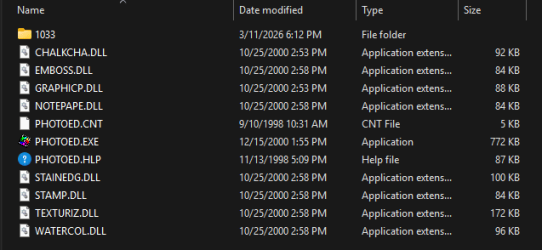
Copilot AI seems to think that depending on the source of installation, ie: old Office 97/2000 version vs newer Office XP/2002 version, can change the way Photo Editor looks for it's filter files. Seems that the Office XP/2002 version, also the same version that my x64.msi installer from my zip file uses, is the one that can work without the Graphics Filters registries because of the presence of effect plug-ins in the installation directory. The effect plug-ins i'm talking about are:

The DLL's located in
Code:
C:\Program Files (x86)\Common Files\Microsoft Shared\PhotoEd
image.png

- - - Updated - - -

Okay I well Copilot is dumb. I found the registry entries you seem to be missing.

View attachment Graphics_Filters.reg
Disclaimer: I hold no responsibility for what running this registry file might do to your system. I recommend you open it with a read-only text editor to see what it'll be changing and try it at your own comfort level.

BTW: I just realized these Graphics Filters, plus some extra entries, are already included in the registry file that is in my original zip... so if you had used my original zip to install this, you should have had these already?
 

My Computer

OS
Windows 7 Ultimate x64
Thanks, ami1, for the heads-up on Microsoft Designer; however, I have searched the apps and checked the Microsoft Store, but with no luck.
Can you confirm the is the correct name is "
Microsoft Designer"
Saying I would still prefer MS Photo Editor
Ya name is "Microsoft Designer" - Microsoft Designer - Stunning designs in a flash
On App store the link is: Microsoft Designer - Free download and install on Windows | Microsoft Store

HOWEVER, it doesn't show up in older windows versions. I am on the latest win 11 25H2 build 26220 - which windows version are you on ?

And yes I too liked photoed too much for its simplicity in crop & resize. Sadly i had to give up finally. At one time i was even trying to code up a similar one from scratch !

I don't even know the reason why i prefer it to say paint.net or even photoscape X which is also really as simple, in fact better in some ways as it shows the browse window right there so you can crop resize to your heart's content !

BTW you can try Photoscape - it is here - PhotoScape X - Free Photo Editor for Mac and Windows 10 (you can try photoscape or photoscape-X both are similar)

It's just like there are 2 clunky old image edit apps on android called Layers & jointpics - which let me quickly remove background, resize and overlap images and collage multiple images in a single one - despite there being way better options available on my phone I always try to have these 2 installed even if i have to fiddle around to get them working !

Probably muscle memory or OCD or just not wanting to look at complex menus when all we do is resize crop layer or remove bg :) Borders on addiction

EDIT:

Here's a scr of Photoscape to show how similar the resize crop etc menus are to photoed - see right toolbar
(pl note - you have to click on "Editor" when it opens, by default it shows the browsing window, you can set that as default)
once you click on say crop the sub-options to constrain to various ratios are also similar to photoed
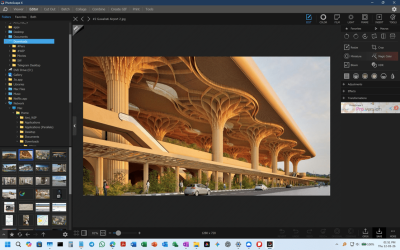
image.png

And no i don't have any interest in pushing photoscape :) In fact i had forgotten about it after using designer but its faster now that i ran it again to get a scr shot so i will start using it again

 

My Computer

OS
Windows 7
Hip, Pip Hooray, I have it back... Photoed is now back where it belongs.

Only minus is that Windows up date keeps trying to download "Office XP Service Pack 3" I have to keep using Windows Show and Hide Cabinet file (wushowhide) when there is any windows update but a small price to pay.

Okay so how did I do it... I downloaded a copy of OfficeXP Business and extracted PHOTOED from the mounted CD.

Now Photo Editor Opens all graphic formats and any size.
 

My Computer

Computer type
PC/Desktop
OS
windows 7 64bit
Back
Top