Solved MSE does not update daily

Jonguy30

New member
Local time
10:11 PM
Messages
160
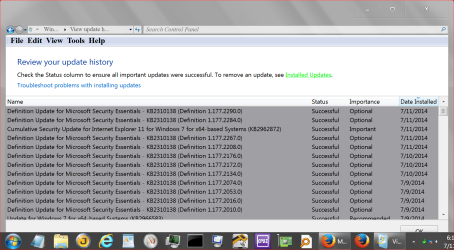
So, I'm making a new thread as to not derail the mbam thread anymore. So my issue is that Microsoft Security Essentials (my current AV) does not update daily. Sometimes it goes 2 days without updating and sometimes 3 days. Windows update is working fine (according to update history logs anyway) as there are no error messages when performing windows update. Every update has been successful. The only problem is that MSE doesn't do the definitions update every day as it should. I'm not sure as to what the problem might be, as I said earlier Windows update is working fine. The update schedule is set to 03:00 at night but that shouldn't be a problem.

I've been told to follow the update history a few days to see if there's any problems. But I'm not sure what's causing this issue. It's not malwarebytes.

Does anyone have any idea as to why it is like this?
 

My Computer

Computer type
Laptop
Computer Manufacturer/Model Number
HP
OS
Windows 7 x64 Home Premium SP1
CPU
Intel Pentium 6100 dual core
Memory
4GB
Graphics Card(s)
ATI mobility radeon 5470, 512 MB RAM
Screen Resolution
1366 x 768
Mouse
Logitech M100
Internet Speed
42 Mbps Dual Carrier 4G
Antivirus
Microsoft security essentials, MSE
Browser
Palemoon
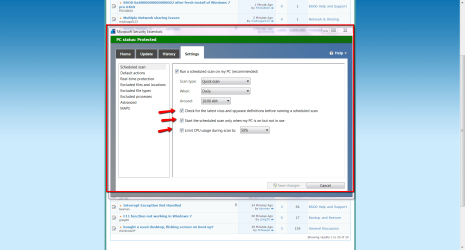
Here's how I have mine set up in settings.
Do you have all these checked?
2014-07-11_0821MSE.png
THW
 

My Computer

Computer Manufacturer/Model Number
HP M9077c
OS
Windows 7 Home Premium 64bit
CPU
Intel(R)Core(TM)2 quad [email protected] 2.39GHz
Motherboard
ASUSeK
Memory
6GB DDR2 6400
Graphics Card(s)
GeForce 8500/512MB
Sound Card
Realtek High Def Audio
Monitor(s) Displays
HP w2408 LCD 24" widescreen
Screen Resolution
1920x1200
Cooling
6 pack of Bud
Keyboard
MS wireless Inteli
Mouse
MS wireless Inteli
Hi,
Have you altered the time when the updates are to load and test,
set it for the morning after you startup,
When was the last time you shut your computer down completely ?

You don't have mbam premium or previously known as Pro ?
 

My Computer

Computer type
PC/Desktop
Computer Manufacturer/Model Number
Custom assembled by me :}
OS
Win-7-Pro64bit 7-H-Prem-64bit
CPU
i7-5930K 2nd i9-9940x both water blocked VRM's too
Motherboard
ASUS SABERTOOTH X99 2nd ASUS x299 Apex
Memory
Trident-z 3200C14 2nd Trident-z 3600C16
Graphics Card(s)
EVGA 1080ti ftw3 2nd Titan Xp both water blocked
Sound Card
Built-in Realtek
Monitor(s) Displays
1-AOC G2460PG 24"G-Sync 144Hz/ 2nd 1-ASUS VG248QE 24" 144Hz
Screen Resolution
1920 x 1080 144Hz
Hard Drives
2-Samsung M.2 Evo & Evo Plus
2-Samsung 850 EVO 500GB SSD's/ 3-2.5 W.D. Black 1tb-&3-1tb/3-3.5 WD Black 1tb hdd's
PSU
EVGA SuperNOVA 1000-P2 2nd 1200-P2
Case
2-Corsair Obsidian Series 450D Black ATX Mid Tower
Cooling
Custom water loops
Keyboard
Logitech G710+/ 2nd Logitech G910
Mouse
2-RedDragon M901 Perdition 16400 dpi Gaming mouse = wired
Internet Speed
Comcast Ping 19ms 89.31mbps download speed 6.12mbps upload
Antivirus
Malwarebytes Pro/ Superantispyware Pro
Browser
FireFox & Pale moon
Other Info
2nd ASUS X299 Apex/Intel i9-9940x with Custom water loop/7H-Prem-x64/Corsair 450D case/Ram Trident-z 3600C16 4x8gb / Samsung970Evo plus 500gb SSD/Dual ssd EZ swap evo/PSU EVGA SuperNova 1200w-P2 80+Platinum/GPU Titan Xp /8-ML-140 on push-pull on 2-280GTX rads
Hi,
Have you altered the time when the updates are to load and test,
set it for the morning after you startup,
When was the last time you shut your computer down completely ?

You don't have mbam premium or previously known as Pro ?

No I do not have mbam premium so I don't have another real-time malware scanner interfering with MSE. Last time I shut down my PC was sometime, ehh, 1:30 AM? I'll be back with more info when I'm done with an MSE full scan that's been going on for nearly 4 hours, lol.
 

My Computer

Computer type
Laptop
Computer Manufacturer/Model Number
HP
OS
Windows 7 x64 Home Premium SP1
CPU
Intel Pentium 6100 dual core
Memory
4GB
Graphics Card(s)
ATI mobility radeon 5470, 512 MB RAM
Screen Resolution
1366 x 768
Mouse
Logitech M100
Internet Speed
42 Mbps Dual Carrier 4G
Antivirus
Microsoft security essentials, MSE
Browser
Palemoon
Your specs show you have Avira AV.
Do you have 2 Anti Virus programs ?
Are you sure it's not Windows Defender updates that only update every 2 or 3 days ?
 

My Computer

Computer type
PC/Desktop
Computer Manufacturer/Model Number
home built
OS
Multi-Boot W7_Pro_x64 W8.1_Pro_x64 W10_Pro_x64 +Linux_VMs +Chromium_VM
CPU
AMD Athlon II x4 620
Motherboard
Gigabyte GA-MA785G-UD3H
Memory
6GB GSkill DDR2 800
Graphics Card(s)
AMD 4670 GPU + AMD 4200 IGP
Sound Card
on board Realtek ALC889A
Monitor(s) Displays
RCA 40" LCD TV, Insignia 32" LCD TV, HP 15" LCD monitor
Screen Resolution
1680 x 1050
Hard Drives
OCZ Vertex 3 120GB,
Samsung F3 1TB (3),
Several others - WD, Seagate, Hitachi, ...
PSU
Corsair 500 W
Case
Rosewill mid tower
Cooling
CM 90mm rifle
Keyboard
Gyration wireless, Logitech wireless, Dell USB wired
Mouse
Gyration wireless, Logitech wireless, V7 USB wired
Internet Speed
Spectrum - 100Mbps D / 10Mbps U
Antivirus
Avast, MBAM3, EMET, WinPatrol
Browser
Pale Moon, Firefox, IE
Other Info
2 multi-boot PC's
Mainly HTPC/Office/Gen purpose (no gaming).
Trendnet USB KVM.
LG DVD burner/Blue Ray Player.
Tray system for removable SATA backup drives.

Not currently OCd, under-volted.
I use Hybrid sleep, rarely re-boot or shutdown.

Hauppauge HD-PVR, Avermedia PCIe TV Tuner, Hauppauge PCI TV Tuner.
Oops. I have not updated my specs in a while. I've gotten rid of avira since last quarter of this year.

EDIT. @THW -I have everything you show checked.
@TrashZone -Do you mean windows update when it checks for updates? That's set to default 03:00 at night. But that shouldn't be a prob.
 

My Computer

Computer type
Laptop
Computer Manufacturer/Model Number
HP
OS
Windows 7 x64 Home Premium SP1
CPU
Intel Pentium 6100 dual core
Memory
4GB
Graphics Card(s)
ATI mobility radeon 5470, 512 MB RAM
Screen Resolution
1366 x 768
Mouse
Logitech M100
Internet Speed
42 Mbps Dual Carrier 4G
Antivirus
Microsoft security essentials, MSE
Browser
Palemoon
Thanks for the info,
The update system might not be waking windows to actually load the updates ?
That's why it would be nice to test if you switched to when your using the machine and see if the updates are installed,
Some updates need a boot to fully install not mse updates but other important ones for win-7 and internet explorer do,

If you click start and look at the shut down button does it show a shield on it or has it ever showed a shield ?
 

My Computer

Computer type
PC/Desktop
Computer Manufacturer/Model Number
Custom assembled by me :}
OS
Win-7-Pro64bit 7-H-Prem-64bit
CPU
i7-5930K 2nd i9-9940x both water blocked VRM's too
Motherboard
ASUS SABERTOOTH X99 2nd ASUS x299 Apex
Memory
Trident-z 3200C14 2nd Trident-z 3600C16
Graphics Card(s)
EVGA 1080ti ftw3 2nd Titan Xp both water blocked
Sound Card
Built-in Realtek
Monitor(s) Displays
1-AOC G2460PG 24"G-Sync 144Hz/ 2nd 1-ASUS VG248QE 24" 144Hz
Screen Resolution
1920 x 1080 144Hz
Hard Drives
2-Samsung M.2 Evo & Evo Plus
2-Samsung 850 EVO 500GB SSD's/ 3-2.5 W.D. Black 1tb-&3-1tb/3-3.5 WD Black 1tb hdd's
PSU
EVGA SuperNOVA 1000-P2 2nd 1200-P2
Case
2-Corsair Obsidian Series 450D Black ATX Mid Tower
Cooling
Custom water loops
Keyboard
Logitech G710+/ 2nd Logitech G910
Mouse
2-RedDragon M901 Perdition 16400 dpi Gaming mouse = wired
Internet Speed
Comcast Ping 19ms 89.31mbps download speed 6.12mbps upload
Antivirus
Malwarebytes Pro/ Superantispyware Pro
Browser
FireFox & Pale moon
Other Info
2nd ASUS X299 Apex/Intel i9-9940x with Custom water loop/7H-Prem-x64/Corsair 450D case/Ram Trident-z 3600C16 4x8gb / Samsung970Evo plus 500gb SSD/Dual ssd EZ swap evo/PSU EVGA SuperNova 1200w-P2 80+Platinum/GPU Titan Xp /8-ML-140 on push-pull on 2-280GTX rads
Yes it has shown the yellow WU shield. Also, whenever patch Tuesday occurs I always get the update on Wednesday. If I were to set the setting to when I'm awake would I get the updates on Tuesday instead? Also do you know when the windows updates are published? At what time? I'm on GMT +2. (would be great if you could convert it from universal time to GMT +2, I don't know much about time zones) Just wondering if I'd be able to get them when I'm awake.
 

My Computer

Computer type
Laptop
Computer Manufacturer/Model Number
HP
OS
Windows 7 x64 Home Premium SP1
CPU
Intel Pentium 6100 dual core
Memory
4GB
Graphics Card(s)
ATI mobility radeon 5470, 512 MB RAM
Screen Resolution
1366 x 768
Mouse
Logitech M100
Internet Speed
42 Mbps Dual Carrier 4G
Antivirus
Microsoft security essentials, MSE
Browser
Palemoon
Hi,
I would imagine you would receive updates as soon as they're released ?
This is the current version update for mse,
Open mse and go to the Update section and compare
View attachment 325161
Also click on Help and About mse and compare this window,
View attachment 325162
 
Last edited:

My Computer

Computer type
PC/Desktop
Computer Manufacturer/Model Number
Custom assembled by me :}
OS
Win-7-Pro64bit 7-H-Prem-64bit
CPU
i7-5930K 2nd i9-9940x both water blocked VRM's too
Motherboard
ASUS SABERTOOTH X99 2nd ASUS x299 Apex
Memory
Trident-z 3200C14 2nd Trident-z 3600C16
Graphics Card(s)
EVGA 1080ti ftw3 2nd Titan Xp both water blocked
Sound Card
Built-in Realtek
Monitor(s) Displays
1-AOC G2460PG 24"G-Sync 144Hz/ 2nd 1-ASUS VG248QE 24" 144Hz
Screen Resolution
1920 x 1080 144Hz
Hard Drives
2-Samsung M.2 Evo & Evo Plus
2-Samsung 850 EVO 500GB SSD's/ 3-2.5 W.D. Black 1tb-&3-1tb/3-3.5 WD Black 1tb hdd's
PSU
EVGA SuperNOVA 1000-P2 2nd 1200-P2
Case
2-Corsair Obsidian Series 450D Black ATX Mid Tower
Cooling
Custom water loops
Keyboard
Logitech G710+/ 2nd Logitech G910
Mouse
2-RedDragon M901 Perdition 16400 dpi Gaming mouse = wired
Internet Speed
Comcast Ping 19ms 89.31mbps download speed 6.12mbps upload
Antivirus
Malwarebytes Pro/ Superantispyware Pro
Browser
FireFox & Pale moon
Other Info
2nd ASUS X299 Apex/Intel i9-9940x with Custom water loop/7H-Prem-x64/Corsair 450D case/Ram Trident-z 3600C16 4x8gb / Samsung970Evo plus 500gb SSD/Dual ssd EZ swap evo/PSU EVGA SuperNova 1200w-P2 80+Platinum/GPU Titan Xp /8-ML-140 on push-pull on 2-280GTX rads
I did get the MSE updates today. Maybe if I changed the windows update time I would get them more frequently.
 

My Computer

Computer type
Laptop
Computer Manufacturer/Model Number
HP
OS
Windows 7 x64 Home Premium SP1
CPU
Intel Pentium 6100 dual core
Memory
4GB
Graphics Card(s)
ATI mobility radeon 5470, 512 MB RAM
Screen Resolution
1366 x 768
Mouse
Logitech M100
Internet Speed
42 Mbps Dual Carrier 4G
Antivirus
Microsoft security essentials, MSE
Browser
Palemoon
Here is a simple way I do Windows Updates and MSE Updates.
1. When I'm not on the computer it is off.
2. When the computer is on I'm using it.
3. When I turn on the computer the first things I do is check for Windows Updates which include MSE Updates.
4. Down load and install them.
5. Check several times a day manually. It only takes a few seconds and you are never behind for long on new definitions. Unless you computer is off for a long time.
The results are

Capture.PNGWindows MSE Updates.PNG

No Sleep or Hibernation problems.
No scheduling problems.
Update as many times a day as you wish so they are always new. Not day old updates.
It only takes a few seconds because you are never far behind on updates.
I treat Malwarebytes Pro the same way. Update manually many times a day.
I do no auto updates of anything and that keep my out of a lot of trouble.
This way I'm always there to monitor how the updates are proceeding and if my input is needed.
 

My Computer

Computer type
PC/Desktop
Computer Manufacturer/Model Number
Home made Desktop
OS
Windows 10 Pro. 64/ version 1709 Windows 7 Pro/64
CPU
Intel i7-6800K @ 4.3
Motherboard
ASUS X-99 Deluxe II
Memory
Corsair Platinum 16 gig @2400
Graphics Card(s)
EVGA GTX 1070 OC
Monitor(s) Displays
Asus 27" LED LCD/VE278Q
Screen Resolution
1920-1080 or 1280-720 HDMI
Hard Drives
INTEL SSD 730-240 Gb Sata 3.0/
PSU
EVGA Platium 1200W
Case
Phanteks Luxe Tempered Glass 8 fans/ one radiator
Cooling
XSPC/ Water Cooled CPU
Keyboard
Das 4 Professional
Mouse
Logitech M705/MX Anywhere 2-S
Internet Speed
100 mbits
Antivirus
Microsoft Security Essentials/ Malwarebytes Premium 3.0/ SAS
Browser
I.E. 11 default/Firefox/ ISP Time Warner Cable/Spectrum
Other Info
LG BluRay Burner/
Sound system-KLipsch-THX/
Icy Dock ssd Hot Swap bays.
I've always done things automatically, at least windows updates. Maybe I should go down the manual route instead. But I've never had problems with automatic windows updates.

EDIT: It looks like MSE still has not updated even though now it should.

Here's a screenshot of windows update in control panel.

http://postimg.org/image/42pdrz0rx/full/


It'd probably be easier if I just installed updates manually. It's strange that it only shows up in control panel and isn't installed automatically. It just stays there.
 
Last edited:

My Computer

Computer type
Laptop
Computer Manufacturer/Model Number
HP
OS
Windows 7 x64 Home Premium SP1
CPU
Intel Pentium 6100 dual core
Memory
4GB
Graphics Card(s)
ATI mobility radeon 5470, 512 MB RAM
Screen Resolution
1366 x 768
Mouse
Logitech M100
Internet Speed
42 Mbps Dual Carrier 4G
Antivirus
Microsoft security essentials, MSE
Browser
Palemoon
Have you downloaded any third party desktop/ screen saver themes ?
 

My Computer

Computer type
PC/Desktop
Computer Manufacturer/Model Number
Custom assembled by me :}
OS
Win-7-Pro64bit 7-H-Prem-64bit
CPU
i7-5930K 2nd i9-9940x both water blocked VRM's too
Motherboard
ASUS SABERTOOTH X99 2nd ASUS x299 Apex
Memory
Trident-z 3200C14 2nd Trident-z 3600C16
Graphics Card(s)
EVGA 1080ti ftw3 2nd Titan Xp both water blocked
Sound Card
Built-in Realtek
Monitor(s) Displays
1-AOC G2460PG 24"G-Sync 144Hz/ 2nd 1-ASUS VG248QE 24" 144Hz
Screen Resolution
1920 x 1080 144Hz
Hard Drives
2-Samsung M.2 Evo & Evo Plus
2-Samsung 850 EVO 500GB SSD's/ 3-2.5 W.D. Black 1tb-&3-1tb/3-3.5 WD Black 1tb hdd's
PSU
EVGA SuperNOVA 1000-P2 2nd 1200-P2
Case
2-Corsair Obsidian Series 450D Black ATX Mid Tower
Cooling
Custom water loops
Keyboard
Logitech G710+/ 2nd Logitech G910
Mouse
2-RedDragon M901 Perdition 16400 dpi Gaming mouse = wired
Internet Speed
Comcast Ping 19ms 89.31mbps download speed 6.12mbps upload
Antivirus
Malwarebytes Pro/ Superantispyware Pro
Browser
FireFox & Pale moon
Other Info
2nd ASUS X299 Apex/Intel i9-9940x with Custom water loop/7H-Prem-x64/Corsair 450D case/Ram Trident-z 3600C16 4x8gb / Samsung970Evo plus 500gb SSD/Dual ssd EZ swap evo/PSU EVGA SuperNova 1200w-P2 80+Platinum/GPU Titan Xp /8-ML-140 on push-pull on 2-280GTX rads
No, I don't even have a screensaver applied and I don't use 3rd party themes. When it goes to sleep mode there's just a black screen. I don't bother with screensavers. Even with windows built-in ones.
 

My Computer

Computer type
Laptop
Computer Manufacturer/Model Number
HP
OS
Windows 7 x64 Home Premium SP1
CPU
Intel Pentium 6100 dual core
Memory
4GB
Graphics Card(s)
ATI mobility radeon 5470, 512 MB RAM
Screen Resolution
1366 x 768
Mouse
Logitech M100
Internet Speed
42 Mbps Dual Carrier 4G
Antivirus
Microsoft security essentials, MSE
Browser
Palemoon
It didn't update today either. It's set to update at 3PM, but no, it just sits there in the control panel as an "optional" download. You're supposed to be installed automatically! Not just sit there doing nothing! :mad:

I have no idea why it doesn't update.
 

My Computer

Computer type
Laptop
Computer Manufacturer/Model Number
HP
OS
Windows 7 x64 Home Premium SP1
CPU
Intel Pentium 6100 dual core
Memory
4GB
Graphics Card(s)
ATI mobility radeon 5470, 512 MB RAM
Screen Resolution
1366 x 768
Mouse
Logitech M100
Internet Speed
42 Mbps Dual Carrier 4G
Antivirus
Microsoft security essentials, MSE
Browser
Palemoon
I have no auto update setting for MSE. I would have to use Windows 7 Updates to get it to work auto. You will receive your MSE updates and WU updates auto.
 

My Computer

Computer type
PC/Desktop
Computer Manufacturer/Model Number
Home made Desktop
OS
Windows 10 Pro. 64/ version 1709 Windows 7 Pro/64
CPU
Intel i7-6800K @ 4.3
Motherboard
ASUS X-99 Deluxe II
Memory
Corsair Platinum 16 gig @2400
Graphics Card(s)
EVGA GTX 1070 OC
Monitor(s) Displays
Asus 27" LED LCD/VE278Q
Screen Resolution
1920-1080 or 1280-720 HDMI
Hard Drives
INTEL SSD 730-240 Gb Sata 3.0/
PSU
EVGA Platium 1200W
Case
Phanteks Luxe Tempered Glass 8 fans/ one radiator
Cooling
XSPC/ Water Cooled CPU
Keyboard
Das 4 Professional
Mouse
Logitech M705/MX Anywhere 2-S
Internet Speed
100 mbits
Antivirus
Microsoft Security Essentials/ Malwarebytes Premium 3.0/ SAS
Browser
I.E. 11 default/Firefox/ ISP Time Warner Cable/Spectrum
Other Info
LG BluRay Burner/
Sound system-KLipsch-THX/
Icy Dock ssd Hot Swap bays.
It doesn't update when I reboot either. And when it does update automatically it does so late evening, not during the day. Well, sometimes it updates when it should, but still.

So, anything else to it? Or is this just how it works?
 

My Computer

Computer type
Laptop
Computer Manufacturer/Model Number
HP
OS
Windows 7 x64 Home Premium SP1
CPU
Intel Pentium 6100 dual core
Memory
4GB
Graphics Card(s)
ATI mobility radeon 5470, 512 MB RAM
Screen Resolution
1366 x 768
Mouse
Logitech M100
Internet Speed
42 Mbps Dual Carrier 4G
Antivirus
Microsoft security essentials, MSE
Browser
Palemoon

My Computer

Computer type
PC/Desktop
Computer Manufacturer/Model Number
home built
OS
Multi-Boot W7_Pro_x64 W8.1_Pro_x64 W10_Pro_x64 +Linux_VMs +Chromium_VM
CPU
AMD Athlon II x4 620
Motherboard
Gigabyte GA-MA785G-UD3H
Memory
6GB GSkill DDR2 800
Graphics Card(s)
AMD 4670 GPU + AMD 4200 IGP
Sound Card
on board Realtek ALC889A
Monitor(s) Displays
RCA 40" LCD TV, Insignia 32" LCD TV, HP 15" LCD monitor
Screen Resolution
1680 x 1050
Hard Drives
OCZ Vertex 3 120GB,
Samsung F3 1TB (3),
Several others - WD, Seagate, Hitachi, ...
PSU
Corsair 500 W
Case
Rosewill mid tower
Cooling
CM 90mm rifle
Keyboard
Gyration wireless, Logitech wireless, Dell USB wired
Mouse
Gyration wireless, Logitech wireless, V7 USB wired
Internet Speed
Spectrum - 100Mbps D / 10Mbps U
Antivirus
Avast, MBAM3, EMET, WinPatrol
Browser
Pale Moon, Firefox, IE
Other Info
2 multi-boot PC's
Mainly HTPC/Office/Gen purpose (no gaming).
Trendnet USB KVM.
LG DVD burner/Blue Ray Player.
Tray system for removable SATA backup drives.

Not currently OCd, under-volted.
I use Hybrid sleep, rarely re-boot or shutdown.

Hauppauge HD-PVR, Avermedia PCIe TV Tuner, Hauppauge PCI TV Tuner.
Alright but it's getting late here. I will post back tomorrow if I have time. Thanks
 

My Computer

Computer type
Laptop
Computer Manufacturer/Model Number
HP
OS
Windows 7 x64 Home Premium SP1
CPU
Intel Pentium 6100 dual core
Memory
4GB
Graphics Card(s)
ATI mobility radeon 5470, 512 MB RAM
Screen Resolution
1366 x 768
Mouse
Logitech M100
Internet Speed
42 Mbps Dual Carrier 4G
Antivirus
Microsoft security essentials, MSE
Browser
Palemoon
Okay task scheduler setup is done according to the instructions. Let's see now if it works.
 

My Computer

Computer type
Laptop
Computer Manufacturer/Model Number
HP
OS
Windows 7 x64 Home Premium SP1
CPU
Intel Pentium 6100 dual core
Memory
4GB
Graphics Card(s)
ATI mobility radeon 5470, 512 MB RAM
Screen Resolution
1366 x 768
Mouse
Logitech M100
Internet Speed
42 Mbps Dual Carrier 4G
Antivirus
Microsoft security essentials, MSE
Browser
Palemoon
Back
Top