
MSE NIS Settings in Windows 7?

Rey Redbad

New member
Local time
3:03 PM
Messages
8
Windows 7 HP SP1 x64 - MSE 4.8.204.0 - Windows Firewall

For Real-time protection in MSE I have only "Turn on real-time..." in the Settings.

From screen shots I've seen on the webbernetz there should four others - for NIS, behavior, etc. They're missing; just white space where they should be.

Help?? Thank you!
 
Last edited:

My Computer My Computer

Computer type
PC/Desktop
Computer Manufacturer/Model Number
Custom build
OS
Windows 7 Home Premium 64bit
CPU
i7-3770K
Motherboard
Biostar TZ77B
Memory
Vengeance 16GB
Graphics Card(s)
Intel HD
Sound Card
Mobo Realtek
Monitor(s) Displays
HP 2511x
Screen Resolution
1920x1080
Hard Drives
Samsung 850 EVO 500GB
PSU
Antec EA-650
Case
Antec 302
Cooling
CM Hyper 212 EVO
Keyboard
Logitech K310
Mouse
Logitech M525
Internet Speed
100/10 Mbps cable
Antivirus
MS Security Essentials
Browser
Firefox
Other Info
LG B/WH14NS40 Blu-ray burner
SpyShelter Free 10.9.1
Malwarebytes Anti-Exploit
AppCheck Pro Antiransomware
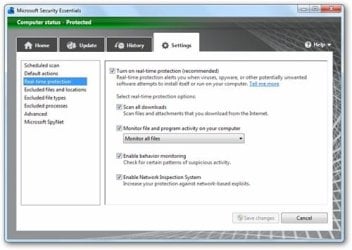
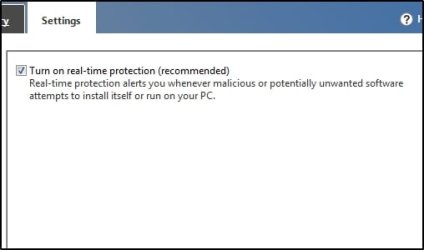
Maybe I used too many words in my OP. :) Here's some pictures. One is from an image search showing all the nice settings and the other is mine with just the on/off check.
 

Attachments

  • MSEsettings.jpg
    MSEsettings.jpg
    31.1 KB · Views: 15
  • MSEsettings2.jpg
    MSEsettings2.jpg
    10.1 KB · Views: 15

My Computer My Computer

Computer type
PC/Desktop
Computer Manufacturer/Model Number
Custom build
OS
Windows 7 Home Premium 64bit
CPU
i7-3770K
Motherboard
Biostar TZ77B
Memory
Vengeance 16GB
Graphics Card(s)
Intel HD
Sound Card
Mobo Realtek
Monitor(s) Displays
HP 2511x
Screen Resolution
1920x1080
Hard Drives
Samsung 850 EVO 500GB
PSU
Antec EA-650
Case
Antec 302
Cooling
CM Hyper 212 EVO
Keyboard
Logitech K310
Mouse
Logitech M525
Internet Speed
100/10 Mbps cable
Antivirus
MS Security Essentials
Browser
Firefox
Other Info
LG B/WH14NS40 Blu-ray burner
SpyShelter Free 10.9.1
Malwarebytes Anti-Exploit
AppCheck Pro Antiransomware
Your first image is old (5 check boxes).

Here is a newer image (4 check boxes).

Your second image is current (1 check box).

The features have changed. There is now only 1 check box.

Based on your posts and images, there is no problem with your installation of MSE.

:-)
 

My Computer My Computer

Computer type
Laptop
Computer Manufacturer/Model Number
Employer provided Dell Latitude
OS
W7 Pro SP1 64bit
CPU
i7
Memory
8GB
Graphics Card(s)
Intel HD Graphics
Hard Drives
crappy SSD
Antivirus
Employer mandated Symantec Endpoint Protection
Browser
Pale Moon 64bit, IE11 64bit & Chrome 64bit
Thanks for the reply!

I had suspicions it had something to do with versions as they evolved, seemingly with emphasis on the KISS principle. (The all too popular practice of leaving out nasty details like versions and dates on the Web sites didn't help me sort it out. Ever wonder what you're reading on a site was written last month or last decade? Or if it's about your app's v1.3 or the current v5.2?)

I understand the 99.99% of users don't need granular status or a decision process other than a global on/off, but the absence of an advanced UI is irritating. I suppose I'll have to assume the two "all" and two "enabled" checked settings as shown in the old UI are what are set on my system. I might dig into the registry and see what might be tweakable there...

I confirmed the Antimalware and Network Inspection services were started, though the latter is of a manual startup. Malware Protection and Network Inspection System kernel drivers (MpFilter & NisDrv) are auto loaded OK. As well the various engines and plugin libraries.

Having been involved with the anti-whatever landscape since Tauscan, I have grown weary of the more-is-better competition in the marketplace and finally gotten around to not renewing the license of the security suite I was using. MSE/Defender has been getting some Good Press lately.

I'm now running it with MBAM and MBAE Premiums with GlassWire free as a font-end to WFW. Bitdefender's TrafficLight in Cyberfox64 rounds it out.

I've also got a scheduled task set to check for sig updates every hour, not wanting to depend on the default update process. I note where MS issues about a half dozen a day average.

Cheers.
 
Last edited:

My Computer My Computer

Computer type
PC/Desktop
Computer Manufacturer/Model Number
Custom build
OS
Windows 7 Home Premium 64bit
CPU
i7-3770K
Motherboard
Biostar TZ77B
Memory
Vengeance 16GB
Graphics Card(s)
Intel HD
Sound Card
Mobo Realtek
Monitor(s) Displays
HP 2511x
Screen Resolution
1920x1080
Hard Drives
Samsung 850 EVO 500GB
PSU
Antec EA-650
Case
Antec 302
Cooling
CM Hyper 212 EVO
Keyboard
Logitech K310
Mouse
Logitech M525
Internet Speed
100/10 Mbps cable
Antivirus
MS Security Essentials
Browser
Firefox
Other Info
LG B/WH14NS40 Blu-ray burner
SpyShelter Free 10.9.1
Malwarebytes Anti-Exploit
AppCheck Pro Antiransomware
Back
Top