
MSI GE70 Driver-Power-State-Failure BSOD help :( (Laptop)

esmorax

New member
Local time
10:01 PM
Messages
11
Dear forummers,

Recently, I've been heving some BSOD'S wen putting my GE70-i550M287FD to sleep mode or hibernation. The NB just stays just active with a black screen for a while, only to end up in a BSOD eventually.
It gives me always the same BSOD, so I figured it would be caused by a single error. However, I haven't been able to detect and fix it up until now. I hoped that some of you might have dealt with it before or know how to deal with it.

The only hardware I've got plugged is the mouse. I have't been able to test if I got the same error without the mouse plugged. Also, this BSOD ONLY occures when going into hibernation/sleep mode.

This is a photo from the BSOD I keep getting once a week/2 weeks or so.

IMG_20140212_213442_zpse94cdbb9.jpg Photo by esmorax | Photobucket
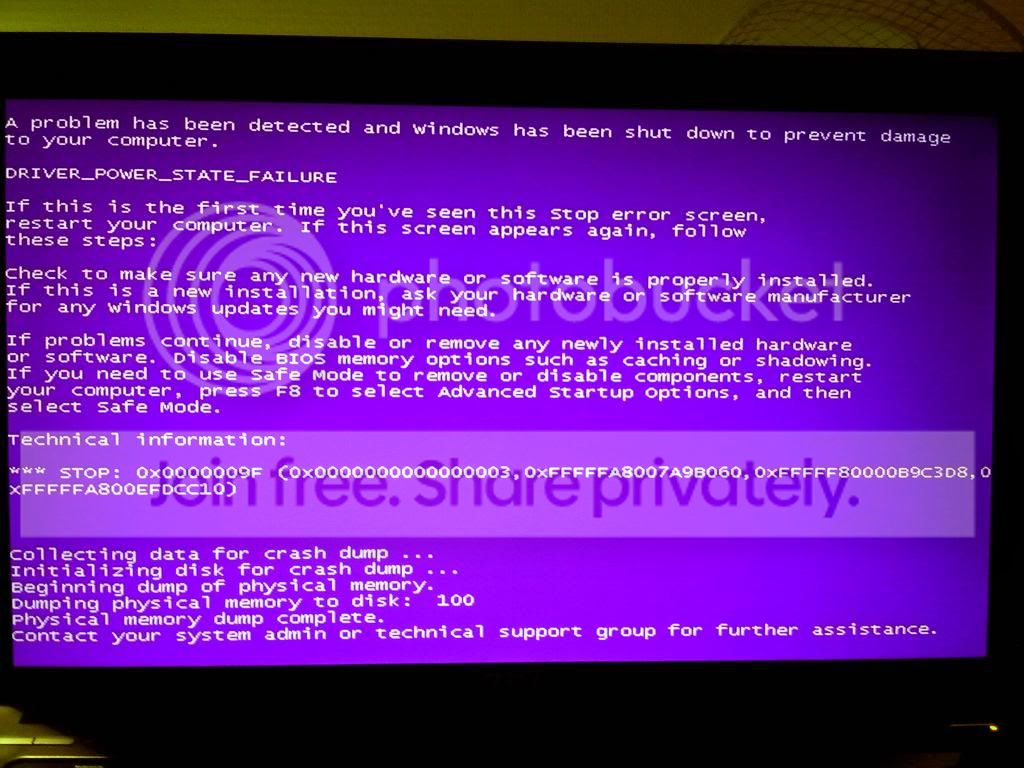
IMG_20140212_213442_zpse94cdbb9.jpg


I have read something about minidump files. How do I open them and do they contain any necessary information needed to fix this error?

Thank you in advance!

esmorax :)
 
Last edited:

My Computer My Computer

At a glance

Windows 7 Ultimate x64Intel Core I5-4200MDDRIII(L) 8GBGT 750M 2GB GDDR5
Computer type
Laptop
Computer Manufacturer/Model Number
MSI
OS
Windows 7 Ultimate x64
CPU
Intel Core I5-4200M
Motherboard
MSI
Memory
DDRIII(L) 8GB
Graphics Card(s)
GT 750M 2GB GDDR5
Sound Card
????
Monitor(s) Displays
Laptop monitor
Screen Resolution
1920x1080
Hard Drives
750 GB
PSU
??
Case
??
Cooling
??
Keyboard
Steelseries
Mouse
Logitech
Internet Speed
??
Antivirus
AVG
Browser
FireFox
Other Info
MSI Notebook: GE70-i550M287FD.
Hello Esmorax, and welcome to Seven Forums.

Please read the instructions here: Blue Screen of Death (BSOD) Posting Instructions, and post back with the needed information. One of our BSOD experts should be by later when able to further help. :)
 

My Computer My Computer

At a glance

64-bit Windows 11 Pro for WorkstationsIntel i7-8700K OC'd to 5 GHz64 GB (4x16GB) G.SKILL TridentZ RGB DDR4 3600...ASUS ROG-STRIX-GTX1080TI-O11G-GAMING
Computer type
PC/Desktop
Computer Manufacturer/Model Number
Self built custom
OS
64-bit Windows 11 Pro for Workstations
CPU
Intel i7-8700K OC'd to 5 GHz
Motherboard
ASUS ROG Maximus XI Formula Z390
Memory
64 GB (4x16GB) G.SKILL TridentZ RGB DDR4 3600 MHz
Graphics Card(s)
ASUS ROG-STRIX-GTX1080TI-O11G-GAMING
Sound Card
Integrated
Monitor(s) Displays
2 x Samsung Odyssey G7 27"
Screen Resolution
2560x1440
Hard Drives
1TB Samsung 990 PRO M.2,
4TB Samsung 990 PRO PRO M.2,
TerraMaster F8 SSD Plus NAS
PSU
Seasonic Prime Titanium 850W
Case
Thermaltake Core P3
Cooling
Corsair Hydro H115i
Keyboard
Logitech wireless K800
Mouse
Logitech MX Master 4
Internet Speed
2 Gb/s Download and 100 Mb/s Upload
Antivirus
Malwarebyte Anti-Malware Premium
Browser
Google Chrome
Other Info
Logitech Z625 speaker system,
Logitech BRIO 4K Pro webcam,
HP Color LaserJet Pro MFP M477fdn,
APC SMART-UPS RT 1000 XL - SURT1000XLI,
Galaxy S23 Plus phone

My Computer My Computer

At a glance

Windows 7 Ultimate x64Intel Core I5-4200MDDRIII(L) 8GBGT 750M 2GB GDDR5
Computer type
Laptop
Computer Manufacturer/Model Number
MSI
OS
Windows 7 Ultimate x64
CPU
Intel Core I5-4200M
Motherboard
MSI
Memory
DDRIII(L) 8GB
Graphics Card(s)
GT 750M 2GB GDDR5
Sound Card
????
Monitor(s) Displays
Laptop monitor
Screen Resolution
1920x1080
Hard Drives
750 GB
PSU
??
Case
??
Cooling
??
Keyboard
Steelseries
Mouse
Logitech
Internet Speed
??
Antivirus
AVG
Browser
FireFox
Other Info
MSI Notebook: GE70-i550M287FD.
Am I allowed to bring up my post if there hasn't been replies for more than 2 days?
I have uploaded the requested file. I hope that someone with the expertise could look at it and maybe help me out in this matter :)

Thank you in advance!
 

My Computer My Computer

At a glance

Windows 7 Ultimate x64Intel Core I5-4200MDDRIII(L) 8GBGT 750M 2GB GDDR5
Computer type
Laptop
Computer Manufacturer/Model Number
MSI
OS
Windows 7 Ultimate x64
CPU
Intel Core I5-4200M
Motherboard
MSI
Memory
DDRIII(L) 8GB
Graphics Card(s)
GT 750M 2GB GDDR5
Sound Card
????
Monitor(s) Displays
Laptop monitor
Screen Resolution
1920x1080
Hard Drives
750 GB
PSU
??
Case
??
Cooling
??
Keyboard
Steelseries
Mouse
Logitech
Internet Speed
??
Antivirus
AVG
Browser
FireFox
Other Info
MSI Notebook: GE70-i550M287FD.
Sorry about the delay. Please complete the steps below and report if you continue to receive blue screens.

Code:
[FONT="Verdana"]Start Menu\Programs\DAEMON Tools Lite	Public:Start Menu\Programs\DAEMON Tools Lite	Public
[/FONT]
Daemon Tools/Alchohol is known to cause BSODs:
How to remove sptd.sys from system
Registry and SPTD problems | DAEMON Pro Help

Scan with Kaspersky TDSSKiller:Anti-rootkit utility TDSSKiller

ESET online scanner: Free Online Virus Scanner | ESET

Code:
[FONT="Verdana"]Start Menu\Programs\AVG	Public:Start Menu\Programs\AVG	Public
avgdiska.sys                Tue Nov 26 02:47:16 2013 (5293B754)
avgfwd6a.sys                Thu Sep 26 13:44:43 2013 (5243E5EB)
avgidsdrivera.sys           Tue Nov 26 02:47:17 2013 (5293B755)
avgidsha.sys                Tue Nov 26 02:47:18 2013 (5293B756)
avgldx64.sys                Fri Nov  1 04:00:14 2013 (5272D2EE)
avgloga.sys                 Fri Nov  1 03:49:41 2013 (5272D075)
avgmfx64.sys                Tue Oct  1 04:49:53 2013 (524A0011)
avgrkx64.sys                Tue Sep 10 04:42:59 2013 (522E4EF3)
avgtdia.sys                 Thu Aug  1 20:06:31 2013 (51FA6B67)
[/FONT]
AVG contributes to BSOD's. Please remove it for testing purpose. Use Microsoft Security Essentials.

Recommended from a strict BSOD perspective, compatibility & stability compared to other security software:

Microsoft Security Essentials - Free Antivirus for Windows

Malwarebytes - Free

http://www.sevenforums.com/system-security/206705-good-free-system-security-combination.html

   Note
Use Revo Uninstaller to uninstall stubborn software. Opt for Advance Mode while uninstalling which allows leftover registry removal:Download Revo Uninstaller Freeware - Free and Full Download - Uninstall software, remove programs, solve uninstall problems

Reduce items at start-up: http://www.sevenforums.com/tutorials/1401-startup-programs-change.html

Perform a clean boot: http://www.sevenforums.com/tutorial...ation-conflicts-performing-clean-startup.html

Run a System file check (SFC): http://www.sevenforums.com/tutorials/1538-sfc-scannow-command-system-file-checker.html

Post screenshot(s) of your Hard Drive(s) using Crystal Disk Info Software: CrystalDiskInfo - Software - Crystal Dew World

Run a Hard Drive test: http://www.sevenforums.com/tutorials/313457-seatools-dos-windows-how-use.html

Run Disk Check on your Hard Drive(s): http://www.sevenforums.com/tutorials/433-disk-check.html

Check for heating issues using Speccy or HWmonitor

Upload a screen shot: http://www.sevenforums.com/tutorials/9733-screenshots-files-upload-post-seven-forums.html

Reinstall the Realtek PCI-E Wireless LAN NIC NDIS Driver:

rtwlane.sys Tue Sep 3 19:41:39 2013 (5225E713)
Realtek PCI-E Wireless LAN NIC NDIS Driver
Driver Reference Table - rtwlane.sys

   Tip
Perform a clean install of a driver following: How to Clean Left Over Driver Files with Driver Sweeper


BSOD BUGCHECK SUMMARY
Code:
[FONT="Lucida Console"]Debug session time: Mon Mar 10 03:57:03.291 2014 (UTC + 6:00)
Built by: 7601.18247.amd64fre.win7sp1_gdr.130828-1532
System Uptime: 0 days 6:28:59.617
Probably caused by : pci.sys
BugCheck 9F, {3, fffffa8007a7ca10, fffff80000b9c3d8, fffffa80074f75c0}
BugCheck Info: DRIVER_POWER_STATE_FAILURE (9f)
Bugcheck code 0000009F
Arguments: 
Arg1: 0000000000000003, A device object has been blocking an Irp for too long a time
Arg2: fffffa8007a7ca10, Physical Device Object of the stack
Arg3: fffff80000b9c3d8, nt!TRIAGE_9F_POWER on Win7, otherwise the Functional Device Object of the stack
Arg4: fffffa80074f75c0, The blocked IRP
BUGCHECK_STR:  0x9F
DEFAULT_BUCKET_ID:  WIN7_DRIVER_FAULT
PROCESS_NAME:  System
FAILURE_BUCKET_ID:  X64_0x9F_3_rtwlane_IMAGE_pci.sys
MaxSpeed:     2500
CurrentSpeed: 2494
BiosVersion = E1757IMS.509
BiosReleaseDate = 04/24/2013
SystemManufacturer = Micro-Star International Co., Ltd.
SystemProductName = GE70 2OC\2OE
¨¨¨¨¨¨¨¨¨¨¨¨¨¨¨¨¨¨¨¨¨¨¨¨¨¨¨¨¨¨¨¨¨¨¨¨¨¨¨¨¨¨¨¨¨¨¨¨¨¨¨¨¨¨¨¨¨¨¨¨¨¨¨¨¨¨¨¨¨¨¨¨¨¨¨¨¨¨¨¨¨¨¨¨¨¨``
[/FONT]
 

My Computer My Computer

At a glance

Windows 10 Home 64BitIntel Core i5 10400 @ 2.90GHz8.00GB Single-Channel Unknown @ 1329MHz (16-2...
Computer type
PC/Desktop
Computer Manufacturer/Model Number
Self assembled
OS
Windows 10 Home 64Bit
CPU
Intel Core i5 10400 @ 2.90GHz
Motherboard
Intel Corporation DG41WV (PROCESSOR)
Memory
8.00GB Single-Channel Unknown @ 1329MHz (16-20-20-38)
Sound Card
Realtek High Definition Audio
Monitor(s) Displays
DELL E170S
Screen Resolution
1280x1024 pixels
Hard Drives
931GB TOSHIBA DT01ACA100 (SATA)
238GB TEAM TM8PS7256G (SATA SSD)
Case
Nothing Fancy
Cooling
Fans
Keyboard
A4 Tech Co LTD
Mouse
A4 Tech Co Ltd/Logitech
Internet Speed
25 Mbps
Sorry about the delay. Please complete the steps below and report if you continue to receive blue screens.

Code:
[FONT=Verdana]Start Menu\Programs\DAEMON Tools Lite    Public:Start Menu\Programs\DAEMON Tools Lite    Public
[/FONT]
Daemon Tools/Alchohol is known to cause BSODs:
How to remove sptd.sys from system
Registry and SPTD problems | DAEMON Pro Help

Scan with Kaspersky TDSSKiller:Anti-rootkit utility TDSSKiller

ESET online scanner: Free Online Virus Scanner | ESET

Code:
[FONT=Verdana]Start Menu\Programs\AVG    Public:Start Menu\Programs\AVG    Public
avgdiska.sys                Tue Nov 26 02:47:16 2013 (5293B754)
avgfwd6a.sys                Thu Sep 26 13:44:43 2013 (5243E5EB)
avgidsdrivera.sys           Tue Nov 26 02:47:17 2013 (5293B755)
avgidsha.sys                Tue Nov 26 02:47:18 2013 (5293B756)
avgldx64.sys                Fri Nov  1 04:00:14 2013 (5272D2EE)
avgloga.sys                 Fri Nov  1 03:49:41 2013 (5272D075)
avgmfx64.sys                Tue Oct  1 04:49:53 2013 (524A0011)
avgrkx64.sys                Tue Sep 10 04:42:59 2013 (522E4EF3)
avgtdia.sys                 Thu Aug  1 20:06:31 2013 (51FA6B67)
[/FONT]
AVG contributes to BSOD's. Please remove it for testing purpose. Use Microsoft Security Essentials.

Recommended from a strict BSOD perspective, compatibility & stability compared to other security software:

Microsoft Security Essentials - Free Antivirus for Windows

Malwarebytes - Free

http://www.sevenforums.com/system-security/206705-good-free-system-security-combination.html

   Note
Use Revo Uninstaller to uninstall stubborn software. Opt for Advance Mode while uninstalling which allows leftover registry removal:Download Revo Uninstaller Freeware - Free and Full Download - Uninstall software, remove programs, solve uninstall problems

Reduce items at start-up: http://www.sevenforums.com/tutorials/1401-startup-programs-change.html

Perform a clean boot: http://www.sevenforums.com/tutorial...ation-conflicts-performing-clean-startup.html

Run a System file check (SFC): http://www.sevenforums.com/tutorials/1538-sfc-scannow-command-system-file-checker.html

Post screenshot(s) of your Hard Drive(s) using Crystal Disk Info Software: CrystalDiskInfo - Software - Crystal Dew World

Run a Hard Drive test: http://www.sevenforums.com/tutorials/313457-seatools-dos-windows-how-use.html

Run Disk Check on your Hard Drive(s): http://www.sevenforums.com/tutorials/433-disk-check.html

Check for heating issues using Speccy or HWmonitor

Upload a screen shot: http://www.sevenforums.com/tutorials/9733-screenshots-files-upload-post-seven-forums.html

Reinstall the Realtek PCI-E Wireless LAN NIC NDIS Driver:

rtwlane.sys Tue Sep 3 19:41:39 2013 (5225E713)
Realtek PCI-E Wireless LAN NIC NDIS Driver
Driver Reference Table - rtwlane.sys

   Tip
Perform a clean install of a driver following: How to Clean Left Over Driver Files with Driver Sweeper


BSOD BUGCHECK SUMMARY
Code:
[FONT=Lucida Console]Debug session time: Mon Mar 10 03:57:03.291 2014 (UTC + 6:00)
Built by: 7601.18247.amd64fre.win7sp1_gdr.130828-1532
System Uptime: 0 days 6:28:59.617
Probably caused by : pci.sys
BugCheck 9F, {3, fffffa8007a7ca10, fffff80000b9c3d8, fffffa80074f75c0}
BugCheck Info: DRIVER_POWER_STATE_FAILURE (9f)
Bugcheck code 0000009F
Arguments: 
Arg1: 0000000000000003, A device object has been blocking an Irp for too long a time
Arg2: fffffa8007a7ca10, Physical Device Object of the stack
Arg3: fffff80000b9c3d8, nt!TRIAGE_9F_POWER on Win7, otherwise the Functional Device Object of the stack
Arg4: fffffa80074f75c0, The blocked IRP
BUGCHECK_STR:  0x9F
DEFAULT_BUCKET_ID:  WIN7_DRIVER_FAULT
PROCESS_NAME:  System
FAILURE_BUCKET_ID:  X64_0x9F_3_rtwlane_IMAGE_pci.sys
MaxSpeed:     2500
CurrentSpeed: 2494
BiosVersion = E1757IMS.509
BiosReleaseDate = 04/24/2013
SystemManufacturer = Micro-Star International Co., Ltd.
SystemProductName = GE70 2OC\2OE
¨¨¨¨¨¨¨¨¨¨¨¨¨¨¨¨¨¨¨¨¨¨¨¨¨¨¨¨¨¨¨¨¨¨¨¨¨¨¨¨¨¨¨¨¨¨¨¨¨¨¨¨¨¨¨¨¨¨¨¨¨¨¨¨¨¨¨¨¨¨¨¨¨¨¨¨¨¨¨¨¨¨¨¨¨¨``
[/FONT]

I have not been able to execute the above all, but I found out that this BSOD does not occur when I have all external devices (mouse) unplugged before I turn the NB to hibernate/sleep mode. Could it be that some driver or anything else related to such devices is causing these BSOD's?

Thank you in advance!
 

My Computer My Computer

At a glance

Windows 7 Ultimate x64Intel Core I5-4200MDDRIII(L) 8GBGT 750M 2GB GDDR5
Computer type
Laptop
Computer Manufacturer/Model Number
MSI
OS
Windows 7 Ultimate x64
CPU
Intel Core I5-4200M
Motherboard
MSI
Memory
DDRIII(L) 8GB
Graphics Card(s)
GT 750M 2GB GDDR5
Sound Card
????
Monitor(s) Displays
Laptop monitor
Screen Resolution
1920x1080
Hard Drives
750 GB
PSU
??
Case
??
Cooling
??
Keyboard
Steelseries
Mouse
Logitech
Internet Speed
??
Antivirus
AVG
Browser
FireFox
Other Info
MSI Notebook: GE70-i550M287FD.
Koolkat77 is the expert here but I'll try and point you in the right direction.

From what I've seen, bugcheck 9F DRIVER_POWER_STATE_FAILURE indicates a driver is in the wrong power state. Now the only driver that is being pointed to is pci.sys. Now that is not correct unless windows files have been damaged.

There is generally a 3rd party driver involved. I personally would highly recommend enabling Driver Verifier to see if it finds the culprit.

Follow these instructions on how to enable it.

http://www.sevenforums.com/tutorials/101379-driver-verifier-enable-disable.html
 

My Computer My Computer

Computer type
PC/Desktop
Dear forummers,

At first, it seemed that everything was running smoothly again after your advice. No BSOD's have been ocuring at all ever since. However, the BSOD's returned again a few days ago.

It seems like it could be the same driver again, but just to be sure I would appreciate it if someone could look at the new files for me again :)
I don't know if there is any relation between it, but the BSOD seem to have returned after I installed some windows updates:
Kb2574819
Kb2973337
Kb3000869

Thank you in advance!

esmorax
 

My Computer My Computer

At a glance

Windows 7 Ultimate x64Intel Core I5-4200MDDRIII(L) 8GBGT 750M 2GB GDDR5
Computer type
Laptop
Computer Manufacturer/Model Number
MSI
OS
Windows 7 Ultimate x64
CPU
Intel Core I5-4200M
Motherboard
MSI
Memory
DDRIII(L) 8GB
Graphics Card(s)
GT 750M 2GB GDDR5
Sound Card
????
Monitor(s) Displays
Laptop monitor
Screen Resolution
1920x1080
Hard Drives
750 GB
PSU
??
Case
??
Cooling
??
Keyboard
Steelseries
Mouse
Logitech
Internet Speed
??
Antivirus
AVG
Browser
FireFox
Other Info
MSI Notebook: GE70-i550M287FD.
Dear forummers,

I have not yet received any new BSOD, however, I haven't used the hibernation or sleep mode ever since. I would appreciate it a lot if someone with expertise could review my case.

Thank you in advance!

esmorax
 

My Computer My Computer

At a glance

Windows 7 Ultimate x64Intel Core I5-4200MDDRIII(L) 8GBGT 750M 2GB GDDR5
Computer type
Laptop
Computer Manufacturer/Model Number
MSI
OS
Windows 7 Ultimate x64
CPU
Intel Core I5-4200M
Motherboard
MSI
Memory
DDRIII(L) 8GB
Graphics Card(s)
GT 750M 2GB GDDR5
Sound Card
????
Monitor(s) Displays
Laptop monitor
Screen Resolution
1920x1080
Hard Drives
750 GB
PSU
??
Case
??
Cooling
??
Keyboard
Steelseries
Mouse
Logitech
Internet Speed
??
Antivirus
AVG
Browser
FireFox
Other Info
MSI Notebook: GE70-i550M287FD.
Back
Top