
Multi-boot/Dual-Boot Windows XP on Windows 7

XboxOmac

New member
Local time
3:04 AM
Messages
225
Can't boot to Windows 7.

So I'm in need of the time right now, where I need help on installing Windows XP. I already made a partition of where I'm going to install XP and stuff like that. The only thing I need right now is, I have a USB Lexar 2 GB and SD Card 1 GB and my desktop that have the files on the installation disc. My laptop does not have a CD Drive at all, so I can't put CDs. I'm looking for a way on how to install this without having to buy a external CD Drive and then going out to buy XP... unless I can copy the files I have onto a CD and burn them.

Please help me out.
 
Last edited:

My Computer

Computer Manufacturer/Model Number
Gateway KAV60
OS
Windows 7 Home Premium 32-bit
Memory
2 GB
Screen Resolution
1024x600
Hard Drives
250 GB HDD
Internet Speed
Time Warner Cable/Road Runner
Other Info
Intel Atom processor N270
Multi-in-1 card reader
802.11b/g
NO optical drive
NO WWAN
NO Bluetooth
The problem is the partition you created needs XP formatting and I am not sure you can format using the XP installer if it is not booted.

I am testing now if XP files can be loaded into a USB stick and booted as Win7 can . Stand by.
 
The option "Install Windows XP" is greyed out. So I was guessing I would have to install it while my computer boots or something.
 

My Computer

Computer Manufacturer/Model Number
Gateway KAV60
OS
Windows 7 Home Premium 32-bit
Memory
2 GB
Screen Resolution
1024x600
Hard Drives
250 GB HDD
Internet Speed
Time Warner Cable/Road Runner
Other Info
Intel Atom processor N270
Multi-in-1 card reader
802.11b/g
NO optical drive
NO WWAN
NO Bluetooth
Yes just discovered that trying it myself.

You'll need to make your USB flash stick bootable to use as an installer which will full format that partition before install. Then you'll have it for repairs as well.

Just copying XP files into primary-formatted flash stick is not as easy as with Win7.

Here is the tutorial which requires several more steps: Installing Windows XP Using A USB Flash Drive | PC Tips
 
Will anything happen to my computer? Like losing Windows 7 and data and stuff like that when installing XP?
 

My Computer

Computer Manufacturer/Model Number
Gateway KAV60
OS
Windows 7 Home Premium 32-bit
Memory
2 GB
Screen Resolution
1024x600
Hard Drives
250 GB HDD
Internet Speed
Time Warner Cable/Road Runner
Other Info
Intel Atom processor N270
Multi-in-1 card reader
802.11b/g
NO optical drive
NO WWAN
NO Bluetooth
Not if installing to another partition. Just make sure you select the correct partition.

Did you create the partition in Disk Management? You can go back now and on Properties tab of the partition, name it XP so you are sure later when installing.

Here is an excellent tutorial for installing XP in a dual boot with Win7. Follow Method 2 which is when XP is installed last: http://www.sevenforums.com/tutorials/8057-dual-boot-installation-windows-7-xp.html
 
Tutorial I found

I'm using the tutorial, which the website I found is above, I followed through it, but then I receive an error when at the bottom of set-up, it says "Starting Windows".... then it goes to "Windows shut down to prevent damage..." and it says tons more in that blue screen. What do I have to do?
 

My Computer

Computer Manufacturer/Model Number
Gateway KAV60
OS
Windows 7 Home Premium 32-bit
Memory
2 GB
Screen Resolution
1024x600
Hard Drives
250 GB HDD
Internet Speed
Time Warner Cable/Road Runner
Other Info
Intel Atom processor N270
Multi-in-1 card reader
802.11b/g
NO optical drive
NO WWAN
NO Bluetooth
What is a very successful tutorial that has worked alot with most USB sticks or SD Cards? I'm in a bad mood, working this since Thursday and I'm still yet to not install XP. :(
 

My Computer

Computer Manufacturer/Model Number
Gateway KAV60
OS
Windows 7 Home Premium 32-bit
Memory
2 GB
Screen Resolution
1024x600
Hard Drives
250 GB HDD
Internet Speed
Time Warner Cable/Road Runner
Other Info
Intel Atom processor N270
Multi-in-1 card reader
802.11b/g
NO optical drive
NO WWAN
NO Bluetooth
That isn't what I was looking for, but I think I found some vital information. Microsoft says that installing XP while already having Windows 7 can make my system inoperable. Is this true?

And I'm looking to install XP while already having Windows 7.
 

My Computer

Computer Manufacturer/Model Number
Gateway KAV60
OS
Windows 7 Home Premium 32-bit
Memory
2 GB
Screen Resolution
1024x600
Hard Drives
250 GB HDD
Internet Speed
Time Warner Cable/Road Runner
Other Info
Intel Atom processor N270
Multi-in-1 card reader
802.11b/g
NO optical drive
NO WWAN
NO Bluetooth
That isn't what I was looking for, but I think I found some vital information. Microsoft says that installing XP while already having Windows 7 can make my system inoperable. Is this true?

And I'm looking to install XP while already having Windows 7.

Normally Windows 7 needs to be installed last to correctly configure the boot with an older OS.

However, installing XP in a dual boot after Win7 can be done successfully by following Method Two in this tutorial:

http://www.sevenforums.com/tutorials/8057-dual-boot-installation-windows-7-xp.html

What is a very successful tutorial that has worked alot with most USB sticks or SD Cards? I'm in a bad mood, working this since Thursday and I'm still yet to not install XP. :(

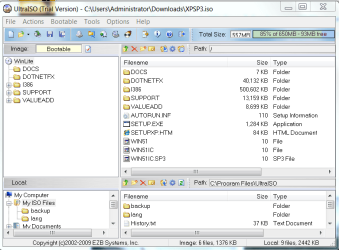
The best method is to use the XP .ISO image file and Write Disk Image to the stick using Bootable tab on UltraISO trial version here: View attachment 41777

I am not sure you have the XP ISO image file from what you said before, but am testing now Make Disk Image on the same UltraISO Bootable tab to see if it can compile the ISO.

It can only create an ISO from disk, however using Nlite you can easily make your XP files into an ISO image and then write the ISO to your USB flash stick using UltraISO Bootable tab! You can also slipstream in drivers on Drivers page in Nlite to make installation smoother.

Then you boot from stick by enabling all USB options in BIOS, and tap the F-key given on first bootup screen for Boot Menu (usually F10 or F12).
 
Last edited:
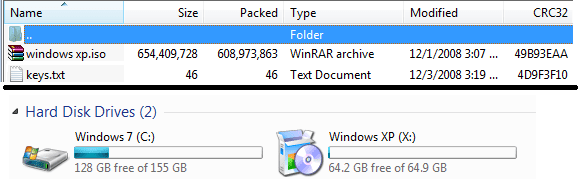
Yes, I do have the ISO. I made a .rar file, put the documents that include the key and such, and I put something called 'windows xp.iso' in it. Would that be what your talking about? I want to get started on this, so do you mind getting a link for me with the program 'UltraISO'?

Oh, also, can I do the same process, but with a SD Card? I can also boot an SD Card from the boot menu.
 

My Computer

Computer Manufacturer/Model Number
Gateway KAV60
OS
Windows 7 Home Premium 32-bit
Memory
2 GB
Screen Resolution
1024x600
Hard Drives
250 GB HDD
Internet Speed
Time Warner Cable/Road Runner
Other Info
Intel Atom processor N270
Multi-in-1 card reader
802.11b/g
NO optical drive
NO WWAN
NO Bluetooth
I put the ultra iso download on the post above^^

XP setup blocked from running in Win7 due to compatibility issues. Can't get around it.

Will need to write XP ISO to stick using UltraISO. You'll need to boot into stick anyway to full format the partition you made for XP.
 
Last edited:
UltraISO is not able to write to SD Card? Wow, I thought that a USB Stick and an SD Card were pretty much the same thing. They're used for storage lol.

Well I'll give the SD Card and UltraISO a try, if it doesn't then, I have to make an attempt with the broken USB stick.

This is an image I just took.

Failed! :(
 

Attachments

  • Windows XP Installation - 1.png
    Windows XP Installation - 1.png
    8.9 KB · Views: 20

My Computer

Computer Manufacturer/Model Number
Gateway KAV60
OS
Windows 7 Home Premium 32-bit
Memory
2 GB
Screen Resolution
1024x600
Hard Drives
250 GB HDD
Internet Speed
Time Warner Cable/Road Runner
Other Info
Intel Atom processor N270
Multi-in-1 card reader
802.11b/g
NO optical drive
NO WWAN
NO Bluetooth
I put the ultra iso download on the page above^^


XP setup blocked from running in Win7 due to compatibility issues. Can't get around it.

Will need to write XP ISO to stick using UltraISO. You'll need to boot into stick anyway to full format the partition you made for XP.

Yeah it didn't work [-_-] :cry:

I'll try first with the SD Card, if I can't then I'll do it with the USB stick.

And Full Format the drive for Windows 7? Don't you mean Windows XP? If I format the drive for Windows 7, I lose everything! :mad:
 

My Computer

Computer Manufacturer/Model Number
Gateway KAV60
OS
Windows 7 Home Premium 32-bit
Memory
2 GB
Screen Resolution
1024x600
Hard Drives
250 GB HDD
Internet Speed
Time Warner Cable/Road Runner
Other Info
Intel Atom processor N270
Multi-in-1 card reader
802.11b/g
NO optical drive
NO WWAN
NO Bluetooth
Can you give me a step-by-step on how to do this? I'm lost around UltraISO. :|
 

My Computer

Computer Manufacturer/Model Number
Gateway KAV60
OS
Windows 7 Home Premium 32-bit
Memory
2 GB
Screen Resolution
1024x600
Hard Drives
250 GB HDD
Internet Speed
Time Warner Cable/Road Runner
Other Info
Intel Atom processor N270
Multi-in-1 card reader
802.11b/g
NO optical drive
NO WWAN
NO Bluetooth
Use the flash stick!

Install and open UltraISO trial version. Load Xp ISO using Open on File tab:

load.PNG

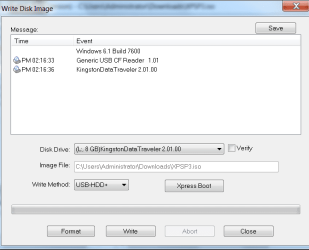
Now select Write Disk Image on Bootable Tab. On this panel it will have XP loaded as Image File.

Use drop-down menu to select USB flash stick, next Format, check Verify box, then Write.

write.PNG

Now reboot computer and tap F-key given on first bootup screen for Boot Menu, select flash stick from Hard Drives.
 
It told me I was missing/corrupted somethingsetup.tif I forgot the name. I just remember being a .tif file
 

My Computer

Computer Manufacturer/Model Number
Gateway KAV60
OS
Windows 7 Home Premium 32-bit
Memory
2 GB
Screen Resolution
1024x600
Hard Drives
250 GB HDD
Internet Speed
Time Warner Cable/Road Runner
Other Info
Intel Atom processor N270
Multi-in-1 card reader
802.11b/g
NO optical drive
NO WWAN
NO Bluetooth
Exactly when did you get this error? See if you can repeat it to copy/screenshot the exact error.

Do you have an .iso or a .tif file?

May need to recompile the files into .iso using Nlite. Very fast and easy - just did it here.

Did you format the stick first using format button first?

Plug in the flash stick, locate it in Computer, right click, select Properties, then Tools, then Error Checking, check both boxes and Start scan for file system errors.
 
How do I screenshot when I am not booted to Windows?
 

My Computer

Computer Manufacturer/Model Number
Gateway KAV60
OS
Windows 7 Home Premium 32-bit
Memory
2 GB
Screen Resolution
1024x600
Hard Drives
250 GB HDD
Internet Speed
Time Warner Cable/Road Runner
Other Info
Intel Atom processor N270
Multi-in-1 card reader
802.11b/g
NO optical drive
NO WWAN
NO Bluetooth
Back
Top