Multi Monitor Set Up 3 Screens

Strom

New member
Local time
7:10 PM
Messages
3
I am trying to run 3 monitors off my Thinkpad and docking station 3 by lenovo. However, only two displays work at a single time and the third is detected but will not display anything. I have a Mini DP to DVI another DP to DVI and the standard AV for my setup - all the DP's are active. Is there something I am missing as to why all three displays are not working? Or does something need to be enabled?


Thanks!
 

My Computer My Computer

At a glance

Windows 7 32 bitintel (r) HD Graphics 4000
Computer type
Laptop
Computer Manufacturer/Model Number
Thinkpad
OS
Windows 7 32 bit
Graphics Card(s)
intel (r) HD Graphics 4000
Hi Strom, welcome to the Seven Forums.

I have never heard of a single GPU laptop capable to use more than two displays at any given time, docked or not. I for instance have a similar setup, an HP laptop with two external displays connected (VGA & HDMI). I can use a combination of any two displays but never all three at the same time.

Kari
 

My Computer My Computer

At a glance

Windows 10 Pro x64 EN-GB1.6 GHz Intel Core i7-720QM Processor6 GBATI Mobility Radeon HD 5850 Graphics
Computer type
Laptop
Computer Manufacturer/Model Number
HP ENVY 17-1150eg
OS
Windows 10 Pro x64 EN-GB
CPU
1.6 GHz Intel Core i7-720QM Processor
Memory
6 GB
Graphics Card(s)
ATI Mobility Radeon HD 5850 Graphics
Sound Card
Beats sound system with integrated subwoofer
Monitor(s) Displays
17" laptop display, 22" LED and 32" Full HD TV through HDMI
Screen Resolution
1600*900 (1), 1920*1080 (2&3)
Hard Drives
Internal: 2 x 500 GB SATA Hard Disk Drive 7200 rpm
External: 2TB for backups, 3TB USB3 network drive for media
Cooling
As Envy runs a bit warm, I have it on a Cooler Master pad
Keyboard
Logitech diNovo Media Desktop Laser (bluetooth)
Mouse
Logitech Performance Mouse MX
Internet Speed
50/10 Mbps VDSL
Antivirus
Windows Defender 4.3.9431.0
Browser
Maxthon 3.5.2., IE11
Thanks Kari.

I thought you would be able to run three displays via the display ports (the reg and mini to DVI) + VGA. It's odd as the 3rd display is recognized but nothing happens - I was wondering if there was a setting in the BIOS that might need to be enabled that you knew of?
 

My Computer My Computer

At a glance

Windows 7 32 bitintel (r) HD Graphics 4000
Computer type
Laptop
Computer Manufacturer/Model Number
Thinkpad
OS
Windows 7 32 bit
Graphics Card(s)
intel (r) HD Graphics 4000
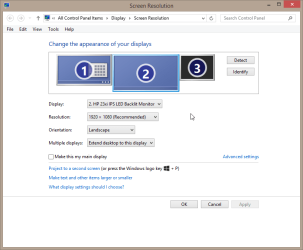
It's not odd, it's how it works. Here a screenshot of my setup:

2014-03-18_14h21_21.png

All three displays found (1 = laptop, 2 = external HDMI, 3 = external VGA) but only two, any two, can be used at any given time.
 

My Computer My Computer

At a glance

Windows 10 Pro x64 EN-GB1.6 GHz Intel Core i7-720QM Processor6 GBATI Mobility Radeon HD 5850 Graphics
Computer type
Laptop
Computer Manufacturer/Model Number
HP ENVY 17-1150eg
OS
Windows 10 Pro x64 EN-GB
CPU
1.6 GHz Intel Core i7-720QM Processor
Memory
6 GB
Graphics Card(s)
ATI Mobility Radeon HD 5850 Graphics
Sound Card
Beats sound system with integrated subwoofer
Monitor(s) Displays
17" laptop display, 22" LED and 32" Full HD TV through HDMI
Screen Resolution
1600*900 (1), 1920*1080 (2&3)
Hard Drives
Internal: 2 x 500 GB SATA Hard Disk Drive 7200 rpm
External: 2TB for backups, 3TB USB3 network drive for media
Cooling
As Envy runs a bit warm, I have it on a Cooler Master pad
Keyboard
Logitech diNovo Media Desktop Laser (bluetooth)
Mouse
Logitech Performance Mouse MX
Internet Speed
50/10 Mbps VDSL
Antivirus
Windows Defender 4.3.9431.0
Browser
Maxthon 3.5.2., IE11
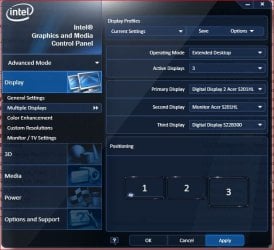
This is what I see so I guess that was the confusion as it looks like you can. Do you know of any way to get three displays to work or am I wishing for too much?
 

Attachments

  • SnipImage.JPG
    SnipImage.JPG
    49.1 KB · Views: 11

My Computer My Computer

At a glance

Windows 7 32 bitintel (r) HD Graphics 4000
Computer type
Laptop
Computer Manufacturer/Model Number
Thinkpad
OS
Windows 7 32 bit
Graphics Card(s)
intel (r) HD Graphics 4000
According to this page, up to three displays can be used simultaneously provided you have a dock capable to it, and the laptop has Nvidia Optimus technology. Check your laptop's specifications to find out if you have Nvidia Optimus system.
 

My Computer My Computer

At a glance

Windows 10 Pro x64 EN-GB1.6 GHz Intel Core i7-720QM Processor6 GBATI Mobility Radeon HD 5850 Graphics
Computer type
Laptop
Computer Manufacturer/Model Number
HP ENVY 17-1150eg
OS
Windows 10 Pro x64 EN-GB
CPU
1.6 GHz Intel Core i7-720QM Processor
Memory
6 GB
Graphics Card(s)
ATI Mobility Radeon HD 5850 Graphics
Sound Card
Beats sound system with integrated subwoofer
Monitor(s) Displays
17" laptop display, 22" LED and 32" Full HD TV through HDMI
Screen Resolution
1600*900 (1), 1920*1080 (2&3)
Hard Drives
Internal: 2 x 500 GB SATA Hard Disk Drive 7200 rpm
External: 2TB for backups, 3TB USB3 network drive for media
Cooling
As Envy runs a bit warm, I have it on a Cooler Master pad
Keyboard
Logitech diNovo Media Desktop Laser (bluetooth)
Mouse
Logitech Performance Mouse MX
Internet Speed
50/10 Mbps VDSL
Antivirus
Windows Defender 4.3.9431.0
Browser
Maxthon 3.5.2., IE11
Back
Top