Solved Multicolored Lines, computer crash, Drivers?

Aemornion

New member
Local time
5:45 PM
Messages
13
Hello all,

I recently built my desktop, and I seem to be having an intermittent problem.

Randomly, the computer will crash, and the screen is frozen in a multicolored lined fashion. Sometimes i can see my mouse on top of this multicolored screen. Sometimes i can even still move the mouse.

It looks like this

0213161649_HDR_zpswkww4y4e.jpg

This has happened 6 times now, although i am not on the computer all that often.

It is important information to note, that this happens when the system is idle, the overwhelming number of events, have happened when I am doing nothing that would tax the system. Like just surfing the net, or using office. Basic stuff. This past Time i was just in the process of starting up AutoCAD, but this is the only event that has any association with that software.

In event viewer, I do not see any errors, up until i reset the computer, this was captured directly following my most recent incident.
Capture_zpsdcvycifx.png


Previously I set the computer to create a minidump file, hopeing i could get more information about the crash, but it did not create one... Note sure why, perhaps the computer didn't actually crash? and just the screen when haywire. But i am really not sure.

Any ideas?

I'd be a step in the right direction if i could simply figure out even the basics of the issue...

CPU: AMD FX-6300 3.5GHz 6-Core Processor
CPU Cooler: CRYORIG H7 49.0 CFM CPU Cooler
Motherboard: ASRock 970M PRO3 Micro ATX AM3+/AM3 Motherboard
Memory: G.Skill Ripjaws Series 8GB (2 x 4GB) DDR3-1600 Memory
Storage: Kingston SSDNow V300 Series 120GB 2.5" Solid State Drive
Storage: Western Digital Caviar Blue 1TB 3.5" 7200RPM Internal Hard Drive
Video Card: MSI Radeon R9 380 4GB Video Card
Case: Fractal Design Core 1000 USB 3.0 MicroATX Mid Tower Case
Power Supply: SeaSonic S12II 520W 80+ Bronze Certified ATX Power Supply
Optical Drive: Asus DRW-24B1ST/BLK/B/AS DVD/CD Writer
Operating System: Microsoft Windows 7 Professional SP1 OEM (64-bit)
Software: Microsoft Office Home and Student 2016, AutoCAD, Steam, various games...
Monitor: Acer H226HQLbid 60Hz 21.5" Monitor
 
Last edited:

My Computer

Computer type
PC/Desktop
Computer Manufacturer/Model Number
Custom
OS
64 bit win 7
CPU
AMD FX-6300 3.5GHz 6-Core Processor
Motherboard
ASRock 970M PRO3 Micro ATX AM3+/AM3 Motherboard
Memory
G.Skill Ripjaws Series 16GB (4 x 4GB) DDR3-1600 Memory
Graphics Card(s)
MSI Radeon R9 380 4GB Video Card
Hard Drives
Kingston SSDNow V300 Series 120GB 2.5" Solid State Drive
3 in a Raid 5
Western Digital Caviar Blue 1TB 3.5" 7200RPM Internal Hard Drive
Antivirus
Norton
Browser
Chrome
Hello and welcome Aemornion mate first thing I would do is to reseat all cards sticks and cables including the monitor one.
Plus I would recheck all the drivers for graphics - by the by what graphic connection are you using DVI HDMI ??

Worse case scenario is you have a dud card or monitor.
 

My Computer

Computer type
PC/Desktop
Computer Manufacturer/Model Number
Own build (new) Desk1 / Asus ROG Win 7 / Desk2 1st build
OS
Desk1 7 Home Prem / Desk2 10 Pro / Main lap Asus ROG 10 Pro 2 laptop Toshiba 7 Pro Asus P2520 7 & 10
CPU
Desk1 i5 3750K / Laptop i7 GTX 860M / Desk2 i5 2500
Motherboard
Desk1 Asus P877-V / Desk2 Gigabyte H67 UD3H / Laptop ?
Memory
Desk1 8GB (1866) / Desk2 16GB (1333) / Laptop 8Gb DDR3
Graphics Card(s)
Desk 1& 2NVidia GTX 650 & Laptops on board Intel
Sound Card
Desk 1 & 2 -XONAR DG Realtek High Def audio Laptop
Monitor(s) Displays
Desk 1 Benq HD 2450 / Desk2 Philips 24" / Laptop 17.5"
Screen Resolution
1920x1080 D1 & D2 & Laptop 1
Hard Drives
Desk1 Samsung 120GB 830 SSD
Asus ROG 256GB 850 Pro SSD
Desk2 Samsung 840 256 SSD
Toshiba 120GB EVO
PSU
Desk 1 Corsair HX 1050/ Laptop ? / Desk 2 Corsair HX 650
Case
Desk 1 Cooler HAF XM ? Toshiba laptop / Desk2 Coolermaster
Cooling
Fans on all Desk1 -2 Desk2 - all Coolermasters 5 Laptop ?
Keyboard
Desk 1 MS Sidewinder X6 Desk 2 MS Sidewinder X 4
Mouse
Desk 1&2 - Gigabyte MS 900 gamer - laptop - Logitec wireless
Internet Speed
ADSL2+
Other Info
One other Desktop (tester) and spare Toshba laptop both with SSD's
Running Kaspersky 2016 ISS on all machines config'd identically
Logitec audio stereo systems on each machine (x3)
Canon MG5250MFC
Router/modem TP-Link running WPA2SK
I'm thinking it's the video card too, or a bad monitor connection. A driver issue would have put an error in the error reporting tool, and a crash would have made a mini-dump, I would think.

On second thought, the power supply might be under-powered by a little bit. I'm thinking that 650 - 750 Watts would be a better choice for all the hardware that is in that PC. That GPU is power hungry.
 

My Computer

Computer type
PC/Desktop
Computer Manufacturer/Model Number
Mellon Labs (custom build)
OS
Win 7 Pro x64/Win 10 Pro x64 dual boot
CPU
AMD FX 8350 Vishera @ 4200
Motherboard
ASUS M5A97 R2.0
Memory
16 GB Mushkin Blackline DDR3-2400 @ 1866 (9-10-10-10-31)
Graphics Card(s)
XFX Radeon R9 280 Double D Black Edition
Sound Card
Realtek HD Audio on MB. Sounds great.
Monitor(s) Displays
Acer 24", Acer 22"
Screen Resolution
3840 x 1080
Hard Drives
1 x Mushkin Chronos 120 GB SSD (Win 10)
1 x Samsung 850 EVO 250 GB SSD (Win 7)
1 x WD 1TB SATA Blue
1 x WD 1TB SATA Green
PSU
Corsair TX-750
Case
CoolerMaster HAF 912+
Cooling
Coolermaster Seidon 240M Liquid AIO. 6 case fans
Keyboard
Logitech G710+
Mouse
Logitech G500s
Internet Speed
Much better since I got fiber, but still way overpriced.
Antivirus
MSE, Malware Bytes for scanning
Browser
Firefox
Other Info
Corsair VOID USB headphones.

A Mellon Labs X-1 - LCD Smartie driven system status display.

Brought to you by the letter E
Hello all,

Thanks for the tips and suggestions.

So I re-seated all the connectors, one monitor is a DVI and the other is HDMI.
I also ran a test of my HDD's no bad sectors or errors were found.

Thats an interesting comment on the PSU size. But I don't see a causal link between this crash and the psu. I mean, the load on the GPU is 2 static screens that occasionally change color and have a mouse moving across them, how hard can that be... Id understand if I were running skyrim max settings with mods, etc (which i have, with no issues doing). Actually putting a load on the GPU which would stress the PSU might cause an issue. Am I missing something? If its really recommended I get a larger size PSU, ill make that happen.

So an update on things, I identified a somewhat repeatable source for the issue.
It also created a dump file, on one occasion. So some advice on how to show that to you guys would be appreciated.

Thankfully it appears not to be GPU related.

I had steam open, and was in the process of downloading a game, when a crash happened.
So upon reboot, I went about my business, then restarted steam, which then restarted the download, and low and behold another crash.

After some additional testing, and some additional crashes, I can only conclude that this is either a separate issue (with identical symptoms) or the root cause of the crashes, I didn't keep track previously, but if steam was downloading something, and update perhaps, prior to the other events. That would account for the variability in the crashes, as I don't have steam up that often.
It seems completely apparent to me that being able to run the computer for an hour researching the issue, and then it crashes a minute after starting steam, on multiple occasions would be a red flag against steam.


I checked the drivers again, and the network driver did in fact update. But it did not fix the problem.

So I am wondering, I happen to have an unopened
TP-Link TG-3468 10/100/1000 Mbps PCI-Express x1 Network Adapter

If I install that card + its drivers and use it instead of the motherboards network port, would that be a good test for if this issue is driver related?

I am also wondering what some good processes are debugging driver related issues.

Thanks for any assistance.
 

My Computer

Computer type
PC/Desktop
Computer Manufacturer/Model Number
Custom
OS
64 bit win 7
CPU
AMD FX-6300 3.5GHz 6-Core Processor
Motherboard
ASRock 970M PRO3 Micro ATX AM3+/AM3 Motherboard
Memory
G.Skill Ripjaws Series 16GB (4 x 4GB) DDR3-1600 Memory
Graphics Card(s)
MSI Radeon R9 380 4GB Video Card
Hard Drives
Kingston SSDNow V300 Series 120GB 2.5" Solid State Drive
3 in a Raid 5
Western Digital Caviar Blue 1TB 3.5" 7200RPM Internal Hard Drive
Antivirus
Norton
Browser
Chrome
You could try the network card and see if it helps. They can do funny things to PCs if they aren't working well. I would disable the network adapter in BIOS before putting in the new card. Obviously, make sure you have the drivers for the new card before starting. :)

A note about the power supply. I ran a modest assessment of your system based on the information that you gave in the original post from here:

eXtreme Power Supply Calculator

I used "Expert" mode.

I used the data that you gave, plus a single USB 2.0 device and 2 case fans to be a bit more realistic. Assuming no overclocking of either the CPU or GPU, the calculator came up with a power rating of 492 Watts. With a 520W PSU, that doesn't leave you a lot of headroom, especially if the supply is older and has degraded somewhat. Most people here would recommend a larger supply for more headroom (you should plan on about 25% more capacity than you need at minimum.) This is because as a supply ages, it's power output goes down.

Given your issues with Steam possibly causing the graphics problem, it may not be the PSU causing this issue, but if it were me, I would consider replacing the supply with a more capable one, especially if the supply is more than two years old. Just my advice, the decision is up to you, of course. :)
 
Last edited:

My Computer

Computer type
PC/Desktop
Computer Manufacturer/Model Number
Mellon Labs (custom build)
OS
Win 7 Pro x64/Win 10 Pro x64 dual boot
CPU
AMD FX 8350 Vishera @ 4200
Motherboard
ASUS M5A97 R2.0
Memory
16 GB Mushkin Blackline DDR3-2400 @ 1866 (9-10-10-10-31)
Graphics Card(s)
XFX Radeon R9 280 Double D Black Edition
Sound Card
Realtek HD Audio on MB. Sounds great.
Monitor(s) Displays
Acer 24", Acer 22"
Screen Resolution
3840 x 1080
Hard Drives
1 x Mushkin Chronos 120 GB SSD (Win 10)
1 x Samsung 850 EVO 250 GB SSD (Win 7)
1 x WD 1TB SATA Blue
1 x WD 1TB SATA Green
PSU
Corsair TX-750
Case
CoolerMaster HAF 912+
Cooling
Coolermaster Seidon 240M Liquid AIO. 6 case fans
Keyboard
Logitech G710+
Mouse
Logitech G500s
Internet Speed
Much better since I got fiber, but still way overpriced.
Antivirus
MSE, Malware Bytes for scanning
Browser
Firefox
Other Info
Corsair VOID USB headphones.

A Mellon Labs X-1 - LCD Smartie driven system status display.

Brought to you by the letter E
Hello mate now you can try this little ditty of mine because the PSU is very underrated as a cause for any problems and card do draw a fair amount of power and if you have used the calculator as Mellon Head has suggested it usually gives you a figure with margin of error for comfort sake for want of a better term.
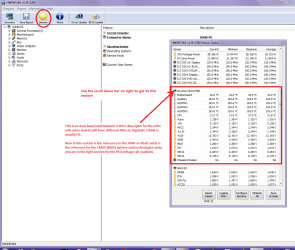
Using HW Info
PART A:
You can test the volts on the PSU with HW Info HWiNFO, HWiNFO32/64 - Download < download the right bit version and close the right hand window select Sensors and scroll down to the power section where you will see what the volts are doing see my pic. In my pic the section (Nuvoton) with VBATT is a dead give away you are in the section for the rail voltages. There are other section titles and one that pops up often is ITE
Now the voltage on the different rails have to be within 5% =+/- of what is required or the machine will not work properly if at all.
See this for the rail voltage info
Power Supply 101: A Reference Of Specifications - Power Supplies (Section 2.)
The original right hand window shows the machine running and is handy for that but for looking at the components in some detail close it and use the main left hand side panel
FOR OTHER COMPONENTS
PART B:
Open each small square with + in it on the section the components are in and then click on the individual component/s (it will highlight in blue) - in the right hand side will appear all sorts of details including brands speeds and other essential info that particular device. See pic for example.
Use PART A: and post back a snip
 

Attachments

  • HW INFO DESKTOP PSU.PNG
    HW INFO DESKTOP PSU.PNG
    157.7 KB · Views: 3

My Computer

Computer type
PC/Desktop
Computer Manufacturer/Model Number
Own build (new) Desk1 / Asus ROG Win 7 / Desk2 1st build
OS
Desk1 7 Home Prem / Desk2 10 Pro / Main lap Asus ROG 10 Pro 2 laptop Toshiba 7 Pro Asus P2520 7 & 10
CPU
Desk1 i5 3750K / Laptop i7 GTX 860M / Desk2 i5 2500
Motherboard
Desk1 Asus P877-V / Desk2 Gigabyte H67 UD3H / Laptop ?
Memory
Desk1 8GB (1866) / Desk2 16GB (1333) / Laptop 8Gb DDR3
Graphics Card(s)
Desk 1& 2NVidia GTX 650 & Laptops on board Intel
Sound Card
Desk 1 & 2 -XONAR DG Realtek High Def audio Laptop
Monitor(s) Displays
Desk 1 Benq HD 2450 / Desk2 Philips 24" / Laptop 17.5"
Screen Resolution
1920x1080 D1 & D2 & Laptop 1
Hard Drives
Desk1 Samsung 120GB 830 SSD
Asus ROG 256GB 850 Pro SSD
Desk2 Samsung 840 256 SSD
Toshiba 120GB EVO
PSU
Desk 1 Corsair HX 1050/ Laptop ? / Desk 2 Corsair HX 650
Case
Desk 1 Cooler HAF XM ? Toshiba laptop / Desk2 Coolermaster
Cooling
Fans on all Desk1 -2 Desk2 - all Coolermasters 5 Laptop ?
Keyboard
Desk 1 MS Sidewinder X6 Desk 2 MS Sidewinder X 4
Mouse
Desk 1&2 - Gigabyte MS 900 gamer - laptop - Logitec wireless
Internet Speed
ADSL2+
Other Info
One other Desktop (tester) and spare Toshba laptop both with SSD's
Running Kaspersky 2016 ISS on all machines config'd identically
Logitec audio stereo systems on each machine (x3)
Canon MG5250MFC
Router/modem TP-Link running WPA2SK
Alright, thank you for your responses,

Based on your analysis, I will work on acquiring a new PSU, hopefully by the end of the week ill have a new one.

Here is the requested voltages.
First without steam open,
SystemVoltages_zpsqbi72fd4.jpg

Second, about 40 seconds before the computer crashed (ie, i opened steam and 40 seconds later it crashed) Not sure if that tells anyone anything.
right%20before%20crash_zps8ulir4zp.jpg


I did a memory test all night and while i was at work today using MemTest86 - Offical Site of the x86 Memory Testing Tool
No errors, as you can see.
MemTest_zpslnqhkudj.jpg

Also tried running steam with just one Ram stick at a time, still the same issue, every time.

I also ran a sfc /scannow check, which returned no issues

I also ran chkdsk, which also had no issues.

I re-seated all the components

Installed my pci-e NIC and associated drivers (Disabled the on board one)
Steam Still crashed the PC when downloading.

Uninstalled Steam, reinstalled Steam, changed settings within steam. Still I start steam, and it begins a download, sooner or later it crashes in the way I previously described, with the wonderful multicolor death screen, and other such fun.

Any other ideas? This is extremely frustrating.
 
Last edited:

My Computer

Computer type
PC/Desktop
Computer Manufacturer/Model Number
Custom
OS
64 bit win 7
CPU
AMD FX-6300 3.5GHz 6-Core Processor
Motherboard
ASRock 970M PRO3 Micro ATX AM3+/AM3 Motherboard
Memory
G.Skill Ripjaws Series 16GB (4 x 4GB) DDR3-1600 Memory
Graphics Card(s)
MSI Radeon R9 380 4GB Video Card
Hard Drives
Kingston SSDNow V300 Series 120GB 2.5" Solid State Drive
3 in a Raid 5
Western Digital Caviar Blue 1TB 3.5" 7200RPM Internal Hard Drive
Antivirus
Norton
Browser
Chrome
Hmm hard to tell from the HW Info pic as I cannot see what the PSU rails are as there should be a reference to VBATT or Vbatt in the board section as in my pic. What did the calculator come up with any way??

In the memtest you have only done 6 passes mate it has to be at least 8 passes ot you may as well not do it. Now as you are getting nowhere with individual sticks it could be the board slots that may be at fault but you really need to run that test as I say for 8 passes before any conclusive results are made.

For pics try this it is so much easier than using other pic making stuff . How to Use the Snipping Tool in Vista - just snip save to wherever you want I do quick ones to desktop and then remove when done and attach in the Manage attachments button
 

My Computer

Computer type
PC/Desktop
Computer Manufacturer/Model Number
Own build (new) Desk1 / Asus ROG Win 7 / Desk2 1st build
OS
Desk1 7 Home Prem / Desk2 10 Pro / Main lap Asus ROG 10 Pro 2 laptop Toshiba 7 Pro Asus P2520 7 & 10
CPU
Desk1 i5 3750K / Laptop i7 GTX 860M / Desk2 i5 2500
Motherboard
Desk1 Asus P877-V / Desk2 Gigabyte H67 UD3H / Laptop ?
Memory
Desk1 8GB (1866) / Desk2 16GB (1333) / Laptop 8Gb DDR3
Graphics Card(s)
Desk 1& 2NVidia GTX 650 & Laptops on board Intel
Sound Card
Desk 1 & 2 -XONAR DG Realtek High Def audio Laptop
Monitor(s) Displays
Desk 1 Benq HD 2450 / Desk2 Philips 24" / Laptop 17.5"
Screen Resolution
1920x1080 D1 & D2 & Laptop 1
Hard Drives
Desk1 Samsung 120GB 830 SSD
Asus ROG 256GB 850 Pro SSD
Desk2 Samsung 840 256 SSD
Toshiba 120GB EVO
PSU
Desk 1 Corsair HX 1050/ Laptop ? / Desk 2 Corsair HX 650
Case
Desk 1 Cooler HAF XM ? Toshiba laptop / Desk2 Coolermaster
Cooling
Fans on all Desk1 -2 Desk2 - all Coolermasters 5 Laptop ?
Keyboard
Desk 1 MS Sidewinder X6 Desk 2 MS Sidewinder X 4
Mouse
Desk 1&2 - Gigabyte MS 900 gamer - laptop - Logitec wireless
Internet Speed
ADSL2+
Other Info
One other Desktop (tester) and spare Toshba laptop both with SSD's
Running Kaspersky 2016 ISS on all machines config'd identically
Logitec audio stereo systems on each machine (x3)
Canon MG5250MFC
Router/modem TP-Link running WPA2SK
@ICIT2LOL:

John, I see no 12V rail. What do you make of the OP's voltages?

@ Aemornion:

Let's wait and see what ICIT2LOL has to say about the voltages before we proceed.
 

My Computer

Computer type
PC/Desktop
Computer Manufacturer/Model Number
Mellon Labs (custom build)
OS
Win 7 Pro x64/Win 10 Pro x64 dual boot
CPU
AMD FX 8350 Vishera @ 4200
Motherboard
ASUS M5A97 R2.0
Memory
16 GB Mushkin Blackline DDR3-2400 @ 1866 (9-10-10-10-31)
Graphics Card(s)
XFX Radeon R9 280 Double D Black Edition
Sound Card
Realtek HD Audio on MB. Sounds great.
Monitor(s) Displays
Acer 24", Acer 22"
Screen Resolution
3840 x 1080
Hard Drives
1 x Mushkin Chronos 120 GB SSD (Win 10)
1 x Samsung 850 EVO 250 GB SSD (Win 7)
1 x WD 1TB SATA Blue
1 x WD 1TB SATA Green
PSU
Corsair TX-750
Case
CoolerMaster HAF 912+
Cooling
Coolermaster Seidon 240M Liquid AIO. 6 case fans
Keyboard
Logitech G710+
Mouse
Logitech G500s
Internet Speed
Much better since I got fiber, but still way overpriced.
Antivirus
MSE, Malware Bytes for scanning
Browser
Firefox
Other Info
Corsair VOID USB headphones.

A Mellon Labs X-1 - LCD Smartie driven system status display.

Brought to you by the letter E
Actually mate I cannot see any rails volts either and I think maybe the Sensor button may have not been used though usually it is the one I reference to - that yellow one. I have asked for other stuff and maybe that HW stuff could be run again because the VBATT section is not there although it is showing the board model?? I am beginning to think that board may be at fault too - hope not but possibly eh?
 

My Computer

Computer type
PC/Desktop
Computer Manufacturer/Model Number
Own build (new) Desk1 / Asus ROG Win 7 / Desk2 1st build
OS
Desk1 7 Home Prem / Desk2 10 Pro / Main lap Asus ROG 10 Pro 2 laptop Toshiba 7 Pro Asus P2520 7 & 10
CPU
Desk1 i5 3750K / Laptop i7 GTX 860M / Desk2 i5 2500
Motherboard
Desk1 Asus P877-V / Desk2 Gigabyte H67 UD3H / Laptop ?
Memory
Desk1 8GB (1866) / Desk2 16GB (1333) / Laptop 8Gb DDR3
Graphics Card(s)
Desk 1& 2NVidia GTX 650 & Laptops on board Intel
Sound Card
Desk 1 & 2 -XONAR DG Realtek High Def audio Laptop
Monitor(s) Displays
Desk 1 Benq HD 2450 / Desk2 Philips 24" / Laptop 17.5"
Screen Resolution
1920x1080 D1 & D2 & Laptop 1
Hard Drives
Desk1 Samsung 120GB 830 SSD
Asus ROG 256GB 850 Pro SSD
Desk2 Samsung 840 256 SSD
Toshiba 120GB EVO
PSU
Desk 1 Corsair HX 1050/ Laptop ? / Desk 2 Corsair HX 650
Case
Desk 1 Cooler HAF XM ? Toshiba laptop / Desk2 Coolermaster
Cooling
Fans on all Desk1 -2 Desk2 - all Coolermasters 5 Laptop ?
Keyboard
Desk 1 MS Sidewinder X6 Desk 2 MS Sidewinder X 4
Mouse
Desk 1&2 - Gigabyte MS 900 gamer - laptop - Logitec wireless
Internet Speed
ADSL2+
Other Info
One other Desktop (tester) and spare Toshba laptop both with SSD's
Running Kaspersky 2016 ISS on all machines config'd identically
Logitec audio stereo systems on each machine (x3)
Canon MG5250MFC
Router/modem TP-Link running WPA2SK
John, I did notice one thing. In the picture just before the crash, the Vcore went way up to around 1.38V from 0.86V. That's a significant jump in voltage. The processor is coming out of Cool 'n Quiet mode and ramping up to full clocking speed. I wonder if it could be a CPU fault? CPU is entering turbo mode, but the temps aren't bad, though they aren't in Celsius, so it's hard to get an accurate picture. I think he's got a well cooled CPU. It's not even reaching 90F at full turbo on four cores. I'm wondering if turning turbo mode off will help?
 

My Computer

Computer type
PC/Desktop
Computer Manufacturer/Model Number
Mellon Labs (custom build)
OS
Win 7 Pro x64/Win 10 Pro x64 dual boot
CPU
AMD FX 8350 Vishera @ 4200
Motherboard
ASUS M5A97 R2.0
Memory
16 GB Mushkin Blackline DDR3-2400 @ 1866 (9-10-10-10-31)
Graphics Card(s)
XFX Radeon R9 280 Double D Black Edition
Sound Card
Realtek HD Audio on MB. Sounds great.
Monitor(s) Displays
Acer 24", Acer 22"
Screen Resolution
3840 x 1080
Hard Drives
1 x Mushkin Chronos 120 GB SSD (Win 10)
1 x Samsung 850 EVO 250 GB SSD (Win 7)
1 x WD 1TB SATA Blue
1 x WD 1TB SATA Green
PSU
Corsair TX-750
Case
CoolerMaster HAF 912+
Cooling
Coolermaster Seidon 240M Liquid AIO. 6 case fans
Keyboard
Logitech G710+
Mouse
Logitech G500s
Internet Speed
Much better since I got fiber, but still way overpriced.
Antivirus
MSE, Malware Bytes for scanning
Browser
Firefox
Other Info
Corsair VOID USB headphones.

A Mellon Labs X-1 - LCD Smartie driven system status display.

Brought to you by the letter E
Yes mate I think that is a real possibility too because that is one heck of a jump which just goes to reinforce me to think the PSU is being stretched or is going south - though the readout on the HW stuff is showing what I think is a low CPU volts.

Don't know quite what to make of it as it does seem to be all over the place in that machine. :confused:

zedit I would be very interested to see what the volts are at pin 8 on the 24 pin plug too because that is the Power good signal:)
 

My Computer

Computer type
PC/Desktop
Computer Manufacturer/Model Number
Own build (new) Desk1 / Asus ROG Win 7 / Desk2 1st build
OS
Desk1 7 Home Prem / Desk2 10 Pro / Main lap Asus ROG 10 Pro 2 laptop Toshiba 7 Pro Asus P2520 7 & 10
CPU
Desk1 i5 3750K / Laptop i7 GTX 860M / Desk2 i5 2500
Motherboard
Desk1 Asus P877-V / Desk2 Gigabyte H67 UD3H / Laptop ?
Memory
Desk1 8GB (1866) / Desk2 16GB (1333) / Laptop 8Gb DDR3
Graphics Card(s)
Desk 1& 2NVidia GTX 650 & Laptops on board Intel
Sound Card
Desk 1 & 2 -XONAR DG Realtek High Def audio Laptop
Monitor(s) Displays
Desk 1 Benq HD 2450 / Desk2 Philips 24" / Laptop 17.5"
Screen Resolution
1920x1080 D1 & D2 & Laptop 1
Hard Drives
Desk1 Samsung 120GB 830 SSD
Asus ROG 256GB 850 Pro SSD
Desk2 Samsung 840 256 SSD
Toshiba 120GB EVO
PSU
Desk 1 Corsair HX 1050/ Laptop ? / Desk 2 Corsair HX 650
Case
Desk 1 Cooler HAF XM ? Toshiba laptop / Desk2 Coolermaster
Cooling
Fans on all Desk1 -2 Desk2 - all Coolermasters 5 Laptop ?
Keyboard
Desk 1 MS Sidewinder X6 Desk 2 MS Sidewinder X 4
Mouse
Desk 1&2 - Gigabyte MS 900 gamer - laptop - Logitec wireless
Internet Speed
ADSL2+
Other Info
One other Desktop (tester) and spare Toshba laptop both with SSD's
Running Kaspersky 2016 ISS on all machines config'd identically
Logitec audio stereo systems on each machine (x3)
Canon MG5250MFC
Router/modem TP-Link running WPA2SK
Thank you for your responses,

Yes, I was using the snipping tool, I love that tool! Best hidden secret software in windows if you ask me.

I clicked the yellow sensors button, and what you see above is what it brought up. I too noticed that I did not see any Vbatt etc.
The reason its all on one window, is I clicked one of the two little buttons in the bottom left of the first screen shot. Which created a new set of data columns, which meant I could snip all the voltages at once without the scroll bar. It did extend onto the other monitor a bit, which is why the dimensions are a little wonky.

I think in playing with it last week, I got it to display a bunch of hidden sensors, but they didn't have any readings if I recall. They were grayed out.
But i'll look into the settings tonight and see if I can figure out what's going on. Is there any other reason that it would not display them, that you can think of?
I'll also change the temp setting from F back to C for you guys. For reference 90F = 32C.

Or maybe I'll wait until the memtest is done to mess with HiWin64 again, I just got my wife to start it up again, so in 24 hours i'm guessing 8 passes will have completed. If I had known that, I would have not stopped it when I got back from work yesterday, but lesson learned.

I can take a picture of my tower when I get home if you think that would be helpful. I have a decent Heat Sink on the CPU.
Everything is new by 3 months, so I'm going to be really disappointed if something is failing already...

I ordered a 650W Seasonic PSU last night. Should be here later in the week. Even if its not the issue, I want to do it right. (anyone want to buy my lightly use 520W seasonic, lol)

But i'll mention once again, It runs everything else fine, I played a few hours of skyrim when I first got the computer put together, with Graphics Mods max settings, no problem, The other week Had 2 different CAD programs, and Photoshop running simultaneously, no problems. I did some stress test things with the GPU and CPU, no issues.
Open steam and let it download something, problem...

Something I might try next is just straight up reinstalling windows, I have acronis to back up my drives, so I could get back to where I am now, if that does not pan out. But regardless I have been having this issue since I built that darn thing, its simply only recently that I isolated a repeatable method of causing the issue.

How would I disable Turbo mode on the CPU, is that a setting in BIOS somewhere?

Are their any methods for testing the motherboard?
or doing a real test of the CPU, similar to the memory test?
What additional stuff can I do to check out my drives?
(I realized that I didn't mention in my first post that my 3 WD drives are in a RAID5 configuration, not sure if that matters? but I apologize for not specifying it.)

Thanks for the help, it is as always most appreciated! I would really be lost on my own, lol.
 
Last edited:

My Computer

Computer type
PC/Desktop
Computer Manufacturer/Model Number
Custom
OS
64 bit win 7
CPU
AMD FX-6300 3.5GHz 6-Core Processor
Motherboard
ASRock 970M PRO3 Micro ATX AM3+/AM3 Motherboard
Memory
G.Skill Ripjaws Series 16GB (4 x 4GB) DDR3-1600 Memory
Graphics Card(s)
MSI Radeon R9 380 4GB Video Card
Hard Drives
Kingston SSDNow V300 Series 120GB 2.5" Solid State Drive
3 in a Raid 5
Western Digital Caviar Blue 1TB 3.5" 7200RPM Internal Hard Drive
Antivirus
Norton
Browser
Chrome
Ok lets wait for the memtest and as for the HW I am assuming you had the right bit version not that I think it makes much difference except for frequencies and RAM speeds etc in the readouts.

That is a nice PSU by the by and did it measure up to what the calculator suggested? - if you mentioned it sorry I cannot see it in your post.

Now the other option you have is to physically measure the volts at 24 pin and GPU power leads with a digital multimeter if you feel like it. The meters are very cheap and good these days and just use the black lead to any black cable and test the other colours with the red lead. I would be very interested in what is showing at pin 8 (grey cable) as it is the Power Good signal - if that drops or goes above a certain voltage it will either not let the machine start up or just shut it down to prevent component damage.

Yep a pic of the machine would be good.
 

My Computer

Computer type
PC/Desktop
Computer Manufacturer/Model Number
Own build (new) Desk1 / Asus ROG Win 7 / Desk2 1st build
OS
Desk1 7 Home Prem / Desk2 10 Pro / Main lap Asus ROG 10 Pro 2 laptop Toshiba 7 Pro Asus P2520 7 & 10
CPU
Desk1 i5 3750K / Laptop i7 GTX 860M / Desk2 i5 2500
Motherboard
Desk1 Asus P877-V / Desk2 Gigabyte H67 UD3H / Laptop ?
Memory
Desk1 8GB (1866) / Desk2 16GB (1333) / Laptop 8Gb DDR3
Graphics Card(s)
Desk 1& 2NVidia GTX 650 & Laptops on board Intel
Sound Card
Desk 1 & 2 -XONAR DG Realtek High Def audio Laptop
Monitor(s) Displays
Desk 1 Benq HD 2450 / Desk2 Philips 24" / Laptop 17.5"
Screen Resolution
1920x1080 D1 & D2 & Laptop 1
Hard Drives
Desk1 Samsung 120GB 830 SSD
Asus ROG 256GB 850 Pro SSD
Desk2 Samsung 840 256 SSD
Toshiba 120GB EVO
PSU
Desk 1 Corsair HX 1050/ Laptop ? / Desk 2 Corsair HX 650
Case
Desk 1 Cooler HAF XM ? Toshiba laptop / Desk2 Coolermaster
Cooling
Fans on all Desk1 -2 Desk2 - all Coolermasters 5 Laptop ?
Keyboard
Desk 1 MS Sidewinder X6 Desk 2 MS Sidewinder X 4
Mouse
Desk 1&2 - Gigabyte MS 900 gamer - laptop - Logitec wireless
Internet Speed
ADSL2+
Other Info
One other Desktop (tester) and spare Toshba laptop both with SSD's
Running Kaspersky 2016 ISS on all machines config'd identically
Logitec audio stereo systems on each machine (x3)
Canon MG5250MFC
Router/modem TP-Link running WPA2SK
Hi Aemornion, welcome to 7F! :)

This is the most severe case of screen tearing that I, have ever seen. This could be a case of your MSI video card out performing your monitors.
First to check would be the output of the cards resolution output to the monitors and make sure they match, then, and this is most important, that the card is not pushing more refresh rate than the 60Hz the monitors are capable of.

Tearing is a specific visual artifact that appears when the frames shown in a game seem to split into a top and bottom half, which do not align. In very severe cases, the split may even occur three or four times.

Unlike many other issues, this one is caused by too much performance. Most monitors have a 60 Hz refresh rate, which means that they only refresh their image 60 times a second. But a fast gaming PC can play many titles at much higher speeds. When the frames start to come in more quickly than the monitor can refresh, a refresh may contain information from multiple frames. And thus the problem.

The most popular fix is an in-game setting called V-sync which locks the game’s output to a certain maximum (usually 60 frames per second). If you want to spend some dough, you can also fix the problem by purchasing a monitor with a 120Hz refresh rate.

Source, 4th section down: 5 Common PC Gaming Problems (And How To Fix Them)
Your tearing is occurring 3x's in the left monitor and 4x's in the right. Check to see:

  • If you do have an in-game V-Sync setting.

  • Can you run games with a borderless setting?

  • There can be problems with using two dis-similar cables, HMDI and DVI.

Also, I find it interesting that you say:
But i'll mention once again, It runs everything else fine, I played a few hours of skyrim when I first got the computer put together, with Graphics Mods max settings, no problem, The other week Had 2 different CAD programs, and Photoshop running simultaneously, no problems. I did some stress test things with the GPU and CPU, no issues. Open steam and let it download something, problem...
Then I would say, when you....
Open steam and let it download something, problem...
Something, maybe an update, Steam installed is causing your problem. But. I would not disregard ICIT2's or MH's findings, you will never be disappointed with having the extra power available.

Can you uninstall Steam and then reinstall it being very careful/watch-full on what it does install. Do you still have the original download of Steam? I would want to stay with the same version you used before the something extra and before you shutdown see if you can disable Steams propensity to automatically install updates, but from what I've been reading that is impossible unless you modify Steam, and steam will not let you start/play any game if an update is pending, its designed now that if a game you're playing has a pending update it won't start until the update has been installed.

If the above is true, this may be moot:
Then shutdown your machine, reboot and see if Steam wants to install something extra, only this time say no.


Related:
It does look like the turbo boost can be disabled in the BIOS. This is a link to one of Mellon Head's earlier posts: http://How to enable turbo boost post #9 | www.sevenforums.com/graphic-cards

Look at all pages, but especially 5 though 9: The Gamer's Graphics & Display Settings Guide

This is a new Steam client update from February 2nd, See the In home section, it mentions an update that fixes? slow framerates, and an Intel quicksync update, disregard if the MSI card or your machine does not have an Intel GPU.

There are over a thousand pages on the Steam forums relating to screen tearing:
http://steamcommunity.com/discussions/forum/search/?q=Screen+Tearing
http://Screen Tearing with new updates search | steamcommunity.com

There may be some ideas here: http://Screen tearing with multiple displays | support.amd.com/en-us/kb-articles
 

My Computer

Computer type
PC/Desktop
Computer Manufacturer/Model Number
Gateway DX4831-01e (Mid-Tower Desktop)
OS
Originally Win 7 Hm Prem x64 Ver 6.1.7600 Build 7601-SP1 | Upgraded to Windows 10 December 14, 2019
CPU
Intel i3 530 2.93GHz, 2933MHz 2 Cores 4 Logical Processors
Motherboard
Gateway H57M01 133 megahertz
Memory
6GB of 1,333MHz DDR3 SDRAM
Graphics Card(s)
32MB Intel Graphics Media Accelerator HD IGChip
Sound Card
Realtek High Definition Audio
Monitor(s) Displays
Gateway HX2000 20inch TFT active matrix TN
Screen Resolution
1600 x 900 x 59 hertz
Hard Drives
WDC WD10EADS-00M2B0 [HDD] (1000.20 GB) -- drive 0,
HL-DT-ST DVDRAM GH41N [CD-ROM dr]
Four card readers, and Four USB 2.0
PSU
300watts.
Case
Mid-Tower Desktop
Cooling
Stock from Gateway
Keyboard
Natural Ergonomic Keyboard 4000, see Other Info
Mouse
Orig. Gateway wore out now using Insignia USB wired optical
Internet Speed
Vz FIOS 10ms png 57.64Mbps down 65.53Mbps up Speedtest.org
Antivirus
Zamana Anti-logger with Anti-malware, MSE, Windows Firewall,
Browser
IE11.0.9600.19399-Upd ver11.0.135, Firefox 68.0.1 x64
Other Info
System Specs by Belarc.

BIOS: American Megatrends Inc. P01-A0 11/17/2009

Replaced the MS 'Natural' Standard PS/2 Enhanced 101-102 Keyboard with a new Natural Ergonomic Keyboard 4000 on August 1st 2014.

Canon Pixma MG3222 Printer.

Updated to IE11 on 12102015 | Fios Quantum Router g1100

Additional AV: SpywareBlaster, manual Mbam, SAS
Once again, than you all for your continued assistance.

Alright, So I check out some of those items relating to frame rates, resolution etc. Everything checked out. I did find a setting that was off, which according to google, is related to vsync, I turned that on. The crash persists.
I do have Fraps, installed, which lets me see frame rate in the corner of the screen. I have never seen it go above 60, for example, right now it is 3, when i was playing skyrim, it was jumping between 58 and 60. Looking into screen tearing a bit, it seems apparent that this is an issue which occurs, during intense graphics load on the GPU, while gaming, etc. of which I am not, at the times of these crashes. as I said, Steam starts up to its little interface, it takes a moment to get itself sorted out, but once it does, it then resumes my game download. (I should note I have zero games installed atm, i uninstalled then all as well as steam when i first made the connection to steam) once it resumes the game download, its only a matter of time until the a crash occurs, some times its 10 seconds, other times 12 minutes, but reguardless, it does eventually happen, more often in under a minute, than longer.

Yes Sorry ICIT2LOL, I did the power analysis, it suggested 504W of power, and recommended a 650W PSU, which I have procured. It actually arrived today, but I didn't have the chance to install it yet. Tomorrow.
The 8 pass memtest came back with zero errors.
Memtest8Pass_zpsfxr2q38h.jpg


I tried once again, to use HiWiNFO64 to view the rail voltages, and they just arn't displayed by the software for some unknown reason. I did look in the bios, to see if any interesting settings were present. And I saw some voltages listed, Here is a picture.
RailVoltages_zpspcgdhzwl.jpg

I am trying to borrow an oscilloscope from work this weekend, so with some wire to probe behind that connector, I'm sure I can identify various voltages and monitor then while a crash occurs, the cables is all the same color i think, so that might be tricky.
But we'l see what happens when i get the new PSU in it tomorrow.

Mellon Head, I went into Bios as suggested and disabled turbo mode, which unfortunately did not cure my ailment.

With reguard to steam, I saw something in another post where they deleted steams files, and let it re download them. So i tried this, I actually got it to crash while it was busy re-downloading itself, and it actually displayed a BSOD.
which made me happy, until it blinked away in an instant, and apparently did not create a mini dump file for me to view. grrr

Thankfully i read something off of it
It had ahcix64s.sys listed near the bottom, not sure if other things were listed as it went away so fast.

Which is particularly interesting, Because i have bios set to be using the RAID drivers and not AHCI drivers
Raid%20Mode_zps3ecndcv6.jpg

Perhaps i really have no idea how both sets come into play? (thats a good bet to make)

Regardless, I went to AMD's site and downloaded the most recent AHCI controller drivers (x64 of course) and installed them.
Steam Still crashed as expected.

I should throw in that i also disabled Norton, and gave it a try, no dice on that either.

So, my current train of though leads me to the RAID array. Anyway I can put it through its paces, and do a full check out, like I did with the RAM? I have run the check disk on it this week, and it didn't have anything to complain about. It didn't find any bad sectors or anything...

Any ideas are welcome and appreciated,
Cheers everyone
 

My Computer

Computer type
PC/Desktop
Computer Manufacturer/Model Number
Custom
OS
64 bit win 7
CPU
AMD FX-6300 3.5GHz 6-Core Processor
Motherboard
ASRock 970M PRO3 Micro ATX AM3+/AM3 Motherboard
Memory
G.Skill Ripjaws Series 16GB (4 x 4GB) DDR3-1600 Memory
Graphics Card(s)
MSI Radeon R9 380 4GB Video Card
Hard Drives
Kingston SSDNow V300 Series 120GB 2.5" Solid State Drive
3 in a Raid 5
Western Digital Caviar Blue 1TB 3.5" 7200RPM Internal Hard Drive
Antivirus
Norton
Browser
Chrome
Well I know you have probably paid a lot of money for this card and Anak has said it is outstripping the monitor and as I don't like AMD in nay case I would myself be cutting my losses and go Nvidia which I did many years ago and have been problem free since. But it is your choice and budget of course. For what it is worth I am running GTX 650 Ti's which are now outdated I guess but they were not that expensive and though I don't game very little the output is brilliant plus I like the GUI control stuff too.

The Norton well another thing I would drop like a red hot rock personally and get something else but again the choice is yours.
 

My Computer

Computer type
PC/Desktop
Computer Manufacturer/Model Number
Own build (new) Desk1 / Asus ROG Win 7 / Desk2 1st build
OS
Desk1 7 Home Prem / Desk2 10 Pro / Main lap Asus ROG 10 Pro 2 laptop Toshiba 7 Pro Asus P2520 7 & 10
CPU
Desk1 i5 3750K / Laptop i7 GTX 860M / Desk2 i5 2500
Motherboard
Desk1 Asus P877-V / Desk2 Gigabyte H67 UD3H / Laptop ?
Memory
Desk1 8GB (1866) / Desk2 16GB (1333) / Laptop 8Gb DDR3
Graphics Card(s)
Desk 1& 2NVidia GTX 650 & Laptops on board Intel
Sound Card
Desk 1 & 2 -XONAR DG Realtek High Def audio Laptop
Monitor(s) Displays
Desk 1 Benq HD 2450 / Desk2 Philips 24" / Laptop 17.5"
Screen Resolution
1920x1080 D1 & D2 & Laptop 1
Hard Drives
Desk1 Samsung 120GB 830 SSD
Asus ROG 256GB 850 Pro SSD
Desk2 Samsung 840 256 SSD
Toshiba 120GB EVO
PSU
Desk 1 Corsair HX 1050/ Laptop ? / Desk 2 Corsair HX 650
Case
Desk 1 Cooler HAF XM ? Toshiba laptop / Desk2 Coolermaster
Cooling
Fans on all Desk1 -2 Desk2 - all Coolermasters 5 Laptop ?
Keyboard
Desk 1 MS Sidewinder X6 Desk 2 MS Sidewinder X 4
Mouse
Desk 1&2 - Gigabyte MS 900 gamer - laptop - Logitec wireless
Internet Speed
ADSL2+
Other Info
One other Desktop (tester) and spare Toshba laptop both with SSD's
Running Kaspersky 2016 ISS on all machines config'd identically
Logitec audio stereo systems on each machine (x3)
Canon MG5250MFC
Router/modem TP-Link running WPA2SK
There was a problem with a windows update back in 2014 concerning raid and ahcix64s.sys it had to do with sha-1 algorithms, see if you have KB2949927 and or KB3123479 installed.

  • If you only have 9927 install 3479, 33479 should supersede and remove 9927.

  • If you have them both, uninstall 9927.

  • You want to only have 3479 on your machine.
Use the installed updates feature located at the bottom left corner of the windows updates page to check, you can enter the KB number in the search box in the upper right corner to help find.
 

My Computer

Computer type
PC/Desktop
Computer Manufacturer/Model Number
Gateway DX4831-01e (Mid-Tower Desktop)
OS
Originally Win 7 Hm Prem x64 Ver 6.1.7600 Build 7601-SP1 | Upgraded to Windows 10 December 14, 2019
CPU
Intel i3 530 2.93GHz, 2933MHz 2 Cores 4 Logical Processors
Motherboard
Gateway H57M01 133 megahertz
Memory
6GB of 1,333MHz DDR3 SDRAM
Graphics Card(s)
32MB Intel Graphics Media Accelerator HD IGChip
Sound Card
Realtek High Definition Audio
Monitor(s) Displays
Gateway HX2000 20inch TFT active matrix TN
Screen Resolution
1600 x 900 x 59 hertz
Hard Drives
WDC WD10EADS-00M2B0 [HDD] (1000.20 GB) -- drive 0,
HL-DT-ST DVDRAM GH41N [CD-ROM dr]
Four card readers, and Four USB 2.0
PSU
300watts.
Case
Mid-Tower Desktop
Cooling
Stock from Gateway
Keyboard
Natural Ergonomic Keyboard 4000, see Other Info
Mouse
Orig. Gateway wore out now using Insignia USB wired optical
Internet Speed
Vz FIOS 10ms png 57.64Mbps down 65.53Mbps up Speedtest.org
Antivirus
Zamana Anti-logger with Anti-malware, MSE, Windows Firewall,
Browser
IE11.0.9600.19399-Upd ver11.0.135, Firefox 68.0.1 x64
Other Info
System Specs by Belarc.

BIOS: American Megatrends Inc. P01-A0 11/17/2009

Replaced the MS 'Natural' Standard PS/2 Enhanced 101-102 Keyboard with a new Natural Ergonomic Keyboard 4000 on August 1st 2014.

Canon Pixma MG3222 Printer.

Updated to IE11 on 12102015 | Fios Quantum Router g1100

Additional AV: SpywareBlaster, manual Mbam, SAS
Alright,
Things i have tried this evening,

I checked out those windows updates, and no joy.
I do not have 9927 installed, and it already had 33479 installed.

I installed my new PSU, while very nice, it too did not cure my issue.

I tried moving the GPU to a different slot on my motherboard, with no change.

I once again, played around with various settings in the AMD software, forcing the fan on, limiting frame rate, etc. with no success.


I think I am inching closer to wiping everything and reinstalling windows...which sucks as i just got it where i wanted it (aside from this issue of course)

I really don't want to be forced to procure a different video card, not until I am absolutely sure that it is the case of the problem. I wish I had a different one to test or another computer to throw it into. But alas I do not.

Thank you all, once more.
 

My Computer

Computer type
PC/Desktop
Computer Manufacturer/Model Number
Custom
OS
64 bit win 7
CPU
AMD FX-6300 3.5GHz 6-Core Processor
Motherboard
ASRock 970M PRO3 Micro ATX AM3+/AM3 Motherboard
Memory
G.Skill Ripjaws Series 16GB (4 x 4GB) DDR3-1600 Memory
Graphics Card(s)
MSI Radeon R9 380 4GB Video Card
Hard Drives
Kingston SSDNow V300 Series 120GB 2.5" Solid State Drive
3 in a Raid 5
Western Digital Caviar Blue 1TB 3.5" 7200RPM Internal Hard Drive
Antivirus
Norton
Browser
Chrome
We have all faced the discouragement you are experiencing now so try not to let it get you down, take a break between trying things at least you know the 3479 update is okay [I had a typo in part of my last reply it is 3479] and you have a better PSU :) . So, before you go throwing the baby out with the bathwater, do you still have Steam installed? Remember, this all started after Steam ran one of its updates.

It occurs to me that you wanted a machine powerful enough to run those CAD and Photoshop programs, and on occasion relax with a game or two and from what I saw on your bucket site you enjoy dabbling in circuitry although I'm not quite sure what that cylindrical object is that your holding :zip: .

If this was my machine I would remove Steam and any games that are involved with Steam and concentrate on making sure the machine and video display was stable with the CAD and Photoshop programs, then go from there.
If you didn't want to uninstall Steam try going into Services and change its startup type to either delayed start, manual or disabled, delayed start will give your system a chance to settle itself before allowing Steam to start. You may even want to try stopping it and any related programs in your startup programs. Startup Programs - Change | Method Three through msconfig. The basic Steam in itself is okay, it's just one of those darn updates.

There is a slight chance there is an operating system (OS) setting involved but I feel this is more hardware related that the Steam update may have fixed for some permutation(s), but now wrecks yours. Something I found about your asrock board.
tearing.PNG
Source starts at 36th down the list: http://970M Pro3 | Memory Support List| www.asrock.com

Even though it can handle up to 16MB of RAM [in some cases] the list shows that it was only tested to handle up to 8MB of your gskill, technically you're in uncharted waters. I would have looked into this further but I didn't have the module ID numbers. Is your gskill ram single sided (SS) or double sided (DS)?
There could be a conflict there which in turn could cause a conflict with the memory on the radeon GPU. A delayed start in Services for Steam may cure the conflict but it would need testing.

Last, but not least, your machine isn't throwing BSOD's but it can be helpful if you ran the collection tool created here: http://www.sevenforums.com/bsod-help-support/96879-blue-screen-death-bsod-posting-instructions.html It could offer some insight to any conflicts, and I would be wiling to look it over.
When you start the collector it may indicate that there are no .dmps to collect, but it will continue to run to collect additional information and finish by placing a SFdebugFiles Folder on your desktop, upload that in your next reply.

   Note
I just noticed in your system specs; Do you or do you not have the Windows Service Pack 1 installed??

Steps to follow before you install Windows 7 SP1 and Windows Server 2008 R2 SP1 from the Microsoft Download Center See step three concerning prerequisites.

Learn how to install Windows 7 Service Pack 1 (SP1)
 

My Computer

Computer type
PC/Desktop
Computer Manufacturer/Model Number
Gateway DX4831-01e (Mid-Tower Desktop)
OS
Originally Win 7 Hm Prem x64 Ver 6.1.7600 Build 7601-SP1 | Upgraded to Windows 10 December 14, 2019
CPU
Intel i3 530 2.93GHz, 2933MHz 2 Cores 4 Logical Processors
Motherboard
Gateway H57M01 133 megahertz
Memory
6GB of 1,333MHz DDR3 SDRAM
Graphics Card(s)
32MB Intel Graphics Media Accelerator HD IGChip
Sound Card
Realtek High Definition Audio
Monitor(s) Displays
Gateway HX2000 20inch TFT active matrix TN
Screen Resolution
1600 x 900 x 59 hertz
Hard Drives
WDC WD10EADS-00M2B0 [HDD] (1000.20 GB) -- drive 0,
HL-DT-ST DVDRAM GH41N [CD-ROM dr]
Four card readers, and Four USB 2.0
PSU
300watts.
Case
Mid-Tower Desktop
Cooling
Stock from Gateway
Keyboard
Natural Ergonomic Keyboard 4000, see Other Info
Mouse
Orig. Gateway wore out now using Insignia USB wired optical
Internet Speed
Vz FIOS 10ms png 57.64Mbps down 65.53Mbps up Speedtest.org
Antivirus
Zamana Anti-logger with Anti-malware, MSE, Windows Firewall,
Browser
IE11.0.9600.19399-Upd ver11.0.135, Firefox 68.0.1 x64
Other Info
System Specs by Belarc.

BIOS: American Megatrends Inc. P01-A0 11/17/2009

Replaced the MS 'Natural' Standard PS/2 Enhanced 101-102 Keyboard with a new Natural Ergonomic Keyboard 4000 on August 1st 2014.

Canon Pixma MG3222 Printer.

Updated to IE11 on 12102015 | Fios Quantum Router g1100

Additional AV: SpywareBlaster, manual Mbam, SAS
Back
Top