Solved Multicolored Lines, computer crash, Drivers?

lol, Yea I do dabble a bit, mostly in high voltage related things. I am definitely not a computer/software engineer.
That cylinder (if I am looking at the pic you are looking at) is fairly mundane, a strange precipitate formed in the bottom of some fertilizer I use for my fish tanks plants, was trying to figure out if it was good or bad on another forum.

It looks like my RAM is F3-12800CL9D-8GBRL (Is that a model id number you wanted?) I consulted the interwebs and was unable to conclude as to if it was single or double sided.

So, I have things set such that steam does not start until I open it. I can accomplish all other tasks with no issue. In-fact i had a fairly complex inventor model open the other day and it functioned beautifully. So as long as i don't want to play a game, via steam, I am apparently good to go.
But as soon as i open steam... Well not as soon as i open steam, if its not downloading something it is fine. but as soon as i tell it to begin downloading something, or it starts to update something, definite crash coming down the pipeline.

Yes, i am running service pack 1, in fact SP1 came preloaded on my install media.

I also completely uninstalled Norton, with no change.

I forgot to upload a pic of my case previously, Here is is now
0225161836_zpsqenhx4xq.jpg


I ran the BSOD compiler thing you wanted, the output .zip file is attached.


So what course of action should i take, regarding the potential RAM incompatibility?

Thanks again for the assistance
 

Attachments

My Computer

Computer type
PC/Desktop
Computer Manufacturer/Model Number
Custom
OS
64 bit win 7
CPU
AMD FX-6300 3.5GHz 6-Core Processor
Motherboard
ASRock 970M PRO3 Micro ATX AM3+/AM3 Motherboard
Memory
G.Skill Ripjaws Series 16GB (4 x 4GB) DDR3-1600 Memory
Graphics Card(s)
MSI Radeon R9 380 4GB Video Card
Hard Drives
Kingston SSDNow V300 Series 120GB 2.5" Solid State Drive
3 in a Raid 5
Western Digital Caviar Blue 1TB 3.5" 7200RPM Internal Hard Drive
Antivirus
Norton
Browser
Chrome
Slight update for the day,

It seems the mode of my failure has changed, I am not quite sure why. But I suspect it is related to my uninstalling something called xFast LAN, which got installed with my ASROCK installer pack. I'm going to reinstall it tomorrow and see if the failure mode reverts back. As I am not entirely sure if that is the only thing i changed before the failure mode changed.

Anyway, on these last 4 tests I have done, the crash has simply locked up the computer forcing a hard reset. I haven't gotten the multicolored death screen. Which is new...

But that's all i've got for now, ill update again if i hit on something more specific.

Thank youall for your assistance.
 

My Computer

Computer type
PC/Desktop
Computer Manufacturer/Model Number
Custom
OS
64 bit win 7
CPU
AMD FX-6300 3.5GHz 6-Core Processor
Motherboard
ASRock 970M PRO3 Micro ATX AM3+/AM3 Motherboard
Memory
G.Skill Ripjaws Series 16GB (4 x 4GB) DDR3-1600 Memory
Graphics Card(s)
MSI Radeon R9 380 4GB Video Card
Hard Drives
Kingston SSDNow V300 Series 120GB 2.5" Solid State Drive
3 in a Raid 5
Western Digital Caviar Blue 1TB 3.5" 7200RPM Internal Hard Drive
Antivirus
Norton
Browser
Chrome
Nice looking case. :)

Were there any other LAN software packages or utilities installed by the ASROCK install disk? That could be part of the problem. It might be worth it to make a trip to the ASROCK website and check to see if they have an updated LAN driver for your motherboard.
 

My Computer

Computer type
PC/Desktop
Computer Manufacturer/Model Number
Mellon Labs (custom build)
OS
Win 7 Pro x64/Win 10 Pro x64 dual boot
CPU
AMD FX 8350 Vishera @ 4200
Motherboard
ASUS M5A97 R2.0
Memory
16 GB Mushkin Blackline DDR3-2400 @ 1866 (9-10-10-10-31)
Graphics Card(s)
XFX Radeon R9 280 Double D Black Edition
Sound Card
Realtek HD Audio on MB. Sounds great.
Monitor(s) Displays
Acer 24", Acer 22"
Screen Resolution
3840 x 1080
Hard Drives
1 x Mushkin Chronos 120 GB SSD (Win 10)
1 x Samsung 850 EVO 250 GB SSD (Win 7)
1 x WD 1TB SATA Blue
1 x WD 1TB SATA Green
PSU
Corsair TX-750
Case
CoolerMaster HAF 912+
Cooling
Coolermaster Seidon 240M Liquid AIO. 6 case fans
Keyboard
Logitech G710+
Mouse
Logitech G500s
Internet Speed
Much better since I got fiber, but still way overpriced.
Antivirus
MSE, Malware Bytes for scanning
Browser
Firefox
Other Info
Corsair VOID USB headphones.

A Mellon Labs X-1 - LCD Smartie driven system status display.

Brought to you by the letter E
Mellon Head,

Thanks =)
Were there any other LAN software packages or utilities installed by the ASROCK
install disk?
Not that I am aware of, but when I return home, I plan on carefully scrutinizing everything in my install folder, and attempting the NIC I have on hand again, now that this xFast Lan thing is uninstalled.
Does anyone think it is worth it to throw 30 bucks at a nice intel NIC, the one I have cost like 9 bucks and is very generic.

The driver I am currently utilizing, came from the asRock site directly, I didn't use the windows driver update or whatever to find it, but yes I shared your sentiment in making sure it is the most up to date version, which it is.

I also read something on another forum about how I can apparently start windows with only certain services activated, I plan on reading more into that, and will be systematically testing to see if a single service is responsible.

Thanks again =)
 

My Computer

Computer type
PC/Desktop
Computer Manufacturer/Model Number
Custom
OS
64 bit win 7
CPU
AMD FX-6300 3.5GHz 6-Core Processor
Motherboard
ASRock 970M PRO3 Micro ATX AM3+/AM3 Motherboard
Memory
G.Skill Ripjaws Series 16GB (4 x 4GB) DDR3-1600 Memory
Graphics Card(s)
MSI Radeon R9 380 4GB Video Card
Hard Drives
Kingston SSDNow V300 Series 120GB 2.5" Solid State Drive
3 in a Raid 5
Western Digital Caviar Blue 1TB 3.5" 7200RPM Internal Hard Drive
Antivirus
Norton
Browser
Chrome
Yes, F3-12800CL9D-8GBRL was the number that was needed, and thank you for posting it.

If you go to the gskill site for that number then click on the QVL tab >open the ASRock listing >then open the 990FX/990X/970
dn.png
drop down list, it shows that number is okay with the Extreme3 board not the Pro3, but your board is working with the ram for all apps except Steam. This has been known to happen.

  • Are you overclocking (OC) the memory or the board?

  • Have you tried the ram sticks in different slots?

  • Your memtest showed the ram as a unit to be okay, did you try testing only one stick in each of the four different memory slots? Tedious and time consuming, yes, but it might show an intermittent problem with either, one of the sticks and or a slot.
So what course of action should i take, regarding the potential RAM incompatibility?
  • Replacing the ram to what is known to be compatible with your board is your call, going back to the ASRock site you have AMD, Kingston, and Geil to choose from if you want to stay with 16GB of DDR3-1600 memory. They are listed 22nd to 29th on the list.

  • Can you RMA the ram for a refund or exchange?

  • Will it really make a difference? I'm not sure, the only way to find out for sure is to swap and test, but at least you will know you have the proper ram, and that concern would be moot.

If I may ask a question; when you decided to build your machine, what process did you use to select the parts?

  • In looking at xFast LAN I noticed the AMD Socket AM3+ / AM3 section has two Pro3 MB's. Is that the CPU you used?

  • If there is not a major difference I would reinstall xFast.

  • What do you mean by "failure mode?

  • You could throw the 30bucks, but make sure the NIC has better specs than the one you're replacing i.e. faster, and more adjust-ability.

Related:

  • Your ram is a Dual Channel Kit which means it is dual sided and that relates to dual channel, DIMM = Dual In Memory Module.

  • You should update your specs to reflect that you do indeed have win7 SP1 to avoid any further confusion.

  • Thank you for D/L'd BSOD report, I have it, but have been too busy to get to it yet, maybe later tonight.

  • By selective Services, do you mean Safe Mode? If you go to the Services link I provided earlier you will see a link in the yellow Tip box that will send you to the Black Viper Site use the SP1 link, his is a well known and trusted site and can offer a baseline as to what and how Services should be set.
 

My Computer

Computer type
PC/Desktop
Computer Manufacturer/Model Number
Gateway DX4831-01e (Mid-Tower Desktop)
OS
Originally Win 7 Hm Prem x64 Ver 6.1.7600 Build 7601-SP1 | Upgraded to Windows 10 December 14, 2019
CPU
Intel i3 530 2.93GHz, 2933MHz 2 Cores 4 Logical Processors
Motherboard
Gateway H57M01 133 megahertz
Memory
6GB of 1,333MHz DDR3 SDRAM
Graphics Card(s)
32MB Intel Graphics Media Accelerator HD IGChip
Sound Card
Realtek High Definition Audio
Monitor(s) Displays
Gateway HX2000 20inch TFT active matrix TN
Screen Resolution
1600 x 900 x 59 hertz
Hard Drives
WDC WD10EADS-00M2B0 [HDD] (1000.20 GB) -- drive 0,
HL-DT-ST DVDRAM GH41N [CD-ROM dr]
Four card readers, and Four USB 2.0
PSU
300watts.
Case
Mid-Tower Desktop
Cooling
Stock from Gateway
Keyboard
Natural Ergonomic Keyboard 4000, see Other Info
Mouse
Orig. Gateway wore out now using Insignia USB wired optical
Internet Speed
Vz FIOS 10ms png 57.64Mbps down 65.53Mbps up Speedtest.org
Antivirus
Zamana Anti-logger with Anti-malware, MSE, Windows Firewall,
Browser
IE11.0.9600.19399-Upd ver11.0.135, Firefox 68.0.1 x64
Other Info
System Specs by Belarc.

BIOS: American Megatrends Inc. P01-A0 11/17/2009

Replaced the MS 'Natural' Standard PS/2 Enhanced 101-102 Keyboard with a new Natural Ergonomic Keyboard 4000 on August 1st 2014.

Canon Pixma MG3222 Printer.

Updated to IE11 on 12102015 | Fios Quantum Router g1100

Additional AV: SpywareBlaster, manual Mbam, SAS
I agree wit Mellon Head on the case and also that the software disk that come with boards are usually well out of date when they get to the consumer - much better getting th drivers online.


If you want some stats on the RAM have a look with the HW Info software use PART B: of the thing I sent and click on the individual sticks it will tell you timings, frequencies etc ad infinitum In fact you cab check out any components like that.

Edit Meant to mention my Asus laptop I bought about a year ago had to have the BIOS updated too to be able to install 7 drivers - the drivers would not install without the BIOS update - might be worth for you to check that out.
 

My Computer

Computer type
PC/Desktop
Computer Manufacturer/Model Number
Own build (new) Desk1 / Asus ROG Win 7 / Desk2 1st build
OS
Desk1 7 Home Prem / Desk2 10 Pro / Main lap Asus ROG 10 Pro 2 laptop Toshiba 7 Pro Asus P2520 7 & 10
CPU
Desk1 i5 3750K / Laptop i7 GTX 860M / Desk2 i5 2500
Motherboard
Desk1 Asus P877-V / Desk2 Gigabyte H67 UD3H / Laptop ?
Memory
Desk1 8GB (1866) / Desk2 16GB (1333) / Laptop 8Gb DDR3
Graphics Card(s)
Desk 1& 2NVidia GTX 650 & Laptops on board Intel
Sound Card
Desk 1 & 2 -XONAR DG Realtek High Def audio Laptop
Monitor(s) Displays
Desk 1 Benq HD 2450 / Desk2 Philips 24" / Laptop 17.5"
Screen Resolution
1920x1080 D1 & D2 & Laptop 1
Hard Drives
Desk1 Samsung 120GB 830 SSD
Asus ROG 256GB 850 Pro SSD
Desk2 Samsung 840 256 SSD
Toshiba 120GB EVO
PSU
Desk 1 Corsair HX 1050/ Laptop ? / Desk 2 Corsair HX 650
Case
Desk 1 Cooler HAF XM ? Toshiba laptop / Desk2 Coolermaster
Cooling
Fans on all Desk1 -2 Desk2 - all Coolermasters 5 Laptop ?
Keyboard
Desk 1 MS Sidewinder X6 Desk 2 MS Sidewinder X 4
Mouse
Desk 1&2 - Gigabyte MS 900 gamer - laptop - Logitec wireless
Internet Speed
ADSL2+
Other Info
One other Desktop (tester) and spare Toshba laptop both with SSD's
Running Kaspersky 2016 ISS on all machines config'd identically
Logitec audio stereo systems on each machine (x3)
Canon MG5250MFC
Router/modem TP-Link running WPA2SK
After looking over your BSOD report your machine did throw a .dmp for the ahcix64s.sys driver. The DRIVER_IRQL_NOT_LESS_OR_EQUAL (d1) bugcheck points to a device driver: http://STOP 0x000000D1: DRIVER_IRQL_NOT_LESS_OR_EQUAL | www.carrona.org/bsodindx.html#0x000000D1
Code:
Microsoft (R) Windows Debugger Version 6.11.0001.404 AMD64
Copyright (c) Microsoft Corporation. All rights reserved.

Loading Dump File [C:\Users\Amln0\Desktop\BABYLON13-Fri_02_26_2016_144917_00\021916-78000-01.dmp]
Mini Kernel Dump File: Only registers and stack trace are available

Symbol search path is: SRV*C:\SymCache*http://msdl.microsoft.com/download/symbols
Executable search path is: 
Windows 7 Kernel Version 7601 (Service Pack 1) MP (6 procs) Free x64
Product: WinNt, suite: TerminalServer SingleUserTS
Built by: 7601.19135.amd64fre.win7sp1_gdr.160121-1718
Machine Name:
Kernel base = 0xfffff800`02e13000 PsLoadedModuleList = 0xfffff800`0305a730
Debug session time: Fri Feb 19 22:00:20.599 2016 (GMT-5)
System Uptime: 0 days 0:00:17.723
Loading Kernel Symbols
...............................................................
..........................................................
Loading User Symbols
*******************************************************************************
*                                                                             *
*                        Bugcheck Analysis                                    *
*                                                                             *
*******************************************************************************

Use !analyze -v to get detailed debugging information.

BugCheck D1, {400156b76ff, b, 1, fffff88001c820e8}

Unable to load image ahcix64s.sys, Win32 error 0n2
*** WARNING: Unable to verify timestamp for ahcix64s.sys
*** ERROR: Module load completed but symbols could not be loaded for ahcix64s.sys
Probably caused by : ahcix64s.sys ( ahcix64s+80e8 )

Followup: MachineOwner
---------

2: kd> !analyze -v
*******************************************************************************
*                                                                             *
*                        Bugcheck Analysis                                    *
*                                                                             *
*******************************************************************************

DRIVER_IRQL_NOT_LESS_OR_EQUAL (d1)
An attempt was made to access a pageable (or completely invalid) address at an
interrupt request level (IRQL) that is too high.  This is usually
caused by drivers using improper addresses.
If kernel debugger is available get stack backtrace.
Arguments:
Arg1: 00000400156b76ff, memory referenced
Arg2: 000000000000000b, IRQL
Arg3: 0000000000000001, value 0 = read operation, 1 = write operation
Arg4: fffff88001c820e8, address which referenced memory

Debugging Details:
------------------


WRITE_ADDRESS: GetPointerFromAddress: unable to read from fffff800030c4100
 00000400156b76ff 

CURRENT_IRQL:  b

FAULTING_IP: 
ahcix64s+80e8
fffff880`01c820e8 488901          mov     qword ptr [rcx],rax

CUSTOMER_CRASH_COUNT:  1

DEFAULT_BUCKET_ID:  VISTA_DRIVER_FAULT

BUGCHECK_STR:  0xD1

PROCESS_NAME:  System

TRAP_FRAME:  fffff8800339a770 -- (.trap 0xfffff8800339a770)
NOTE: The trap frame does not contain all registers.
Some register values may be zeroed or incorrect.
rax=0000000000000000 rbx=0000000000000000 rcx=00000400156b76ff
rdx=0000000000000012 rsi=0000000000000000 rdi=0000000000000000
rip=fffff88001c820e8 rsp=fffff8800339a900 rbp=fffffa800f679b10
 r8=0000000000000001  r9=0000000000000001 r10=0000000000000001
r11=fffffa800d72b758 r12=0000000000000000 r13=0000000000000000
r14=0000000000000000 r15=0000000000000000
iopl=0         nv up ei pl nz na po nc
ahcix64s+0x80e8:
fffff880`01c820e8 488901          mov     qword ptr [rcx],rax ds:9620:00000400`156b76ff=????????????????
Resetting default scope

LAST_CONTROL_TRANSFER:  from fffff80002e86969 to fffff80002e873c0

STACK_TEXT:  
fffff880`0339a628 fffff800`02e86969 : 00000000`0000000a 00000400`156b76ff 00000000`0000000b 00000000`00000001 : nt!KeBugCheckEx
fffff880`0339a630 fffff800`02e855e0 : fffffa80`0d72b758 fffff880`01ca1759 fffffa80`0d7d7338 fffffa80`0f647080 : nt!KiBugCheckDispatch+0x69
fffff880`0339a770 fffff880`01c820e8 : 00000000`00000001 fffffa80`0d72b758 00000000`00008000 fffffa80`0d918a18 : nt!KiPageFault+0x260
fffff880`0339a900 00000000`00000001 : fffffa80`0d72b758 00000000`00008000 fffffa80`0d918a18 00000000`00008000 : ahcix64s+0x80e8
fffff880`0339a908 fffffa80`0d72b758 : 00000000`00008000 fffffa80`0d918a18 00000000`00008000 fffff880`01caae55 : 0x1
fffff880`0339a910 00000000`00008000 : fffffa80`0d918a18 00000000`00008000 fffff880`01caae55 fffffa80`0d728920 : 0xfffffa80`0d72b758
fffff880`0339a918 fffffa80`0d918a18 : 00000000`00008000 fffff880`01caae55 fffffa80`0d728920 fffffa80`0d728990 : 0x8000
fffff880`0339a920 00000000`00008000 : fffff880`01caae55 fffffa80`0d728920 fffffa80`0d728990 00000000`00000001 : 0xfffffa80`0d918a18
fffff880`0339a928 fffff880`01caae55 : fffffa80`0d728920 fffffa80`0d728990 00000000`00000001 fffffa80`0d918a18 : 0x8000
fffff880`0339a930 fffffa80`0d728920 : fffffa80`0d728990 00000000`00000001 fffffa80`0d918a18 00000000`00000000 : ahcix64s+0x30e55
fffff880`0339a938 fffffa80`0d728990 : 00000000`00000001 fffffa80`0d918a18 00000000`00000000 00000000`00000000 : 0xfffffa80`0d728920
fffff880`0339a940 00000000`00000001 : fffffa80`0d918a18 00000000`00000000 00000000`00000000 00000000`00000000 : 0xfffffa80`0d728990
fffff880`0339a948 fffffa80`0d918a18 : 00000000`00000000 00000000`00000000 00000000`00000000 00000000`00000000 : 0x1
fffff880`0339a950 00000000`00000000 : 00000000`00000000 00000000`00000000 00000000`00000000 00000000`00000000 : 0xfffffa80`0d918a18


STACK_COMMAND:  kb

FOLLOWUP_IP: 
ahcix64s+80e8
fffff880`01c820e8 488901          mov     qword ptr [rcx],rax

SYMBOL_STACK_INDEX:  3

SYMBOL_NAME:  ahcix64s+80e8

FOLLOWUP_NAME:  MachineOwner

MODULE_NAME: ahcix64s

IMAGE_NAME:  ahcix64s.sys

DEBUG_FLR_IMAGE_TIMESTAMP:  4ec4a8e9

FAILURE_BUCKET_ID:  X64_0xD1_ahcix64s+80e8

BUCKET_ID:  X64_0xD1_ahcix64s+80e8

Followup: MachineOwner
---------

2: kd> lmvm ahcix64s
start             end                 module name
fffff880`01c7a000 fffff880`01ce8000   ahcix64s T (no symbols)           
    Loaded symbol image file: ahcix64s.sys
    Image path: ahcix64s.sys
    Image name: ahcix64s.sys
    Timestamp:        Thu Nov 17 01:25:45 2011 (4EC4A8E9)
    CheckSum:         0005295C
    ImageSize:        0006E000
    Translations:     0000.04b0 0000.04e4 0409.04b0 0409.04e4
That lead me to look into your driver list and you do have some that are woefully out of date, the ahcix64s.sys isn't too bad at only being 4.9years old but there are some Kernel drivers that are over 9years old.
I took the liberty of creating a driver list from the report, I use Libre Office and saved it as an MS Excel 2007/10/13 XML (.xlsx) File, I 'm hoping you can open it, it's there at the bottom of my post.

Because of what I found I agree with Mellon Head, and ICIT2 that you should check into [online] and update all the drivers for the parts you used to build your machine especially the BIOS, motherboard (MB), CPU, GPU, hard disk, and solid state drives (HDD / SSD).
You will find that some drivers are easy to find, others not so easy, and some that have only the one that you already have that's 9years old. I suspect that the Steam updates are in conflict with these older drivers.

To help in your quest you can run: http://www.sevenforums.com/tutorials/101379-driver-verifier-enable-disable.html to see if there are any obvious problem drivers, you will still have to manually go over the list if the verifier doesn't show much. And this to find them: http://www.sevenforums.com/tutorials/314096-drivers-find-update-outdated-drivers.html


Related:

  • Do you really need the Glarys Startup Manager? If not please remove it. We find that anything Glary's causes problems, never used to, but it does for win7.


  • One more item I found in your StartUp log, AMD\CNext\CNext\cnext.exe It has to do with your radeon graphics card [Crimson software] some users are having permission problems with it, this may be a way to fix it: CNEXT.EXE bugfix Since I saw this you may want to look into the permissions before you check the drivers. It is a long shot, but I still believe Steam is having problems with those older drivers.

  • When you are D/L'd newer drivers make sure you are getting the proper operating system [OS] and bit versions [32 or 64].

  • Take your time, it's suggested to run the driver verifier for at least a day under normal circumstances to see if your system will find a bad driver.

I used the in-house Windows zip program, all you need to do is D/L'd it >right click and >Extract All:
 

Attachments

My Computer

Computer type
PC/Desktop
Computer Manufacturer/Model Number
Gateway DX4831-01e (Mid-Tower Desktop)
OS
Originally Win 7 Hm Prem x64 Ver 6.1.7600 Build 7601-SP1 | Upgraded to Windows 10 December 14, 2019
CPU
Intel i3 530 2.93GHz, 2933MHz 2 Cores 4 Logical Processors
Motherboard
Gateway H57M01 133 megahertz
Memory
6GB of 1,333MHz DDR3 SDRAM
Graphics Card(s)
32MB Intel Graphics Media Accelerator HD IGChip
Sound Card
Realtek High Definition Audio
Monitor(s) Displays
Gateway HX2000 20inch TFT active matrix TN
Screen Resolution
1600 x 900 x 59 hertz
Hard Drives
WDC WD10EADS-00M2B0 [HDD] (1000.20 GB) -- drive 0,
HL-DT-ST DVDRAM GH41N [CD-ROM dr]
Four card readers, and Four USB 2.0
PSU
300watts.
Case
Mid-Tower Desktop
Cooling
Stock from Gateway
Keyboard
Natural Ergonomic Keyboard 4000, see Other Info
Mouse
Orig. Gateway wore out now using Insignia USB wired optical
Internet Speed
Vz FIOS 10ms png 57.64Mbps down 65.53Mbps up Speedtest.org
Antivirus
Zamana Anti-logger with Anti-malware, MSE, Windows Firewall,
Browser
IE11.0.9600.19399-Upd ver11.0.135, Firefox 68.0.1 x64
Other Info
System Specs by Belarc.

BIOS: American Megatrends Inc. P01-A0 11/17/2009

Replaced the MS 'Natural' Standard PS/2 Enhanced 101-102 Keyboard with a new Natural Ergonomic Keyboard 4000 on August 1st 2014.

Canon Pixma MG3222 Printer.

Updated to IE11 on 12102015 | Fios Quantum Router g1100

Additional AV: SpywareBlaster, manual Mbam, SAS
Sorry for the delay,

Windows disagreed with my having updated the bios, and I had to reinstall windows as a result, which then had its own issues.
regardless, now that's sorted I now have a fresh windows install.

I got it back up last night and havn't had a chance to do anything yet.


From previously,
I'm just confused
You say that my ahcis.sys driver is out of date but when I tried to update it using the amd installer, and it indicated that it was the most recent version.
Drivre%20Update_zps6xb2rpfp.jpg


When I reinstalled windows, I used this installer to provide the drivers. Should I be looking elsewhere for these drivers in particular?

Thanks
 

My Computer

Computer type
PC/Desktop
Computer Manufacturer/Model Number
Custom
OS
64 bit win 7
CPU
AMD FX-6300 3.5GHz 6-Core Processor
Motherboard
ASRock 970M PRO3 Micro ATX AM3+/AM3 Motherboard
Memory
G.Skill Ripjaws Series 16GB (4 x 4GB) DDR3-1600 Memory
Graphics Card(s)
MSI Radeon R9 380 4GB Video Card
Hard Drives
Kingston SSDNow V300 Series 120GB 2.5" Solid State Drive
3 in a Raid 5
Western Digital Caviar Blue 1TB 3.5" 7200RPM Internal Hard Drive
Antivirus
Norton
Browser
Chrome
You're welcome. No problem about the delays, it is understood that some things take time.

Using the AMD installer as you did is the preferred way to check for or make updates to your system's hardware. It is the most reliable and safest way to update because one can never tell for sure what is in an important system file if D/L'd from a, to use the term loosely, "dll" site.

If a user has a custom machine like you, you need to stay with the vendor(s) that built the individual pieces of hardware that comprises your build. If a user has a Dell, HP or like me a Gateway/Asus that user needs to stay with those vendors to ensure the user gets the drivers for the hardware that was specifically designed for those different brands and builds. It is helpful if the site has a way for the user to input make/model/serial numbers or has an auto-detect that can take the worry out of wondering if you have the right drivers.

As an analogy; You could replace a Chevrolet engine with a Ford engine and you might get it to work, but with great difficulty and alteration, if you have a Chevy, stick with Chevy parts.

You did well by using the AMD installer, and if it told you, you already had the most up to date ACHI drivers then that is what you have to accept. The short answer? No, don't go looking elsewhere.

Finish setting up your machine without Steam to see if its stable and run the driver verifier for a day or so to see if any problem drivers show up.
 

My Computer

Computer type
PC/Desktop
Computer Manufacturer/Model Number
Gateway DX4831-01e (Mid-Tower Desktop)
OS
Originally Win 7 Hm Prem x64 Ver 6.1.7600 Build 7601-SP1 | Upgraded to Windows 10 December 14, 2019
CPU
Intel i3 530 2.93GHz, 2933MHz 2 Cores 4 Logical Processors
Motherboard
Gateway H57M01 133 megahertz
Memory
6GB of 1,333MHz DDR3 SDRAM
Graphics Card(s)
32MB Intel Graphics Media Accelerator HD IGChip
Sound Card
Realtek High Definition Audio
Monitor(s) Displays
Gateway HX2000 20inch TFT active matrix TN
Screen Resolution
1600 x 900 x 59 hertz
Hard Drives
WDC WD10EADS-00M2B0 [HDD] (1000.20 GB) -- drive 0,
HL-DT-ST DVDRAM GH41N [CD-ROM dr]
Four card readers, and Four USB 2.0
PSU
300watts.
Case
Mid-Tower Desktop
Cooling
Stock from Gateway
Keyboard
Natural Ergonomic Keyboard 4000, see Other Info
Mouse
Orig. Gateway wore out now using Insignia USB wired optical
Internet Speed
Vz FIOS 10ms png 57.64Mbps down 65.53Mbps up Speedtest.org
Antivirus
Zamana Anti-logger with Anti-malware, MSE, Windows Firewall,
Browser
IE11.0.9600.19399-Upd ver11.0.135, Firefox 68.0.1 x64
Other Info
System Specs by Belarc.

BIOS: American Megatrends Inc. P01-A0 11/17/2009

Replaced the MS 'Natural' Standard PS/2 Enhanced 101-102 Keyboard with a new Natural Ergonomic Keyboard 4000 on August 1st 2014.

Canon Pixma MG3222 Printer.

Updated to IE11 on 12102015 | Fios Quantum Router g1100

Additional AV: SpywareBlaster, manual Mbam, SAS
As an analogy; You could replace a Chevrolet engine with a Ford engine and you might get it to work, but with great difficulty and alteration, if you have a Chevy, stick with Chevy parts.

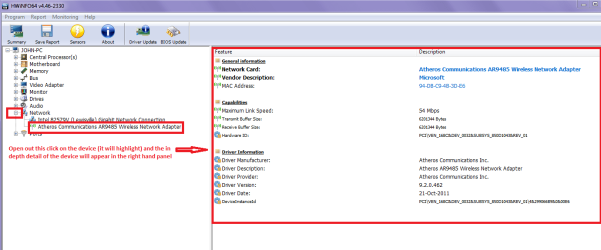
Great advice mate as I never use the Windows feature for updates way too hairy fairy. I always use the manufacturers updates for drivers etc and if I have a job finding what device is in a machine I use HW Info to let me know exactly what for example the WLAN is (see my pic) then go that manufacturers site and download it. HWiNFO, HWiNFO32/64 - Download < go to the installer (green box at bottom I use the US site) after picking the correct bit version and install, Close the running info and click on the part/s you want to find out about again see pic

Plus for example if it was made by Broadcomm then I would either go to the boards drivers list and look for the Broadcomm one (sometimes there are several listed ie Realtek Broadcomm Atheros etc etc)

I have quoted the wifi (WLAN) just as an example you can open out any o the other components for detailed info by opening them out as well ie running frequencies and times for the RAM ;)
 

Attachments

  • DRIVERS.PNG
    DRIVERS.PNG
    32.7 KB · Views: 3

My Computer

Computer type
PC/Desktop
Computer Manufacturer/Model Number
Own build (new) Desk1 / Asus ROG Win 7 / Desk2 1st build
OS
Desk1 7 Home Prem / Desk2 10 Pro / Main lap Asus ROG 10 Pro 2 laptop Toshiba 7 Pro Asus P2520 7 & 10
CPU
Desk1 i5 3750K / Laptop i7 GTX 860M / Desk2 i5 2500
Motherboard
Desk1 Asus P877-V / Desk2 Gigabyte H67 UD3H / Laptop ?
Memory
Desk1 8GB (1866) / Desk2 16GB (1333) / Laptop 8Gb DDR3
Graphics Card(s)
Desk 1& 2NVidia GTX 650 & Laptops on board Intel
Sound Card
Desk 1 & 2 -XONAR DG Realtek High Def audio Laptop
Monitor(s) Displays
Desk 1 Benq HD 2450 / Desk2 Philips 24" / Laptop 17.5"
Screen Resolution
1920x1080 D1 & D2 & Laptop 1
Hard Drives
Desk1 Samsung 120GB 830 SSD
Asus ROG 256GB 850 Pro SSD
Desk2 Samsung 840 256 SSD
Toshiba 120GB EVO
PSU
Desk 1 Corsair HX 1050/ Laptop ? / Desk 2 Corsair HX 650
Case
Desk 1 Cooler HAF XM ? Toshiba laptop / Desk2 Coolermaster
Cooling
Fans on all Desk1 -2 Desk2 - all Coolermasters 5 Laptop ?
Keyboard
Desk 1 MS Sidewinder X6 Desk 2 MS Sidewinder X 4
Mouse
Desk 1&2 - Gigabyte MS 900 gamer - laptop - Logitec wireless
Internet Speed
ADSL2+
Other Info
One other Desktop (tester) and spare Toshba laptop both with SSD's
Running Kaspersky 2016 ISS on all machines config'd identically
Logitec audio stereo systems on each machine (x3)
Canon MG5250MFC
Router/modem TP-Link running WPA2SK
Alright guys,

So after a 5 days of just the computer, minimal installations, no steam, etc.

I am not sure what exactly driver verifier is supposed to do, but if i understand correctly if drivers are in conflict i would get a BSOD with the driver conflict information. Is that correct?
regardless I did not get any BSOD's during this period of time.
typeing verified /query popped up another cmd type black screen briefly. But whatever it said just scrolled rapidly by, making it unreadable.

However,
I got a singular crash with matching symptoms, those being, in this case the computer completely locked up forcing a restart. Certainly not the multicolored death lines, but previously when using steam and troubleshooting, it would occasionally freeze in this fashion as well. Refer to post #24 for my mention of the different failure mode, last time.
Still no dump file or BSOD.

During this crash, I was letting windows media player do its thing and discover all the music in my music directory, and reading an article on chrome.

So, I am wondering 2 things.

Is it possible that this is all related to some glitch inside either my SSD or RAID5 triple drive? I did find an obscure post on one of the steam forums, saying that if the drive has some sort of error it can cause the GPU to hang and lead to these kinds of multicolored displays.

And if so, How does one go about diagnosing such a thing, if their is no trace left behind in the form of a dump file or whatever?

I am debating, installing windows on just the SSD with no raid5 triple drive connected, and then switching it, installing windows on just the raid5 and not SSD. But would this be a real test? As I am unsure I could keep the computer in raid5 mode, while simultaneously testing the drive, ie invalidating it being driver or drive related.

Are their any direct tests I can put the drives through to see if i get errors when trying to quickly push a lot of data and the like.

Thank you all for any and suggestions.
 

My Computer

Computer type
PC/Desktop
Computer Manufacturer/Model Number
Custom
OS
64 bit win 7
CPU
AMD FX-6300 3.5GHz 6-Core Processor
Motherboard
ASRock 970M PRO3 Micro ATX AM3+/AM3 Motherboard
Memory
G.Skill Ripjaws Series 16GB (4 x 4GB) DDR3-1600 Memory
Graphics Card(s)
MSI Radeon R9 380 4GB Video Card
Hard Drives
Kingston SSDNow V300 Series 120GB 2.5" Solid State Drive
3 in a Raid 5
Western Digital Caviar Blue 1TB 3.5" 7200RPM Internal Hard Drive
Antivirus
Norton
Browser
Chrome
Did you turn the Cool 'n' Quiet OFF (as recommended in the mobo manual page 48)?

"Please note that enabling this function may reduce CPU voltage and memory
frequency, and lead to system stability or compatibility issue with some memory
modules or power supplies. Please set this item to [Disable] if above issue occurs."

Can you enter the OC Tweeker setup and provide screen shot of the DRAM Timing Configuration settings?

Regards,
GEWB
 

My Computer

Computer type
PC/Desktop
Computer Manufacturer/Model Number
(7 different computers booting up to 10 systems)
OS
Linux Mint / XP / Win7 Home, Pro, Ultimate / Win8.1 / Win10
Other Info
Four desktops, two laptops, one notebook and one tablet
GEWB, thanks for the reply.
Anak & ICIT2LOL, Thank you both for your recommendations on driver locating as well.

I did not, but it is now off, per your and apparently the manuals recommendation.
CPUConfiguration_zpsw75yxe32.jpg

for everyone's reference here is the manual
ASRock > 970M Pro3

Ill let that change settle in for a couple days and see if i get a crash.

I did not make any adjustments to the bios settings, aside from setting up the RAID stuff. I don't really know what any of it is, and just assumed that its defaults were set intelligently, and I have no plans to overclock, i don't really have the need to.
OCTweaker1_zpswcmnpvjk.jpg

OCTweaker2_zpseslwyekm.jpg


Here is the DRAM Timing controls
DDRAMTimingControl_zpsviw6sxls.jpg


Not sure if you want this info, but For good measure here are what the bios has to say about the rail voltages
RailVoltages_zpsxp2cvgeo.jpg


Anything seem suspect to you?
 

My Computer

Computer type
PC/Desktop
Computer Manufacturer/Model Number
Custom
OS
64 bit win 7
CPU
AMD FX-6300 3.5GHz 6-Core Processor
Motherboard
ASRock 970M PRO3 Micro ATX AM3+/AM3 Motherboard
Memory
G.Skill Ripjaws Series 16GB (4 x 4GB) DDR3-1600 Memory
Graphics Card(s)
MSI Radeon R9 380 4GB Video Card
Hard Drives
Kingston SSDNow V300 Series 120GB 2.5" Solid State Drive
3 in a Raid 5
Western Digital Caviar Blue 1TB 3.5" 7200RPM Internal Hard Drive
Antivirus
Norton
Browser
Chrome
I would set overclock mode to "manual", and turn off "Spread Spectrum" It impacts performance.

The reason to set overclock mode to manual is when it's set to auto, the PC may overclock without you realizing it. That could cause stability issues.

And I think it's hilarious that your maximum processor speed is 6300 MHz. Should be 3600. Same with your Northbridge. It should be 2600. Someone goofed when making the BIOS.
 

My Computer

Computer type
PC/Desktop
Computer Manufacturer/Model Number
Mellon Labs (custom build)
OS
Win 7 Pro x64/Win 10 Pro x64 dual boot
CPU
AMD FX 8350 Vishera @ 4200
Motherboard
ASUS M5A97 R2.0
Memory
16 GB Mushkin Blackline DDR3-2400 @ 1866 (9-10-10-10-31)
Graphics Card(s)
XFX Radeon R9 280 Double D Black Edition
Sound Card
Realtek HD Audio on MB. Sounds great.
Monitor(s) Displays
Acer 24", Acer 22"
Screen Resolution
3840 x 1080
Hard Drives
1 x Mushkin Chronos 120 GB SSD (Win 10)
1 x Samsung 850 EVO 250 GB SSD (Win 7)
1 x WD 1TB SATA Blue
1 x WD 1TB SATA Green
PSU
Corsair TX-750
Case
CoolerMaster HAF 912+
Cooling
Coolermaster Seidon 240M Liquid AIO. 6 case fans
Keyboard
Logitech G710+
Mouse
Logitech G500s
Internet Speed
Much better since I got fiber, but still way overpriced.
Antivirus
MSE, Malware Bytes for scanning
Browser
Firefox
Other Info
Corsair VOID USB headphones.

A Mellon Labs X-1 - LCD Smartie driven system status display.

Brought to you by the letter E
Driver verifier is a utility/tool that has the capability to apply stress to drivers as they are being used, it could be compared to other stress testing tools such as Furmark and Passmark, but it is designed to only deal with drivers.

Driver Verifier is a tool included in Microsoft Windows that replaces the default operating system subroutines with ones that are specifically developed to catch device driver bugs.[1] Once enabled, it monitors and stresses drivers to detect illegal function calls or actions that may be causing system corruption. It acts within the kernel mode and can target specific device drivers for continual checking or make driver verifier functionality multithreaded, so that several device drivers can be stressed at the same time.

Source: https://en.wikipedia.org/wiki/Driver_Verifier
Related: https://support.microsoft.com/en-us/kb/244617
As before, to make sure your machine didn't throw a BSOD, you could run the BSOD tool again for checking.


To diagnose the drives you would disconnect all but the one that has the OS on it and if it is in RAID mode, return it to AHCI and test.

Is there a particular reason you need to run RAID?

Your suggestion to swap drives that have the OS on it and test is a good one. My earlier suggestion to test in AHCI mode only may have been a bit harsh; I would proceed with this test in both AHCI and RAID.

There are stress tests for HDD, I'd try checking the western digital site to see if they have one for your drive. I'm not sure I'd suggest one for your SSD, Mellon, and or ICIT2 would know more about that than me.
 

My Computer

Computer type
PC/Desktop
Computer Manufacturer/Model Number
Gateway DX4831-01e (Mid-Tower Desktop)
OS
Originally Win 7 Hm Prem x64 Ver 6.1.7600 Build 7601-SP1 | Upgraded to Windows 10 December 14, 2019
CPU
Intel i3 530 2.93GHz, 2933MHz 2 Cores 4 Logical Processors
Motherboard
Gateway H57M01 133 megahertz
Memory
6GB of 1,333MHz DDR3 SDRAM
Graphics Card(s)
32MB Intel Graphics Media Accelerator HD IGChip
Sound Card
Realtek High Definition Audio
Monitor(s) Displays
Gateway HX2000 20inch TFT active matrix TN
Screen Resolution
1600 x 900 x 59 hertz
Hard Drives
WDC WD10EADS-00M2B0 [HDD] (1000.20 GB) -- drive 0,
HL-DT-ST DVDRAM GH41N [CD-ROM dr]
Four card readers, and Four USB 2.0
PSU
300watts.
Case
Mid-Tower Desktop
Cooling
Stock from Gateway
Keyboard
Natural Ergonomic Keyboard 4000, see Other Info
Mouse
Orig. Gateway wore out now using Insignia USB wired optical
Internet Speed
Vz FIOS 10ms png 57.64Mbps down 65.53Mbps up Speedtest.org
Antivirus
Zamana Anti-logger with Anti-malware, MSE, Windows Firewall,
Browser
IE11.0.9600.19399-Upd ver11.0.135, Firefox 68.0.1 x64
Other Info
System Specs by Belarc.

BIOS: American Megatrends Inc. P01-A0 11/17/2009

Replaced the MS 'Natural' Standard PS/2 Enhanced 101-102 Keyboard with a new Natural Ergonomic Keyboard 4000 on August 1st 2014.

Canon Pixma MG3222 Printer.

Updated to IE11 on 12102015 | Fios Quantum Router g1100

Additional AV: SpywareBlaster, manual Mbam, SAS
Ill let that change settle in for a couple days and see if i get a crash.

I did not make any adjustments to the bios settings, aside from setting up the RAID stuff. I don't really know what any of it is, and just assumed that its defaults were set intelligently, and I have no plans to overclock, i don't really have the need to.

Anything seem suspect to you?

Thanks for following up with my request. Let's see what happens with C 'n' Q turned off.

I didn't think you made changes to timing but I have learned that the manufacturer doesn't always set things properly - just look at the earlier post about their BIOS text.

I don't see anything unusual but I concure with member Mellon Head about checking some settings in Manual instead of Auto.

Keep us posted!

Regards,
GEWB
 

My Computer

Computer type
PC/Desktop
Computer Manufacturer/Model Number
(7 different computers booting up to 10 systems)
OS
Linux Mint / XP / Win7 Home, Pro, Ultimate / Win8.1 / Win10
Other Info
Four desktops, two laptops, one notebook and one tablet
Hello all,

So long story short, I seem to have fixed my issue. its been a few weeks and I have not had any problems (fingers crossed).

I had installed windows on just my Raid 5 array, and the problem was non existent, so that lead me to check out my SSD further. Updated the firmware (no change), bought a new SSD (no change). Changed the sata port on the mother board (no Change).

I thought well ok, what if these cables as a batch just suck. I had swapped the cables previously, but they all came from the same bag, same manufacturer, etc, etc.

So, I bought a new batch of cables from a different supplier, and behold!!
Swapped in the cables from the new batch, and haven't had a problem since!

I guess in the old batch the shielding was ineffective or something, but now they are in the trash.

I thank you all for your support and help along the way, I did in fact learn a lot about troubleshooting my computer in the process, and cannot thank you enough for the assist.

Cheers,
Aemornion
 

My Computer

Computer type
PC/Desktop
Computer Manufacturer/Model Number
Custom
OS
64 bit win 7
CPU
AMD FX-6300 3.5GHz 6-Core Processor
Motherboard
ASRock 970M PRO3 Micro ATX AM3+/AM3 Motherboard
Memory
G.Skill Ripjaws Series 16GB (4 x 4GB) DDR3-1600 Memory
Graphics Card(s)
MSI Radeon R9 380 4GB Video Card
Hard Drives
Kingston SSDNow V300 Series 120GB 2.5" Solid State Drive
3 in a Raid 5
Western Digital Caviar Blue 1TB 3.5" 7200RPM Internal Hard Drive
Antivirus
Norton
Browser
Chrome
Back
Top