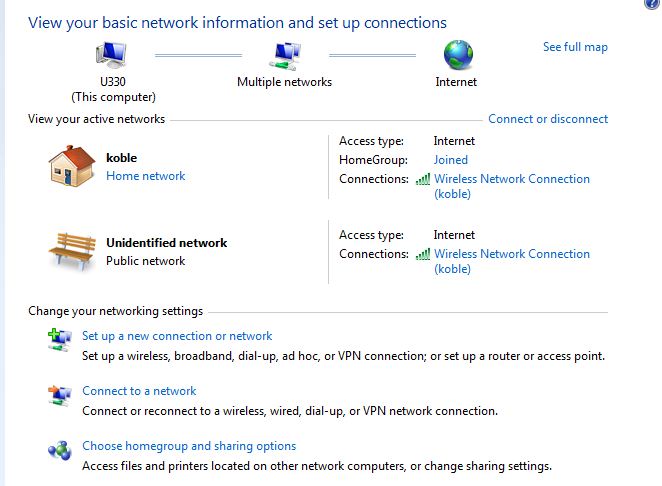
Multiple Active Connections (Pic)

Serantos

New member
Local time
11:59 AM
Messages
10
Location
Las Vegas
Hey guys,
I don't know exactly what I did here and how it got to this point, but I show two active networks, one being my home network and on being an unidentified network. As you can see, they are both connected to my wireless router and it makes absolutely no sense why I have two active networks. I have been beating my head off of a wall trying to figure this one out. Does anyone have an idea on how to delete this unidentified network?
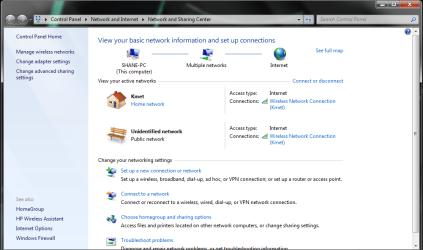
Untitled.png

Thanks as always for the help!

-Shane
 

My Computer

Computer Manufacturer/Model Number
Custom
OS
Windows 7 Ultimate x64
CPU
Intel Q6600 2.4GHz Quad Core
Memory
4GB
Graphics Card(s)
NVidia 8600GT
Sound Card
Audigy 2ZS
Of course I would figure it out 3 seconds after I post something. Well, if this ever happens to anyone, make sure your default gateway is set properly. For some reason mine was wrong, I changed it back and voila, it was gone.

Sorry if I wasted anyone's time.
 

My Computer

Computer Manufacturer/Model Number
Custom
OS
Windows 7 Ultimate x64
CPU
Intel Q6600 2.4GHz Quad Core
Memory
4GB
Graphics Card(s)
NVidia 8600GT
Sound Card
Audigy 2ZS
I have the same issue:

8HKMk.jpg


However, I'm not sure what you mean by:

make sure your default gateway is set properly.

Under ipconfig, I have two default gateways:

169.254.15.14
10.0.1.1

I'm using an Apple AEBS as my router.

Thanks for any suggestions...
 

My Computer

OS
Windows 7 Home Premium 32bit
Usually this is because of a router that isn't configured correctly or doesn't have the correct firmware to work with Windows 7. It's just one connection with two default gateways so it shows up as two connections.

You can usually fix this problem by going into your IPv4 connection properties window and typing in the correct default gateway manually. I think you are getting the second one from your modem. The link below shows you where to type the correc default gateway.
Windows 7 Unidentified Network, Limited Access, No Internet Connection Problem Resolved
 

My Computer

Computer type
PC/Desktop
Computer Manufacturer/Model Number
Home built
OS
Windows 7 Ult, Windows 8.1 Pro,
CPU
Q9650-4.275GHz, E8600 4.5GHz, E6750-3.8GHz
Motherboard
Evga 780i FTW
Memory
G.Skill PC2 9600 1200Mhz 5 5 5 15 2T
Graphics Card(s)
GTX480
Sound Card
Asus Xonar D2
Monitor(s) Displays
HannsG
Screen Resolution
1680X1050
Hard Drives
GSkill Phoenix Pro 120GB SSD
PSU
ThermalTake Toughpower 1000Watt modular
Case
ThermalTake XaserV
Cooling
Xigmatek S1283
Keyboard
Logitech G15
Mouse
Logitech G9
Internet Speed
T1
Thanks for the reply.

Strangely enough, I went to the IPV4 Properties, manually entered in what I thought was the correct IP address, subnet mask, and default gateway only to have it not connect at all.

I then checked "obtain an IP address automatically" again. It connected fine and the unidentified network disappeared. So it's fixed...for now, and ipconfig is only showing one default gateway: 10.0.1.1
 

My Computer

OS
Windows 7 Home Premium 32bit
For this particular problem you should only need to type in the correct default gateway and then set your IPv4 propterties to use DHCP, sounds like you figured that out pretty fast. :)

When you type in the IP,subnet mask and everything else then you are setting up a static IP which isn't really what you want. You would need to set up your router for static IP's also for that to work.

Try rebooting to make sure the correct default gateway stays put then you should be ok after that.
 

My Computer

Computer type
PC/Desktop
Computer Manufacturer/Model Number
Home built
OS
Windows 7 Ult, Windows 8.1 Pro,
CPU
Q9650-4.275GHz, E8600 4.5GHz, E6750-3.8GHz
Motherboard
Evga 780i FTW
Memory
G.Skill PC2 9600 1200Mhz 5 5 5 15 2T
Graphics Card(s)
GTX480
Sound Card
Asus Xonar D2
Monitor(s) Displays
HannsG
Screen Resolution
1680X1050
Hard Drives
GSkill Phoenix Pro 120GB SSD
PSU
ThermalTake Toughpower 1000Watt modular
Case
ThermalTake XaserV
Cooling
Xigmatek S1283
Keyboard
Logitech G15
Mouse
Logitech G9
Internet Speed
T1
Back
Top