Multiple crashing - "STOP: 0x000000F4", blue screen with white script.

kr2

New member
Member
Local time
2:35 AM
Messages
71
Location
United Kingdom
Multiple crashing - "STOP: 0x000000F4", blue screen with white script.

[FONT=&quot]Hi,[/FONT]

[FONT=&quot]Have[/FONT][FONT=&quot] read the instructions at: Blue Screen of Death (BSOD) Posting Instructions tried to download the SF_Diagnostic_Tool, but it seemed to hang. There are several enquiry posts on that thread which have not been addressed I also noticed. I do not know which other 'configure dump file settings' will be likely to shed some light on my crashes.[/FONT][FONT=&quot]
[/FONT]
[FONT=&quot]My dual core 32 bit, Windows 7 Home Premium (4GB Ram) which I upgraded to several years ago - away from Vista - is now crashing on a regular basis, at least once a day. I get the following.

"STOP: 0x000000F4" blue screen with white script.

The pc will restart after about 10-20 minutes if I let it stand. The full blue screen crash seems to happen when I have one or several browsers open. Activities will suddenly freeze, the clock will stop, the mouse become unresponsive, then a complete freeze, then after about 30 seconds, blue screen.

[/FONT]
[FONT=&quot]Is there a pc log to tell me what is going wrong & how I can correct whatever it is that is causing these crashes please? The crashes are becoming more frequent over the last 3 months or so.

For the record, my Windows 7 is now less stable than Vista was, crashes more often, crashes playing music (wav), crashes playing videos (Power DVD), and blue screen crashes when I surf the Internet.

I am pretty sure Win7 compiles some form of "crash dump" record before it restarts. Please specify or kindly suggest which crash recording module will tell me what is happening here?

Many thanks,

Ric
[/FONT]
 

My Computer

Computer type
PC/Desktop
Computer Manufacturer/Model Number
dell
OS
Windows 7 & 64 bit, Home Premium, 2.80GHz AMDII
CPU
2.8
Antivirus
Avast
Browser
chrome

My Computer

Computer type
PC/Desktop
Computer Manufacturer/Model Number
Pauly Special
OS
Win7 Ultimate X64
CPU
Intel i5 3570K
Motherboard
Gigabyte Z77X-DS3H
Memory
8GB DDR3 1600
Graphics Card(s)
Onboard
Sound Card
Onboard
Screen Resolution
1280x1024
Hard Drives
Samsung 840 Evo SSD (OS)
1TB Spinner (Data)
PSU
800W Arctic
Case
Cooler Master
Cooling
3x120mm Fans
Keyboard
MS Wireless
Mouse
MS Wireless
Internet Speed
20M
Heat?

Many thanks Pauly,

Inspected the case interior and removed any dust in the vents, there wasn't much - I have done this on previous occasions. I have a CPUID CPU-Z (version 1.51) software on my pc which on an earlier computer gives me internal heat sensor readings. But on this pc all it tells me is what type of cpu I am running. Is there a software I can safely download which will give me temperatures and possibly fan data please?

What is that link in your post btw?

Thanks again,

Ric
 

My Computer

Computer type
PC/Desktop
Computer Manufacturer/Model Number
dell
OS
Windows 7 & 64 bit, Home Premium, 2.80GHz AMDII
CPU
2.8
Antivirus
Avast
Browser
chrome

My Computer

Computer type
PC/Desktop
Computer Manufacturer/Model Number
Golden Mk. I.4
OS
Windows 10 Pro x64 ; Xubuntu x64
CPU
Intel i7 860 @ 2.80 GHz O/C'ed to 4.0GHz
Motherboard
Gigabyte P55A-UD3R Rev.1. Award BIOS F13
Memory
16GB Corsair Vengance DDR3 @ 661 MHz Dual Channel (9-9-9-24)
Graphics Card(s)
EVGA NVidia GTX 560 1024MB
Sound Card
Realtek Integrated
Monitor(s) Displays
Dual Samsung SyncMaster 2494HS
Screen Resolution
1920*1080 and 1920*1080
Hard Drives
1*Samsung 840 EVO 120GB SSD;
1*OCZ Vertex 2 60GB SSD;
2*Samsung F3 SpinPoint 1TB in RAID0;
1*Samsung F1 SpinPoint 1TB;
2*Western Digital 1TB External USB 3.0
1*Western Digital 500GB External USB 3.0
1*Seagate 500GB External USB 2.0
PSU
Thermaltake ToughPower QFan 750W
Case
Thermaltake Element S VK60001W2Z
Cooling
Corsair H60 Water Cooling, 2*230mm and 2*80mm case fans
Keyboard
Logitech G110
Mouse
Logitech MX518
Pauly,

I went for this:

2. To have Windows Create a Small memory dump (Minidump) File on BSOD
A) Click on the Download button below to download the below.
Create_Minidump_on_BSOD.reg


It is downloading now - I saved to Desktop.

>>>>>>>>>>>>>>>>>>>>>>>>>>>>>>>>

Thanks to the other posters - will look at what you suggest: are these heat sensor softwares please?

R
 

My Computer

Computer type
PC/Desktop
Computer Manufacturer/Model Number
dell
OS
Windows 7 & 64 bit, Home Premium, 2.80GHz AMDII
CPU
2.8
Antivirus
Avast
Browser
chrome

My Computer

Computer type
PC/Desktop
Computer Manufacturer/Model Number
Golden Mk. I.4
OS
Windows 10 Pro x64 ; Xubuntu x64
CPU
Intel i7 860 @ 2.80 GHz O/C'ed to 4.0GHz
Motherboard
Gigabyte P55A-UD3R Rev.1. Award BIOS F13
Memory
16GB Corsair Vengance DDR3 @ 661 MHz Dual Channel (9-9-9-24)
Graphics Card(s)
EVGA NVidia GTX 560 1024MB
Sound Card
Realtek Integrated
Monitor(s) Displays
Dual Samsung SyncMaster 2494HS
Screen Resolution
1920*1080 and 1920*1080
Hard Drives
1*Samsung 840 EVO 120GB SSD;
1*OCZ Vertex 2 60GB SSD;
2*Samsung F3 SpinPoint 1TB in RAID0;
1*Samsung F1 SpinPoint 1TB;
2*Western Digital 1TB External USB 3.0
1*Western Digital 500GB External USB 3.0
1*Seagate 500GB External USB 2.0
PSU
Thermaltake ToughPower QFan 750W
Case
Thermaltake Element S VK60001W2Z
Cooling
Corsair H60 Water Cooling, 2*230mm and 2*80mm case fans
Keyboard
Logitech G110
Mouse
Logitech MX518

My Computer

Computer type
PC/Desktop
Computer Manufacturer/Model Number
dell
OS
Windows 7 & 64 bit, Home Premium, 2.80GHz AMDII
CPU
2.8
Antivirus
Avast
Browser
chrome
Pauly,

I went for this:

2. To have Windows Create a Small memory dump (Minidump) File on BSOD
A) Click on the Download button below to download the below.
Create_Minidump_on_BSOD.reg


It is downloading now - I saved to Desktop.

>>>>>>>>>>>>>>>>>>>>>>>>>>>>>>>>

Thanks to the other posters - will look at what you suggest: are these heat sensor softwares please?

R

Have downloaded > Merged > restarted :)

Where to now?

Thanks again.
 

My Computer

Computer type
PC/Desktop
Computer Manufacturer/Model Number
dell
OS
Windows 7 & 64 bit, Home Premium, 2.80GHz AMDII
CPU
2.8
Antivirus
Avast
Browser
chrome
Run HWINFO, and lets look at the current idle temperatures of the components.
 

My Computer

Computer type
PC/Desktop
Computer Manufacturer/Model Number
Golden Mk. I.4
OS
Windows 10 Pro x64 ; Xubuntu x64
CPU
Intel i7 860 @ 2.80 GHz O/C'ed to 4.0GHz
Motherboard
Gigabyte P55A-UD3R Rev.1. Award BIOS F13
Memory
16GB Corsair Vengance DDR3 @ 661 MHz Dual Channel (9-9-9-24)
Graphics Card(s)
EVGA NVidia GTX 560 1024MB
Sound Card
Realtek Integrated
Monitor(s) Displays
Dual Samsung SyncMaster 2494HS
Screen Resolution
1920*1080 and 1920*1080
Hard Drives
1*Samsung 840 EVO 120GB SSD;
1*OCZ Vertex 2 60GB SSD;
2*Samsung F3 SpinPoint 1TB in RAID0;
1*Samsung F1 SpinPoint 1TB;
2*Western Digital 1TB External USB 3.0
1*Western Digital 500GB External USB 3.0
1*Seagate 500GB External USB 2.0
PSU
Thermaltake ToughPower QFan 750W
Case
Thermaltake Element S VK60001W2Z
Cooling
Corsair H60 Water Cooling, 2*230mm and 2*80mm case fans
Keyboard
Logitech G110
Mouse
Logitech MX518
Run HWINFO, and lets look at the current idle temperatures of the components.

Have downloaded HWINFO but it's just given me a zip - there is no 'exe' file in the zip. How do I open this program please?

Thanks.
 

My Computer

Computer type
PC/Desktop
Computer Manufacturer/Model Number
dell
OS
Windows 7 & 64 bit, Home Premium, 2.80GHz AMDII
CPU
2.8
Antivirus
Avast
Browser
chrome
ZIP files need to be unzipped. Install and use this:

7-Zip

or download the self-installing executable of HWINFO instead.
 

My Computer

Computer type
PC/Desktop
Computer Manufacturer/Model Number
Golden Mk. I.4
OS
Windows 10 Pro x64 ; Xubuntu x64
CPU
Intel i7 860 @ 2.80 GHz O/C'ed to 4.0GHz
Motherboard
Gigabyte P55A-UD3R Rev.1. Award BIOS F13
Memory
16GB Corsair Vengance DDR3 @ 661 MHz Dual Channel (9-9-9-24)
Graphics Card(s)
EVGA NVidia GTX 560 1024MB
Sound Card
Realtek Integrated
Monitor(s) Displays
Dual Samsung SyncMaster 2494HS
Screen Resolution
1920*1080 and 1920*1080
Hard Drives
1*Samsung 840 EVO 120GB SSD;
1*OCZ Vertex 2 60GB SSD;
2*Samsung F3 SpinPoint 1TB in RAID0;
1*Samsung F1 SpinPoint 1TB;
2*Western Digital 1TB External USB 3.0
1*Western Digital 500GB External USB 3.0
1*Seagate 500GB External USB 2.0
PSU
Thermaltake ToughPower QFan 750W
Case
Thermaltake Element S VK60001W2Z
Cooling
Corsair H60 Water Cooling, 2*230mm and 2*80mm case fans
Keyboard
Logitech G110
Mouse
Logitech MX518
>:-(

This was going nowhere. I downloaded WHINFO32bit then downloaded Win7zip then when I opened WHINFO it said download the 32 bit version! It's now 2 hours since I asked how to download a heat sensor software & I am still no nearer to that...

Update - managed to find a couple of useful softwares - more later ;)

Ric
 
Last edited:

My Computer

Computer type
PC/Desktop
Computer Manufacturer/Model Number
dell
OS
Windows 7 & 64 bit, Home Premium, 2.80GHz AMDII
CPU
2.8
Antivirus
Avast
Browser
chrome
Heat & Fan Speed

Run HWINFO, and lets look at the current idle temperatures of the components.

Hi,

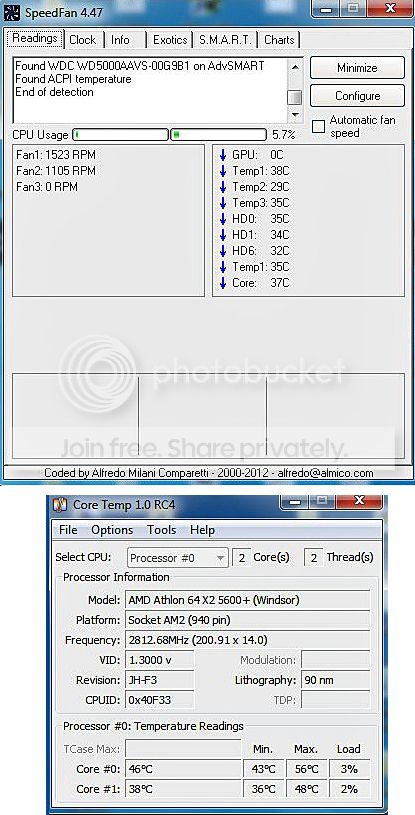
Managed to find a couple of softwares at CNET, SpeedFan & CoreTemp :)

SpeedFan says there's only two fans running but I can only see two: one on the heatsink and one at the rear of the pc.

SPEED-FANOK_zps87b711f3.jpg


Please advise - thanks,

R
 

My Computer

Computer type
PC/Desktop
Computer Manufacturer/Model Number
dell
OS
Windows 7 & 64 bit, Home Premium, 2.80GHz AMDII
CPU
2.8
Antivirus
Avast
Browser
chrome
Speedfan isn't reliable enough................download the self-installing EXE of HWINFO.
 

My Computer

Computer type
PC/Desktop
Computer Manufacturer/Model Number
Golden Mk. I.4
OS
Windows 10 Pro x64 ; Xubuntu x64
CPU
Intel i7 860 @ 2.80 GHz O/C'ed to 4.0GHz
Motherboard
Gigabyte P55A-UD3R Rev.1. Award BIOS F13
Memory
16GB Corsair Vengance DDR3 @ 661 MHz Dual Channel (9-9-9-24)
Graphics Card(s)
EVGA NVidia GTX 560 1024MB
Sound Card
Realtek Integrated
Monitor(s) Displays
Dual Samsung SyncMaster 2494HS
Screen Resolution
1920*1080 and 1920*1080
Hard Drives
1*Samsung 840 EVO 120GB SSD;
1*OCZ Vertex 2 60GB SSD;
2*Samsung F3 SpinPoint 1TB in RAID0;
1*Samsung F1 SpinPoint 1TB;
2*Western Digital 1TB External USB 3.0
1*Western Digital 500GB External USB 3.0
1*Seagate 500GB External USB 2.0
PSU
Thermaltake ToughPower QFan 750W
Case
Thermaltake Element S VK60001W2Z
Cooling
Corsair H60 Water Cooling, 2*230mm and 2*80mm case fans
Keyboard
Logitech G110
Mouse
Logitech MX518

My Computer

Computer type
PC/Desktop
Computer Manufacturer/Model Number
Pauly Special
OS
Win7 Ultimate X64
CPU
Intel i5 3570K
Motherboard
Gigabyte Z77X-DS3H
Memory
8GB DDR3 1600
Graphics Card(s)
Onboard
Sound Card
Onboard
Screen Resolution
1280x1024
Hard Drives
Samsung 840 Evo SSD (OS)
1TB Spinner (Data)
PSU
800W Arctic
Case
Cooler Master
Cooling
3x120mm Fans
Keyboard
MS Wireless
Mouse
MS Wireless
Internet Speed
20M
Speedfan isn't reliable enough................download the self-installing EXE of HWINFO.

Do you have a link to the EXE please, I have already downloaded several HWINFO files.
 

My Computer

Computer type
PC/Desktop
Computer Manufacturer/Model Number
dell
OS
Windows 7 & 64 bit, Home Premium, 2.80GHz AMDII
CPU
2.8
Antivirus
Avast
Browser
chrome
How do the temperatures look please?

Thanks,

Ric
 

My Computer

Computer type
PC/Desktop
Computer Manufacturer/Model Number
dell
OS
Windows 7 & 64 bit, Home Premium, 2.80GHz AMDII
CPU
2.8
Antivirus
Avast
Browser
chrome

My Computer

Computer type
PC/Desktop
Computer Manufacturer/Model Number
Golden Mk. I.4
OS
Windows 10 Pro x64 ; Xubuntu x64
CPU
Intel i7 860 @ 2.80 GHz O/C'ed to 4.0GHz
Motherboard
Gigabyte P55A-UD3R Rev.1. Award BIOS F13
Memory
16GB Corsair Vengance DDR3 @ 661 MHz Dual Channel (9-9-9-24)
Graphics Card(s)
EVGA NVidia GTX 560 1024MB
Sound Card
Realtek Integrated
Monitor(s) Displays
Dual Samsung SyncMaster 2494HS
Screen Resolution
1920*1080 and 1920*1080
Hard Drives
1*Samsung 840 EVO 120GB SSD;
1*OCZ Vertex 2 60GB SSD;
2*Samsung F3 SpinPoint 1TB in RAID0;
1*Samsung F1 SpinPoint 1TB;
2*Western Digital 1TB External USB 3.0
1*Western Digital 500GB External USB 3.0
1*Seagate 500GB External USB 2.0
PSU
Thermaltake ToughPower QFan 750W
Case
Thermaltake Element S VK60001W2Z
Cooling
Corsair H60 Water Cooling, 2*230mm and 2*80mm case fans
Keyboard
Logitech G110
Mouse
Logitech MX518
Try HWINFO:

32 bit version : HWiNFO32 Download
64 bit version : HWiNFO64 Download

Have you browsed these links???

Indeed thanks. From post #12 above:~

This was going nowhere. I downloaded WHINFO32bit then downloaded Win7zip then when I opened WHINFO it said download the 32 bit version! It's now 2 hours since I asked how to download a heat sensor software & I am still no nearer to that...


Update - managed to find a couple of useful softwares ...
 

My Computer

Computer type
PC/Desktop
Computer Manufacturer/Model Number
dell
OS
Windows 7 & 64 bit, Home Premium, 2.80GHz AMDII
CPU
2.8
Antivirus
Avast
Browser
chrome
Back
Top