Multiple Emails

ColColt

New member
Local time
5:14 PM
Messages
204
Location
E. TN
Having recently gotten Window 7 on a new computer(Dell XPS 8700) and knowing they don't install an email browser, I downloaded the one I was familiar with, Windows Live Mail, which is what I have on the old Vista machine downstairs.

The problem now is I'm getting duplicate emails on both computers via Comcast. Can I get Comcast to give me another email address for the new computer so I won't be getting emails on both computers the same? I guess I made the misake of using my email address for both of them.
 

My Computer

Computer type
PC/Desktop
Computer Manufacturer/Model Number
Dell XPS 8700
OS
Windows 7(64) Home Premium
Memory
8GB
Graphics Card(s)
NVIDIA GeForce GT 720 1GB DDR3
Monitor(s) Displays
Dell U2412M
Screen Resolution
1920x1200
Hard Drives
1TB 7200 RPM SATA Hard Drive 6.0 Gb/s
Keyboard
Wireless
Mouse
Wireless
Antivirus
avast
Browser
Firefox
Other Info
Logitech Z323 Speakers
Some ISP provide multiple email addresses ... You should check with Comcast ...


My ISP provides up to five email addresses ...
 

My Computer

Computer Manufacturer/Model Number
W530-3630QM1
OS
windows 7 home 64bit
CPU
INTEL-CORE I7
Memory
16GB
Hard Drives
750GB
Browser
Chrome
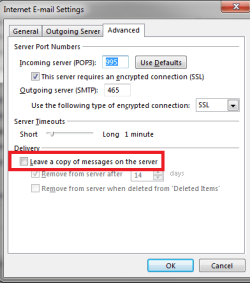
I use Outlook but had the same problem once. If you configure the account on your primary PC, the one most used for emails, to not leave a copy of messages on the server, then you won't get copies of emails on the other PC. I usually also configure so my main PC checks more often for new emails than the other devices to minimize the risk of duplicate emails.

Note that this method will delete all new emails from the server once they're downloaded to your primary mail PC!

emailsetting.png
 

My Computer

Computer type
Laptop
Computer Manufacturer/Model Number
HP Elitebook 8540p
OS
Windows 7 Pro 32
CPU
Intel(R) Core(TM) i5 CPU M 540 @ 2.53GHz
Motherboard
Hewlett-Packard 1521
Memory
4,00 GB (Usable 2,98)
Graphics Card(s)
NVIDIA NVS 5100M
Sound Card
NVIDIA High Definition Audio
Screen Resolution
1600x900
Hard Drives
INTEL SSDSA2CW120G3
Antivirus
F-Secure Internet Security
Browser
IE, Firefox, Opera
Other Info
Sandboxie,
SRP (Software Restriction Policy),
EMET (Enhanced Mitigation Experience Toolkit),
WFC (Windows Firewall Control by BiniSoft),
Malwarebytes Premium
By far the best solution to having a single email account accessed by multiple devices is the IMAP protocol, if this is available from your email provider, It does rely on an always on type of net connection, so it's not suitible for the old dial up connections.

The way IMAP works is that all mail is stored on the server, if you delete or in way alter an email this is virtually instantly updated on all other devices.

It would appear that comcast are not universally supporting IMAP, directly, but there is a simple workaround - it's called a gmail account, you simply set-up an account with gmail, (if you do not already have one), using the imap protocol, set this to collect your comcast mail, and link your email programs to the gmail account

It may seem complicated but is quite simple in practice, and has certain other advantages such as a reliable access from smart phones Etc and via the web on other systems such as cybercafe, freinds etc

If you are inteested let me know and I'll be pleased to give further help.

I run many email accounts through my gmail account, and though I have a locat application (outlook), I actually manage all my mail through my browser :) on this, and three other PC and apps on the phones, Tablets without any issues :)
 

My Computers

System One System Two

  • Computer type
    PC/Desktop
    Computer Manufacturer/Model Number
    ChillBlast - Custom to my design
    OS
    Windows 11 Pro x64 [Latest Release and Release Preview]
    CPU
    Ryzen 9 5950X, 3.8 - 5.2 MHz
    Motherboard
    Asus Prime X570-Pro
    Memory
    64GB [2 x 32GB] DDR4 3200MHz
    Graphics Card(s)
    4GB NVIDIA GEFORCE GTX 1650 Ti
    Sound Card
    On-board SPDIF to 5.1 System + HDMI [5.1 system]
    Monitor(s) Displays
    32" UHD 32 Bit HDR Monitor + 43" UHD 4K 32Bit HDR TV
    Screen Resolution
    2 x 3840 x 2160 @60Hz
    Hard Drives
    1TB M2 SSD OS, 500GB Fast Access SSD, 2 x 8TB Data + Various Externals from 1TB to 4TB, 10TB NAS
    PSU
    NZXT C750 80 PLUS Gold 750W Modular PSU
    Case
    Workstation Case [Matt Black]
    Cooling
    NZXT Kraken X63 280mm CPU Cooler +2x Quiet Case fans
    Keyboard
    Logitech Wireless MX Keys & K400 + others
    Mouse
    Logitech Wireless MX Master 3S
    Internet Speed
    920 MB Down 50 MB Up
    Antivirus
    BitDefender Total Security Pro
    Browser
    Chrome (always run latest Non-Beta)
    Other Info
    Also run ...
    Laptop - Quad 8GB - Windows 10 Pro x64
    Nexus 7 Android tablet x2
    Samsung 10.2" tablet
    Blackview TAB 8 4G Android Tablet c/w Keyboard
    Wacom Intuos Pro Medium Pen Pad
    Wacom Intuos Pro Small Pen Pad
    Wacom Expresskeys Remote
    Loopdeck+ Graphics Controller
    Shuttle Pro v2 Control
  • Computer type
    Laptop
    System Manufacturer/Model Number
    Dell XPS 17 10750H
    OS
    Windows 11 Pro x64 Latest RP
    CPU
    Intel I7 10750H 5.0GHz
    Motherboard
    Dell XPS
    Memory
    32GB [2x16GB] DDR4 2933 MHz
    Graphics Card(s)
    nVidia GTX1650Ti 4 GB GDDR6
    Sound Card
    Stock [Realtek] 4 Speaker
    Monitor(s) Displays
    17" IPS UHD+ Infinity Edge Touchscreen
    Screen Resolution
    3840 x 2400
    Hard Drives
    2TB M2 NVMe, 4TB External + various 500GB & 1TB External NVMe (also have access to spinner HDD from
    PSU
    Stock
    Case
    Stock XPS Aluminium & Carbon Fibre
    Cooling
    Stock - Active Fan Control
    Keyboard
    Backlit + Various Logitech
    Mouse
    Stock Track Pad + Logitech MX Trackball
    Internet Speed
    72 MB Down 18MB Up
    Browser
    Chrome
    Other Info
    Also run ...
    Laptop - Quad 8GB - Windows 10 Pro x64
    Nexus 7 Android tablet x2
    10.2" tablet
    Sony Z3 Android Smartphone
    Wacom Intuos Pro Medium Pen Pad
    Wacom Intuos Pro Small Pen Pad
    Wacom Expresskeys Remote
    Loopdeck+ Graphics Controller
    Shuttle Pro v2 Control Pad
    10TB NAS
I have another account with Comcast I signed up for several years back but, I've never used it. They list it when I checked a little while ago. I'm not sure how I could get that email address to be tied to the new computer only and eliminate getting all those messages.

Do you think that would be possible?

I checked for a box to untick about leaving a copy of message on the server under Advanced tab but it's not there in Live Mail.
 

My Computer

Computer type
PC/Desktop
Computer Manufacturer/Model Number
Dell XPS 8700
OS
Windows 7(64) Home Premium
Memory
8GB
Graphics Card(s)
NVIDIA GeForce GT 720 1GB DDR3
Monitor(s) Displays
Dell U2412M
Screen Resolution
1920x1200
Hard Drives
1TB 7200 RPM SATA Hard Drive 6.0 Gb/s
Keyboard
Wireless
Mouse
Wireless
Antivirus
avast
Browser
Firefox
Other Info
Logitech Z323 Speakers
Back
Top