- Local time
- 11:49 AM
- Messages
- 50
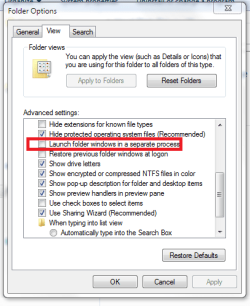
There are times when I open the task manager and I see six or eight, sometimes twelve or more instances of explorer.exe running and eating up resources. This can be when I have an explorer window open, or even if I'm just sitting at an empty desktop or doing nothing at all. There's always a "master" one that is eating up anywhere from 10 to 50MB of RAM or more (depending on if I have an explorer window open, whether or not I'm moving files around, etc.), then there are as many as a dozen or more little ones eating up anywhere from 1.5MB to 10MB or more (depending on I don't know what...)
Why is explorer launching multiple instances? Or, why are explorer processes not being killed off the way they should? How can I get this under control?
Why is explorer launching multiple instances? Or, why are explorer processes not being killed off the way they should? How can I get this under control?
My Computer
- Computer Manufacturer/Model Number
- Dell Studio XPS 7100
- OS
- Windows 7 Home Premium
- CPU
- AMD Phenom II X6 1045T 2.7GHz
- Motherboard
- Dell 0NWWY0
- Memory
- 8GB DDR3 SDRAM
- Graphics Card(s)
- AMD Radeon HD6970
- Monitor(s) Displays
- Dell IN2020M
- Screen Resolution
- 1600x900
- Hard Drives
- Seagate ST310005 28AS SATA Disk Device (1000GB)
Toshiba USB 3.5"-HDD (750GB)
Western Digital WD20 00JD-22HBB0 SATA Disk Device (200GB)
Toshiba MK1032GAX (100GB)
- PSU
- COOLER MASTER Silent Pro RSA00-AMBAJ3-US 1000W
- Case
- Original
- Cooling
- Forced air
- Keyboard
- Logitech G11
- Mouse
- Logitech MX-518
- Internet Speed
- [URL=http://www.speedtest.net][IMG]http://www.speedtest.net/