Multiple explorer processes.

jwalk

New member
Power User
Local time
7:51 PM
Messages
50
There are times when I open the task manager and I see six or eight, sometimes twelve or more instances of explorer.exe running and eating up resources. This can be when I have an explorer window open, or even if I'm just sitting at an empty desktop or doing nothing at all. There's always a "master" one that is eating up anywhere from 10 to 50MB of RAM or more (depending on if I have an explorer window open, whether or not I'm moving files around, etc.), then there are as many as a dozen or more little ones eating up anywhere from 1.5MB to 10MB or more (depending on I don't know what...)

Why is explorer launching multiple instances? Or, why are explorer processes not being killed off the way they should? How can I get this under control?
 

My Computer

Computer Manufacturer/Model Number
Dell Studio XPS 7100
OS
Windows 7 Home Premium
CPU
AMD Phenom II X6 1045T 2.7GHz
Motherboard
Dell 0NWWY0
Memory
8GB DDR3 SDRAM
Graphics Card(s)
AMD Radeon HD6970
Monitor(s) Displays
Dell IN2020M
Screen Resolution
1600x900
Hard Drives
Seagate ST310005 28AS SATA Disk Device (1000GB)
Toshiba USB 3.5"-HDD (750GB)
Western Digital WD20 00JD-22HBB0 SATA Disk Device (200GB)
Toshiba MK1032GAX (100GB)
PSU
COOLER MASTER Silent Pro RSA00-AMBAJ3-US 1000W
Case
Original
Cooling
Forced air
Keyboard
Logitech G11
Mouse
Logitech MX-518
Internet Speed
[URL=http://www.speedtest.net][IMG]http://www.speedtest.net/
Have you changed any Explorer shortcuts to open in certain places besides the default location?
 

My Computer

Computer type
PC/Desktop
Computer Manufacturer/Model Number
Alienware Aurora ALX R4
OS
Windows 10 Pro (x64)
CPU
Intel Core i7-3930K (3.2GHz - 4.5GHz)
Motherboard
Alienware Aurora-R4 x79
Memory
4x Samsung 4GB PC3-12800 DDR3 (16GB 1600MHz)
Graphics Card(s)
Nvidia Geforce GTX 690
Sound Card
SteelSeries Siberia Elite
Monitor(s) Displays
Dell UltraSharp U3011
Screen Resolution
2560x1600
Hard Drives
Samsung 850 Pro 256 GB, Seagate 1TB Desktop Hybrid HDD, 2x Western Digital 4TB Green HDD
PSU
875W Some Dell PSU <.<
Case
Alienware Aurora ALX
Cooling
Custom Liquid Cooling (EK CPU & GPU blocks) dual EK 480RAD
Keyboard
Logitech G710+ Mechanical
Mouse
Logitech G700s
Internet Speed
Verizon Fios (50 mbps average)
Other Info
Server: Intel NUC D54250WYK: i5-4250U, 16GB, 256 GB mSATA, Windows Server 2012 R2
I'm not sure what you're asking.

I have locations bookmarked in the sidebar, and they show up in the right-click menu to the explorer launcher that's pinned to my taskbar...

Other than that, no.
 

My Computer

Computer Manufacturer/Model Number
Dell Studio XPS 7100
OS
Windows 7 Home Premium
CPU
AMD Phenom II X6 1045T 2.7GHz
Motherboard
Dell 0NWWY0
Memory
8GB DDR3 SDRAM
Graphics Card(s)
AMD Radeon HD6970
Monitor(s) Displays
Dell IN2020M
Screen Resolution
1600x900
Hard Drives
Seagate ST310005 28AS SATA Disk Device (1000GB)
Toshiba USB 3.5"-HDD (750GB)
Western Digital WD20 00JD-22HBB0 SATA Disk Device (200GB)
Toshiba MK1032GAX (100GB)
PSU
COOLER MASTER Silent Pro RSA00-AMBAJ3-US 1000W
Case
Original
Cooling
Forced air
Keyboard
Logitech G11
Mouse
Logitech MX-518
Internet Speed
[URL=http://www.speedtest.net][IMG]http://www.speedtest.net/
ehhh something has caused windows to launch explorer.exe to many times, it's likely got to do with something you added or was changed incidentally. you can close exploere and relaunch it with a run command but you really need to narrow down what is causing this. i'd start looking at any shell extensions you may have added.
 

My Computer

Computer Manufacturer/Model Number
Custom
OS
Windows 7 Ultimate Signature Edition
CPU
Intel Core i7 Extreme 3.33GHz
Motherboard
EVGA X-58 SLI Classified
Memory
12GB DDR3
Graphics Card(s)
2x EVGA 285 2GB in SLI
Sound Card
Creative Labs X-Fi ExtremeGamer
Monitor(s) Displays
30" Viewsonic
Hard Drives
2x1TB Western Digital 7200RPM in RAID 0/1TB WD My Book External HDD
PSU
Thermaltake 1000w supporting quad SLI
Case
Thermaltake Armor Full Tower
Cooling
Thermaltake V1 CPU+DIY Liquid cooling
It's been a little while since I've messed with this, but I'm still having issues with multiple explorer.exe processes showing up and not going away.

Using Process Explorer, I've been able to determine that it is wininit.exe>services.exe>svchost.exe that is launching all the explorer processes. The command given in the properties window for each and every instance is
Code:
C:\Windows\explorer.exe /factory,{75dff2b7-6936-4c06-a8bb-676a7b00b24b} -Embedding
I tried Googling that command, but all Google gives me is 20 pages of Chinese results which, when translated, don't tell me squat.

Basically, every time I open an explorer window of my own, it never really goes away even after I close it. It seems to stop spawning at about 7 or 10 processes or so, but with each one eating up memory, it does slow me down after while.

As valtonray suggested, I'm going over my shell extensions. I'm using ShellExView, but I'm a little unclear as to how to narrow down such a list of possibilities.

I have standard stuff installed - Adobe Reader, 7Zip, Unlocker (which I wouldn't need if these explorer processes would die on their own), PowerISO, and that's pretty much it - the rest in the list is system stuff.

Can someone point me in any kind of direction here?
 

My Computer

Computer Manufacturer/Model Number
Dell Studio XPS 7100
OS
Windows 7 Home Premium
CPU
AMD Phenom II X6 1045T 2.7GHz
Motherboard
Dell 0NWWY0
Memory
8GB DDR3 SDRAM
Graphics Card(s)
AMD Radeon HD6970
Monitor(s) Displays
Dell IN2020M
Screen Resolution
1600x900
Hard Drives
Seagate ST310005 28AS SATA Disk Device (1000GB)
Toshiba USB 3.5"-HDD (750GB)
Western Digital WD20 00JD-22HBB0 SATA Disk Device (200GB)
Toshiba MK1032GAX (100GB)
PSU
COOLER MASTER Silent Pro RSA00-AMBAJ3-US 1000W
Case
Original
Cooling
Forced air
Keyboard
Logitech G11
Mouse
Logitech MX-518
Internet Speed
[URL=http://www.speedtest.net][IMG]http://www.speedtest.net/
I would start with the following,,,

stop using ShellExView for a while altogether and see if the problem continues.

I would also run a couple different online virus scans such as NOD32 and OneCare Safety Scan
Just to be sure you are not infected.

What antivirus are you using,, if it is AVG,, kill that garbage and install MSE.
 

My Computer

Computer Manufacturer/Model Number
Self Built
OS
Win 7 Ultimate 32bit
CPU
C2D E6600 2.4Ghz
Motherboard
Intel D965WH
Memory
4G Kingston KHX5400D2
Graphics Card(s)
EVGA GTX 570 HD SC (012-P3-1573-KR)
Sound Card
On-Board
Monitor(s) Displays
Samsung 226BW
Screen Resolution
1680 x 1050
Hard Drives
2 x 250 Seagate Barracuda
2 x 500 Seagate Barracuda (Raid1)
PSU
Corsair TX750W
Case
In-Win C589
Cooling
Stock Intel Cooling
I would start with the following,,,

stop using ShellExView for a while altogether and see if the problem continues.

I would also run a couple different online virus scans such as NOD32 and OneCare Safety Scan
Just to be sure you are not infected.

What antivirus are you using,, if it is AVG,, kill that garbage and install MSE.
I just downloaded and ran ShellExView yesterday. This has been going on for a while, so I doubt that has anything to do with it. I just wanted to check and make sure that the few I thought I had were the only ones I really had.

As for AV, I'm using Comodo.
 

My Computer

Computer Manufacturer/Model Number
Dell Studio XPS 7100
OS
Windows 7 Home Premium
CPU
AMD Phenom II X6 1045T 2.7GHz
Motherboard
Dell 0NWWY0
Memory
8GB DDR3 SDRAM
Graphics Card(s)
AMD Radeon HD6970
Monitor(s) Displays
Dell IN2020M
Screen Resolution
1600x900
Hard Drives
Seagate ST310005 28AS SATA Disk Device (1000GB)
Toshiba USB 3.5"-HDD (750GB)
Western Digital WD20 00JD-22HBB0 SATA Disk Device (200GB)
Toshiba MK1032GAX (100GB)
PSU
COOLER MASTER Silent Pro RSA00-AMBAJ3-US 1000W
Case
Original
Cooling
Forced air
Keyboard
Logitech G11
Mouse
Logitech MX-518
Internet Speed
[URL=http://www.speedtest.net][IMG]http://www.speedtest.net/
solution of this bug

hi...
i had the same probs...
The solution to this prob is very simple...

Just create shortcut of ur computer icon on desktop by right clicking it...
now use this shortcut to open explorer each time you need...
it will create only one instance for all explorer open by it

If u find ur issue unresolved you can mail me at [email protected]
 

My Computer

OS
Windows 7 ultimate x86
There are times when I open the task manager and I see six or eight, sometimes twelve or more instances of explorer.exe running and eating up resources. This can be when I have an explorer window open, or even if I'm just sitting at an empty desktop or doing nothing at all. There's always a "master" one that is eating up anywhere from 10 to 50MB of RAM or more (depending on if I have an explorer window open, whether or not I'm moving files around, etc.), then there are as many as a dozen or more little ones eating up anywhere from 1.5MB to 10MB or more (depending on I don't know what...)

Why is explorer launching multiple instances? Or, why are explorer processes not being killed off the way they should? How can I get this under control?

I too have had a similar issue.

First of all, let me clear that it has nothing to do with malware. Now, are you using programs like Internet Download Manager, UTorrent, BitTorrent etc?

Basically, the ones with commandline :

C:\Windows\explorer.exe /factory,{75dff2b7-6936-4c06-a8bb-676a7b00b24b} -Embedding

are shell containing folders. I mean that they appears when you right click any file/folder and select 'Open file/folder location' from explorer's or above mentioned programs's context menu.
 

My Computer

Computer Manufacturer/Model Number
HCL
OS
Winbdows 7 ultimate x64 | Ubuntu 12.04 x64 LTS
CPU
Core 2 Duo e7400 @ 2.90GHz
Motherboard
Gigabyte G31M-ES2L
Memory
3GB DDR2
Graphics Card(s)
Asus Nvidia GTX 560Ti 1GB
Sound Card
On-board
Monitor(s) Displays
HCL eZeeBee 18.5" LCD
Screen Resolution
1366x768 @ 60Hz
Hard Drives
Western Digital 320GB
PSU
Corsair CX500 V2 500W
Cooling
Stock
Keyboard
Stock
Mouse
Stock
Internet Speed
15-25kBps D/L | 10kBps U/L | Hey Don't laugh
Disable this

Capture.PNG
 

My Computer

Computer type
PC/Desktop
Computer Manufacturer/Model Number
Custom Build
OS
Windows 10 Pro x64, Arch Linux
CPU
Intel Core 2 Quad Q8200 OC'd 3.08GHz
Motherboard
Asus Rampage formula LGA775
Memory
8GB DDR2 900Mhz
Graphics Card(s)
MSI GT730 2GB GDDR5 (Kepler)
Sound Card
Supreme FX2
Monitor(s) Displays
Samsung LS22F350 LED
Screen Resolution
1080P
Hard Drives
Kingston SSDNow UV400 120GB, 500GB Hitachi, 2TB Samsung, 500GB Seagate FreeAgent, 640GB Samsung, 160GB Toshiba (Arch)
PSU
AeroCool 500W Bronze
Cooling
Cooler Master V6 + 3X fans
Keyboard
Prolink keyboard
Mouse
Logitech M705
Internet Speed
1MiB/s
Browser
Chrome Beta
There's another possibility: You have multiple iexplore.exe processes open when you have (or recently have had) multiple tabs open in IE. If you close your tabs, all or most of those iexplore.exe processes should end. But, sometimes what happens is that for some reason, the IE tabs that you think you've closed, haven't actually closed, and their processes continue to run in Task Manager. If you go into Task Manager and manually end those processes, you'll see that immediately thereafter, a number of IE windows will open and shut themselves down, thus clearing the iexplore.exe processes in Task Manager. By the way, even if that isn't the situation, there's no harm done in just periodically going into Task Manager and manually ending those iexplore.exe processes yourself.
 

My Computer

Computer Manufacturer/Model Number
HP Pavillion dv5t (generation 1)
OS
Vista 64 bit and 32 bit (SP2)
CPU
Intel(R) Core(TM)2 Duo Processor T9400 (2.53 GHz
Memory
4GB DDR2 System Memory (2 Dimm)
Graphics Card(s)
512 MB NVIDIA GeForce 9600M GT
Monitor(s) Displays
15.4" diagonal WSXGA+ High-Definition HP BrightView Widescre
Screen Resolution
1680 x 1050
Hard Drives
320GB 5400RPM SATA Hard Drive with HP ProtectSmart Hard Drive Protection
Keyboard
Built-in HP
Mouse
Built in - Synaptics TouchPad V6.5 on PS/2 Port
Internet Speed
Max
Other Info
~ Intel Next-Gen Wireless-N Mini-card w/Bluetooth ~ Blu-Ray ROM DVD+/-R/RW ~ Integ. HDTV Hybrid Tuner ~ 12 Cell Battery ~ MS Office (Home Premium) 2007 ~
Hi,
In my taskmanager , 400+ explorer.exe is running. How can i remove that. How it came is that, i have changed the default location of one of the softwares shortcut in satrt menu. please give me solution to stop explorer.exe.
 

My Computer

OS
windows7 32 bit
There's another possibility: You have multiple iexplore.exe processes open when you have (or recently have had) multiple tabs open in IE. If you close your tabs, all or most of those iexplore.exe processes should end.
Not Internet Explorer - Explorer. I don't use IE for anything. At all. Ever.

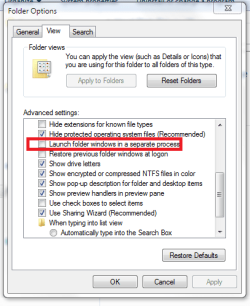
To whomever it was that suggested I unselect "launch each folder in a separate process" - it wasn't selected to begin with, though that was a good guess.
 

My Computer

Computer Manufacturer/Model Number
Dell Studio XPS 7100
OS
Windows 7 Home Premium
CPU
AMD Phenom II X6 1045T 2.7GHz
Motherboard
Dell 0NWWY0
Memory
8GB DDR3 SDRAM
Graphics Card(s)
AMD Radeon HD6970
Monitor(s) Displays
Dell IN2020M
Screen Resolution
1600x900
Hard Drives
Seagate ST310005 28AS SATA Disk Device (1000GB)
Toshiba USB 3.5"-HDD (750GB)
Western Digital WD20 00JD-22HBB0 SATA Disk Device (200GB)
Toshiba MK1032GAX (100GB)
PSU
COOLER MASTER Silent Pro RSA00-AMBAJ3-US 1000W
Case
Original
Cooling
Forced air
Keyboard
Logitech G11
Mouse
Logitech MX-518
Internet Speed
[URL=http://www.speedtest.net][IMG]http://www.speedtest.net/
Technically explorer.exe isn't allowed to launch separate processes unless that box is checked (or you open a new window containing a COM factory), so if you've got more than 1 with that box unchecked that really doesn't leave many alternatives other than an Explorer shell extension. I saw you talking about it previously, but what happens if you go and disable everything non-Microsoft via shellexview and rebooted to see if it continues?
 

My Computer

Computer type
PC/Desktop
Computer Manufacturer/Model Number
Custom
OS
Windows 10 Pro x64
CPU
Intel Core i7 4790K @ 4.5GHz
Motherboard
Asus Maximus Hero VII
Memory
32GB DDR3
Graphics Card(s)
Nvidia GeForce GTX970
Sound Card
Realtek HD Audio
Screen Resolution
1920x1200
Hard Drives
1x Samsung 250GB SSD
4x WD RE 2TB (RAIDZ)
PSU
Corsair AX760i
Case
Fractal Design Define R4
Cooling
Noctua NH-D15
they solved it siomewhere else, heres a answer

Well i've solved it.. those instances are launched when i use the 'open containing folder' command in utorrent.
 

My Computer

Computer Manufacturer/Model Number
dell m5030
OS
windows 7 premium 64 bit
CPU
AMD Athlon IIP360 Dual core 2.3ghz
Memory
4GB PC3
Graphics Card(s)
ATI Mobility Radeon HD 4250
Monitor(s) Displays
15.6 inch
Hard Drives
120gb Patriot PYRO
.......
 
Last edited:

My Computer

Computer Manufacturer/Model Number
Home made desktop
OS
Windows Seven 64
CPU
i7 860
Motherboard
Asus
Memory
8 Go
Graphics Card(s)
ATI 4550
Back
Top