Multiple folders for Windows Desktop Background?

nabilalk

New member
Power User
Local time
11:17 PM
Messages
299
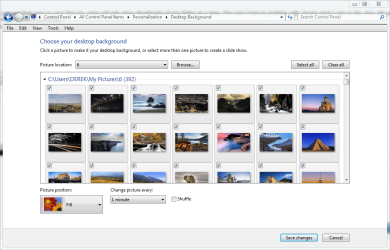
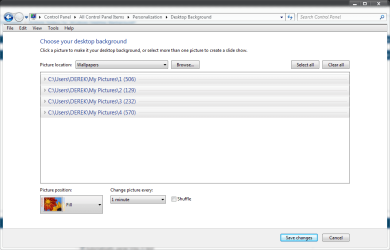
Win 7 only allows you to set one folder at a time to search for wallpapers under Personalize>desktop background Is there a way to allow Win 7 to search folders within folders, or add multiple folders to the Picture Location so that you can use multiple folders for your desktop background?

I suppose I could use Webshots or some other desktop background app, but I would like to be able to do this without installing additional software. Thanks.

Update: Creating a new Library and manually adding each folder of wallpapers that I wanted to include, including manually adding subfolders allowed Win 7 to search all of the wallpapers that I wanted to use. Thank you Brink for the solution.
 
Last edited:

My Computer

Computer Manufacturer/Model Number
Gateway M6827
OS
Win 7 Professional 32-bit
CPU
Intel Core 2 Duo CPU T5750 @ 2.00 GHz
Memory
3GB
Monitor(s) Displays
ViewSonic Vx900
Screen Resolution
1280x1024
Hard Drives
150GB Hard Drive
Win 7 only allows you to set one folder at a time to search for wallpapers under Personalize>desktop background Is there a way to allow Win 7 to search folders within folders, or add multiple folders to the Picture Location so that you can use multiple folders for your desktop background?

I suppose I could use Webshots or some other desktop background app, but I would like to be able to do this without installing additional software. Thanks.
That's an interesting question. I prefer to keep my wallpapers in two distinct folders....."the girls" and "basic walls".....hopefully someone has an answer for you.:geek:
 

My Computer

Computer type
PC/Desktop
Computer Manufacturer/Model Number
Gigabyte Technology Co., Ltd.
OS
Win 7 Ultimate 64-bit SP1 (desktop)
CPU
Intel Core 2 Duo E8400
Motherboard
Gigabyte GA-EP35-DS3R
Memory
2x 2GB OCZ DDR II SDRAM PC2-6400
Graphics Card(s)
NVIDIA GeForce 9400GT
Monitor(s) Displays
HP 2009m(primary), Acer P191W
Screen Resolution
1600x900, 1440x900
Hard Drives
Internal:WD Caviar Black 640GB 32MB cache 7200RPM
External:Samsung Story Station 1TB HDD desktop drive
500GB Toshiba portable drive
PSU
Antec Earthwatts EA500D
Case
Antec Sonata III
Cooling
4 fans
Keyboard
Logitech Wave
Mouse
Logitech M-SBF90
Internet Speed
Slow due to home Wireless-G router
Antivirus
MSE, Hitman Pro, Malwarebytes
Browser
Chrome and Palemoon
Other Info
Laptop....Acer 5750Z-4835
15.6" HD Widescreen CineCrystal™ LED-backlit LCD Display: (1366x768 resolution, 16:9 aspect ratio)
Intel® Pentium® Processor B940 (2.0GHz, 2MB L3 cache)
Windows® 7 Home Premium,500GB Hard Drive,4GB DDR3 RAM, Intel® HD Graphics,8X DVD-Super Multi Double-Layer Drive
Multi-in-1 Digital Media Card Reader,802.11b/g/n Wi-Fi
Chrome and Palemoon, MSE, Hitman Pro
Win 7 only allows you to set one folder at a time to search for wallpapers under Personalize>desktop background Is there a way to allow Win 7 to search folders within folders, or add multiple folders to the Picture Location so that you can use multiple folders for your desktop background?

I suppose I could use Webshots or some other desktop background app, but I would like to be able to do this without installing additional software. Thanks.

Have you tried putting your multiple folders into a single folder, then just have it use that one folder.
 

My Computer

Computer type
PC/Desktop
Computer Manufacturer/Model Number
Self Built
OS
Win 10 Pro x64
CPU
Intel I5-2500K @3.3GHz
Motherboard
Asrock P67 Extreme4
Memory
16GB G.Skill Ripjaws X (4x4GB)
Graphics Card(s)
EVGA GeForce 750 Ti SC 2GB
Sound Card
ASUS Xonar DG 5.1 Channels 24-bit 96KHz PCI Interface Sound
Monitor(s) Displays
auria eq2367
Screen Resolution
1920 x 1080
Hard Drives
250GB Samsung 850 EVO SSD
1TB WD Blue
1TB Hitachi
PSU
SeaSonic X 650W 80 Plus Gold
Case
Corsair Obsidian 750D
Cooling
Corsair H60, Three 140mm case fans
Keyboard
Logitech Wireless Keyboard K520
Mouse
Logitech Wireless Mouse M310
Internet Speed
Wave Broadband ~ 100 dn 5 up
Antivirus
Windows Defender, Malwarebytes Premium
Browser
Edge, IE11, Chrome
Other Info
Laptop specs: HP g7-1365dx /
CPU: AMD A6-3420M APU with Radeon(tm) HD Graphics /
RAM: Crucial 8Gb (2x4Gb) /
SSD: Crucial M4-CT128M4SSD2 ATA Device/ FW 000F /
GFX: AMD Radeon HD 6520G /
OS: Windows 10 Pro x64
Win 7 only allows you to set one folder at a time to search for wallpapers under Personalize>desktop background Is there a way to allow Win 7 to search folders within folders, or add multiple folders to the Picture Location so that you can use multiple folders for your desktop background?

I suppose I could use Webshots or some other desktop background app, but I would like to be able to do this without installing additional software. Thanks.

Have you tried putting your multiple folders into a single folder, then just have it use that one folder.
Yes I have. The main issue is that Win 7 won't search folders within folders. For example, if you set your wallpaper folder to My Pictures, Win 7 will only search for images in the root directory of My Pictures. It will not search subfolders.
 

My Computer

Computer Manufacturer/Model Number
Gateway M6827
OS
Win 7 Professional 32-bit
CPU
Intel Core 2 Duo CPU T5750 @ 2.00 GHz
Memory
3GB
Monitor(s) Displays
ViewSonic Vx900
Screen Resolution
1280x1024
Hard Drives
150GB Hard Drive
Win 7 only allows you to set one folder at a time to search for wallpapers under Personalize>desktop background Is there a way to allow Win 7 to search folders within folders, or add multiple folders to the Picture Location so that you can use multiple folders for your desktop background?

I suppose I could use Webshots or some other desktop background app, but I would like to be able to do this without installing additional software. Thanks.

Have you tried putting your multiple folders into a single folder, then just have it use that one folder.
Yes I have. The main issue is that Win 7 won't search folders within folders. For example, if you set your wallpaper folder to My Pictures, Win 7 will only search for images in the root directory of My Pictures. It will not search subfolders.

O.K. how about creating a new folder with just the contents of the multiple folders copied to the new folder.
 

My Computer

Computer type
PC/Desktop
Computer Manufacturer/Model Number
Self Built
OS
Win 10 Pro x64
CPU
Intel I5-2500K @3.3GHz
Motherboard
Asrock P67 Extreme4
Memory
16GB G.Skill Ripjaws X (4x4GB)
Graphics Card(s)
EVGA GeForce 750 Ti SC 2GB
Sound Card
ASUS Xonar DG 5.1 Channels 24-bit 96KHz PCI Interface Sound
Monitor(s) Displays
auria eq2367
Screen Resolution
1920 x 1080
Hard Drives
250GB Samsung 850 EVO SSD
1TB WD Blue
1TB Hitachi
PSU
SeaSonic X 650W 80 Plus Gold
Case
Corsair Obsidian 750D
Cooling
Corsair H60, Three 140mm case fans
Keyboard
Logitech Wireless Keyboard K520
Mouse
Logitech Wireless Mouse M310
Internet Speed
Wave Broadband ~ 100 dn 5 up
Antivirus
Windows Defender, Malwarebytes Premium
Browser
Edge, IE11, Chrome
Other Info
Laptop specs: HP g7-1365dx /
CPU: AMD A6-3420M APU with Radeon(tm) HD Graphics /
RAM: Crucial 8Gb (2x4Gb) /
SSD: Crucial M4-CT128M4SSD2 ATA Device/ FW 000F /
GFX: AMD Radeon HD 6520G /
OS: Windows 10 Pro x64
Have you tried putting your multiple folders into a single folder, then just have it use that one folder.
Yes I have. The main issue is that Win 7 won't search folders within folders. For example, if you set your wallpaper folder to My Pictures, Win 7 will only search for images in the root directory of My Pictures. It will not search subfolders.

O.K. how about creating a new folder with just the contents of the multiple folders copied to the new folder.
I could do that yes. But then I would have duplicate copies of all of my wallpapers. I have about 6GB of wallpapers, and I would prefer not to have duplicates. Plus, I like to keep things organized, and throwing all of my wallpapers in one folder would not allow me to maintain my folder structure.
 

My Computer

Computer Manufacturer/Model Number
Gateway M6827
OS
Win 7 Professional 32-bit
CPU
Intel Core 2 Duo CPU T5750 @ 2.00 GHz
Memory
3GB
Monitor(s) Displays
ViewSonic Vx900
Screen Resolution
1280x1024
Hard Drives
150GB Hard Drive
Hello Nabilalk,

How about creating a new Library folder and including the folder locations that have the images you want to use in the library, then selecting the library in Desktop Background. This way they will be available from one library folder, but still only stored in there original locations.

Hope this helps,
Shawn
 

My Computer

Computer type
PC/Desktop
Computer Manufacturer/Model Number
Self built custom
OS
64-bit Windows 11 Pro for Workstations
CPU
Intel i7-8700K OC'd to 5 GHz
Motherboard
ASUS ROG Maximus XI Formula Z390
Memory
64 GB (4x16GB) G.SKILL TridentZ RGB DDR4 3600 MHz
Graphics Card(s)
ASUS ROG-STRIX-GTX1080TI-O11G-GAMING
Sound Card
Integrated
Monitor(s) Displays
2 x Samsung Odyssey G7 27"
Screen Resolution
2560x1440
Hard Drives
1TB Samsung 990 PRO M.2,
4TB Samsung 990 PRO PRO M.2,
TerraMaster F8 SSD Plus NAS
PSU
Seasonic Prime Titanium 850W
Case
Thermaltake Core P3
Cooling
Corsair Hydro H115i
Keyboard
Logitech wireless K800
Mouse
Logitech MX Master 4
Internet Speed
2 Gb/s Download and 100 Mb/s Upload
Antivirus
Malwarebyte Anti-Malware Premium
Browser
Google Chrome
Other Info
Logitech Z625 speaker system,
Logitech BRIO 4K Pro webcam,
HP Color LaserJet Pro MFP M477fdn,
APC SMART-UPS RT 1000 XL - SURT1000XLI,
Galaxy S23 Plus phone
Hello Nabilalk,

How about creating a new Library folder and including the folder locations that have the images you want to use in the library, then selecting the library in Desktop Background. This way they will be available from one library folder, but still only stored in there original locations.

Hope this helps,
Shawn
That sounds like a plan Brink. I will give that a try and post back.
 

My Computer

Computer Manufacturer/Model Number
Gateway M6827
OS
Win 7 Professional 32-bit
CPU
Intel Core 2 Duo CPU T5750 @ 2.00 GHz
Memory
3GB
Monitor(s) Displays
ViewSonic Vx900
Screen Resolution
1280x1024
Hard Drives
150GB Hard Drive
Yes I have. The main issue is that Win 7 won't search folders within folders. For example, if you set your wallpaper folder to My Pictures, Win 7 will only search for images in the root directory of My Pictures. It will not search subfolders.

O.K. how about creating a new folder with just the contents of the multiple folders copied to the new folder.
I could do that yes. But then I would have duplicate copies of all of my wallpapers. I have about 6GB of wallpapers, and I would prefer not to have duplicates. Plus, I like to keep things organized, and throwing all of my wallpapers in one folder would not allow me to maintain my folder structure.

I know what you mean, I have alot of wallpapers too. And some of my folders do have duplicates from other folders. Mainly because there are so many to put in specific folders, laziness on my part. :o
Those are about all I have to offer for suggestions, If you do find something that works out for you I'd be interested in how you do it.
Sorry I couldn't be more help to you, good luck with that.:)
 

My Computer

Computer type
PC/Desktop
Computer Manufacturer/Model Number
Self Built
OS
Win 10 Pro x64
CPU
Intel I5-2500K @3.3GHz
Motherboard
Asrock P67 Extreme4
Memory
16GB G.Skill Ripjaws X (4x4GB)
Graphics Card(s)
EVGA GeForce 750 Ti SC 2GB
Sound Card
ASUS Xonar DG 5.1 Channels 24-bit 96KHz PCI Interface Sound
Monitor(s) Displays
auria eq2367
Screen Resolution
1920 x 1080
Hard Drives
250GB Samsung 850 EVO SSD
1TB WD Blue
1TB Hitachi
PSU
SeaSonic X 650W 80 Plus Gold
Case
Corsair Obsidian 750D
Cooling
Corsair H60, Three 140mm case fans
Keyboard
Logitech Wireless Keyboard K520
Mouse
Logitech Wireless Mouse M310
Internet Speed
Wave Broadband ~ 100 dn 5 up
Antivirus
Windows Defender, Malwarebytes Premium
Browser
Edge, IE11, Chrome
Other Info
Laptop specs: HP g7-1365dx /
CPU: AMD A6-3420M APU with Radeon(tm) HD Graphics /
RAM: Crucial 8Gb (2x4Gb) /
SSD: Crucial M4-CT128M4SSD2 ATA Device/ FW 000F /
GFX: AMD Radeon HD 6520G /
OS: Windows 10 Pro x64
Hello Nabilalk,

How about creating a new Library folder and including the folder locations that have the images you want to use in the library, then selecting the library in Desktop Background. This way they will be available from one library folder, but still only stored in there original locations.

Hope this helps,
Shawn

Thanks Shawn, That's a great idea. I'll Have to try that myself.:D
 

My Computer

Computer type
PC/Desktop
Computer Manufacturer/Model Number
Self Built
OS
Win 10 Pro x64
CPU
Intel I5-2500K @3.3GHz
Motherboard
Asrock P67 Extreme4
Memory
16GB G.Skill Ripjaws X (4x4GB)
Graphics Card(s)
EVGA GeForce 750 Ti SC 2GB
Sound Card
ASUS Xonar DG 5.1 Channels 24-bit 96KHz PCI Interface Sound
Monitor(s) Displays
auria eq2367
Screen Resolution
1920 x 1080
Hard Drives
250GB Samsung 850 EVO SSD
1TB WD Blue
1TB Hitachi
PSU
SeaSonic X 650W 80 Plus Gold
Case
Corsair Obsidian 750D
Cooling
Corsair H60, Three 140mm case fans
Keyboard
Logitech Wireless Keyboard K520
Mouse
Logitech Wireless Mouse M310
Internet Speed
Wave Broadband ~ 100 dn 5 up
Antivirus
Windows Defender, Malwarebytes Premium
Browser
Edge, IE11, Chrome
Other Info
Laptop specs: HP g7-1365dx /
CPU: AMD A6-3420M APU with Radeon(tm) HD Graphics /
RAM: Crucial 8Gb (2x4Gb) /
SSD: Crucial M4-CT128M4SSD2 ATA Device/ FW 000F /
GFX: AMD Radeon HD 6520G /
OS: Windows 10 Pro x64
You're welcome. I just hope it does the trick for you. :)
 

My Computer

Computer type
PC/Desktop
Computer Manufacturer/Model Number
Self built custom
OS
64-bit Windows 11 Pro for Workstations
CPU
Intel i7-8700K OC'd to 5 GHz
Motherboard
ASUS ROG Maximus XI Formula Z390
Memory
64 GB (4x16GB) G.SKILL TridentZ RGB DDR4 3600 MHz
Graphics Card(s)
ASUS ROG-STRIX-GTX1080TI-O11G-GAMING
Sound Card
Integrated
Monitor(s) Displays
2 x Samsung Odyssey G7 27"
Screen Resolution
2560x1440
Hard Drives
1TB Samsung 990 PRO M.2,
4TB Samsung 990 PRO PRO M.2,
TerraMaster F8 SSD Plus NAS
PSU
Seasonic Prime Titanium 850W
Case
Thermaltake Core P3
Cooling
Corsair Hydro H115i
Keyboard
Logitech wireless K800
Mouse
Logitech MX Master 4
Internet Speed
2 Gb/s Download and 100 Mb/s Upload
Antivirus
Malwarebyte Anti-Malware Premium
Browser
Google Chrome
Other Info
Logitech Z625 speaker system,
Logitech BRIO 4K Pro webcam,
HP Color LaserJet Pro MFP M477fdn,
APC SMART-UPS RT 1000 XL - SURT1000XLI,
Galaxy S23 Plus phone
You're welcome. I just hope it does the trick for you. :)

Well I tried that but it will still only use one folder at a time, Good idea though.
Thanks.
 

My Computer

Computer type
PC/Desktop
Computer Manufacturer/Model Number
Self Built
OS
Win 10 Pro x64
CPU
Intel I5-2500K @3.3GHz
Motherboard
Asrock P67 Extreme4
Memory
16GB G.Skill Ripjaws X (4x4GB)
Graphics Card(s)
EVGA GeForce 750 Ti SC 2GB
Sound Card
ASUS Xonar DG 5.1 Channels 24-bit 96KHz PCI Interface Sound
Monitor(s) Displays
auria eq2367
Screen Resolution
1920 x 1080
Hard Drives
250GB Samsung 850 EVO SSD
1TB WD Blue
1TB Hitachi
PSU
SeaSonic X 650W 80 Plus Gold
Case
Corsair Obsidian 750D
Cooling
Corsair H60, Three 140mm case fans
Keyboard
Logitech Wireless Keyboard K520
Mouse
Logitech Wireless Mouse M310
Internet Speed
Wave Broadband ~ 100 dn 5 up
Antivirus
Windows Defender, Malwarebytes Premium
Browser
Edge, IE11, Chrome
Other Info
Laptop specs: HP g7-1365dx /
CPU: AMD A6-3420M APU with Radeon(tm) HD Graphics /
RAM: Crucial 8Gb (2x4Gb) /
SSD: Crucial M4-CT128M4SSD2 ATA Device/ FW 000F /
GFX: AMD Radeon HD 6520G /
OS: Windows 10 Pro x64
Solution

Hello Nabilalk,

How about creating a new Library folder and including the folder locations that have the images you want to use in the library, then selecting the library in Desktop Background. This way they will be available from one library folder, but still only stored in there original locations.

Hope this helps,
Shawn
The Library creation trick works. You create a new library and then add each folder of wallpapers that you want to that library. Keep in mind though, that you have to add subfolders separately in order for Win 7 backgrounds to search that folder for wallpapers. For example, if you have a folder of wallpapers called Nature, and you have subfolders named Americas, Europe, Africa, Antarctica, Middle East, Asia, then you have to select each folder separately in order for you to be able to use the wallpapers from that folder. Depending on how many subfolders you have, this can be quite tedious. However, it is a workaround that allows you to use the stock Windows 7 background features, without having to install additional software.

Thanks Brink!
 

My Computer

Computer Manufacturer/Model Number
Gateway M6827
OS
Win 7 Professional 32-bit
CPU
Intel Core 2 Duo CPU T5750 @ 2.00 GHz
Memory
3GB
Monitor(s) Displays
ViewSonic Vx900
Screen Resolution
1280x1024
Hard Drives
150GB Hard Drive
Hello Nabilalk,

How about creating a new Library folder and including the folder locations that have the images you want to use in the library, then selecting the library in Desktop Background. This way they will be available from one library folder, but still only stored in there original locations.

Hope this helps,
Shawn
That's actually what I did yesterday. It still only lets your "shuffle wallpaper" access one of the folders at a time, it seems, but I'm ok with that. :geek:
 

My Computer

Computer type
PC/Desktop
Computer Manufacturer/Model Number
Gigabyte Technology Co., Ltd.
OS
Win 7 Ultimate 64-bit SP1 (desktop)
CPU
Intel Core 2 Duo E8400
Motherboard
Gigabyte GA-EP35-DS3R
Memory
2x 2GB OCZ DDR II SDRAM PC2-6400
Graphics Card(s)
NVIDIA GeForce 9400GT
Monitor(s) Displays
HP 2009m(primary), Acer P191W
Screen Resolution
1600x900, 1440x900
Hard Drives
Internal:WD Caviar Black 640GB 32MB cache 7200RPM
External:Samsung Story Station 1TB HDD desktop drive
500GB Toshiba portable drive
PSU
Antec Earthwatts EA500D
Case
Antec Sonata III
Cooling
4 fans
Keyboard
Logitech Wave
Mouse
Logitech M-SBF90
Internet Speed
Slow due to home Wireless-G router
Antivirus
MSE, Hitman Pro, Malwarebytes
Browser
Chrome and Palemoon
Other Info
Laptop....Acer 5750Z-4835
15.6" HD Widescreen CineCrystal™ LED-backlit LCD Display: (1366x768 resolution, 16:9 aspect ratio)
Intel® Pentium® Processor B940 (2.0GHz, 2MB L3 cache)
Windows® 7 Home Premium,500GB Hard Drive,4GB DDR3 RAM, Intel® HD Graphics,8X DVD-Super Multi Double-Layer Drive
Multi-in-1 Digital Media Card Reader,802.11b/g/n Wi-Fi
Chrome and Palemoon, MSE, Hitman Pro
Hello Nabilalk,

How about creating a new Library folder and including the folder locations that have the images you want to use in the library, then selecting the library in Desktop Background. This way they will be available from one library folder, but still only stored in there original locations.

Hope this helps,
Shawn
That's actually what I did yesterday. It still only lets your "shuffle wallpaper" access one of the folders at a time, it seems, but I'm ok with that. :geek:

Same here.
The Library creation trick works. You create a new library and then add each folder of wallpapers that you want to that library. Keep in mind though, that you have to add subfolders separately in order for Win 7 backgrounds to search that folder for wallpapers. For example, if you have a folder of wallpapers called Nature, and you have subfolders named Americas, Europe, Africa, Antarctica, Middle East, Asia, then you have to select each folder separately in order for you to be able to use the wallpapers from that folder. Depending on how many subfolders you have, this can be quite tedious. However, it is a workaround that allows you to use the stock Windows 7 background features, without having to install additional software.
Are you saying you got that to use the pictures in multiple folders?
I can't get it to use more than one folder at a time.
 

My Computer

Computer type
PC/Desktop
Computer Manufacturer/Model Number
Self Built
OS
Win 10 Pro x64
CPU
Intel I5-2500K @3.3GHz
Motherboard
Asrock P67 Extreme4
Memory
16GB G.Skill Ripjaws X (4x4GB)
Graphics Card(s)
EVGA GeForce 750 Ti SC 2GB
Sound Card
ASUS Xonar DG 5.1 Channels 24-bit 96KHz PCI Interface Sound
Monitor(s) Displays
auria eq2367
Screen Resolution
1920 x 1080
Hard Drives
250GB Samsung 850 EVO SSD
1TB WD Blue
1TB Hitachi
PSU
SeaSonic X 650W 80 Plus Gold
Case
Corsair Obsidian 750D
Cooling
Corsair H60, Three 140mm case fans
Keyboard
Logitech Wireless Keyboard K520
Mouse
Logitech Wireless Mouse M310
Internet Speed
Wave Broadband ~ 100 dn 5 up
Antivirus
Windows Defender, Malwarebytes Premium
Browser
Edge, IE11, Chrome
Other Info
Laptop specs: HP g7-1365dx /
CPU: AMD A6-3420M APU with Radeon(tm) HD Graphics /
RAM: Crucial 8Gb (2x4Gb) /
SSD: Crucial M4-CT128M4SSD2 ATA Device/ FW 000F /
GFX: AMD Radeon HD 6520G /
OS: Windows 10 Pro x64
Hello Nabilalk,

How about creating a new Library folder and including the folder locations that have the images you want to use in the library, then selecting the library in Desktop Background. This way they will be available from one library folder, but still only stored in there original locations.

Hope this helps,
Shawn
That's actually what I did yesterday. It still only lets your "shuffle wallpaper" access one of the folders at a time, it seems, but I'm ok with that. :geek:

Same here.
The Library creation trick works. You create a new library and then add each folder of wallpapers that you want to that library. Keep in mind though, that you have to add subfolders separately in order for Win 7 backgrounds to search that folder for wallpapers. For example, if you have a folder of wallpapers called Nature, and you have subfolders named Americas, Europe, Africa, Antarctica, Middle East, Asia, then you have to select each folder separately in order for you to be able to use the wallpapers from that folder. Depending on how many subfolders you have, this can be quite tedious. However, it is a workaround that allows you to use the stock Windows 7 background features, without having to install additional software.
Are you saying you got that to use the pictures in multiple folders?
I can't get it to use more than one folder at a time.
So you want it to shuffle through all of them, must be.

It's not a big deal for me,being limited to just one, as right now I only have two folders there...."the girls"(which is PG-13 since there is a woman living in the house;)) and "basic walls".
 

My Computer

Computer type
PC/Desktop
Computer Manufacturer/Model Number
Gigabyte Technology Co., Ltd.
OS
Win 7 Ultimate 64-bit SP1 (desktop)
CPU
Intel Core 2 Duo E8400
Motherboard
Gigabyte GA-EP35-DS3R
Memory
2x 2GB OCZ DDR II SDRAM PC2-6400
Graphics Card(s)
NVIDIA GeForce 9400GT
Monitor(s) Displays
HP 2009m(primary), Acer P191W
Screen Resolution
1600x900, 1440x900
Hard Drives
Internal:WD Caviar Black 640GB 32MB cache 7200RPM
External:Samsung Story Station 1TB HDD desktop drive
500GB Toshiba portable drive
PSU
Antec Earthwatts EA500D
Case
Antec Sonata III
Cooling
4 fans
Keyboard
Logitech Wave
Mouse
Logitech M-SBF90
Internet Speed
Slow due to home Wireless-G router
Antivirus
MSE, Hitman Pro, Malwarebytes
Browser
Chrome and Palemoon
Other Info
Laptop....Acer 5750Z-4835
15.6" HD Widescreen CineCrystal™ LED-backlit LCD Display: (1366x768 resolution, 16:9 aspect ratio)
Intel® Pentium® Processor B940 (2.0GHz, 2MB L3 cache)
Windows® 7 Home Premium,500GB Hard Drive,4GB DDR3 RAM, Intel® HD Graphics,8X DVD-Super Multi Double-Layer Drive
Multi-in-1 Digital Media Card Reader,802.11b/g/n Wi-Fi
Chrome and Palemoon, MSE, Hitman Pro
Hello Nabilalk,

How about creating a new Library folder and including the folder locations that have the images you want to use in the library, then selecting the library in Desktop Background. This way they will be available from one library folder, but still only stored in there original locations.

Hope this helps,
Shawn
That's actually what I did yesterday. It still only lets your "shuffle wallpaper" access one of the folders at a time, it seems, but I'm ok with that. :geek:

Same here.
The Library creation trick works. You create a new library and then add each folder of wallpapers that you want to that library. Keep in mind though, that you have to add subfolders separately in order for Win 7 backgrounds to search that folder for wallpapers. For example, if you have a folder of wallpapers called Nature, and you have subfolders named Americas, Europe, Africa, Antarctica, Middle East, Asia, then you have to select each folder separately in order for you to be able to use the wallpapers from that folder. Depending on how many subfolders you have, this can be quite tedious. However, it is a workaround that allows you to use the stock Windows 7 background features, without having to install additional software.
Are you saying you got that to use the pictures in multiple folders?
I can't get it to use more than one folder at a time.
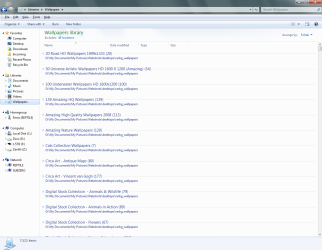
Yes that is exactly what I am saying. The setup is tedious, but it works. Here are some basic steps to get you going:

1. Create a new Library via any of the methods described and add one folder you want to use

2. Open up the library you created, mine is called Wallpapers and click on Include: 1 location

3. Click Add and navigate to another folder that you want to include. Note, if you have a folder called Nature and within the Nature folder you have another folder of wallpapers that you want to include lets say its called Panorama, you have to include the Panorama folder in your library via the Add function. If you only include the Nature folder, and you don't have pictures in the root directory of that folder, then it won't work. You have to manually add each subfolder that contains the wallpapers that you want to include in your Wallpaper library

4. To add additional folders, continue to click Add and browse for the other other folder locations that include the wallpapers. Keep in mind once again, that if a folder has subfolders that you also want to include, you must add the subfolders as well as the root folders.

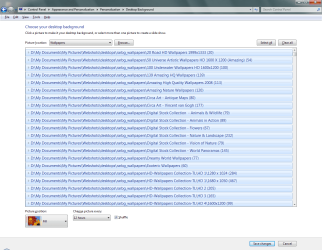
I hope that helps, please post back if you still have questions. To prove this works, here are some screens of my Wallpaper library in action.
 

Attachments

  • Wallpaper_Library.png
    Wallpaper_Library.png
    76.9 KB · Views: 138
  • Wallpaper_Library_folder.png
    Wallpaper_Library_folder.png
    63.1 KB · Views: 98

My Computer

Computer Manufacturer/Model Number
Gateway M6827
OS
Win 7 Professional 32-bit
CPU
Intel Core 2 Duo CPU T5750 @ 2.00 GHz
Memory
3GB
Monitor(s) Displays
ViewSonic Vx900
Screen Resolution
1280x1024
Hard Drives
150GB Hard Drive
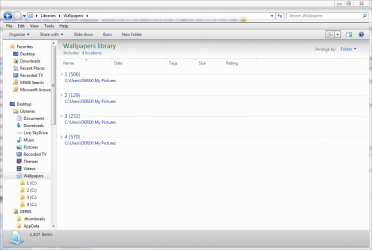
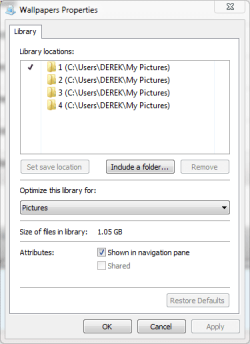
I don't know how you got that view in your first pic, mine will only show thumbnails of one folder at a time. The rest I had no problem with, here's what I got so far, How did you get that view where you select your wallpapers? Mine will only show thumbnails.

O.K. nevermind about the view question I figured that out.:o
But I still can't get it to list more than one folder. I'll keep trying though.
Thanks for your nice tutorial.:D
 

Attachments

  • wallpapers library.PNG
    wallpapers library.PNG
    91.6 KB · Views: 24
  • wallpaper library properties.PNG
    wallpaper library properties.PNG
    10.4 KB · Views: 16
  • wallpapers library location.PNG
    wallpapers library location.PNG
    13.3 KB · Views: 16
  • background.PNG
    background.PNG
    77.6 KB · Views: 28

My Computer

Computer type
PC/Desktop
Computer Manufacturer/Model Number
Self Built
OS
Win 10 Pro x64
CPU
Intel I5-2500K @3.3GHz
Motherboard
Asrock P67 Extreme4
Memory
16GB G.Skill Ripjaws X (4x4GB)
Graphics Card(s)
EVGA GeForce 750 Ti SC 2GB
Sound Card
ASUS Xonar DG 5.1 Channels 24-bit 96KHz PCI Interface Sound
Monitor(s) Displays
auria eq2367
Screen Resolution
1920 x 1080
Hard Drives
250GB Samsung 850 EVO SSD
1TB WD Blue
1TB Hitachi
PSU
SeaSonic X 650W 80 Plus Gold
Case
Corsair Obsidian 750D
Cooling
Corsair H60, Three 140mm case fans
Keyboard
Logitech Wireless Keyboard K520
Mouse
Logitech Wireless Mouse M310
Internet Speed
Wave Broadband ~ 100 dn 5 up
Antivirus
Windows Defender, Malwarebytes Premium
Browser
Edge, IE11, Chrome
Other Info
Laptop specs: HP g7-1365dx /
CPU: AMD A6-3420M APU with Radeon(tm) HD Graphics /
RAM: Crucial 8Gb (2x4Gb) /
SSD: Crucial M4-CT128M4SSD2 ATA Device/ FW 000F /
GFX: AMD Radeon HD 6520G /
OS: Windows 10 Pro x64
I don't know how you got that view in your first pic, mine will only show thumbnails of one folder at a time. The rest I had no problem with, here's what I got so far, How did you get that view where you select your wallpapers? Mine will only show thumbnails.

O.K. nevermind about the view question I figured that out.:o
But I still can't get it to list more than one folder. I'll keep trying though.
Thanks for your nice tutorial.:D
Under the Pictures Location in Personalize>Desktop Background you have 6 selected. You need to select your newly created Wallpaper Library. Try that and post back.
 

My Computer

Computer Manufacturer/Model Number
Gateway M6827
OS
Win 7 Professional 32-bit
CPU
Intel Core 2 Duo CPU T5750 @ 2.00 GHz
Memory
3GB
Monitor(s) Displays
ViewSonic Vx900
Screen Resolution
1280x1024
Hard Drives
150GB Hard Drive
I don't know how you got that view in your first pic, mine will only show thumbnails of one folder at a time. The rest I had no problem with, here's what I got so far, How did you get that view where you select your wallpapers? Mine will only show thumbnails.

O.K. nevermind about the view question I figured that out.:o
But I still can't get it to list more than one folder. I'll keep trying though.
Thanks for your nice tutorial.:D
Under the Pictures Location in Personalize>Desktop Background you have 6 selected. You need to select your newly created Wallpaper Library. Try that and post back.

Yeah I had 6 selected because I hadn't figured out the collapse view yet and the pictures are not for all eyes.;) Here's what I got now.
That's funny I was trying to help you at first and you ended up helping me.
Thanks. + rep for you.
 

Attachments

  • new location.PNG
    new location.PNG
    20.2 KB · Views: 29

My Computer

Computer type
PC/Desktop
Computer Manufacturer/Model Number
Self Built
OS
Win 10 Pro x64
CPU
Intel I5-2500K @3.3GHz
Motherboard
Asrock P67 Extreme4
Memory
16GB G.Skill Ripjaws X (4x4GB)
Graphics Card(s)
EVGA GeForce 750 Ti SC 2GB
Sound Card
ASUS Xonar DG 5.1 Channels 24-bit 96KHz PCI Interface Sound
Monitor(s) Displays
auria eq2367
Screen Resolution
1920 x 1080
Hard Drives
250GB Samsung 850 EVO SSD
1TB WD Blue
1TB Hitachi
PSU
SeaSonic X 650W 80 Plus Gold
Case
Corsair Obsidian 750D
Cooling
Corsair H60, Three 140mm case fans
Keyboard
Logitech Wireless Keyboard K520
Mouse
Logitech Wireless Mouse M310
Internet Speed
Wave Broadband ~ 100 dn 5 up
Antivirus
Windows Defender, Malwarebytes Premium
Browser
Edge, IE11, Chrome
Other Info
Laptop specs: HP g7-1365dx /
CPU: AMD A6-3420M APU with Radeon(tm) HD Graphics /
RAM: Crucial 8Gb (2x4Gb) /
SSD: Crucial M4-CT128M4SSD2 ATA Device/ FW 000F /
GFX: AMD Radeon HD 6520G /
OS: Windows 10 Pro x64
Back
Top