
Hi there,
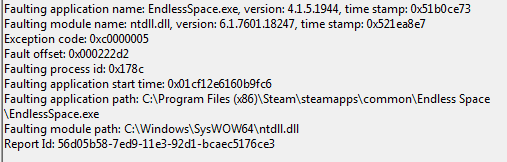
My problems began when I tried to run Endless Space (steam). It crashes as soon as I launch it. The screen will go black, and then seconds later it will crash to the desktop with the message "A problem caused the program to stop working correctly. Windows will close the program and notify you if a solution is available."
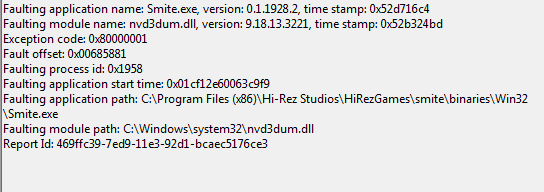
After posting on the developer's forum and trying some fixes I found there, I encountered the same problem with the game Smite by Hi-Rez, leading me to believe that this is not an Endless Space error but something else. My graphics drivers are up to date.
I have tried:
Uninstalling and re-installing games
Turning off firewall and anti-virus
Running Smite in compatibility mode
Changing the launch settings in Endless space to "-novideo" (interestingly this actually got me to a loading screen before the game crashed)
Uninstalling and then reinstalling various versions of the VC Redist file accompanied by a restart (including the file that came with Endless Space)
Other games (Civ V, WoW, Starcraft III) work fine.
Attached are the event viewer details. Thanks for your help!
My problems began when I tried to run Endless Space (steam). It crashes as soon as I launch it. The screen will go black, and then seconds later it will crash to the desktop with the message "A problem caused the program to stop working correctly. Windows will close the program and notify you if a solution is available."
After posting on the developer's forum and trying some fixes I found there, I encountered the same problem with the game Smite by Hi-Rez, leading me to believe that this is not an Endless Space error but something else. My graphics drivers are up to date.
I have tried:
Uninstalling and re-installing games
Turning off firewall and anti-virus
Running Smite in compatibility mode
Changing the launch settings in Endless space to "-novideo" (interestingly this actually got me to a loading screen before the game crashed)
Uninstalling and then reinstalling various versions of the VC Redist file accompanied by a restart (including the file that came with Endless Space)
Other games (Civ V, WoW, Starcraft III) work fine.
Attached are the event viewer details. Thanks for your help!
Attachments
My Computer
- Computer type
- PC/Desktop
- OS
- Microsoft Windows 7 Professional 64-bit 7601 Multiprocessor Free Service Pack 1
- CPU
- Intel(R) Core(TM) i7 CPU 950 @ 3.07GHz
- Motherboard
- ASUSTeK Computer INC. SABERTOOTH X58
- Memory
- 6.00 GB
- Graphics Card(s)
- (1) NVIDIA GeForce GTX 470 (2) NVIDIA GeForce GTX 470
- Sound Card
- (1) NVIDIA High Definition Audio (2) USB Audio Device (3
- Screen Resolution
- 1680 x 1050 x 32 bits (4294967296 colors) @ 60 Hz
- Hard Drives
- (1) ST3320613AS ATA Device (2) ST3500418AS ATA Device (3) M4-CT128 M4SSD2 SCSI Disk Device
- Antivirus
- AVG
- Browser
- Chrome


