Multiple Users On One Computer Requiring Username And Password

codyjacks

New member
Local time
3:41 AM
Messages
12
Hello all, I am very new to the computer world, but I found out how to set my computer to require a username and password for every user on my computer from this article: http://www.sevenforums.com/tutorials/61650-log-user-name-password.html (I used option two: manually changing the setting in registry editor.) My problem is that when I change my account name, I still have to log in with the old account name. My original account name was Cody, but I wanted to change that to cjacks, then create a new account without administrator privileges, named Cody. When I did this, I set both accounts to have the same password, (now I have two accounts, one named Cody, and one named cjacks, both with the same password) but the only username I could log in with was "Cody", and it logged me into the account that I had just re-named cjacks. (The original administrator account.) My questions are: why would I not be able to log into the newly made, "Cody" account, and why does using the username "Cody" log me into the account that is now named "cjacks"? By the way, when I lock my computer, it goes to a login screen requiring username and password, and I know that this would only allow me to login to the account that I was on when I locked my computer. To login to other accounts, I would, theoretically, push switch user, and then in the next screen it asks me for a username and password, and I could put in any username and password associated with any user account on the computer, and it would log me into that account. This will not work, however. Any help/insight would be very much appreciated. :)
 

My Computer My Computer

Computer type
PC/Desktop
Computer Manufacturer/Model Number
Dell
OS
Windows 7 Home Premium x64
Memory
1 TB
Antivirus
Avast
Browser
Firefox
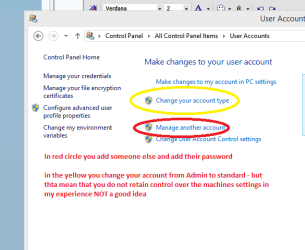
Hello and welcome Cody mate how exactly are you setting up the accounts? If you want just guest accounts then you just need to add accounts via Control Panel > User Accounts > then do as in pic.

One word of advice - if you want to retain control over the machines settings then make yourself the administrator - it saves so many problems later on. After fixing few of friends computers where the kids have had accounts on them it makes for a lot of work to dump them if you have to.

The pic is done up on my 8.1 laptop so may look slightly different on your machine.
 

Attachments

  • UAC.PNG
    UAC.PNG
    11.4 KB · Views: 48

My Computer My Computer

Computer type
PC/Desktop
Computer Manufacturer/Model Number
Own build (new) Desk1 / Asus ROG Win 7 / Desk2 1st build
OS
Desk1 7 Home Prem / Desk2 10 Pro / Main lap Asus ROG 10 Pro 2 laptop Toshiba 7 Pro Asus P2520 7 & 10
CPU
Desk1 i5 3750K / Laptop i7 GTX 860M / Desk2 i5 2500
Motherboard
Desk1 Asus P877-V / Desk2 Gigabyte H67 UD3H / Laptop ?
Memory
Desk1 8GB (1866) / Desk2 16GB (1333) / Laptop 8Gb DDR3
Graphics Card(s)
Desk 1& 2NVidia GTX 650 & Laptops on board Intel
Sound Card
Desk 1 & 2 -XONAR DG Realtek High Def audio Laptop
Monitor(s) Displays
Desk 1 Benq HD 2450 / Desk2 Philips 24" / Laptop 17.5"
Screen Resolution
1920x1080 D1 & D2 & Laptop 1
Hard Drives
Desk1 Samsung 120GB 830 SSD
Asus ROG 256GB 850 Pro SSD
Desk2 Samsung 840 256 SSD
Toshiba 120GB EVO
PSU
Desk 1 Corsair HX 1050/ Laptop ? / Desk 2 Corsair HX 650
Case
Desk 1 Cooler HAF XM ? Toshiba laptop / Desk2 Coolermaster
Cooling
Fans on all Desk1 -2 Desk2 - all Coolermasters 5 Laptop ?
Keyboard
Desk 1 MS Sidewinder X6 Desk 2 MS Sidewinder X 4
Mouse
Desk 1&2 - Gigabyte MS 900 gamer - laptop - Logitec wireless
Internet Speed
ADSL2+
Other Info
One other Desktop (tester) and spare Toshba laptop both with SSD's
Running Kaspersky 2016 ISS on all machines config'd identically
Logitec audio stereo systems on each machine (x3)
Canon MG5250MFC
Router/modem TP-Link running WPA2SK
I am just setting up the second account through "add or remove user accounts" in control panel. The idea is that I will have one account (administrator) that I will use, then another standard account (the only one my parents think exists). I really like how I set it to require a username and password because they'll have no idea how many other accounts there are. (In this case, there's only one.) And they're not going to be installing programs, changing anything or looking at the user accounts page, so they won't know the difference between administrator or non administrator. I just need to find out how to make my computer recognize the two different accounts that exist... I don't get why it doesn't register that I have changed the name of an account, or that a new one exists... I would imagine that there isn't any problem changing the registry editor settings... But I don't know. I know that at my work they use the same thing so they can have tons of accounts on one computer, but the only one you can see/access is your own because you have to put in both your username and password.
 

My Computer My Computer

Computer type
PC/Desktop
Computer Manufacturer/Model Number
Dell
OS
Windows 7 Home Premium x64
Memory
1 TB
Antivirus
Avast
Browser
Firefox
Cody whatever you do don't change anything in the registry unless you know exactly what you are doing in there in fact I strongly urge you to make a back up of it in case of mishap.
To do that http://www.sevenforums.com/tutorials/4230-registry-backup-restore.html I do this after I install the OS for safety sake.

I have to say at this point I am wondering why you need to do this but can see why the motive for not letting your parents put programs on the machine or see what you are doing on the machine. However at the same time I am wondering what if anything what you intend doing on the machine is something they wouldn't approve of.

Even if you do make multiple accounts with all sorts of passwords and stuff there are ways to see what you are doing on the computer.

If it is say to hide conversations between you and your friends then just use an account for which only you have access. But again there ways around this for those who know how to do that if your parents are cluey enough..
 

My Computer My Computer

Computer type
PC/Desktop
Computer Manufacturer/Model Number
Own build (new) Desk1 / Asus ROG Win 7 / Desk2 1st build
OS
Desk1 7 Home Prem / Desk2 10 Pro / Main lap Asus ROG 10 Pro 2 laptop Toshiba 7 Pro Asus P2520 7 & 10
CPU
Desk1 i5 3750K / Laptop i7 GTX 860M / Desk2 i5 2500
Motherboard
Desk1 Asus P877-V / Desk2 Gigabyte H67 UD3H / Laptop ?
Memory
Desk1 8GB (1866) / Desk2 16GB (1333) / Laptop 8Gb DDR3
Graphics Card(s)
Desk 1& 2NVidia GTX 650 & Laptops on board Intel
Sound Card
Desk 1 & 2 -XONAR DG Realtek High Def audio Laptop
Monitor(s) Displays
Desk 1 Benq HD 2450 / Desk2 Philips 24" / Laptop 17.5"
Screen Resolution
1920x1080 D1 & D2 & Laptop 1
Hard Drives
Desk1 Samsung 120GB 830 SSD
Asus ROG 256GB 850 Pro SSD
Desk2 Samsung 840 256 SSD
Toshiba 120GB EVO
PSU
Desk 1 Corsair HX 1050/ Laptop ? / Desk 2 Corsair HX 650
Case
Desk 1 Cooler HAF XM ? Toshiba laptop / Desk2 Coolermaster
Cooling
Fans on all Desk1 -2 Desk2 - all Coolermasters 5 Laptop ?
Keyboard
Desk 1 MS Sidewinder X6 Desk 2 MS Sidewinder X 4
Mouse
Desk 1&2 - Gigabyte MS 900 gamer - laptop - Logitec wireless
Internet Speed
ADSL2+
Other Info
One other Desktop (tester) and spare Toshba laptop both with SSD's
Running Kaspersky 2016 ISS on all machines config'd identically
Logitec audio stereo systems on each machine (x3)
Canon MG5250MFC
Router/modem TP-Link running WPA2SK
Did you restart the PC after making the changes?
 

My Computer My Computer

Computer type
PC/Desktop
Computer Manufacturer/Model Number
Dell
OS
Win 7 x64
CPU
Core I5
Yeah, I did restart it.
 

My Computer My Computer

Computer type
PC/Desktop
Computer Manufacturer/Model Number
Dell
OS
Windows 7 Home Premium x64
Memory
1 TB
Antivirus
Avast
Browser
Firefox
The registry is not something that will make the computer explode if I mess something up.. I have windows 7 on a flash drive and have (MANY times) reinstalled windows because I've messed something up. I'm not afraid of the registry editor; I'm simply bored of the boringness of my system. I wanna learn how to change all these things to make my computer work EXACTLY as I please, and do EXACTLY what I want. I have it backed up, and I've changed a few things (based on forums) that change reaction times from 1200 milliseconds to 800 milliseconds. I've toyed around with it a bit, but now something isn't working right, which is why I'm asking about it here. And this is more for just toying around with my system to make it do what I want than actually hiding anything. All I need to know is how to use multiple usernames and passwords on one system, while windows requires both username and password.
 

My Computer My Computer

Computer type
PC/Desktop
Computer Manufacturer/Model Number
Dell
OS
Windows 7 Home Premium x64
Memory
1 TB
Antivirus
Avast
Browser
Firefox
Hmm well I can only think of the UAC settings to do that Cody if making an account up in a name and adding a password (as a standard / guest user) to that name isn't what you want then it is beyond my experience.

Sorry I could be of any help.
 

My Computer My Computer

Computer type
PC/Desktop
Computer Manufacturer/Model Number
Own build (new) Desk1 / Asus ROG Win 7 / Desk2 1st build
OS
Desk1 7 Home Prem / Desk2 10 Pro / Main lap Asus ROG 10 Pro 2 laptop Toshiba 7 Pro Asus P2520 7 & 10
CPU
Desk1 i5 3750K / Laptop i7 GTX 860M / Desk2 i5 2500
Motherboard
Desk1 Asus P877-V / Desk2 Gigabyte H67 UD3H / Laptop ?
Memory
Desk1 8GB (1866) / Desk2 16GB (1333) / Laptop 8Gb DDR3
Graphics Card(s)
Desk 1& 2NVidia GTX 650 & Laptops on board Intel
Sound Card
Desk 1 & 2 -XONAR DG Realtek High Def audio Laptop
Monitor(s) Displays
Desk 1 Benq HD 2450 / Desk2 Philips 24" / Laptop 17.5"
Screen Resolution
1920x1080 D1 & D2 & Laptop 1
Hard Drives
Desk1 Samsung 120GB 830 SSD
Asus ROG 256GB 850 Pro SSD
Desk2 Samsung 840 256 SSD
Toshiba 120GB EVO
PSU
Desk 1 Corsair HX 1050/ Laptop ? / Desk 2 Corsair HX 650
Case
Desk 1 Cooler HAF XM ? Toshiba laptop / Desk2 Coolermaster
Cooling
Fans on all Desk1 -2 Desk2 - all Coolermasters 5 Laptop ?
Keyboard
Desk 1 MS Sidewinder X6 Desk 2 MS Sidewinder X 4
Mouse
Desk 1&2 - Gigabyte MS 900 gamer - laptop - Logitec wireless
Internet Speed
ADSL2+
Other Info
One other Desktop (tester) and spare Toshba laptop both with SSD's
Running Kaspersky 2016 ISS on all machines config'd identically
Logitec audio stereo systems on each machine (x3)
Canon MG5250MFC
Router/modem TP-Link running WPA2SK
Yes, that's what I want to do, but once I do that, the login screen doesn't recognize the name change of my original account, and it doesn't recognize that I set up a second account. So that's exactly what I want to do, it just seems to not work the way it should. Ordinarily, when you make a second account, it comes up where you can see its icon next to the original icon on the login screen. However, in this case, there is only one option, and it requires a username and a password. Theoretically, you could put in the name for any account that is registered on the computer, put in its password, and it would log you into that account. It's just not doing that for me.
 

My Computer My Computer

Computer type
PC/Desktop
Computer Manufacturer/Model Number
Dell
OS
Windows 7 Home Premium x64
Memory
1 TB
Antivirus
Avast
Browser
Firefox
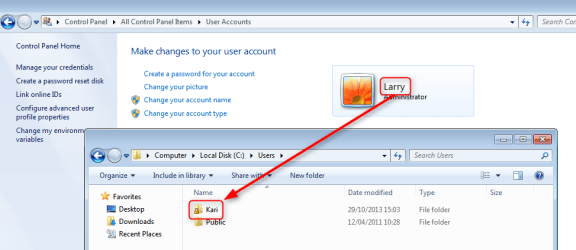
Changing the name of your user account does not change the name of the user profile folder, which can cause issues if the old username is then again used on new user accounts.

An example: My user account in this computer I am using now is Kari. If I now change its name to Larry in Control Panel > User Accounts, the account name would be Larry but my personal user folder would still be C:\Users\Kari.

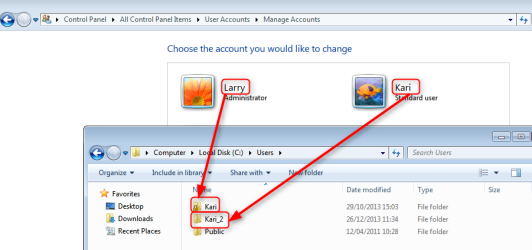
As the name of the user account folder does not change when the user account name is changed, it also prevents using the old name of the user account in a new user account profile folder name because this folder still exists.

Here two screenshots to explain more. First, I have changed my username from Kari to Larry but as the username change does not change the name of the user folder, Larry's personal folders are still stored at C:\Users\Kari:

2013-12-26_11h32_55.png

I now re-create the user account Kari. As the user profile folder Kari still exists and is used by the user account Larry, the new user user profile will be named automatically by Windows to Kari_2:

2013-12-26_11h36_47.png

This is why instead of changing the username it is always better to create a new user profile, copy all personal files and folders from old profile to new profile and finally delete the old profile (user account and its profile folder).

If however it is necessary to change the username, then here's the recommended method to change the name of the user account folder: http://www.sevenforums.com/tutorials/147545-user-profile-folder-change-user-account-folder-name.html.

Kari
 
Last edited:

My Computer My Computer

Computer type
Laptop
Computer Manufacturer/Model Number
HP ENVY 17-1150eg
OS
Windows 10 Pro x64 EN-GB
CPU
1.6 GHz Intel Core i7-720QM Processor
Memory
6 GB
Graphics Card(s)
ATI Mobility Radeon HD 5850 Graphics
Sound Card
Beats sound system with integrated subwoofer
Monitor(s) Displays
17" laptop display, 22" LED and 32" Full HD TV through HDMI
Screen Resolution
1600*900 (1), 1920*1080 (2&3)
Hard Drives
Internal: 2 x 500 GB SATA Hard Disk Drive 7200 rpm
External: 2TB for backups, 3TB USB3 network drive for media
Cooling
As Envy runs a bit warm, I have it on a Cooler Master pad
Keyboard
Logitech diNovo Media Desktop Laser (bluetooth)
Mouse
Logitech Performance Mouse MX
Internet Speed
50/10 Mbps VDSL
Antivirus
Windows Defender 4.3.9431.0
Browser
Maxthon 3.5.2., IE11
Awesome. Thanks so much! Now, I have left the name of the old one the same, and created one named cjacks, once I get this all sorted out I will just transfer admin privileges. However, now I'm up against another wall. I restarted my computer after I created "cjacks", and it won't let me log into it when the computer first starts up. Also, when I'm in "Cody" (the administrator at this point), I can go into the OS(C:) file, but the only things that show up under "users" are Cody and public. Any ideas on why it didn't set up a new folder? Or is it invisible because I'm not on that account? The primary issue is that it won't let me log in to cjacks. Thanks for your help so far!
 

My Computer My Computer

Computer type
PC/Desktop
Computer Manufacturer/Model Number
Dell
OS
Windows 7 Home Premium x64
Memory
1 TB
Antivirus
Avast
Browser
Firefox
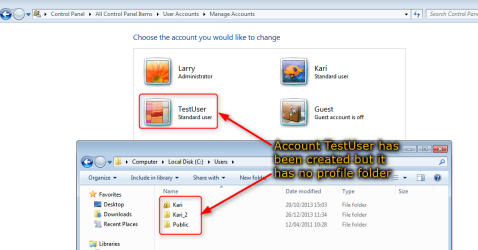
Windows does not create the user profile folder in C:\Users when the new user account is created. When creating a user account, Windows will prepare the system for this new user by reserving the account name, but nothing else will be done at this point.

See the screenshot below. I created a new user account and named it TestUser. The username is reserved and can be seen in Control Panel > User Accounts, but the C:\Users has no profile folder for it:

2013-12-26_20h34_51.png

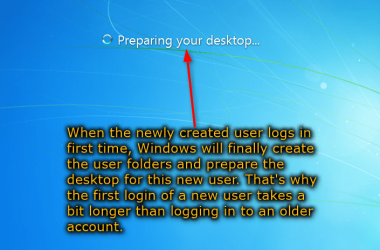
Windows will create the user profile folders and prepare the desktop only when this new user logs in first time. If you created a user account but it is never used, logged in, the user profile folder will never be created.

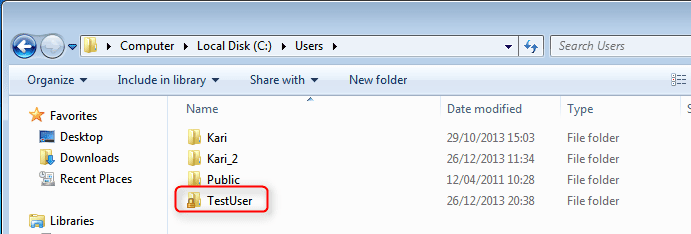
I now log in with this new user TestUser for the first time. Login takes a bit longer, Windows tells me it's preparing the desktop. This is when Windows finally creates the profile folders. After logging in, the newly created profile folders are there:

2013-12-26_20h38_04.png

2013-12-26_20h43_33.png

Your case then:
You have quite succesfully messed up your Windows setup with your username changes. I would do as follows:
This way you would have your Windows as you wanted, an admin account cjacksand a standard account Cody

Kari
 
Last edited:

My Computer My Computer

Computer type
Laptop
Computer Manufacturer/Model Number
HP ENVY 17-1150eg
OS
Windows 10 Pro x64 EN-GB
CPU
1.6 GHz Intel Core i7-720QM Processor
Memory
6 GB
Graphics Card(s)
ATI Mobility Radeon HD 5850 Graphics
Sound Card
Beats sound system with integrated subwoofer
Monitor(s) Displays
17" laptop display, 22" LED and 32" Full HD TV through HDMI
Screen Resolution
1600*900 (1), 1920*1080 (2&3)
Hard Drives
Internal: 2 x 500 GB SATA Hard Disk Drive 7200 rpm
External: 2TB for backups, 3TB USB3 network drive for media
Cooling
As Envy runs a bit warm, I have it on a Cooler Master pad
Keyboard
Logitech diNovo Media Desktop Laser (bluetooth)
Mouse
Logitech Performance Mouse MX
Internet Speed
50/10 Mbps VDSL
Antivirus
Windows Defender 4.3.9431.0
Browser
Maxthon 3.5.2., IE11
Thanks for your reply. My question wasn't answered, though. The problems that I'm having at this point is that I can't log into any account on my computer besides the initial Cody account, and that the original Cody account doesn't respond to a change of name in the login screen. I think I will go and change the registry input back to showing all users, and once they are all present, accounted for and showing in the windows login screen, I will change it back to require username and password to login. I honestly don't understand why I would need to restore my computer, considering that no accounts were ever logged into, besides the initial Cody account, so the only system file that ever existed was(is) Cody.
 

My Computer My Computer

Computer type
PC/Desktop
Computer Manufacturer/Model Number
Dell
OS
Windows 7 Home Premium x64
Memory
1 TB
Antivirus
Avast
Browser
Firefox
I changed my registry editor value (dontdisplaylastusername) back from one to zero, and then it showed both Cody and cjacks users. I didn't log into cjacks, however, because I didn't want to make that folder in case this becomes a problem. I realized that they both did, in fact, exist, so I went and changed the registry editor value from zero to one again, and it then would only allow me to login with Cody's credentials, and said that the username/password was incorrect for cjacks. Any ideas why I am only allowed to login to one account when I require a username and password to login? Maybe if we took a look at the root we could get to the bottom of it quicker. Essentially, I am trying to make my computer require a username AND password to login, and I want to be able to use multiple accounts and change their names as I please. Does anyone have any ideas on how to make this happen easier than messing around in the registry editor? Or does anyone know why what I did in the registry editor didn't do what I wanted it to do? Thanks to all of you for the help up to this point.
 

My Computer My Computer

Computer type
PC/Desktop
Computer Manufacturer/Model Number
Dell
OS
Windows 7 Home Premium x64
Memory
1 TB
Antivirus
Avast
Browser
Firefox
Thanks for your reply. My question wasn't answered, though.
Yes, it was answered. There was a small mistake in my previous post, I edited it a bit after realizing I had mixed the way you want it; you want Cody to be admin account and cjacks standard account, initially I thought it was vice versa (misread your original post).

I honestly don't understand why I would need to restore my computer, considering that no accounts were ever logged into, besides the initial Cody account, so the only system file that ever existed was(is) Cody.
From the beginning you have made it wrong, messing with registry, creating new user account using a name of an old account which was not deleted as it should be. Your registry is messed up, restoring will fix that.

Maybe if we took a look at the root we could get to the bottom of it quicker.
Maybe you could try the solutions given to you?

Your PC, your Windows, your decision. I know what's wrong in your system at the moment, I have told it to you and given recommendations about how to fix it. It's up to you what you decide to do.

I think I will unsubscribe this thread. Seems useless.

Kari
 

My Computer My Computer

Computer type
Laptop
Computer Manufacturer/Model Number
HP ENVY 17-1150eg
OS
Windows 10 Pro x64 EN-GB
CPU
1.6 GHz Intel Core i7-720QM Processor
Memory
6 GB
Graphics Card(s)
ATI Mobility Radeon HD 5850 Graphics
Sound Card
Beats sound system with integrated subwoofer
Monitor(s) Displays
17" laptop display, 22" LED and 32" Full HD TV through HDMI
Screen Resolution
1600*900 (1), 1920*1080 (2&3)
Hard Drives
Internal: 2 x 500 GB SATA Hard Disk Drive 7200 rpm
External: 2TB for backups, 3TB USB3 network drive for media
Cooling
As Envy runs a bit warm, I have it on a Cooler Master pad
Keyboard
Logitech diNovo Media Desktop Laser (bluetooth)
Mouse
Logitech Performance Mouse MX
Internet Speed
50/10 Mbps VDSL
Antivirus
Windows Defender 4.3.9431.0
Browser
Maxthon 3.5.2., IE11
I figured it out with a buddy of mine. The problem was that one account was set up to require a username and password, and the other one was set up to click on an icon and then input the password, so I couldn't login to that one with username and password. I'm sorry that you're bothered by me, but I know that you were trying to solve a different problem because of miscommunication. No matter. Thanks for your help. Problem solved. Also, my registry isn't messed up. I changed one value, and it did what I wanted it to once I found out how it works.
 

My Computer My Computer

Computer type
PC/Desktop
Computer Manufacturer/Model Number
Dell
OS
Windows 7 Home Premium x64
Memory
1 TB
Antivirus
Avast
Browser
Firefox
Back
Top