
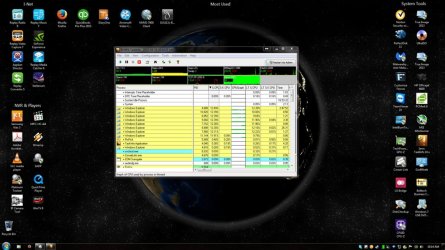
After a short period of time using Windows Explorer to copy files from my system to my backup server, or even if I use word and "Browse" for a file to open. IE: Anything that would use windows explorer within the os to save a file or open a file, I end up with multiple instances of Windows Explorer.exe. These spawned windows explorer task will not go away, even after closing out all the windows that were opened. In some cases this issue prevents me from 'safely removing' my thumb drive because it thinks there is a window open still. I have included a screenshot of my desktop and TaskInfo which shows all the instances. These all take up about 12.5% cpu and very shortly my quick system comes to a pausing halt.
This issue is only taking place on my 64bit version of windows 7 ultimate, it does not happen on my 32bit version of windows 7 ultimate. They appear only after doing things that utilize the windows explorer portion of browsing for a file, such as if I open word and choose "open", or if I open windows explorer in any way. After a short amount of time I will have this problem take place. It's as if there is a memory leak or some "error" that causes that instance to get hung up. My only remedy is to use TaskInfo and terminate the Windows Explorer.exe that are at 12% and I keep the one that is normal cpu usage (3%). At this point everything is fine.
Please, any ideas would be awesome. I have done ALL windows updates, but this started on clean install after getting all updates that were available as of 8/10/2015. That is when both os's were installed.
This issue is only taking place on my 64bit version of windows 7 ultimate, it does not happen on my 32bit version of windows 7 ultimate. They appear only after doing things that utilize the windows explorer portion of browsing for a file, such as if I open word and choose "open", or if I open windows explorer in any way. After a short amount of time I will have this problem take place. It's as if there is a memory leak or some "error" that causes that instance to get hung up. My only remedy is to use TaskInfo and terminate the Windows Explorer.exe that are at 12% and I keep the one that is normal cpu usage (3%). At this point everything is fine.
Please, any ideas would be awesome. I have done ALL windows updates, but this started on clean install after getting all updates that were available as of 8/10/2015. That is when both os's were installed.
Attachments
My Computer
At a glance
Windows 7 Ultimate 64bitAMD FX-835016gig Patriot 2133Geforce GTX 970
- Computer type
- PC/Desktop
- Computer Manufacturer/Model Number
- custom build
- OS
- Windows 7 Ultimate 64bit
- CPU
- AMD FX-8350
- Motherboard
- Sabertooth 990fx
- Memory
- 16gig Patriot 2133
- Graphics Card(s)
- Geforce GTX 970
- Hard Drives
- 4-1TB
1-3TB
- Antivirus
- Norton
- Browser
- Firefox


