Multiple Windows Server 2008 R2

If i am not wrong this whole arrangement would lead to environment where the clients of both network 172 n 10 will communicate each other..!!!

In server B forward lookup zone you have created A record for single client...!!! what does that mean? will this single client be resolved... if yes, then to make other clients of network 10 resolve their names should i manually add it one by one...?
 

My Computer

Computer type
PC/Desktop
OS
SERVER 2008 R2
Yes, I could ping client 10.10.10.50 from ServerA for example. Communications both ways is possible.

You should already have a DNS zone for your domain (needed for Active Directory) so no need to manually enter any records (they should be dynamically updated since clients are authenticated and trusted). Well, open your DNS forward zone and check if you have records for your clients, if not perhaps dynamic update is not configured yet. We can look at that later. First thing first, make your clients on 10.0.0.0/255.0.0.0 accessible.
 

My Computer

Computer type
PC/Desktop
Computer Manufacturer/Model Number
Custom Build
OS
Windows 7 Ultimate x64 SP1
CPU
AMD Phenom 2 1090T
Motherboard
Gigabyte GA-890FXA-UD5
Memory
2x8GB Kingston HyperX Fury Black 1600Mhz Unganged
Graphics Card(s)
MSI GTX 970 Gaming 4G
Sound Card
Realtek On-Board HD 7.1 Audio / Logitech G35
Monitor(s) Displays
3xAcer GD245HQ
Screen Resolution
1920x1080
Hard Drives
Samsung 850 Pro 512GB SSD - OS /
WD Caviar Black SATA 3 - 1 TBx2 - Dynamic RAID 0 /
WD Caviar Green SATA 2 - 640GBx2 - Dynamic RAID 0 /
WD Caviar Green SATA 2 - 640GB - Internal Backup /
Seagate Barracude SATA 3 - 3TB - External Backup/ Sync
PSU
HighPower 1000W
Case
Cooler Master HAF 932
Cooling
Noctua NH-D14
Keyboard
Logitech G19
Mouse
Logitech G500
Internet Speed
100/4 Mbit Cable (100GB quota)
Antivirus
ZoneAlarm Extreme Security / MBAM Pro / MBAE Free / SAS Free
Browser
IE 11 - Firefox - Chrome
Other Info
Logitech F710/ G27/ G940/ Z5500 // TrackIR 5 // Nvidia 3D Surround Vision
Yes its working great job,,, :D thanks a lot for your continued assistance :)

Do you have any idea how to configure UAG " Unified Access Gateway "
I want to install it on server B in this Scenario being the client of Server A having IP assigned by DHCP of Server A.

SO that i can define and apply all the policies of UAG server (in this case it is server B) on the clients of Server A .... is it possible!!!
 

My Computer

Computer type
PC/Desktop
OS
SERVER 2008 R2
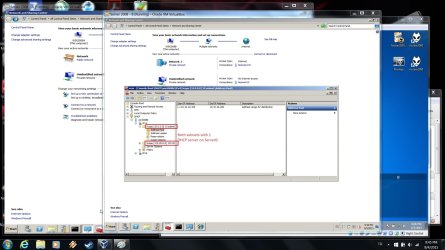
Before anything else, you should really fix this dynamic IP on ServerB, change it to a static IP and exclude it from DHCP on ServerA :p You should also consider consolidating DHCP to one server instead of two. For example ServerB can serve both subnets (and even more with DHCP relaying, not needed on your case). You don't need 2 DHCP servers in your network.
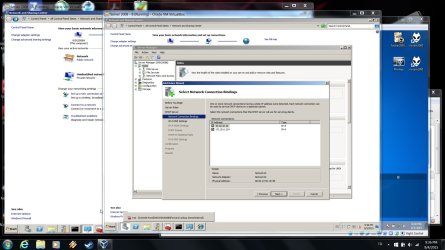
07 - DHCP Server Role.jpg

08 - DHCP subnets.jpg

---------------------------

Coming to UAG, let me tell you it is new for me, however, reading a bit on it:

Microsoft Forefront Unified Access Gateway (UAG), is a computer software solution
that provides secure remote access to corporate networks for remote employees
and business partners.

Do you really need this? Clients of ServerA are not considered remote; these are the computers in your company aren't they? What exactly are you trying to accomplish? Please list them as much as possible.
 

My Computer

Computer type
PC/Desktop
Computer Manufacturer/Model Number
Custom Build
OS
Windows 7 Ultimate x64 SP1
CPU
AMD Phenom 2 1090T
Motherboard
Gigabyte GA-890FXA-UD5
Memory
2x8GB Kingston HyperX Fury Black 1600Mhz Unganged
Graphics Card(s)
MSI GTX 970 Gaming 4G
Sound Card
Realtek On-Board HD 7.1 Audio / Logitech G35
Monitor(s) Displays
3xAcer GD245HQ
Screen Resolution
1920x1080
Hard Drives
Samsung 850 Pro 512GB SSD - OS /
WD Caviar Black SATA 3 - 1 TBx2 - Dynamic RAID 0 /
WD Caviar Green SATA 2 - 640GBx2 - Dynamic RAID 0 /
WD Caviar Green SATA 2 - 640GB - Internal Backup /
Seagate Barracude SATA 3 - 3TB - External Backup/ Sync
PSU
HighPower 1000W
Case
Cooler Master HAF 932
Cooling
Noctua NH-D14
Keyboard
Logitech G19
Mouse
Logitech G500
Internet Speed
100/4 Mbit Cable (100GB quota)
Antivirus
ZoneAlarm Extreme Security / MBAM Pro / MBAE Free / SAS Free
Browser
IE 11 - Firefox - Chrome
Other Info
Logitech F710/ G27/ G940/ Z5500 // TrackIR 5 // Nvidia 3D Surround Vision
You are Right... server A clients are part of Local Lan ....

what i want is:

  • to introduce another server Like Server B with UAG services running on within Server A network of 172.
  • And to allow the clients of Server B to reach internet or access my public Network of 121 behind the private network of Server A (172.20.0.0) Using UAG services.
 

My Computer

Computer type
PC/Desktop
OS
SERVER 2008 R2
I just left the UAG for a moment and moved to TMG......

I configured every thing.
I can access the web from TMG server but cant access from the clients
I even cant ping the tmg server from clients...
 

My Computer

Computer type
PC/Desktop
OS
SERVER 2008 R2
I will have to check this later, I did install and configure ISA Server back in the days. They should be similar. However, when you install such a service, you should first configure everything to allow and work your way back.
 

My Computer

Computer type
PC/Desktop
Computer Manufacturer/Model Number
Custom Build
OS
Windows 7 Ultimate x64 SP1
CPU
AMD Phenom 2 1090T
Motherboard
Gigabyte GA-890FXA-UD5
Memory
2x8GB Kingston HyperX Fury Black 1600Mhz Unganged
Graphics Card(s)
MSI GTX 970 Gaming 4G
Sound Card
Realtek On-Board HD 7.1 Audio / Logitech G35
Monitor(s) Displays
3xAcer GD245HQ
Screen Resolution
1920x1080
Hard Drives
Samsung 850 Pro 512GB SSD - OS /
WD Caviar Black SATA 3 - 1 TBx2 - Dynamic RAID 0 /
WD Caviar Green SATA 2 - 640GBx2 - Dynamic RAID 0 /
WD Caviar Green SATA 2 - 640GB - Internal Backup /
Seagate Barracude SATA 3 - 3TB - External Backup/ Sync
PSU
HighPower 1000W
Case
Cooler Master HAF 932
Cooling
Noctua NH-D14
Keyboard
Logitech G19
Mouse
Logitech G500
Internet Speed
100/4 Mbit Cable (100GB quota)
Antivirus
ZoneAlarm Extreme Security / MBAM Pro / MBAE Free / SAS Free
Browser
IE 11 - Firefox - Chrome
Other Info
Logitech F710/ G27/ G940/ Z5500 // TrackIR 5 // Nvidia 3D Surround Vision
Ok, I got my virtual network upgraded to Active Directory and installed TMG on Server A.

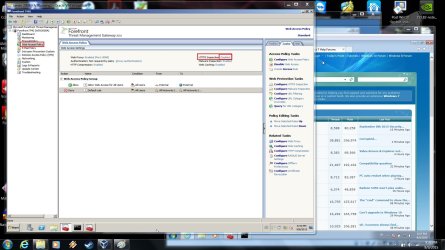
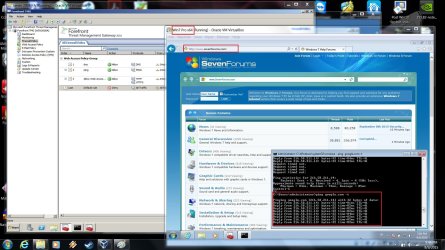
Here are couple of things you should configure on TMG management console:
- Networking:
---- Networks: Make sure 10.0.0.0 and 172.20.0.0 networks are Internal
---- Routing: Static Route to 10.0.0.0 (Create "Network Topology Route", Destination: 10.0.0.0, Netmask: 255.0.0.0, Gateway: 172.20.0.254, metric: 256 (default))
- Firewall Policy:
---- DNS: New Access Rule - dns - Allow - Add - Infrastructure - DNS - next - Networks (Internal) - Networks (External) - All Users - Finish
---- Ping: New Access Rule - ping - Allow - Add - Infrastructure - Ping - next - Networks (Internal) - Networks (Internal and External) - All Users - Finish
- Web Access Policy
---- HTTPS Inspection (I disabled this one because I didn't have time to get it to work)

TMG Firewall Policy - 02.jpg

TMG Web Access Policy - 03.jpg

TMG Client Access - 04.jpg

Since only HTTP and HTTPS is allowed, FTP for example doesn't allow Internet access. Add FTP to firewall policy similar to dns and ping and it will be allowed once you Apply.
 

My Computer

Computer type
PC/Desktop
Computer Manufacturer/Model Number
Custom Build
OS
Windows 7 Ultimate x64 SP1
CPU
AMD Phenom 2 1090T
Motherboard
Gigabyte GA-890FXA-UD5
Memory
2x8GB Kingston HyperX Fury Black 1600Mhz Unganged
Graphics Card(s)
MSI GTX 970 Gaming 4G
Sound Card
Realtek On-Board HD 7.1 Audio / Logitech G35
Monitor(s) Displays
3xAcer GD245HQ
Screen Resolution
1920x1080
Hard Drives
Samsung 850 Pro 512GB SSD - OS /
WD Caviar Black SATA 3 - 1 TBx2 - Dynamic RAID 0 /
WD Caviar Green SATA 2 - 640GBx2 - Dynamic RAID 0 /
WD Caviar Green SATA 2 - 640GB - Internal Backup /
Seagate Barracude SATA 3 - 3TB - External Backup/ Sync
PSU
HighPower 1000W
Case
Cooler Master HAF 932
Cooling
Noctua NH-D14
Keyboard
Logitech G19
Mouse
Logitech G500
Internet Speed
100/4 Mbit Cable (100GB quota)
Antivirus
ZoneAlarm Extreme Security / MBAM Pro / MBAE Free / SAS Free
Browser
IE 11 - Firefox - Chrome
Other Info
Logitech F710/ G27/ G940/ Z5500 // TrackIR 5 // Nvidia 3D Surround Vision
Without applying your configuration I did succeed to browse the internet from the 10.0.0.0 network....
I did these things....

1. Assigned a Public static IP to the external interface that is 121.52.X.X
2. 10.10.10.10 to the internal interface
3. Enabled proxy server settings in the web browser and assigned 10.10.10.10 as a proxy server IP.

With these settings i can browse the internet from 10.0.0.0 network clients

* Remember I have not defined the DNS protocol as mentioned by You ....

MY IPv4 statics as follows

  • for 10.0.0.0 Networks
client side : IP 10.10.10.20
DNS 10.10.10.10
No gateway

  • On TMG server
External Lan : IP 121.52.X.X
No DNS
Gateway 121.52.X.Y
Internal Lan : IP 10.10.10.10
Dns 10.10.10.10
No gateway


My Computer

Computer type
PC/Desktop
OS
SERVER 2008 R2
Hmm, you seem to have messed up everything :p or something

On TMG server (ServerA? it doesn't mean much to install TMG on ServerB unless you wan't 10.0.0.0 network to be treated differently but that is another topic) Internal LAN is 10.10.10.10? Typo perhaps? It should have been 172.20.0.1 (in my example), where did that subnet go?

Can you make another drawing of the network please? Include IP addresses, services and as much info as possible.
 

My Computer

Computer type
PC/Desktop
Computer Manufacturer/Model Number
Custom Build
OS
Windows 7 Ultimate x64 SP1
CPU
AMD Phenom 2 1090T
Motherboard
Gigabyte GA-890FXA-UD5
Memory
2x8GB Kingston HyperX Fury Black 1600Mhz Unganged
Graphics Card(s)
MSI GTX 970 Gaming 4G
Sound Card
Realtek On-Board HD 7.1 Audio / Logitech G35
Monitor(s) Displays
3xAcer GD245HQ
Screen Resolution
1920x1080
Hard Drives
Samsung 850 Pro 512GB SSD - OS /
WD Caviar Black SATA 3 - 1 TBx2 - Dynamic RAID 0 /
WD Caviar Green SATA 2 - 640GBx2 - Dynamic RAID 0 /
WD Caviar Green SATA 2 - 640GB - Internal Backup /
Seagate Barracude SATA 3 - 3TB - External Backup/ Sync
PSU
HighPower 1000W
Case
Cooler Master HAF 932
Cooling
Noctua NH-D14
Keyboard
Logitech G19
Mouse
Logitech G500
Internet Speed
100/4 Mbit Cable (100GB quota)
Antivirus
ZoneAlarm Extreme Security / MBAM Pro / MBAE Free / SAS Free
Browser
IE 11 - Firefox - Chrome
Other Info
Logitech F710/ G27/ G940/ Z5500 // TrackIR 5 // Nvidia 3D Surround Vision
Back
Top