You can't ping individual computers behind a NAT unless you forward ports to them. Maybe 1 or 2 servers but for an entire segment this is infeasible. Also not a very good practice to NAT internally. The method below will achieve what you want with routing LAN networks.
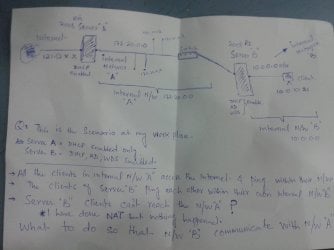
Simple Diagram:
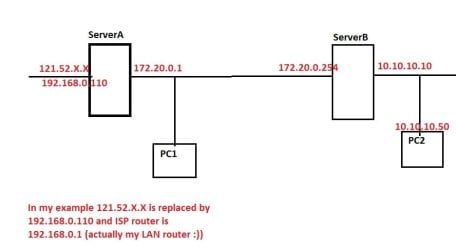
I started with changing Network Interface names to more meaningful ones:
On ServerA: Internet and Network172
On ServerB: Network172 and Network10
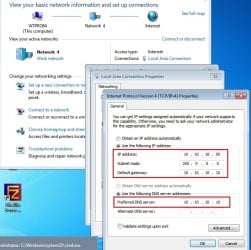
All interfaces are configured with static IPs, it goes as:
ServerA - Internet:
192.168.0.110 / 255.255.255.0 - Gateway: 192.168.0.1 - DNS Servers: nothing set
ServerA - Network172:
172.20.0.1 / 255.255.0.0 - Gateway: nothing set - DNS servers: 172.20.0.254 (since you have AD on ServerB, I guess your DNS is there too)
ServerB - Network172:
172.20.0.254 / 255.255.0.0 - Gateway: 172.20.0.1 - DNS Servers: 172.20.0.254
ServerB - Network10:
10.10.10.10 / 255.0.0.0 - Gateway: nothing set - DNS Servers: 10.10.10.10
Due to the nature of TCP/IP setup on internal interfaces, they were set as "Unidentified Networks", and had to resort to Group Policy to designate them as Private. (Skip if yours are already private). Open Group Policy (run "
mmc" and add snap-in for Group Policy Object)
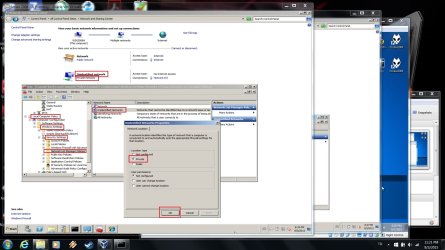
Install Routing and Remote Access on both servers (if not already), both servers will be configured as "Routers" for LAN routing only.
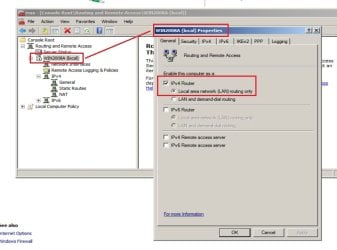
Configure ServerA Internet interface as NAT: Right click General for ServerA and "New Routing Protocol" and select NAT from the list. A NAT entry will show under IPv4, right click and "New Interface", select Internet (this is the name I gave earlier for ServerA outer interface, 192.168.0.110) from the list.
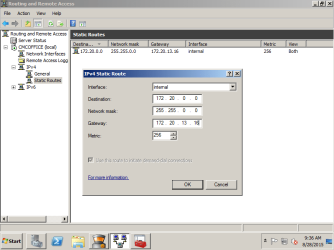
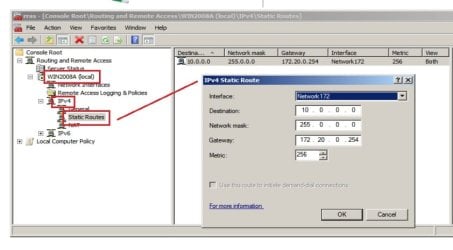
Add Static Route for segment 10.0.0.0: Under ServerA IPv4 list, right click "Static Routes" - "New Static Route" as below:
Next post - ServerB