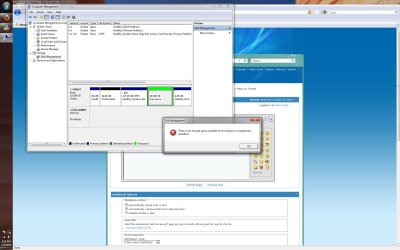
Must be a simple fix right??.....

Nerp Angel

New member
Local time
7:20 PM
Messages
6
Can someone tell me how to turn that green "free space" into unallocated space?

Here's a picture of it!!
What to DO?! on Flickr - Photo Sharing!
If that doesn't work I uploaded a picture to this thread!

What i'm trying to do is re-combine all of my separate sections of my hard drive back into one giant one. But i've split it up so many times installing linux and the windows 7 beta I'm stuck on how to put it all back together.

thanks :)
 

Attachments

  • Untitled.jpg
    Untitled.jpg
    228.5 KB · Views: 64

My Computer

OS
Windows 7 Ultimate 64bit

My Computer

Computer Manufacturer/Model Number
Dell XPS420
OS
Vista Ult 64 bit Seven Ult RTM x64
CPU
Intel Core2 Quad Q6600 2.40 gigahertz
Memory
Crucial Ballistix 4x2GB PC2 6400
Graphics Card(s)
NVIDIA GeForce 8600 GTS 256 MB
Sound Card
Creative SB X-Fi audio
Monitor(s) Displays
HP w2207 + HPvs15
Screen Resolution
1680x1050 + 1024x768
Hard Drives
2-WD5000AAKS-500 GB
WD5000AAV-500 GB external
Keyboard
Microsoft Comfort Curve
Mouse
MX Revolution
Other Info
Wacom Intuos 2 Graphics Tablet
Experience Index=5.5
Sorry, forgot to mention. This pops up when I try to delete the partition.
 

Attachments

  • Untitled.jpg
    Untitled.jpg
    160.8 KB · Views: 63

My Computer

OS
Windows 7 Ultimate 64bit
That looks like an extended partition (in green).

If you can't simply expand C with a right click in Disk Management, you may have to use third party tools like Easeus or Paragon.
 

My Computer

Computer type
PC/Desktop
Computer Manufacturer/Model Number
Ignatz Special; 4 speed manual gearbox; factory air conditioning; one of one
OS
Windows 7 Home Premium SP1, 64-bit
CPU
Intel Skylake i5-6600K, not overclocked
Motherboard
AsRock Z170M Extreme 4, micro ATX
Memory
8 GB HyperX DDR4-2666 (2 x 4 GB)
Graphics Card(s)
none; graphics are integrated on CPU
Sound Card
onboard: Realtek ALC1150; external: USB Behringer UF0-202
Monitor(s) Displays
Dell S2340M 23 inch IPS
Screen Resolution
1600 x 900
Hard Drives
System: Crucial MX100 series SSD, 128 GB;
Data: Samsung Spinpoint 103SJ, 1 TB;
Backup: WD Caviar Green WD30EZRX-00D8PB0, 3 TB
PSU
Rosewill SilentNight 500 watt fanless, semi-modular
Case
Antec Solo II
Cooling
Noctua NH-U12S; Noctua F12 intake, Noctua S12A exhaust
Keyboard
Microsoft 200 6JH-00001 USB
Mouse
Dell or Microsoft optical wired; USB
Antivirus
Microsoft Security Essentials and Malwarebytes Premium
Browser
Pale Moon
Other Info
All fans PWM; speeds at idle: CPU circa 500 rpm; intake circa 600 rpm; exhaust circa 600 rpm; CPU temps 27 idle and 47 C load in a warm room (27 C/81 F) when running Intel Extreme Tuning Utility stress test.

My Computer

Computer type
PC/Desktop
Computer Manufacturer/Model Number
Self Built
OS
Win 10 Pro x64
CPU
Intel I5-2500K @3.3GHz
Motherboard
Asrock P67 Extreme4
Memory
16GB G.Skill Ripjaws X (4x4GB)
Graphics Card(s)
EVGA GeForce 750 Ti SC 2GB
Sound Card
ASUS Xonar DG 5.1 Channels 24-bit 96KHz PCI Interface Sound
Monitor(s) Displays
auria eq2367
Screen Resolution
1920 x 1080
Hard Drives
250GB Samsung 850 EVO SSD
1TB WD Blue
1TB Hitachi
PSU
SeaSonic X 650W 80 Plus Gold
Case
Corsair Obsidian 750D
Cooling
Corsair H60, Three 140mm case fans
Keyboard
Logitech Wireless Keyboard K520
Mouse
Logitech Wireless Mouse M310
Internet Speed
Wave Broadband ~ 100 dn 5 up
Antivirus
Windows Defender, Malwarebytes Premium
Browser
Edge, IE11, Chrome
Other Info
Laptop specs: HP g7-1365dx /
CPU: AMD A6-3420M APU with Radeon(tm) HD Graphics /
RAM: Crucial 8Gb (2x4Gb) /
SSD: Crucial M4-CT128M4SSD2 ATA Device/ FW 000F /
GFX: AMD Radeon HD 6520G /
OS: Windows 10 Pro x64
Thanks guys! Partition Wizard did it! Or so I think it would've... Because I have a new problem...

I know this is bad but it happened.. When i was partitioning my drive back to a full hard drive, I must have got to about 98 or 99% when all of a sudden my laptop battery died. Oh yes.. I was pissed. I THOUGHT I PLUGGED IT IN!! So anyways I try to restart my computer and it tells me "No operating system installed". So I figure I'll just reinstall windows 7 back to m computer and just go from there right? Um no... I start to install and I get all the way to the part where it asks for my product key. I enter it EXACTLY like it is on the sticker and it says it's invalid now. invalid?! Did I mess up my laptop here? Or is it "invalid" now because I had already used it 20 mins before to install windows 7 to my laptop before using that partition wizard? Do I need to call some support hotline? Thanks.
 

My Computer

OS
Windows 7 Ultimate 64bit
I enter it EXACTLY like it is on the sticker and it says it's invalid now. invalid?! Did I mess up my laptop here? Or is it "invalid" now because I had already used it 20 mins before to install windows 7 to my laptop before using that partition wizard? Do I need to call some support hotline? Thanks.

Try this.
When it asks you product key leave it empty.
It should still go on installing and when you are on windows try activating it.
There it will ask for product key one more time.
but this time it will give more detailed error massage.
 

My Computer

OS
Windows 7 Ultimate x86 SP1
Oh that's right!! I totally forgot to do that! I'll try and report back with success or failure :)
 

My Computer

OS
Windows 7 Ultimate 64bit
Oh that's right!! I totally forgot to do that! I'll try and report back with success or failure :)

Chances are extremely high that your hard drive is now too corrupt to work properly. I will be very surprised if you haven't lost everything on the drive. You will probably have to format and start from scratch.
 

My Computer

Computer Manufacturer/Model Number
Custom
OS
Windows 7 Ultimate RTM (Technet)
CPU
3.00 gigahertz Intel Core2 Duo E8400
Motherboard
ASUSTeK Computer INC. P5K/EPU Rev 1.xx
Memory
4GB
Graphics Card(s)
ATI Radeon X1950 Pro
Sound Card
Built in HD Audio
Monitor(s) Displays
22" Gateway LCD
Screen Resolution
1920 x 1200
Hard Drives
ST3160023A [Hard drive] (160.04 GB) -- drive 0, rev 8.01, ST3500630AS [Hard drive] (500.11 GB) -- drive 2, rev 3.AAK
ST3500630AS [Hard drive] (500.11 GB) -- drive 1, rev 3.AAK
Keyboard
Logitech G11
Mouse
Microsoft Wireless Laser Mouse 5000
Internet Speed
13.44 Mbps
Back
Top