Solved my 8gb ram all used help.

key4you

New member
Local time
8:37 AM
Messages
19
i have hp dv 6 with 2gb graphic and 8 gig of ram. but facing very slow start up. and after some use all ram used. need help.
 

Attachments

  • Capture.PNG
    Capture.PNG
    1,007 KB · Views: 2

My Computer My Computer

OS
windows 7 ultimate
Memory
2gb
Graphics Card(s)
ATI HD 4670 1GB
Hard Drives
80gb
Internet Speed
300kbsp
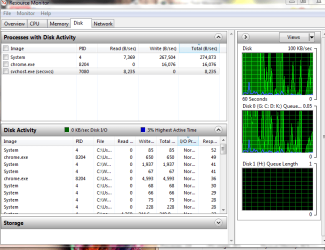
Click on Resource Monitor and see what it shows for Memory utilization. Post a screen capture.
 

My Computer My Computer

Computer type
PC/Desktop
Computer Manufacturer/Model Number
Lenovo IdeaCenter 450
OS
Windows 10 Pro X64
CPU
Intel Quad Core i7-4770 @ 3.4Ghz
Memory
16.0GB PC3-12800 DDR3 SDRAM 1600 MHz
Graphics Card(s)
Intel Integrated HD Graphics
Sound Card
Realtek HD Audio
Monitor(s) Displays
HP 22" LCD
Screen Resolution
1680 x 1050
Hard Drives
250GB Samsung EVO SATA-3 SSD
2TB Seagate ST2000DM001 SATA-2
1.5TB Seagate ST3150041AS SATA
Keyboard
Dell USB
Mouse
Lenovo USB
Internet Speed
Cable via Road Runner 3MB Upload, 30MB Download
Antivirus
Windows Defender, MBAM Pro, MBAE
Browser
Seamonkey
Other Info
UEFI/GPT
PLDS DVD-RW DH16AERSH
svchost.exe using 6 gb ram:cry:
 

My Computer My Computer

OS
windows 7 ultimate
Memory
2gb
Graphics Card(s)
ATI HD 4670 1GB
Hard Drives
80gb
Internet Speed
300kbsp
Sounds like some program or background service is using quite a bit of memory; but Z is right; we need to see that resource monitor to figure whats using all the ram.
 

My Computer My Computer

Computer type
PC/Desktop
Computer Manufacturer/Model Number
custom built
OS
Windows 7 ultimate 64-bit
CPU
Intel I7 2600K 3.4ghz
Motherboard
Asus Evo P8P67
Memory
Corsair 16gb ddr3 1600mhz
Graphics Card(s)
Nvidia Geforce gt 430
Sound Card
Sound Blaster Titanium x-fi pci express
Monitor(s) Displays
Dell E198WFP
Hard Drives
1 western digital 2TB drive.
PSU
Antec 1200 watt
Case
Inwin Dragon Rider
Cooling
6 case supplied cooling fans
Keyboard
logitech mk700
Mouse
logitech m705
Internet Speed
25-50mbps download; 10mbps upload(i think)
Antivirus
avg free 2014
Browser
mozilla firefox
Other Info
Also have a pretty bad speaker setup which is a klipsch promedia 5.1 surround speaker setup with huge subwoofer and lg blu ray player/writer. Also a hp officejet pro 8600 plus wireless all in one and a logitech s7500 webcam.
svchost.exe using 6 gb ram:cry:

yea; that is quite a bit of ram for any service to use and there really should be some sort of explanation for it.
 

My Computer My Computer

Computer type
PC/Desktop
Computer Manufacturer/Model Number
custom built
OS
Windows 7 ultimate 64-bit
CPU
Intel I7 2600K 3.4ghz
Motherboard
Asus Evo P8P67
Memory
Corsair 16gb ddr3 1600mhz
Graphics Card(s)
Nvidia Geforce gt 430
Sound Card
Sound Blaster Titanium x-fi pci express
Monitor(s) Displays
Dell E198WFP
Hard Drives
1 western digital 2TB drive.
PSU
Antec 1200 watt
Case
Inwin Dragon Rider
Cooling
6 case supplied cooling fans
Keyboard
logitech mk700
Mouse
logitech m705
Internet Speed
25-50mbps download; 10mbps upload(i think)
Antivirus
avg free 2014
Browser
mozilla firefox
Other Info
Also have a pretty bad speaker setup which is a klipsch promedia 5.1 surround speaker setup with huge subwoofer and lg blu ray player/writer. Also a hp officejet pro 8600 plus wireless all in one and a logitech s7500 webcam.
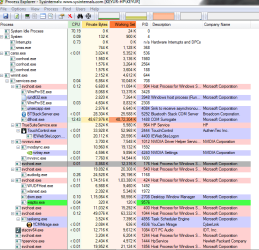
You can also take a look at it with ProcessExplorer. It may provide more information.
 

My Computer My Computer

Computer type
PC/Desktop
Computer Manufacturer/Model Number
Lenovo IdeaCenter 450
OS
Windows 10 Pro X64
CPU
Intel Quad Core i7-4770 @ 3.4Ghz
Memory
16.0GB PC3-12800 DDR3 SDRAM 1600 MHz
Graphics Card(s)
Intel Integrated HD Graphics
Sound Card
Realtek HD Audio
Monitor(s) Displays
HP 22" LCD
Screen Resolution
1680 x 1050
Hard Drives
250GB Samsung EVO SATA-3 SSD
2TB Seagate ST2000DM001 SATA-2
1.5TB Seagate ST3150041AS SATA
Keyboard
Dell USB
Mouse
Lenovo USB
Internet Speed
Cable via Road Runner 3MB Upload, 30MB Download
Antivirus
Windows Defender, MBAM Pro, MBAE
Browser
Seamonkey
Other Info
UEFI/GPT
PLDS DVD-RW DH16AERSH
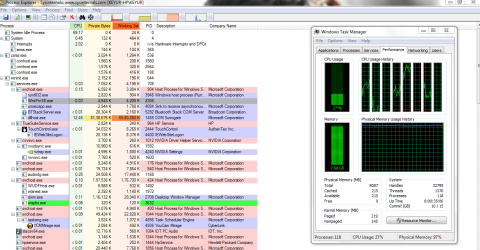
i just start laptop and within 10 minutes this happen.
 

Attachments

  • Capture1.PNG
    Capture1.PNG
    45.8 KB · Views: 1
  • Capture2.PNG
    Capture2.PNG
    30 KB · Views: 1
  • Capture3.PNG
    Capture3.PNG
    43.7 KB · Views: 1

My Computer My Computer

OS
windows 7 ultimate
Memory
2gb
Graphics Card(s)
ATI HD 4670 1GB
Hard Drives
80gb
Internet Speed
300kbsp
after 30 minutes this :zip:
 

Attachments

  • Capture5.PNG
    Capture5.PNG
    66.3 KB · Views: 6

My Computer My Computer

OS
windows 7 ultimate
Memory
2gb
Graphics Card(s)
ATI HD 4670 1GB
Hard Drives
80gb
Internet Speed
300kbsp
Seems like you have a video or audio codec issue, thats why the COM Surrogate was triggered.
 

My Computer My Computer

Computer type
PC/Desktop
OS
Microsoft Windows 10 Professional / Windows 7 Professional
CPU
Intel i5-3570
Motherboard
Lenovo Mahobay
Memory
16GB DDR3
Graphics Card(s)
AMD Radeon HD 7850 2GB
Sound Card
(1) Realtek HD Audio (2) AMD HD Audio
Monitor(s) Displays
LG LS192WS
Screen Resolution
1440 x 900 @ 32bit color
Hard Drives
(1) SUV300S37A/120G (2) ST3500413AS SATA Disk Device AHCI mode enabled.
PSU
Corsair HX620
Case
Thermaltake V4 Black Edition
Cooling
Cooler Master Hyper 212 + Artic Silver 5 on CPU/GPU
Keyboard
Dell SK-8115
Mouse
Razer Copperhead with MAPED mat (awesome!)
Internet Speed
100 Mbps up/down
Browser
Chrome
Hello, Microsoft will not help you with this problem, but I will.
I had the same problem, I solved it completelly and in 2 minutes:

The problem appears when dllhost.exe attempts to create a thumbnail of an mp4 file, but for some reason cannot complete the task, and starts reading the hard drive non stop and filling all phisical Ram, and starts using the swap file (virtual memory file wich uses hard drive space as ram memory), slowing down or freezing the computer.
The cause is probably an error in the integrated mp4 windows codecs.

Anyway, the solution is to download and install a freeware program wich generates all video files thumbnails instead of windows. It even creates thumbails of flash (flv) files!

You can download it from this link:

Codecs.com | Downloads for Media Preview 1.3.1.343

Or googleing Media Preview 1.3.1.343
After the installation is complete, simply enable all the video files thumbnail options and done.
Problem solved. You do not even need to restart the computer.

Before you install it you should kill the dllhost.exe if it is running. After the installation, just open a folder or select a file to see the thumbnails generate quickly and without any problems.

If you have the tasks monitor open, you will see the dllhost appear while the thumbnails are being generated, and then it will disappear. It will never exeed 20.000kb.

Done and done.

I hope this helps anyone with the same issue.

Regards.
 

My Computer My Computer

OS
windows 7 ultimate
Memory
2gb
Graphics Card(s)
ATI HD 4670 1GB
Hard Drives
80gb
Internet Speed
300kbsp
Back
Top