Solved My Command Prompt Has Been Deleted...

jacek11

New member
Local time
11:06 PM
Messages
17
Hello guys I have a big problem...
my command prompt has been deleted...
when I tried system repair it says no errors detected :huh:
is there any command prompts that has-----NO VIRUSES----
Any help would be good thanks
:D
 

My Computer

Computer type
Laptop
Computer Manufacturer/Model Number
Acer Extensa 5220
OS
32 bit Windows 7 Ultimate x64
CPU
Intel(R) Celeron(R) CPU 530 @ 1.73 GHz
Memory
5,0 GB
Graphics Card(s)
Mobile Intel(R) 965 Express Chipset Family
Sound Card
Realtek
Monitor(s) Displays
Generic PnP Monitor
Screen Resolution
1280 x 800
Hard Drives
WDC WD1600BEVT-75ZCT0 ATA
Keyboard
Standard PS/2 Keyboard
Mouse
HID-compliant
Internet Speed
9 MB
Antivirus
Avast
Browser
Google Chrome
discs

I suggest you use you try system restore to a point before you lost command mode,
Have you still got the installation discs?

Roy
 

My Computer

Computer type
PC/Desktop
Computer Manufacturer/Model Number
medionl/Aspire 6930G/acer x55a
OS
W7 home premium 32bit/W7HP 64bit/w10 tp insider ring
CPU
E5300 dual core
Motherboard
medion MS7366
Memory
3gb
Graphics Card(s)
Nvidia Geforce 7100 Nforce 630i
Monitor(s) Displays
avixc
Internet Speed
n (isp resticted to 72)
Antivirus
mse/pands
Browser
palemoon
Other Info
Belkin Fd7050 n USB using Railink RT2870 drivers, more upto date
If you type cmd in the Start do you get the cmd.exe at the top of the small window? If so right click it and choose "Run as administrator". See if that works. Check your folder C:\Windows\System32 and see if cmd.exe is in there.
 

My Computer

Computer type
PC/Desktop
OS
Microsoft Windows 7 Home Premium 64-bit 7601 Multiprocessor Free Service Pack 1
CPU
Intel(R) Core(TM) i7-3770 CPU @ 3.40GHz
Motherboard
ASUSTeK COMPUTER INC. P8H77-M
Memory
8.00 GB
Graphics Card(s)
Intel(R) HD Graphics 4000
Sound Card
On Board
Monitor(s) Displays
Dell 24"
Screen Resolution
1920 x 1080
Hard Drives
(1) INTEL SSDSC2CT180A3 ATA Device (2) ST500DM002-1BD142 ATA Device (3) WDC WD3200AAKS-75L9A0 ATA Device (4) Generic- Compact Flash USB Device (5) Generic- MS/MS-Pro USB Device (6) Generic- SD/MMC USB Device (7) Generic- SM/xD-Picture USB
PSU
500w Corsair
Case
Cooler Master
Cooling
3 Fans
Keyboard
Logitech MK300
Mouse
Logitech WOM
Internet Speed
75Mb
Antivirus
Norton 360
Browser
Firefox, Opera, IE
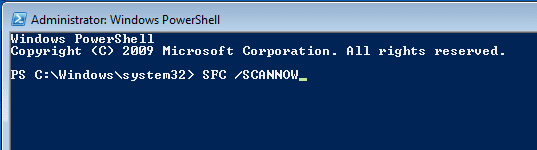
Maybe you can use PowerShell to get cmd back in place:

ps1.png

ps2.PNG
 

My Computer

Computer type
Laptop
Computer Manufacturer/Model Number
Employer provided Dell Latitude
OS
W7 Pro SP1 64bit
CPU
i7
Memory
8GB
Graphics Card(s)
Intel HD Graphics
Hard Drives
crappy SSD
Antivirus
Employer mandated Symantec Endpoint Protection
Browser
Pale Moon 64bit, IE11 64bit & Chrome 64bit
reinstall windows
 

My Computer

Computer type
Laptop
Computer Manufacturer/Model Number
Acer
OS
Windows 10 64bit
Motherboard
Intel
GURMAN, that is not a very helpful post. The problem should be simple to fix and certainly does not require a reinstall.
 

My Computer

Computer type
PC/Desktop
Computer Manufacturer/Model Number
Lenovo IdeaCenter 450
OS
Windows 10 Pro X64
CPU
Intel Quad Core i7-4770 @ 3.4Ghz
Memory
16.0GB PC3-12800 DDR3 SDRAM 1600 MHz
Graphics Card(s)
Intel Integrated HD Graphics
Sound Card
Realtek HD Audio
Monitor(s) Displays
HP 22" LCD
Screen Resolution
1680 x 1050
Hard Drives
250GB Samsung EVO SATA-3 SSD
2TB Seagate ST2000DM001 SATA-2
1.5TB Seagate ST3150041AS SATA
Keyboard
Dell USB
Mouse
Lenovo USB
Internet Speed
Cable via Road Runner 3MB Upload, 30MB Download
Antivirus
Windows Defender, MBAM Pro, MBAE
Browser
Seamonkey
Other Info
UEFI/GPT
PLDS DVD-RW DH16AERSH
Back
Top