My computer is slow

lostsoul62

Banned
Local time
3:41 PM
Messages
380
Location
AZ
I put out a post a day or two ago about my 64 bit Windows 7 on my Intel E6550 was slow. After the response I got from you guys I am going to stay with the 64 bit no matter what. So I figure I can go out and just build another computer and reload Windows 7 (64 bit from scratch) or find a program which I though you guys could help me with. There are dozens of programs out there that say it will make your computer faster, fix your registry, Hard Drive problems and so on. I had one of these programs about 15 years ago but I quit using them as I got better with computers but I feel I could use one now because I generally don't trust them but if it screws up my computer, so what, I have backups and I have other computers and I really don't care or mind if I have to format and re-load, it might give me something to do in my old age. So my question is can you recommend anything?
 

My Computer

OS
Windows 7 x64 RC1, Vista Ultimate, XP Pro
CPU
AMD 955
Memory
4 gigs - 1333
Graphics Card(s)
5750
Monitor(s) Displays
i-inc 28"
Screen Resolution
1920x1200
Hard Drives
2 SATA2 750 GB - 1 SATA2 1TB - 1 SATA3 1TB - 1 USB3 2TB - 1 USB3 500 GB, SSD 60 GB
Internet Speed
7 Megs
First, can you better define or quantify slow? Does it boot slowly, does it slowly move from screen to screen within the UI, does it take 35 seconds to open up Internet explorer?

There really isn't any good reason why a Core 2 Duo E6550 at 2.33ghz with 4GB or RAM running off modern SATA hard drives should be slow.
 

My Computer

Computer Manufacturer/Model Number
Self-Built in July 2009
OS
Windows 7 Ultimate x64
CPU
Intel Q9550 2.83Ghz OC'd to 3.40Ghz
Motherboard
Gigabyte GA-EP45-UD3R rev. 1.1, F12 BIOS
Memory
8GB G.Skill PI DDR2-800, 4-4-4-12 timings
Graphics Card(s)
EVGA 1280MB Nvidia GeForce GTX570
Sound Card
Realtek ALC899A 8 channel onboard audio
Monitor(s) Displays
23" Acer x233H
Screen Resolution
1920x1080
Hard Drives
Intel X25-M 80GB Gen 2 SSD
Western Digital 1TB Caviar Black, 32MB cache. WD1001FALS
PSU
Corsair 620HX modular
Case
Antec P182
Cooling
stock
Keyboard
ABS M1 Mechanical
Mouse
Logitech G9 Laser Mouse
Internet Speed
15/2 cable modem
Other Info
Windows and Linux enthusiast. Logitech G35 Headset.
Slow computer?

/format c:

It's the cure.. for everything... even world peace :D
 

My Computer

Computer type
PC/Desktop
Computer Manufacturer/Model Number
DELL VOSTRO 3650
OS
Windows 8.1 PRO
CPU
3rd Generation Intel Core i7‐3612QM CPU @ 2.10GHZ
Memory
8GB DDR3
Graphics Card(s)
NVIDIA GeForce GT 525M (128 bit), 1GB Grpahics
Screen Resolution
1920X1080
Hard Drives
750GB 5400RPM
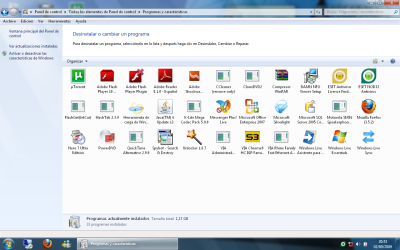
I can recommend you to make a clean install of Windows 7 x64 and tweak it disabling system services that you don't use, installing only programs that you know you will use, tweaking startup with MSConfig and using some type of light files/registry cleaner like the free CCleaner (http://www.ccleaner.com) after installing and tweaking all what you need to use from now on.
Also, is good to NOT install always the newest versions of every application you use. Just do it if you REALLY need it. For example, I use Nero 7 instead of Nero 9, because it's light-weight and have all the tools that I need (burning CD/DVD, creating movies, ripping music, etc.).
That's the way I install Windows since lots of years ago, for me and my clients were I work.

Hope it helps you. ^_^


PS: Attached an screenshot from one common installation that I use to do. :)
 

Attachments

  • Programas y características.png
    Programas y características.png
    90.5 KB · Views: 939

My Computer

Computer type
PC/Desktop
Computer Manufacturer/Model Number
@Home: Built by me / @Work: Banghó Extrema
OS
@Home/Work: Windows 8.1 Enterprise x64
CPU
@Home: Core [email protected] GHz / @Work: Core [email protected] GHz
Motherboard
@Home: Gigabyte GA-Z87-D3HP / @Work: ASRock H61M-VG3
Memory
@Home: 8 GB. DDR3-1333 CL9 / @Work: 12 GB. DDR3-1333 CL9
Graphics Card(s)
@Home: MSI N560GTX-Ti Twin Frozr II / @Work: Intel HD 2500
Sound Card
@Home/Work: Realtek HD Audio
Monitor(s) Displays
@Home: Samsung T260 LCD via DVI-D / @Work: Acer AL1714 (VGA)
Screen Resolution
@Home: 1920x1200x32@60h / @Work: 1280x1024x32@60h
Hard Drives
@Home: 4 disks that results in ~4.3 TB. of usable space.
@Work: Western Digital WD10EARS (1 TB.)
PSU
@Home: Topower 650W / @Work: Shark Net 600W
Case
@Home: Euro Case Generic / @Work: Banghó Extrema
Keyboard
@Home: Genius (Spa) / @Work: Noga Net (Spa)
Mouse
@Home: HP Laser 2.4G Xa965 / @Work: Genius Optical generic
Internet Speed
@Home/Work: Fibertel 7Mbps/512kbps
Antivirus
@Home/Work: Windows Defender+Spybot 2+AdwCleaner
Browser
@Home/Work: Google Chrome (Dev)+Mozilla Firefox (Aurora)
Other Info
@Home:
Microsoft Xbox 360 wireless gamepad+USB receiver.
Microsoft Xbox 360 wired gamepad.
Logitech C910 Full HD webcam.
Generic 5.1 analog Home Theater.

@Work:
2-Way electronic keyboard/mouse/monitor switch.
Well a clean install should definitely speed up your PC but if you dont want to i sugest you to try tuneup utilities i personally think its the best software for repairing windows errors and boosting your performance.
 

My Computer

OS
Windows 7 X86
CPU
Intel Pentium Dual CPU E2140
Motherboard
Foxconn
Memory
2 GB
Graphics Card(s)
Nvidia Ge force 8400 GS 512MB
My 2 cents for what its worth.

Do a clean install. Back up often (images etc in case of issues)

Stay away from the registery cleaners, performance boosters etc.
They are just a waste of money & do more harm than good.
With the exception of disk defragmenters (such as PerfectDisk, Diskeeper, Auslogics) as any are superior than Windows built in.


They only way to get better performance, is to upgrade hardware. Theres is no "miracle" software that can do the same.
 

My Computer

Computer Manufacturer/Model Number
Custom (Self Build)
OS
Windows 7 Home Premium 64bit
CPU
Intel Core i7 2700k
Motherboard
eVGA P67 SLI
Memory
8GB Mushkin Redline Ridgebacks @1866
Graphics Card(s)
EVGA GTX570 SC
Sound Card
XiFi Titanium HD
Monitor(s) Displays
LG W2453V
Screen Resolution
1920x1080
Hard Drives
Intel 320 80GB -- Intel X25-V 40GB --WD Black 1TB x2 -- WD Blue 640GB
PSU
Seasonic x750
Case
Corsair 600T SE White
Cooling
eVGA Superclocked CPU Cooler
Keyboard
Saitek Cyborg
Antivirus
Kaspersky
Browser
IE
Other Info
LG BD/DVD
Back
Top