My computer reads missing operating system

Sel Disk first, then sel each Vol to see which is marked Active.

Continue the commands Kaktussoft gave you to determine which partition is marked Active then run 3 Startup Repairs no matter what it reports.

If you didn't save a Win7 backup image that option is not available to you. But REcovery may run from its hotkey or by marking it Active. But work through the steps I gave you earlier first to do everything possiblee to rescue your install unless you're ready to rescue your files and skip to running Recovery or Reinstall.
 
Sel Disk first, then sel each Vol to see which is marked Active.

Continue the commands Kaktussoft gave you to determine which partition is marked Active then run 3 Startup Repairs no matter what it reports.

If you didn't save a Win7 backup image that option is not available to you. But REcovery may run from its hotkey or by marking it Active. But work through the steps I gave you earlier first to do everything possiblee to rescue your install unless you're ready to rescue your files and skip to running Recovery or Reinstall.
@greg: "missing operating system" is a message that comes from MBR
Reason: corrupt mbr code, or maybe no active partition.

startup repair should fix that I know. I hope he can access the recovery environment
 

My Computer

Computer type
Laptop
Computer Manufacturer/Model Number
ACER ASPIRE 5742G
OS
Microsoft Windows 7 Home Premium 64-bits 7601 Multiprocessor Free Service Pack 1
CPU
Intel(R) Core(TM) i3 CPU M 370 @ 2.40GHz
Motherboard
Acer Aspire 5742G
Memory
4,00 GB
Graphics Card(s)
ATI Mobility Radeon HD 5400 Series
Sound Card
(1) AMD High Definition Audio Device (2) Realtek High Defi
Screen Resolution
1366 x 768 x 32 bits (4294967296 colors) @ 60 Hz
Hard Drives
WDC WD5000BEVT-22ZAT0
Yes, Kaktussoft, sorry for interfering as you correctly tried to ascertain that OS partition was marked Active.

Then if Startup Repair x3 doesn't work he can try to manually use the Bootrec.exe tool in the Windows Recovery Environment to troubleshoot and repair startup issues in Windows, run Recovery if necessary marking it Active first, or Clean Reinstall - Factory OEM Windows 7 after rescuiing files.

I only wanted to make sure he has all the steps up front, including to try to get disk to boot since System Recovery Options sometimes do not work as well from F8 and require the Installer or Repair disk.
 
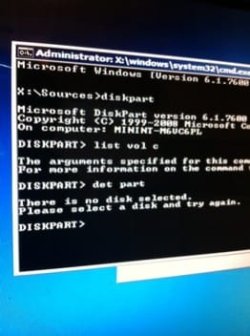
I'm new to this I don't know how to select disk and then view to see if its active can you be a little more specific plz?
 

My Computer

OS
64
Kaktussoft, I'm sorry for interfering as you correctly tried to ascertain that OS partition was marked Active. Then if Startup Repair x3 doesn't work he can try to manually use the Bootrec.exe tool in the Windows Recovery Environment to troubleshoot and repair startup issues in Windows .

I only wanted to make sure he has the steps to try to get disk to boot since System Recovery Options sometimes do not work as well from F8 and require the Installer or Repair disk.
No problem Greg.. any information is welcome. But I think bootrec doesn't work, because he hasn't selected a win7 os in the list. At least that's what I read between the lines.

Anyway... bootsect works as well
 

My Computer

Computer type
Laptop
Computer Manufacturer/Model Number
ACER ASPIRE 5742G
OS
Microsoft Windows 7 Home Premium 64-bits 7601 Multiprocessor Free Service Pack 1
CPU
Intel(R) Core(TM) i3 CPU M 370 @ 2.40GHz
Motherboard
Acer Aspire 5742G
Memory
4,00 GB
Graphics Card(s)
ATI Mobility Radeon HD 5400 Series
Sound Card
(1) AMD High Definition Audio Device (2) Realtek High Defi
Screen Resolution
1366 x 768 x 32 bits (4294967296 colors) @ 60 Hz
Hard Drives
WDC WD5000BEVT-22ZAT0
I'm new to this I don't know how to select disk and then view to see if its active can you be a little more specific plz?

Code:
diskpart
sel  vol c
det part
sel vol  d
det part
exit
 

My Computer

Computer type
Laptop
Computer Manufacturer/Model Number
ACER ASPIRE 5742G
OS
Microsoft Windows 7 Home Premium 64-bits 7601 Multiprocessor Free Service Pack 1
CPU
Intel(R) Core(TM) i3 CPU M 370 @ 2.40GHz
Motherboard
Acer Aspire 5742G
Memory
4,00 GB
Graphics Card(s)
ATI Mobility Radeon HD 5400 Series
Sound Card
(1) AMD High Definition Audio Device (2) Realtek High Defi
Screen Resolution
1366 x 768 x 32 bits (4294967296 colors) @ 60 Hz
Hard Drives
WDC WD5000BEVT-22ZAT0
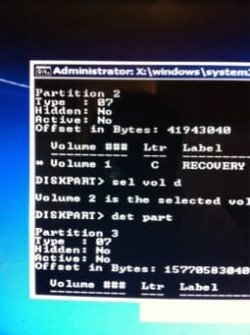
Kaktussoft can u continue to help me resolve my issue? ImageUploadedBySeven Forums1350081538.961155.jpg this is what I'm seeing on my screen
 

My Computer

OS
64
sel vol c
instead of
vol c
!!!
 

My Computer

Computer type
Laptop
Computer Manufacturer/Model Number
ACER ASPIRE 5742G
OS
Microsoft Windows 7 Home Premium 64-bits 7601 Multiprocessor Free Service Pack 1
CPU
Intel(R) Core(TM) i3 CPU M 370 @ 2.40GHz
Motherboard
Acer Aspire 5742G
Memory
4,00 GB
Graphics Card(s)
ATI Mobility Radeon HD 5400 Series
Sound Card
(1) AMD High Definition Audio Device (2) Realtek High Defi
Screen Resolution
1366 x 768 x 32 bits (4294967296 colors) @ 60 Hz
Hard Drives
WDC WD5000BEVT-22ZAT0

My Computer

Computer type
Laptop
Computer Manufacturer/Model Number
ACER ASPIRE 5742G
OS
Microsoft Windows 7 Home Premium 64-bits 7601 Multiprocessor Free Service Pack 1
CPU
Intel(R) Core(TM) i3 CPU M 370 @ 2.40GHz
Motherboard
Acer Aspire 5742G
Memory
4,00 GB
Graphics Card(s)
ATI Mobility Radeon HD 5400 Series
Sound Card
(1) AMD High Definition Audio Device (2) Realtek High Defi
Screen Resolution
1366 x 768 x 32 bits (4294967296 colors) @ 60 Hz
Hard Drives
WDC WD5000BEVT-22ZAT0

My Computer

Computer type
Laptop
Computer Manufacturer/Model Number
ACER ASPIRE 5742G
OS
Microsoft Windows 7 Home Premium 64-bits 7601 Multiprocessor Free Service Pack 1
CPU
Intel(R) Core(TM) i3 CPU M 370 @ 2.40GHz
Motherboard
Acer Aspire 5742G
Memory
4,00 GB
Graphics Card(s)
ATI Mobility Radeon HD 5400 Series
Sound Card
(1) AMD High Definition Audio Device (2) Realtek High Defi
Screen Resolution
1366 x 768 x 32 bits (4294967296 colors) @ 60 Hz
Hard Drives
WDC WD5000BEVT-22ZAT0
Is volume D active now? if so type: exit
 

My Computer

Computer type
Laptop
Computer Manufacturer/Model Number
ACER ASPIRE 5742G
OS
Microsoft Windows 7 Home Premium 64-bits 7601 Multiprocessor Free Service Pack 1
CPU
Intel(R) Core(TM) i3 CPU M 370 @ 2.40GHz
Motherboard
Acer Aspire 5742G
Memory
4,00 GB
Graphics Card(s)
ATI Mobility Radeon HD 5400 Series
Sound Card
(1) AMD High Definition Audio Device (2) Realtek High Defi
Screen Resolution
1366 x 768 x 32 bits (4294967296 colors) @ 60 Hz
Hard Drives
WDC WD5000BEVT-22ZAT0
Yes it is active now ...
exit diskpart by typing exit
#22 read that please. Nothing was marked active!!! Computer didn't know where to boot from!! Try to reboot normally now. And post results
 

My Computer

Computer type
Laptop
Computer Manufacturer/Model Number
ACER ASPIRE 5742G
OS
Microsoft Windows 7 Home Premium 64-bits 7601 Multiprocessor Free Service Pack 1
CPU
Intel(R) Core(TM) i3 CPU M 370 @ 2.40GHz
Motherboard
Acer Aspire 5742G
Memory
4,00 GB
Graphics Card(s)
ATI Mobility Radeon HD 5400 Series
Sound Card
(1) AMD High Definition Audio Device (2) Realtek High Defi
Screen Resolution
1366 x 768 x 32 bits (4294967296 colors) @ 60 Hz
Hard Drives
WDC WD5000BEVT-22ZAT0
Now that I exited ... It found problem and restarted but now its saying missing bootmgr at start up
 

My Computer

OS
64
Now that I exited ... It found problem and restarted but now its saying missing bootmgr at start up
Boot again form DVD and do th shift+F10 trick to enter command prompt

Code:
DIR  D:\
ATTRIB  D:\BOOT\BCD

Do you see files and folders? Does second command show a file?

Maybe better do a "startup repair" (I think it works now)
http://www.sevenforums.com/tutorials/681-startup-repair.html
To come to that stage http://www.sevenforums.com/tutorials/668-system-recovery-options.html

You see this?
 

My Computer

Computer type
Laptop
Computer Manufacturer/Model Number
ACER ASPIRE 5742G
OS
Microsoft Windows 7 Home Premium 64-bits 7601 Multiprocessor Free Service Pack 1
CPU
Intel(R) Core(TM) i3 CPU M 370 @ 2.40GHz
Motherboard
Acer Aspire 5742G
Memory
4,00 GB
Graphics Card(s)
ATI Mobility Radeon HD 5400 Series
Sound Card
(1) AMD High Definition Audio Device (2) Realtek High Defi
Screen Resolution
1366 x 768 x 32 bits (4294967296 colors) @ 60 Hz
Hard Drives
WDC WD5000BEVT-22ZAT0
Back
Top