My computer restarts randomly

I thought something looked different for me in W10 vs. W7, so you can see W10 has more choices.
I've never played with or tested this and know what it does and how it works.
It's just one of those changes for W10, that i don't know about yet.

Sorry guys. I was too busy today.

Finally I set that to Small Memory Dump

No restart today until now. Waiting...

Are you saying you now see a Blue Screen with error information and you are waiting ?

If that's what you see, restart the PC.
You should now have a minidump file from the BSOD.
Post info for a BSOD using these instructions:
http://www.sevenforums.com/bsod-help-support/96879-blue-screen-death-bsod-posting-instructions.html

A BSOD expert would need to help with that.
 

My Computer

Computer type
PC/Desktop
Computer Manufacturer/Model Number
home built
OS
Multi-Boot W7_Pro_x64 W8.1_Pro_x64 W10_Pro_x64 +Linux_VMs +Chromium_VM
CPU
AMD Athlon II x4 620
Motherboard
Gigabyte GA-MA785G-UD3H
Memory
6GB GSkill DDR2 800
Graphics Card(s)
AMD 4670 GPU + AMD 4200 IGP
Sound Card
on board Realtek ALC889A
Monitor(s) Displays
RCA 40" LCD TV, Insignia 32" LCD TV, HP 15" LCD monitor
Screen Resolution
1680 x 1050
Hard Drives
OCZ Vertex 3 120GB,
Samsung F3 1TB (3),
Several others - WD, Seagate, Hitachi, ...
PSU
Corsair 500 W
Case
Rosewill mid tower
Cooling
CM 90mm rifle
Keyboard
Gyration wireless, Logitech wireless, Dell USB wired
Mouse
Gyration wireless, Logitech wireless, V7 USB wired
Internet Speed
Spectrum - 100Mbps D / 10Mbps U
Antivirus
Avast, MBAM3, EMET, WinPatrol
Browser
Pale Moon, Firefox, IE
Other Info
2 multi-boot PC's
Mainly HTPC/Office/Gen purpose (no gaming).
Trendnet USB KVM.
LG DVD burner/Blue Ray Player.
Tray system for removable SATA backup drives.

Not currently OCd, under-volted.
I use Hybrid sleep, rarely re-boot or shutdown.

Hauppauge HD-PVR, Avermedia PCIe TV Tuner, Hauppauge PCI TV Tuner.
No no no. No BSOD at all.
I mean I'm waiting for the next sudden shutdown or sudden restart.

Sorry for misunderstanding. My English are not so good. Sorry
 

My Computer

Computer type
PC/Desktop
Computer Manufacturer/Model Number
Custom build
OS
Microsoft Windows 7 Professional 64-bit 7601 Multiprocessor Free Service Pack 1
CPU
Intel(R) Core(TM) i5-4460 CPU @ 3.20GHz
Motherboard
Gigabyte Technology Co., Ltd. H97M-HD3
Memory
16,00 GB
Graphics Card(s)
Intel(R) HD Graphics 4600
Sound Card
Realtek High Definition Audio
Screen Resolution
1280 x 1024 x 32 bits (4294967296 colors) @ 60 Hz
Hard Drives
Samsung SSD 850 EVO 250G SCSI Disk Device
No problem, i just wasn't sure :o

When you do get the next sudden shutdown or sudden restart, hopefully these changes will help find what caused it.
 

My Computer

Computer type
PC/Desktop
Computer Manufacturer/Model Number
home built
OS
Multi-Boot W7_Pro_x64 W8.1_Pro_x64 W10_Pro_x64 +Linux_VMs +Chromium_VM
CPU
AMD Athlon II x4 620
Motherboard
Gigabyte GA-MA785G-UD3H
Memory
6GB GSkill DDR2 800
Graphics Card(s)
AMD 4670 GPU + AMD 4200 IGP
Sound Card
on board Realtek ALC889A
Monitor(s) Displays
RCA 40" LCD TV, Insignia 32" LCD TV, HP 15" LCD monitor
Screen Resolution
1680 x 1050
Hard Drives
OCZ Vertex 3 120GB,
Samsung F3 1TB (3),
Several others - WD, Seagate, Hitachi, ...
PSU
Corsair 500 W
Case
Rosewill mid tower
Cooling
CM 90mm rifle
Keyboard
Gyration wireless, Logitech wireless, Dell USB wired
Mouse
Gyration wireless, Logitech wireless, V7 USB wired
Internet Speed
Spectrum - 100Mbps D / 10Mbps U
Antivirus
Avast, MBAM3, EMET, WinPatrol
Browser
Pale Moon, Firefox, IE
Other Info
2 multi-boot PC's
Mainly HTPC/Office/Gen purpose (no gaming).
Trendnet USB KVM.
LG DVD burner/Blue Ray Player.
Tray system for removable SATA backup drives.

Not currently OCd, under-volted.
I use Hybrid sleep, rarely re-boot or shutdown.

Hauppauge HD-PVR, Avermedia PCIe TV Tuner, Hauppauge PCI TV Tuner.
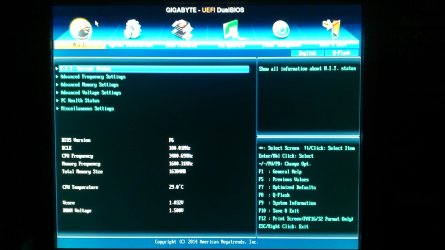
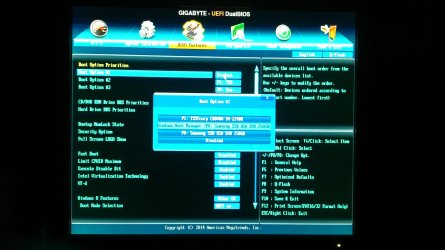
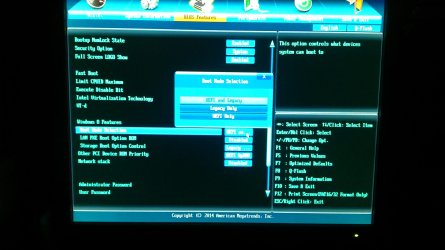
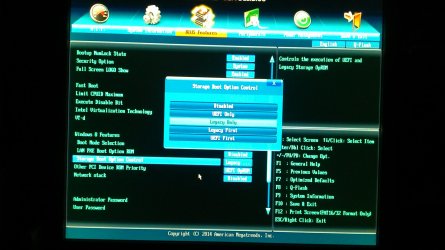
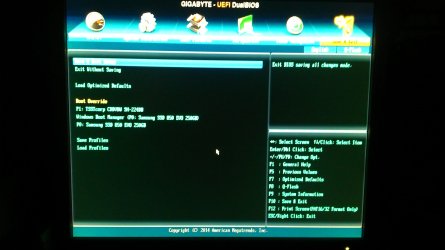
Bios settings

the settings that need to be posted should show
Whether
EFI is enabled.

Do you still have the installation disks???

Dave, if its a bios problem he will not get a blue screen,
I think that the system is stuck at allways on, ie looping, and will not turn off and create a critical failure.

Roy
 

My Computer

Computer type
PC/Desktop
Computer Manufacturer/Model Number
medionl/Aspire 6930G/acer x55a
OS
W7 home premium 32bit/W7HP 64bit/w10 tp insider ring
CPU
E5300 dual core
Motherboard
medion MS7366
Memory
3gb
Graphics Card(s)
Nvidia Geforce 7100 Nforce 630i
Monitor(s) Displays
avixc
Internet Speed
n (isp resticted to 72)
Antivirus
mse/pands
Browser
palemoon
Other Info
Belkin Fd7050 n USB using Railink RT2870 drivers, more upto date
Paanoos -- Have you got a Windows 7 Installation Disk?
 

My Computer

Computer type
PC/Desktop
Computer Manufacturer/Model Number
Custom Build
OS
Windows 7 Home Premium 32-Bit - Build 7600 SP1
CPU
Intel Core i3-2120 3.30Ghz
Motherboard
Asus P8Z68-V LX Intel Z68 Socket H2 ATX
Memory
Kingston 4 GB DDR3 1333 mhz
Graphics Card(s)
AMD Radeon HD6670
Sound Card
Sound Blaster Audigy SE 24-Bit
Monitor(s) Displays
Asus VE228
Screen Resolution
1440 X 900
Hard Drives
OCZ Vertex 3 120 GB Sata 3 SSD ==
Kingston SH103/S3 120 G Hyper X 120 GB SSD ==
Western Digital 500 GB Caviar Green 7200 RPM ==
PSU
Corsair CX600M == 600 Watt
Case
NZXT Apollo - Silver with Clear Side Panel
Cooling
Three 120 mm Fans
Keyboard
Microsoft Natural 4000
Mouse
Microsoft Custom Optical 3000
Internet Speed
AT&T Fiber Optic Wireless Network
Antivirus
Microsoft Security Essentials
Browser
Chrome
Other Info
120 mm Blue LED Fan -- Three Blue LED Lazer Light Sticks
I don't know if these photos can help you.
I'm not so familiar with this kind of BIOS.

Yes. I have Windows 7 Installation Disk.

INFO : I mentioned that restart or shutdown happens only when computer is idle for at least 15-20 minutes. Yesterday and today that I worked all day with this computer nothing happened.
And of coarse hibernation and other power saving settings are all disabled in Windows.
 

Attachments

  • DSC_0158.JPG
    DSC_0158.JPG
    306.4 KB · Views: 6
  • DSC_0159.JPG
    DSC_0159.JPG
    364.5 KB · Views: 4
  • DSC_0160.JPG
    DSC_0160.JPG
    372.5 KB · Views: 5
  • DSC_0161.JPG
    DSC_0161.JPG
    338.2 KB · Views: 3
  • DSC_0162.JPG
    DSC_0162.JPG
    395.7 KB · Views: 4
  • DSC_0163.JPG
    DSC_0163.JPG
    319.3 KB · Views: 2
  • DSC_0164.JPG
    DSC_0164.JPG
    296.8 KB · Views: 3

My Computer

Computer type
PC/Desktop
Computer Manufacturer/Model Number
Custom build
OS
Microsoft Windows 7 Professional 64-bit 7601 Multiprocessor Free Service Pack 1
CPU
Intel(R) Core(TM) i5-4460 CPU @ 3.20GHz
Motherboard
Gigabyte Technology Co., Ltd. H97M-HD3
Memory
16,00 GB
Graphics Card(s)
Intel(R) HD Graphics 4600
Sound Card
Realtek High Definition Audio
Screen Resolution
1280 x 1024 x 32 bits (4294967296 colors) @ 60 Hz
Hard Drives
Samsung SSD 850 EVO 250G SCSI Disk Device
dual boot

thanks for the screenshots.
It appears at some stage you had W8 installed, then went back to 7 (only?).
Im thinking that there were some W8 updates waiting to be applied on next shutdown, (15 min is standard reset time). when you uninstalled W8 those updates appear to have been left behind, and are trying to install, but no W8, hence the "Windows did not shutdown correctly" error.
Believe the pending file names are the same on 7 and 8.

If this is the case your best course of action

A) Back up all of your personnal files/folders etc to an external device.
B) Reset your Bios to default
C) Reinstall W7, as you have the discs, read this W7 tutorial first
http://www.sevenforums.com/tutorials/1649-clean-install-windows-7-a.html?ltr=C

Note the reinstall will take some time.

Roy
 

My Computer

Computer type
PC/Desktop
Computer Manufacturer/Model Number
medionl/Aspire 6930G/acer x55a
OS
W7 home premium 32bit/W7HP 64bit/w10 tp insider ring
CPU
E5300 dual core
Motherboard
medion MS7366
Memory
3gb
Graphics Card(s)
Nvidia Geforce 7100 Nforce 630i
Monitor(s) Displays
avixc
Internet Speed
n (isp resticted to 72)
Antivirus
mse/pands
Browser
palemoon
Other Info
Belkin Fd7050 n USB using Railink RT2870 drivers, more upto date
You have had some of the best guys on the Forum helping you and no luck yet on solving the problem. I concur with Torchwood that it is time to do a Reinstall of Windows 7. You need to backup any files you have to an external disk. You will have to reinstall all of your programs after the Win 7 Install. We will be glad to help you through the install. As was said above, follow the "Clean Install Windows 7" Tutorial that Torchwood has referenced. A reinstall should take just under an hour, you will need to stay at your PC while it installs to hit a few keys when prompted. We will be here for any questions. Good Luck == One more thing. Be sure and have your Product Key available when doing your install. You will need it. It should be on a sticker on the outside of your PC.
 

My Computer

Computer type
PC/Desktop
Computer Manufacturer/Model Number
Custom Build
OS
Windows 7 Home Premium 32-Bit - Build 7600 SP1
CPU
Intel Core i3-2120 3.30Ghz
Motherboard
Asus P8Z68-V LX Intel Z68 Socket H2 ATX
Memory
Kingston 4 GB DDR3 1333 mhz
Graphics Card(s)
AMD Radeon HD6670
Sound Card
Sound Blaster Audigy SE 24-Bit
Monitor(s) Displays
Asus VE228
Screen Resolution
1440 X 900
Hard Drives
OCZ Vertex 3 120 GB Sata 3 SSD ==
Kingston SH103/S3 120 G Hyper X 120 GB SSD ==
Western Digital 500 GB Caviar Green 7200 RPM ==
PSU
Corsair CX600M == 600 Watt
Case
NZXT Apollo - Silver with Clear Side Panel
Cooling
Three 120 mm Fans
Keyboard
Microsoft Natural 4000
Mouse
Microsoft Custom Optical 3000
Internet Speed
AT&T Fiber Optic Wireless Network
Antivirus
Microsoft Security Essentials
Browser
Chrome
Other Info
120 mm Blue LED Fan -- Three Blue LED Lazer Light Sticks
thanks for the screenshots.
It appears at some stage you had W8 installed, then went back to 7 (only?).
Im thinking that there were some W8 updates waiting to be applied on next shutdown, (15 min is standard reset time). when you uninstalled W8 those updates appear to have been left behind, and are trying to install, but no W8, hence the "Windows did not shutdown correctly" error.
Believe the pending file names are the same on 7 and 8.

Roy

Dear Roy

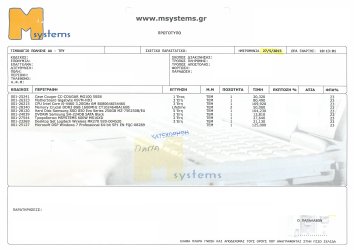
As I probably have mentioned I bought this computer 6 months ago with the particular configuration and with Windows 7 (you can see attached invoice).
I'd like to believe that I bought a NEW computer. I mean that hard drive was new and only Windows 7 installed on him.
Believe me ! I have only a few knowledge about new motherboards, new BIOS, new hard drives (and their partitions) and "new" Windows (8 or 10).
I own more experience with Windows XP and Windows 7 and motherboards with AMI BIOS.

So I have no reason NOT to believe you and I appreciate for your help.

You have had some of the best guys on the Forum helping you and no luck yet on solving the problem. I concur with Torchwood that it is time to do a Reinstall of Windows 7. You need to backup any files you have to an external disk. You will have to reinstall all of your programs after the Win 7 Install. We will be glad to help you through the install. As was said above, follow the "Clean Install Windows 7" Tutorial that Torchwood has referenced. A reinstall should take just under an hour, you will need to stay at your PC while it installs to hit a few keys when prompted. We will be here for any questions. Good Luck == One more thing. Be sure and have your Product Key available when doing your install. You will need it. It should be on a sticker on the outside of your PC.

Dear bigmck

I know that here on this Forum all you guys are the best and always try do the best.
In case you agree with Torchwood that a Windows 7 clean installation is the solution I have to accept your suggestion.
BUT this computer is my daily work tool and there is no chance to format it.

If both of you believe that Windows reinstallation is necessary and there is no other solution then I'm affraid that I have to learn to live with my problem.

I appreciate your time and your help and I have to thank you for your suggestions.
 

Attachments

  • My computer.jpg
    My computer.jpg
    450.8 KB · Views: 4

My Computer

Computer type
PC/Desktop
Computer Manufacturer/Model Number
Custom build
OS
Microsoft Windows 7 Professional 64-bit 7601 Multiprocessor Free Service Pack 1
CPU
Intel(R) Core(TM) i5-4460 CPU @ 3.20GHz
Motherboard
Gigabyte Technology Co., Ltd. H97M-HD3
Memory
16,00 GB
Graphics Card(s)
Intel(R) HD Graphics 4600
Sound Card
Realtek High Definition Audio
Screen Resolution
1280 x 1024 x 32 bits (4294967296 colors) @ 60 Hz
Hard Drives
Samsung SSD 850 EVO 250G SCSI Disk Device
Hi Paanoos,

Have a suggestion as the comp is 6 months old >take it back<, and get them to repair or replace it.

BUT as you said it was your daily work tool get them to provide a replacement while thier fixing/replacing it.

Roy
 

My Computer

Computer type
PC/Desktop
Computer Manufacturer/Model Number
medionl/Aspire 6930G/acer x55a
OS
W7 home premium 32bit/W7HP 64bit/w10 tp insider ring
CPU
E5300 dual core
Motherboard
medion MS7366
Memory
3gb
Graphics Card(s)
Nvidia Geforce 7100 Nforce 630i
Monitor(s) Displays
avixc
Internet Speed
n (isp resticted to 72)
Antivirus
mse/pands
Browser
palemoon
Other Info
Belkin Fd7050 n USB using Railink RT2870 drivers, more upto date

My Computer

Computer type
PC/Desktop
Computer Manufacturer/Model Number
Custom Build
OS
Windows 7 Home Premium 32-Bit - Build 7600 SP1
CPU
Intel Core i3-2120 3.30Ghz
Motherboard
Asus P8Z68-V LX Intel Z68 Socket H2 ATX
Memory
Kingston 4 GB DDR3 1333 mhz
Graphics Card(s)
AMD Radeon HD6670
Sound Card
Sound Blaster Audigy SE 24-Bit
Monitor(s) Displays
Asus VE228
Screen Resolution
1440 X 900
Hard Drives
OCZ Vertex 3 120 GB Sata 3 SSD ==
Kingston SH103/S3 120 G Hyper X 120 GB SSD ==
Western Digital 500 GB Caviar Green 7200 RPM ==
PSU
Corsair CX600M == 600 Watt
Case
NZXT Apollo - Silver with Clear Side Panel
Cooling
Three 120 mm Fans
Keyboard
Microsoft Natural 4000
Mouse
Microsoft Custom Optical 3000
Internet Speed
AT&T Fiber Optic Wireless Network
Antivirus
Microsoft Security Essentials
Browser
Chrome
Other Info
120 mm Blue LED Fan -- Three Blue LED Lazer Light Sticks
Hi Paanoos,

Have a suggestion as the comp is 6 months old >take it back<, and get them to repair or replace it.

BUT as you said it was your daily work tool get them to provide a replacement while thier fixing/replacing it.

Roy

Roy you're right !
This is the most right...
But this computer runs my company accounting program so you understand that even replacing is very difficult.

Since you have a Win 7 disk, you should try to run Startup Repair. http://www.sevenforums.com/tutorials/105541-startup-repair-run-3-separate-times.html Follow the Tutorial. Be sure and run it three times. This will not bother any of you data on your PC. When you get through, post a screen shot of your Disk Management.

Followed the tutorial but nothing changed.
"Windows did not detect any problem" was the message all 3 times.
And in Disk Management nothing changed.

Only one thing I mentioned. I don't know if this means something.
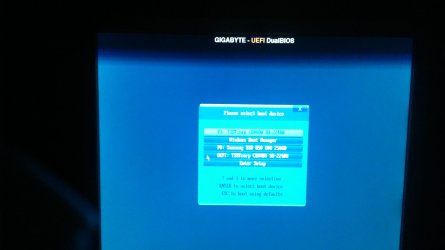
When I selected first option during boot (P1: TSSTcorp CDDVDW SH-224DB) I couldn't do a Startup Repair. The message was something like Windows disk is different than Windows running and cannot repair.
I had to select option 4 (UEFI: TSSTcorp CDDVDW SH-224DB) to run Startup Repair with success.
[Please see the attach file]
 

Attachments

  • DSC_0165.JPG
    DSC_0165.JPG
    171.4 KB · Views: 3

My Computer

Computer type
PC/Desktop
Computer Manufacturer/Model Number
Custom build
OS
Microsoft Windows 7 Professional 64-bit 7601 Multiprocessor Free Service Pack 1
CPU
Intel(R) Core(TM) i5-4460 CPU @ 3.20GHz
Motherboard
Gigabyte Technology Co., Ltd. H97M-HD3
Memory
16,00 GB
Graphics Card(s)
Intel(R) HD Graphics 4600
Sound Card
Realtek High Definition Audio
Screen Resolution
1280 x 1024 x 32 bits (4294967296 colors) @ 60 Hz
Hard Drives
Samsung SSD 850 EVO 250G SCSI Disk Device
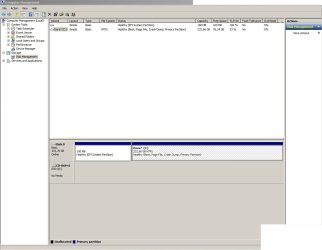
Please post your Disk Management so we can help. You might not see a problem when there is one. Be sure and stretch the columns so all print can be read.
 

My Computer

Computer type
PC/Desktop
Computer Manufacturer/Model Number
Custom Build
OS
Windows 7 Home Premium 32-Bit - Build 7600 SP1
CPU
Intel Core i3-2120 3.30Ghz
Motherboard
Asus P8Z68-V LX Intel Z68 Socket H2 ATX
Memory
Kingston 4 GB DDR3 1333 mhz
Graphics Card(s)
AMD Radeon HD6670
Sound Card
Sound Blaster Audigy SE 24-Bit
Monitor(s) Displays
Asus VE228
Screen Resolution
1440 X 900
Hard Drives
OCZ Vertex 3 120 GB Sata 3 SSD ==
Kingston SH103/S3 120 G Hyper X 120 GB SSD ==
Western Digital 500 GB Caviar Green 7200 RPM ==
PSU
Corsair CX600M == 600 Watt
Case
NZXT Apollo - Silver with Clear Side Panel
Cooling
Three 120 mm Fans
Keyboard
Microsoft Natural 4000
Mouse
Microsoft Custom Optical 3000
Internet Speed
AT&T Fiber Optic Wireless Network
Antivirus
Microsoft Security Essentials
Browser
Chrome
Other Info
120 mm Blue LED Fan -- Three Blue LED Lazer Light Sticks
Hello bigmck

here is what you asked for..
 

Attachments

  • Disk Management.jpg
    Disk Management.jpg
    81.7 KB · Views: 3

My Computer

Computer type
PC/Desktop
Computer Manufacturer/Model Number
Custom build
OS
Microsoft Windows 7 Professional 64-bit 7601 Multiprocessor Free Service Pack 1
CPU
Intel(R) Core(TM) i5-4460 CPU @ 3.20GHz
Motherboard
Gigabyte Technology Co., Ltd. H97M-HD3
Memory
16,00 GB
Graphics Card(s)
Intel(R) HD Graphics 4600
Sound Card
Realtek High Definition Audio
Screen Resolution
1280 x 1024 x 32 bits (4294967296 colors) @ 60 Hz
Hard Drives
Samsung SSD 850 EVO 250G SCSI Disk Device
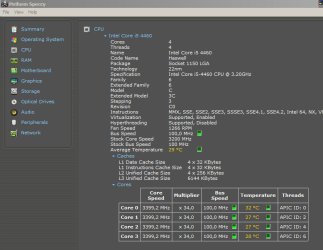
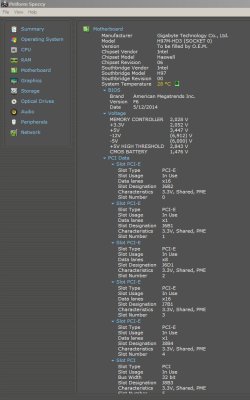
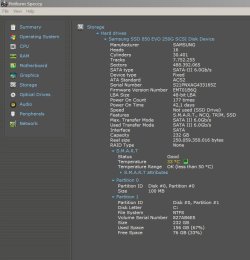
Let's try something else. Have you checked your temperatures to see if that is the reason for the reboot? If not, download
https://www.piriform.com/speccy If your CPU is over 60 degrees then heat is a problem. Your Hard Drives should be in the 40 degree range. Let us know how that goes.
 

My Computer

Computer type
PC/Desktop
Computer Manufacturer/Model Number
Custom Build
OS
Windows 7 Home Premium 32-Bit - Build 7600 SP1
CPU
Intel Core i3-2120 3.30Ghz
Motherboard
Asus P8Z68-V LX Intel Z68 Socket H2 ATX
Memory
Kingston 4 GB DDR3 1333 mhz
Graphics Card(s)
AMD Radeon HD6670
Sound Card
Sound Blaster Audigy SE 24-Bit
Monitor(s) Displays
Asus VE228
Screen Resolution
1440 X 900
Hard Drives
OCZ Vertex 3 120 GB Sata 3 SSD ==
Kingston SH103/S3 120 G Hyper X 120 GB SSD ==
Western Digital 500 GB Caviar Green 7200 RPM ==
PSU
Corsair CX600M == 600 Watt
Case
NZXT Apollo - Silver with Clear Side Panel
Cooling
Three 120 mm Fans
Keyboard
Microsoft Natural 4000
Mouse
Microsoft Custom Optical 3000
Internet Speed
AT&T Fiber Optic Wireless Network
Antivirus
Microsoft Security Essentials
Browser
Chrome
Other Info
120 mm Blue LED Fan -- Three Blue LED Lazer Light Sticks
I think that temperature is not the problem
 

Attachments

  • Speccy_0001.jpg
    Speccy_0001.jpg
    45.8 KB · Views: 0
  • Speccy_0002.jpg
    Speccy_0002.jpg
    68.2 KB · Views: 0
  • Speccy_0003.jpg
    Speccy_0003.jpg
    75 KB · Views: 0
  • Speccy_0004.jpg
    Speccy_0004.jpg
    61 KB · Views: 25

My Computer

Computer type
PC/Desktop
Computer Manufacturer/Model Number
Custom build
OS
Microsoft Windows 7 Professional 64-bit 7601 Multiprocessor Free Service Pack 1
CPU
Intel(R) Core(TM) i5-4460 CPU @ 3.20GHz
Motherboard
Gigabyte Technology Co., Ltd. H97M-HD3
Memory
16,00 GB
Graphics Card(s)
Intel(R) HD Graphics 4600
Sound Card
Realtek High Definition Audio
Screen Resolution
1280 x 1024 x 32 bits (4294967296 colors) @ 60 Hz
Hard Drives
Samsung SSD 850 EVO 250G SCSI Disk Device
I agree that temperature is not the problem. I believe the EFI system partition is the problem but I have no experience dealing with it. Here is a tutorial that explains how to change it to MBR as Win 7 normally has. http://www.sevenforums.com/tutorials/26203-convert-gpt-disk-mbr-disk.html We have covered about everything else that this could be. You can download Macrium Reflect which will give you an image of your current setup on an external disk. Macrium Reflect Free You can then run the tutorial and attempt to change it to MBR. If you something happens and you can not boot your PC, you can restore the image and be up and running in 15 minutes. If you really want to fix this problem you can try this. If you would rather not, I understand. At any rate, I will be here to assist if you need help.
 

My Computer

Computer type
PC/Desktop
Computer Manufacturer/Model Number
Custom Build
OS
Windows 7 Home Premium 32-Bit - Build 7600 SP1
CPU
Intel Core i3-2120 3.30Ghz
Motherboard
Asus P8Z68-V LX Intel Z68 Socket H2 ATX
Memory
Kingston 4 GB DDR3 1333 mhz
Graphics Card(s)
AMD Radeon HD6670
Sound Card
Sound Blaster Audigy SE 24-Bit
Monitor(s) Displays
Asus VE228
Screen Resolution
1440 X 900
Hard Drives
OCZ Vertex 3 120 GB Sata 3 SSD ==
Kingston SH103/S3 120 G Hyper X 120 GB SSD ==
Western Digital 500 GB Caviar Green 7200 RPM ==
PSU
Corsair CX600M == 600 Watt
Case
NZXT Apollo - Silver with Clear Side Panel
Cooling
Three 120 mm Fans
Keyboard
Microsoft Natural 4000
Mouse
Microsoft Custom Optical 3000
Internet Speed
AT&T Fiber Optic Wireless Network
Antivirus
Microsoft Security Essentials
Browser
Chrome
Other Info
120 mm Blue LED Fan -- Three Blue LED Lazer Light Sticks
OK bigmck

I'll study this tutorial and maybe this weekend I'll try it.

Many many thanks to you
 

My Computer

Computer type
PC/Desktop
Computer Manufacturer/Model Number
Custom build
OS
Microsoft Windows 7 Professional 64-bit 7601 Multiprocessor Free Service Pack 1
CPU
Intel(R) Core(TM) i5-4460 CPU @ 3.20GHz
Motherboard
Gigabyte Technology Co., Ltd. H97M-HD3
Memory
16,00 GB
Graphics Card(s)
Intel(R) HD Graphics 4600
Sound Card
Realtek High Definition Audio
Screen Resolution
1280 x 1024 x 32 bits (4294967296 colors) @ 60 Hz
Hard Drives
Samsung SSD 850 EVO 250G SCSI Disk Device
Let us know how it is going.
 

My Computer

Computer type
PC/Desktop
Computer Manufacturer/Model Number
Custom Build
OS
Windows 7 Home Premium 32-Bit - Build 7600 SP1
CPU
Intel Core i3-2120 3.30Ghz
Motherboard
Asus P8Z68-V LX Intel Z68 Socket H2 ATX
Memory
Kingston 4 GB DDR3 1333 mhz
Graphics Card(s)
AMD Radeon HD6670
Sound Card
Sound Blaster Audigy SE 24-Bit
Monitor(s) Displays
Asus VE228
Screen Resolution
1440 X 900
Hard Drives
OCZ Vertex 3 120 GB Sata 3 SSD ==
Kingston SH103/S3 120 G Hyper X 120 GB SSD ==
Western Digital 500 GB Caviar Green 7200 RPM ==
PSU
Corsair CX600M == 600 Watt
Case
NZXT Apollo - Silver with Clear Side Panel
Cooling
Three 120 mm Fans
Keyboard
Microsoft Natural 4000
Mouse
Microsoft Custom Optical 3000
Internet Speed
AT&T Fiber Optic Wireless Network
Antivirus
Microsoft Security Essentials
Browser
Chrome
Other Info
120 mm Blue LED Fan -- Three Blue LED Lazer Light Sticks
Hi Pasnoos,
Just to comfirm if my original thoughts are correct could you run the MGADiag Tool,


Roy
 

My Computer

Computer type
PC/Desktop
Computer Manufacturer/Model Number
medionl/Aspire 6930G/acer x55a
OS
W7 home premium 32bit/W7HP 64bit/w10 tp insider ring
CPU
E5300 dual core
Motherboard
medion MS7366
Memory
3gb
Graphics Card(s)
Nvidia Geforce 7100 Nforce 630i
Monitor(s) Displays
avixc
Internet Speed
n (isp resticted to 72)
Antivirus
mse/pands
Browser
palemoon
Other Info
Belkin Fd7050 n USB using Railink RT2870 drivers, more upto date
Back
Top