My Documents completely deleted off my computer.

Harz77

New member
Local time
1:41 PM
Messages
11
Trying to move the My Documents folder over to my other drive and in the process it was completely deleted. I tried to do this a few months ago but didn't even realise. I'll try show pictures to show what's happening. I've tried everything online so far but i can't find the folders or files that everyone else has.

1st image: 05ceaec9426cc5c2cd6324b8610281d7.png (My documents folder isn't there)
2nd image: 43cfc3be1d1c1efe300816f77707cb9c.png (properties of documents)
 

My Computer

Computer type
PC/Desktop
OS
Windows 7 Ultimate 64 Bit
I always suggest coping folders and files to new locations and then when verified you can delete if needed. Have you checked your trash to retrieve ? Something tells me you didn't delete but just moved them somewhere you're not finding yet.
 

My Computer

Computer type
PC/Desktop
Computer Manufacturer/Model Number
A blend of brains, brawn and dumb luck.
OS
Windows 7 Ultimate 64
CPU
i7 3770k OC'd 4.6 @ 1.17v, also FX 8120 & i5 miniITX
Motherboard
MSI P67A-GD80 b3
Memory
32 gb G.Skill Sniper DDR3 10-12-12-31 @ 2133
Graphics Card(s)
XFX Radeon 7870 2GB DDR5
Sound Card
Sound Blaster Z Series Card
Monitor(s) Displays
(2) LG LED 23" 1920 x 1080 2ms Monitors via mini d-port
Screen Resolution
1680 X 1050 p
Hard Drives
Samsung 256 gb 830 SSD sata III
(1) 1 tb WD Black
(2) 1 tb Hitachi deskmates/sata II
(2) 1 tb WD green/sata II
(2) 3 tb Seagate Barracuda
(1) 120 gb OCZ Vertex SS
(1) Drobo 5N w/5 Seagate 3tb
PSU
EVGA modular 1000G2 80% gold rating & APC 1200 RS
Case
CoolerMaster Storm Styker
Cooling
7 case fans 140mm & 120mm, NZXT Kraken X60
Keyboard
(2) Logitech Illuminated Keyboards (1) usb (1) wireless
Mouse
Logitech G700 & T-BC21 - nano nx for the laptop
Internet Speed
Basic 120mbps down
Antivirus
Trend Micro Titanium Max Security & Malwarebytes Premium
Browser
Chrome and IE 10
Other Info
5 Noctua case fans + 3 Noctua in p/p on NZXT cooler
Integrated hot swap drive bays for 2.5" Drives
(2) Lite-on dvd/cd/Blu Ray optical 22X
Integrated fan controller and led on/off
HP Officejet Pro 8630 all-n-one
Hot-swappable 3.5" hard drive bay
Netgear Nighthawk router
Asus USB 3 & sata 6 PCIe card
Vantec IDE to sata adptr./Ultra sata adptr
Lenovo L420 i5 lappy with m sata
Drobo 5N advanced NAS
Hi, yes i have checked my trash and can't find anything. I simply made the folder in my D drive and tried to copy it over but something happened in the process. It worked for videos pictures and downloads completely fine. Is there anyway of still making all my documents save on D drive. Or just simply finding the my documents folder and putting it over to my D drive.
 

My Computer

Computer type
PC/Desktop
OS
Windows 7 Ultimate 64 Bit
You can do a search via a known file name and this could point you to where you moved the files/folder.
 

My Computer

Computer type
PC/Desktop
Computer Manufacturer/Model Number
A blend of brains, brawn and dumb luck.
OS
Windows 7 Ultimate 64
CPU
i7 3770k OC'd 4.6 @ 1.17v, also FX 8120 & i5 miniITX
Motherboard
MSI P67A-GD80 b3
Memory
32 gb G.Skill Sniper DDR3 10-12-12-31 @ 2133
Graphics Card(s)
XFX Radeon 7870 2GB DDR5
Sound Card
Sound Blaster Z Series Card
Monitor(s) Displays
(2) LG LED 23" 1920 x 1080 2ms Monitors via mini d-port
Screen Resolution
1680 X 1050 p
Hard Drives
Samsung 256 gb 830 SSD sata III
(1) 1 tb WD Black
(2) 1 tb Hitachi deskmates/sata II
(2) 1 tb WD green/sata II
(2) 3 tb Seagate Barracuda
(1) 120 gb OCZ Vertex SS
(1) Drobo 5N w/5 Seagate 3tb
PSU
EVGA modular 1000G2 80% gold rating & APC 1200 RS
Case
CoolerMaster Storm Styker
Cooling
7 case fans 140mm & 120mm, NZXT Kraken X60
Keyboard
(2) Logitech Illuminated Keyboards (1) usb (1) wireless
Mouse
Logitech G700 & T-BC21 - nano nx for the laptop
Internet Speed
Basic 120mbps down
Antivirus
Trend Micro Titanium Max Security & Malwarebytes Premium
Browser
Chrome and IE 10
Other Info
5 Noctua case fans + 3 Noctua in p/p on NZXT cooler
Integrated hot swap drive bays for 2.5" Drives
(2) Lite-on dvd/cd/Blu Ray optical 22X
Integrated fan controller and led on/off
HP Officejet Pro 8630 all-n-one
Hot-swappable 3.5" hard drive bay
Netgear Nighthawk router
Asus USB 3 & sata 6 PCIe card
Vantec IDE to sata adptr./Ultra sata adptr
Lenovo L420 i5 lappy with m sata
Drobo 5N advanced NAS
I've searched many times and can't find it, and specific way how to search?
 

My Computer

Computer type
PC/Desktop
OS
Windows 7 Ultimate 64 Bit
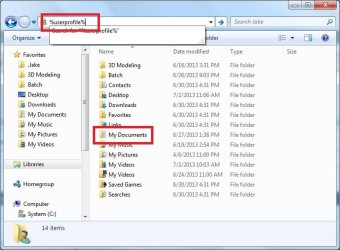
Go into windows explorer, at the type, type in %userprofile%. Do you see your documents there?
I see it's missing from the library, but that doesn't mean it's missing from the computer.
See image.
 

Attachments

  • Untitled.jpg
    Untitled.jpg
    50.1 KB · Views: 7

My Computer

Computer type
PC/Desktop
Computer Manufacturer/Model Number
Custom Build
OS
Windows 7 Home Premium
CPU
AMD FX-4170 4.2GHz
Motherboard
ASRock 960GM/U3S3 FX
Memory
8GB Transcend Information DDR3 1333MHz PC3-10600
Graphics Card(s)
NVidia GTX 650-Ti 2Gb (Zotac Amp Edition)
Sound Card
Integrated
Monitor(s) Displays
Yup, I've got one of those.
Screen Resolution
I'm not into resolutions. I always break them.
Hard Drives
SG 1.5TB
WDC 1TB (Backup)
PSU
550W
Case
Mini ATX
Cooling
Fan
Keyboard
Cheap
Mouse
Logitec M510
Internet Speed
50Mph. I mean Mbps.
Antivirus
Avast
Browser
Firefox
Other Info
You forgot speakers, man. I've got those too! I've had these babies since windows 98!
Go to Start > type in CMD > right click on CMD there at the top > hit run as admin > then type this in:
C:\Users>for /f "tokens=*" %a in ('dir /b /s /ad "%systemdrive%\documents"') do explorer "%a"

It will take a little while, and when it's done, it will open every single folder on your computer named "documents".
You can search through these and see if any of them is the one you can't find.
 

My Computer

Computer type
PC/Desktop
Computer Manufacturer/Model Number
Custom Build
OS
Windows 7 Home Premium
CPU
AMD FX-4170 4.2GHz
Motherboard
ASRock 960GM/U3S3 FX
Memory
8GB Transcend Information DDR3 1333MHz PC3-10600
Graphics Card(s)
NVidia GTX 650-Ti 2Gb (Zotac Amp Edition)
Sound Card
Integrated
Monitor(s) Displays
Yup, I've got one of those.
Screen Resolution
I'm not into resolutions. I always break them.
Hard Drives
SG 1.5TB
WDC 1TB (Backup)
PSU
550W
Case
Mini ATX
Cooling
Fan
Keyboard
Cheap
Mouse
Logitec M510
Internet Speed
50Mph. I mean Mbps.
Antivirus
Avast
Browser
Firefox
Other Info
You forgot speakers, man. I've got those too! I've had these babies since windows 98!
Go to Start > type in CMD > right click on CMD there at the top > hit run as admin > then type this in:
C:\Users>for /f "tokens=*" %a in ('dir /b /s /ad "%systemdrive%\documents"') do explorer "%a"

It will take a little while, and when it's done, it will open every single folder on your computer named "documents".
You can search through these and see if any of them is the one you can't find.

Oops! This is what I meant:
for /f "tokens=*" %a in ('dir /b /s /ad "%systemdrive%\documents"') do explorer "%a"
 

My Computer

Computer type
PC/Desktop
Computer Manufacturer/Model Number
Custom Build
OS
Windows 7 Home Premium
CPU
AMD FX-4170 4.2GHz
Motherboard
ASRock 960GM/U3S3 FX
Memory
8GB Transcend Information DDR3 1333MHz PC3-10600
Graphics Card(s)
NVidia GTX 650-Ti 2Gb (Zotac Amp Edition)
Sound Card
Integrated
Monitor(s) Displays
Yup, I've got one of those.
Screen Resolution
I'm not into resolutions. I always break them.
Hard Drives
SG 1.5TB
WDC 1TB (Backup)
PSU
550W
Case
Mini ATX
Cooling
Fan
Keyboard
Cheap
Mouse
Logitec M510
Internet Speed
50Mph. I mean Mbps.
Antivirus
Avast
Browser
Firefox
Other Info
You forgot speakers, man. I've got those too! I've had these babies since windows 98!
Could you write it all out again please, doesn't seem to be working.
 

My Computer

Computer type
PC/Desktop
OS
Windows 7 Ultimate 64 Bit
Could you write it all out again please, doesn't seem to be working.
The first time I had this:
c:\users>for /f "tokens=*" %a in ('dir /b /s /ad "%systemdrive%\documents"') do explorer "%a"

last time I posted this:
for /f "tokens=*" %a in ('dir /b /s /ad "%systemdrive%\documents"') do explorer "%a"

They are quite different. Is the latter still not working? It takes several minutes
 

My Computer

Computer type
PC/Desktop
Computer Manufacturer/Model Number
Custom Build
OS
Windows 7 Home Premium
CPU
AMD FX-4170 4.2GHz
Motherboard
ASRock 960GM/U3S3 FX
Memory
8GB Transcend Information DDR3 1333MHz PC3-10600
Graphics Card(s)
NVidia GTX 650-Ti 2Gb (Zotac Amp Edition)
Sound Card
Integrated
Monitor(s) Displays
Yup, I've got one of those.
Screen Resolution
I'm not into resolutions. I always break them.
Hard Drives
SG 1.5TB
WDC 1TB (Backup)
PSU
550W
Case
Mini ATX
Cooling
Fan
Keyboard
Cheap
Mouse
Logitec M510
Internet Speed
50Mph. I mean Mbps.
Antivirus
Avast
Browser
Firefox
Other Info
You forgot speakers, man. I've got those too! I've had these babies since windows 98!
I expected that on some folders - did any other folders appear? If so, was one of them the one that went missing.
 

My Computer

Computer type
PC/Desktop
Computer Manufacturer/Model Number
Custom Build
OS
Windows 7 Home Premium
CPU
AMD FX-4170 4.2GHz
Motherboard
ASRock 960GM/U3S3 FX
Memory
8GB Transcend Information DDR3 1333MHz PC3-10600
Graphics Card(s)
NVidia GTX 650-Ti 2Gb (Zotac Amp Edition)
Sound Card
Integrated
Monitor(s) Displays
Yup, I've got one of those.
Screen Resolution
I'm not into resolutions. I always break them.
Hard Drives
SG 1.5TB
WDC 1TB (Backup)
PSU
550W
Case
Mini ATX
Cooling
Fan
Keyboard
Cheap
Mouse
Logitec M510
Internet Speed
50Mph. I mean Mbps.
Antivirus
Avast
Browser
Firefox
Other Info
You forgot speakers, man. I've got those too! I've had these babies since windows 98!
Nope just the ones i showed before, as i said i think it is completely deleted of my computer.
 

My Computer

Computer type
PC/Desktop
OS
Windows 7 Ultimate 64 Bit
Indeed. It is in fact deleted.
You said in the original post that you moved it. So you must have a backup on the other drive, right?
 

My Computer

Computer type
PC/Desktop
Computer Manufacturer/Model Number
Custom Build
OS
Windows 7 Home Premium
CPU
AMD FX-4170 4.2GHz
Motherboard
ASRock 960GM/U3S3 FX
Memory
8GB Transcend Information DDR3 1333MHz PC3-10600
Graphics Card(s)
NVidia GTX 650-Ti 2Gb (Zotac Amp Edition)
Sound Card
Integrated
Monitor(s) Displays
Yup, I've got one of those.
Screen Resolution
I'm not into resolutions. I always break them.
Hard Drives
SG 1.5TB
WDC 1TB (Backup)
PSU
550W
Case
Mini ATX
Cooling
Fan
Keyboard
Cheap
Mouse
Logitec M510
Internet Speed
50Mph. I mean Mbps.
Antivirus
Avast
Browser
Firefox
Other Info
You forgot speakers, man. I've got those too! I've had these babies since windows 98!
I have a windows image backup which i did right at the beginning when building my computer? Is there a way of creating a new documents folder or anything?
 

My Computer

Computer type
PC/Desktop
OS
Windows 7 Ultimate 64 Bit
Is there a way of creating a new documents folder or anything?

Yes, back on that picture you had: 43cfc3be1d1c1efe300816f77707cb9c.png
You see where it says include a folder? Click that.
It will open a new window. This should be the folder of all the folders in your useraccount. If you don't have one labeled "My Documents," right-click on a blank area, go to new, then click folder. Rename it to My Documents, and then click the button that says "include folder".

Back at the properties window, click the new folder you just made to highlight it, then click "set save location". Press OK.
 

My Computer

Computer type
PC/Desktop
Computer Manufacturer/Model Number
Custom Build
OS
Windows 7 Home Premium
CPU
AMD FX-4170 4.2GHz
Motherboard
ASRock 960GM/U3S3 FX
Memory
8GB Transcend Information DDR3 1333MHz PC3-10600
Graphics Card(s)
NVidia GTX 650-Ti 2Gb (Zotac Amp Edition)
Sound Card
Integrated
Monitor(s) Displays
Yup, I've got one of those.
Screen Resolution
I'm not into resolutions. I always break them.
Hard Drives
SG 1.5TB
WDC 1TB (Backup)
PSU
550W
Case
Mini ATX
Cooling
Fan
Keyboard
Cheap
Mouse
Logitec M510
Internet Speed
50Mph. I mean Mbps.
Antivirus
Avast
Browser
Firefox
Other Info
You forgot speakers, man. I've got those too! I've had these babies since windows 98!
Ok i'll try now thanks for your help so far :)
 

My Computer

Computer type
PC/Desktop
OS
Windows 7 Ultimate 64 Bit
Is there a way of creating a new documents folder or anything?

Yes, back on that picture you had: 43cfc3be1d1c1efe300816f77707cb9c.png
You see where it says include a folder? Click that.
It will open a new window. This should be the folder of all the folders in your useraccount. If you don't have one labeled "My Documents," right-click on a blank area, go to new, then click folder. Rename it to My Documents, and then click the button that says "include folder".

Back at the properties window, click the new folder you just made to highlight it, then click "set save location". Press OK.

I didn't have to even use the back up i just simply added the folder on the D drive to the properties. I'm sorry for all the questions hopefully this should work as my normal "My Documents" folder. I should of really clicked include folder etc thanks.
 

My Computer

Computer type
PC/Desktop
OS
Windows 7 Ultimate 64 Bit
Back
Top