My documents, pics, music, and vids..

AGlobalThreatsK

Computer Technician
Power User
Local time
2:20 PM
Messages
137
When I open Documents on the start menu, it points to My Documents. I already changed the default from the public documents to My Documents, and removed the public documents from the menu so My Documents is the only thing I see.

What I want to do though is have Documents on the start menu go directly into the My Documents folder, instead of having to point to
Start > Documents > My Documents > files located here.

I want it to simply be Start > Documents > files located here, just like how all the previous versions of Windows were.

I thought it was kind of cool at first how you could access both the public and your own documents, but after I found out I could remove the public displays from the menu I definitely would prefer it to go directly into the My Documents folder. Same goes for Music, Pictures, and Videos.

Anyone know how?
 

My Computer My Computer

At a glance

7 x64 + XP Pro x86Undervolted T9900 3.06 GHz Core2Duo4GB DDR3 1066MHzNVIDIA 9800M GTS 1GB DDR3 1066 MHz
Computer Manufacturer/Model Number
Gateway P7801
OS
7 x64 + XP Pro x86
CPU
Undervolted T9900 3.06 GHz Core2Duo
Memory
4GB DDR3 1066MHz
Graphics Card(s)
NVIDIA 9800M GTS 1GB DDR3 1066 MHz
Monitor(s) Displays
17" WUXGA
Screen Resolution
1920x1200
Hard Drives
32GB Patriot V2 SSD w/ Hyperfast
PSU
9-cell Lithium Ion
Keyboard
Logitech Classic
Mouse
Logitech MX310
Internet Speed
slow AT&T
Other Info
Nlited XP x86 (540MB C:) locked with EWF
hello globalthreat....

Start - > Documents does indeed point to c:\users\documents, which is the new way of sorting documents , music, pictures etc of M$.

In other words, the documents folder is "My documents" folder. My documents is now just an alias, to support earlier versions shorcuts.

You don't have to create a folder "My documents" inside Documents, cause "Documents" is "My Documents" now.
 

My Computer My Computer

At a glance

Windows 7 RC 7100 32bit/64bitIntel Core2Duo E4500 2.20 GHz2x1GB Kinsgston DDR2 800MHzNvidia 8500GT
Computer Manufacturer/Model Number
ENIAC
OS
Windows 7 RC 7100 32bit/64bit
CPU
Intel Core2Duo E4500 2.20 GHz
Motherboard
ASUS P5LD2-X/1333
Memory
2x1GB Kinsgston DDR2 800MHz
Graphics Card(s)
Nvidia 8500GT
Sound Card
Onboard High Definition Audio Device
Monitor(s) Displays
Sony Bravia 42"
Case
LINKW 2222
Cooling
Standard Intel
Keyboard
Some cheap one
Mouse
Microsoft Intellimouse something
Internet Speed
24MBps ADSL
Hi globalthreat,

I suspect you mean you want to go directly to here

MYDOCUMENTS2009-01-20_005753.jpg


You could create a shortcut to C:\users\username\Documents

and have it in the quick launch, or add it to Favorites Menu on the right pane of the Start Menu. Do you not see that folder when you click "Documents " on the Start Menu.

SIW2
 

My Computers My Computers

  • At a glance

    7 X64i5 84002x8gb 3200mhz
    Computer type
    PC/Desktop
    OS
    7 X64
    CPU
    i5 8400
    Motherboard
    gigabyte b365m ds3h
    Memory
    2x8gb 3200mhz
    Hard Drives
    various
    PSU
    pure power 11 400w cm
    Case
    Coolermaster
    Cooling
    cryorig m9i
  • At a glance

    7x64g54008gb ddr4 2400
    Computer type
    PC/Desktop
    OS
    7x64
    CPU
    g5400
    Motherboard
    ga b365m ds3h
    Memory
    8gb ddr4 2400
    PSU
    xfx pro 450w
This is what I have now:

b45b448d13.png


This is what I want:

7944aedac8.png


I don't want to have to go into Documents then My Documents. I want Documents to go straight INTO my documents. Very simple and stupid I know, but I'm picky.
 

My Computer My Computer

At a glance

7 x64 + XP Pro x86Undervolted T9900 3.06 GHz Core2Duo4GB DDR3 1066MHzNVIDIA 9800M GTS 1GB DDR3 1066 MHz
Computer Manufacturer/Model Number
Gateway P7801
OS
7 x64 + XP Pro x86
CPU
Undervolted T9900 3.06 GHz Core2Duo
Memory
4GB DDR3 1066MHz
Graphics Card(s)
NVIDIA 9800M GTS 1GB DDR3 1066 MHz
Monitor(s) Displays
17" WUXGA
Screen Resolution
1920x1200
Hard Drives
32GB Patriot V2 SSD w/ Hyperfast
PSU
9-cell Lithium Ion
Keyboard
Logitech Classic
Mouse
Logitech MX310
Internet Speed
slow AT&T
Other Info
Nlited XP x86 (540MB C:) locked with EWF
Bump, these double menus are really annoying. There has to be some way to do this.
 

My Computer My Computer

At a glance

7 x64 + XP Pro x86Undervolted T9900 3.06 GHz Core2Duo4GB DDR3 1066MHzNVIDIA 9800M GTS 1GB DDR3 1066 MHz
Computer Manufacturer/Model Number
Gateway P7801
OS
7 x64 + XP Pro x86
CPU
Undervolted T9900 3.06 GHz Core2Duo
Memory
4GB DDR3 1066MHz
Graphics Card(s)
NVIDIA 9800M GTS 1GB DDR3 1066 MHz
Monitor(s) Displays
17" WUXGA
Screen Resolution
1920x1200
Hard Drives
32GB Patriot V2 SSD w/ Hyperfast
PSU
9-cell Lithium Ion
Keyboard
Logitech Classic
Mouse
Logitech MX310
Internet Speed
slow AT&T
Other Info
Nlited XP x86 (540MB C:) locked with EWF
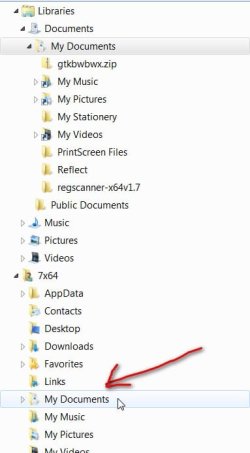
I don't think you can as there is a good reason for showing it that way, if you look at this screen shot you will see that if you have added other locations to the documents library they are also displayed as links and if you had it your way those extra folder could not be shown, make sense?

2009-02-06_114846.jpg
 

My Computer My Computer

At a glance

Windows 7 Ultimate Vista Ultimate x64Core 2 Duo E8500 3.16Ghz @ 3.8Ghz2x2Gigs Patriot PC2-6400 LLInno3D GeForce GTX260 216 SP
Computer Manufacturer/Model Number
Home Brew
OS
Windows 7 Ultimate Vista Ultimate x64
CPU
Core 2 Duo E8500 3.16Ghz @ 3.8Ghz
Motherboard
eVGA 750i FTW
Memory
2x2Gigs Patriot PC2-6400 LL
Graphics Card(s)
Inno3D GeForce GTX260 216 SP
Monitor(s) Displays
ASUS VW222U 22" 2ms Response time
Screen Resolution
1680x1050
Hard Drives
SATA 150GB
SATA II 250GB
USB IDE 750GB Ext.
PSU
HYTEC 600W & Thermaltake 650W Toughpower Power Exp
Case
Thermaltake Armor LCS (Liquid Cooling System)
Cooling
Liquid Cooling System
Keyboard
Logitech G15 Gaming Keyboard
Mouse
Logitech G9 Gaming Mouse
Yea I know WHY they changed it but I want the old style back. I don't want multiple documents folders, I want to point to Documents and have all my files show up. Instead of Documents going into the Documents Library, I want it to go into My Documents and simply display the files like in vista/xp
 

My Computer My Computer

At a glance

7 x64 + XP Pro x86Undervolted T9900 3.06 GHz Core2Duo4GB DDR3 1066MHzNVIDIA 9800M GTS 1GB DDR3 1066 MHz
Computer Manufacturer/Model Number
Gateway P7801
OS
7 x64 + XP Pro x86
CPU
Undervolted T9900 3.06 GHz Core2Duo
Memory
4GB DDR3 1066MHz
Graphics Card(s)
NVIDIA 9800M GTS 1GB DDR3 1066 MHz
Monitor(s) Displays
17" WUXGA
Screen Resolution
1920x1200
Hard Drives
32GB Patriot V2 SSD w/ Hyperfast
PSU
9-cell Lithium Ion
Keyboard
Logitech Classic
Mouse
Logitech MX310
Internet Speed
slow AT&T
Other Info
Nlited XP x86 (540MB C:) locked with EWF
Hi ,

I also find it completely useless. If I come across a way of bypassing it, I'll let you know.

In fact there is a kind of workround.

Keep all your docs and data etc. on a separate partition in folders you have created there. Create a shortcut to the other partition, or the folders you want to access on there regularly. Just bypass the default folder structure on The C drive completely.

SIW2
 

My Computers My Computers

  • At a glance

    7 X64i5 84002x8gb 3200mhz
    Computer type
    PC/Desktop
    OS
    7 X64
    CPU
    i5 8400
    Motherboard
    gigabyte b365m ds3h
    Memory
    2x8gb 3200mhz
    Hard Drives
    various
    PSU
    pure power 11 400w cm
    Case
    Coolermaster
    Cooling
    cryorig m9i
  • At a glance

    7x64g54008gb ddr4 2400
    Computer type
    PC/Desktop
    OS
    7x64
    CPU
    g5400
    Motherboard
    ga b365m ds3h
    Memory
    8gb ddr4 2400
    PSU
    xfx pro 450w
Do you think this might be a good place to look, maybe if you have look there in your Vista Registry you might have the registry value that you can add here.

2009-02-06_125133.jpg
 

My Computer My Computer

At a glance

Windows 7 Ultimate Vista Ultimate x64Core 2 Duo E8500 3.16Ghz @ 3.8Ghz2x2Gigs Patriot PC2-6400 LLInno3D GeForce GTX260 216 SP
Computer Manufacturer/Model Number
Home Brew
OS
Windows 7 Ultimate Vista Ultimate x64
CPU
Core 2 Duo E8500 3.16Ghz @ 3.8Ghz
Motherboard
eVGA 750i FTW
Memory
2x2Gigs Patriot PC2-6400 LL
Graphics Card(s)
Inno3D GeForce GTX260 216 SP
Monitor(s) Displays
ASUS VW222U 22" 2ms Response time
Screen Resolution
1680x1050
Hard Drives
SATA 150GB
SATA II 250GB
USB IDE 750GB Ext.
PSU
HYTEC 600W & Thermaltake 650W Toughpower Power Exp
Case
Thermaltake Armor LCS (Liquid Cooling System)
Cooling
Liquid Cooling System
Keyboard
Logitech G15 Gaming Keyboard
Mouse
Logitech G9 Gaming Mouse
Do you think this might be a good place to look, maybe if you have look there in your Vista Registry you might have the registry value that you can add here.

View attachment 4255

That's just to hide the My Documents item from the Start Menu. Goto
%appdata%\Microsoft\Windows\Libraries delete the documents library and create a new folder with that name. Now open the libraries view in explorer -- I can show you how if you don't know -- and delete it. The folder wil show up underneath. Use an NTFS symlink (junction) to mount you real docs folder there.
 

My Computer My Computer

At a glance

El Capitan / Windows 10i7-4980HQ16GBIris 5200
Computer type
Laptop
Computer Manufacturer/Model Number
Apple
OS
El Capitan / Windows 10
CPU
i7-4980HQ
Memory
16GB
Graphics Card(s)
Iris 5200
Right click on the start orb and select properties. Then Customize, then in the list under "documents" check "Display as link". For others that you want to go directly, do the same thing, e.g Computer.
 

My Computer My Computer

At a glance

Windows 10 Pro x64, Windows 8.1 Pro x64, Wind...INTEL i9-7920X LGA 206664 GB (4 X 16 GB) G-Skill V Series DDR4 3200 ...EVGA GTX 1060 SC 3 GB
Computer type
PC/Desktop
Computer Manufacturer/Model Number
Custom Built
OS
Windows 10 Pro x64, Windows 8.1 Pro x64, Windows 7 Ultimate x64 SP1,
CPU
INTEL i9-7920X LGA 2066
Motherboard
Gigabyte X299-WU8 F3
Memory
64 GB (4 X 16 GB) G-Skill V Series DDR4 3200 Quad Channel
Graphics Card(s)
EVGA GTX 1060 SC 3 GB
Sound Card
Realtek Onboard ALC1220
Monitor(s) Displays
2 x Samsung S27E310
Screen Resolution
1920x1080
Hard Drives
Samsung 2 x 970 EVO Plus 500 GB NVMe
1 x 6TB WD 6003FZBX SATA
1 x 6TB WD 60EFRX SATA
12 x 3TB WD 30EFRX SATA
PSU
Seasonic X-1050
Case
Thermaltake Armor+
Cooling
Corsair H80i V2 Liquid AOI Cooler
Keyboard
Logitech G510s
Mouse
Logitech MX Master 2S
Internet Speed
200 Mb/s
Antivirus
ESET NOD32 13.1
Browser
EDGE (Dev, Canary, Beta), Chrome
Other Info
ASUS RT-AC68U router
Malwarebytes 4.0.4
That's just to hide the My Documents item from the Start Menu. Goto
%appdata%\Microsoft\Windows\Libraries delete the documents library and create a new folder with that name. Now open the libraries view in explorer -- I can show you how if you don't know -- and delete it. The folder wil show up underneath. Use an NTFS symlink (junction) to mount you real docs folder there.


Whats an NTFS symlink (junction) ?
 

My Computer My Computer

At a glance

7 x64 + XP Pro x86Undervolted T9900 3.06 GHz Core2Duo4GB DDR3 1066MHzNVIDIA 9800M GTS 1GB DDR3 1066 MHz
Computer Manufacturer/Model Number
Gateway P7801
OS
7 x64 + XP Pro x86
CPU
Undervolted T9900 3.06 GHz Core2Duo
Memory
4GB DDR3 1066MHz
Graphics Card(s)
NVIDIA 9800M GTS 1GB DDR3 1066 MHz
Monitor(s) Displays
17" WUXGA
Screen Resolution
1920x1200
Hard Drives
32GB Patriot V2 SSD w/ Hyperfast
PSU
9-cell Lithium Ion
Keyboard
Logitech Classic
Mouse
Logitech MX310
Internet Speed
slow AT&T
Other Info
Nlited XP x86 (540MB C:) locked with EWF

My Computer My Computer

At a glance

El Capitan / Windows 10i7-4980HQ16GBIris 5200
Computer type
Laptop
Computer Manufacturer/Model Number
Apple
OS
El Capitan / Windows 10
CPU
i7-4980HQ
Memory
16GB
Graphics Card(s)
Iris 5200
Bump

Anybody found a workaround for this yet? I like how in XP and Vista I can just point to Documents and it shows my files. I don't like pointing to Documents and then have it show My Documents, and then I have to point to My Documents to see my files.

I understand the point of the libraries but I want the pre-library menus back :(
 

My Computer My Computer

At a glance

7 x64 + XP Pro x86Undervolted T9900 3.06 GHz Core2Duo4GB DDR3 1066MHzNVIDIA 9800M GTS 1GB DDR3 1066 MHz
Computer Manufacturer/Model Number
Gateway P7801
OS
7 x64 + XP Pro x86
CPU
Undervolted T9900 3.06 GHz Core2Duo
Memory
4GB DDR3 1066MHz
Graphics Card(s)
NVIDIA 9800M GTS 1GB DDR3 1066 MHz
Monitor(s) Displays
17" WUXGA
Screen Resolution
1920x1200
Hard Drives
32GB Patriot V2 SSD w/ Hyperfast
PSU
9-cell Lithium Ion
Keyboard
Logitech Classic
Mouse
Logitech MX310
Internet Speed
slow AT&T
Other Info
Nlited XP x86 (540MB C:) locked with EWF
Hi,

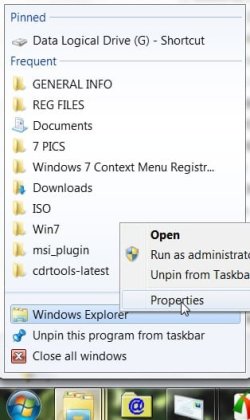
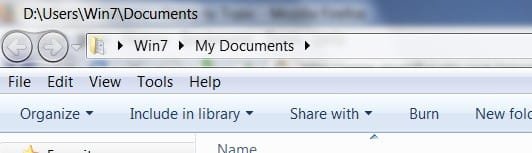
I changed the Target so the explorer Taskbar icon goes direct to My Documents.

MYDOCS-1-2009-04-16_223330.jpg

Select Properties and paste this in as the Target, Apply, Ok.

explorer.exe shell:::{26EE0668-A00A-44D7-9371-BEB064C986833}

MYDOCS-3-2009-04-16_224242.jpg


Or you could rt click desktop, select new shortcut and paste it in there.

Hope it helps.
 

My Computers My Computers

  • At a glance

    7 X64i5 84002x8gb 3200mhz
    Computer type
    PC/Desktop
    OS
    7 X64
    CPU
    i5 8400
    Motherboard
    gigabyte b365m ds3h
    Memory
    2x8gb 3200mhz
    Hard Drives
    various
    PSU
    pure power 11 400w cm
    Case
    Coolermaster
    Cooling
    cryorig m9i
  • At a glance

    7x64g54008gb ddr4 2400
    Computer type
    PC/Desktop
    OS
    7x64
    CPU
    g5400
    Motherboard
    ga b365m ds3h
    Memory
    8gb ddr4 2400
    PSU
    xfx pro 450w
I'm talking about the Start Menu, not the taskbar. I want the old menu styles for Documents, Music, Pictures, and Videos.

What you're suggesting would mean I'd have to have 4 different explorers pinned to the taskbar.

Thanks for the input though, any and all help is appreciated.
 

My Computer My Computer

At a glance

7 x64 + XP Pro x86Undervolted T9900 3.06 GHz Core2Duo4GB DDR3 1066MHzNVIDIA 9800M GTS 1GB DDR3 1066 MHz
Computer Manufacturer/Model Number
Gateway P7801
OS
7 x64 + XP Pro x86
CPU
Undervolted T9900 3.06 GHz Core2Duo
Memory
4GB DDR3 1066MHz
Graphics Card(s)
NVIDIA 9800M GTS 1GB DDR3 1066 MHz
Monitor(s) Displays
17" WUXGA
Screen Resolution
1920x1200
Hard Drives
32GB Patriot V2 SSD w/ Hyperfast
PSU
9-cell Lithium Ion
Keyboard
Logitech Classic
Mouse
Logitech MX310
Internet Speed
slow AT&T
Other Info
Nlited XP x86 (540MB C:) locked with EWF
http://www.sevenforums.com/tutorials/5736-start-menu-enable-folder-library-pin-start-menu.html

I must be wrong at what you are looking to do, but I believe this is the work around. pin it to start menu. I am sure you actually want it on the right side. There should be a browse option to add folders of our choosing to that side built into the start menu customize window, but there's not.

Try this - create a new library with just that folder in it or place all your files in the new library directly - How to Create A New Library In Windows 7 » My Digital Life

when you create the library - you have to click properties to add folder to library. But when you're done i'm sure you can open the folder inside the library and drag all the file into the library itself - just label the library my documents like you wanted to in the first place.Just wont be in right pane, so you may as well just drag your my docs folder into the left start menu pane. this whole idea is a waste of time, can just paste the folder itself instead - i just did it- i thought the new library would show on right pane - no luck wtf
Short of renaming one of the libraries you do not use - i see no way of doing this.

Trying to help out - good luck
 

My Computer My Computer

At a glance

windows7 7600 x86itel pentium 43.00 GBdiamond radion x1050
Computer Manufacturer/Model Number
dell optiplex - 2003
OS
windows7 7600 x86
CPU
itel pentium 4
Memory
3.00 GB
Graphics Card(s)
diamond radion x1050
Sound Card
SoundMax
Monitor(s) Displays
dell 2408wfp dell e172fp
Screen Resolution
1920 x 1200 1280 x 1024
Hard Drives
2 - 80 GB internals WD
1 - 01 TB ext
2 - 750 GB ext
1- 500 GB ext
all running on system no problems
Keyboard
old logitech cordless
Mouse
logitech wireless
Internet Speed
16 / 4
Other Info
networked into my sbs2003 server running sp1 still
it's a wonder I could even get windows 7 to connect to it
Still not what I'm looking for :(

Thanks for the help tho :)
 

My Computer My Computer

At a glance

7 x64 + XP Pro x86Undervolted T9900 3.06 GHz Core2Duo4GB DDR3 1066MHzNVIDIA 9800M GTS 1GB DDR3 1066 MHz
Computer Manufacturer/Model Number
Gateway P7801
OS
7 x64 + XP Pro x86
CPU
Undervolted T9900 3.06 GHz Core2Duo
Memory
4GB DDR3 1066MHz
Graphics Card(s)
NVIDIA 9800M GTS 1GB DDR3 1066 MHz
Monitor(s) Displays
17" WUXGA
Screen Resolution
1920x1200
Hard Drives
32GB Patriot V2 SSD w/ Hyperfast
PSU
9-cell Lithium Ion
Keyboard
Logitech Classic
Mouse
Logitech MX310
Internet Speed
slow AT&T
Other Info
Nlited XP x86 (540MB C:) locked with EWF
If you make it a link instead of a menu it loads the document library on click - which, in your case, only contains the single Documents folder, so it is automatically opened.

Other than that, ***you're stuck***
 

My Computers My Computers

  • At a glance

    Windows 11 21H2 Current buildAMD Ryzen 9 3950X4 * 32 GB - Corsair Vengeance 3600 MHzEVGA GeForce RTX 3080 Ti XC3 ULTRA GAMING (12...
    Computer type
    PC/Desktop
    Computer Manufacturer/Model Number
    The Beast Model A (homebrew)
    OS
    Windows 11 21H2 Current build
    CPU
    AMD Ryzen 9 3950X
    Motherboard
    MSI MEG X570 GODLIKE
    Memory
    4 * 32 GB - Corsair Vengeance 3600 MHz
    Graphics Card(s)
    EVGA GeForce RTX 3080 Ti XC3 ULTRA GAMING (12G-P5-3955-KR)
    Sound Card
    Realtek® ALC1220 Codec
    Monitor(s) Displays
    2x Eve Spectrum ES07D03 4K Gaming Monitor (Matte) | Eve Spec
    Screen Resolution
    3x 3840 x 2160
    Hard Drives
    3x Samsung 980 Pro NVMe PCIe 4 M.2 2 TB SSD (MZ-V8P2T0B/AM) } 3x Sabrent Rocket NVMe 4.0 1 TB SSD
    PSU
    PC Power & Cooling’s Silencer Series 1050 Watt, 80 Plus Plat
    Case
    Fractal Design Define 7 XL Dark ATX Full Tower Case
    Cooling
    SteelSeries Apex Pro Wired Gaming Keyboard
    Keyboard
    SteelSeries Apex Pro
    Mouse
    Logitech MX Master 3S | MX Master 3 for business
    Internet Speed
    AT&T LightSpeed Gigabit Duplex Ftth
    Antivirus
    Windows Defender + MB 3
    Browser
    Nightly (default) + Firefox (stable),Chrome, Edge
  • At a glance

    ChromeOS Flex Dev Channel (current)Intel(R) Core(TM) i5-6300U CPU @ 2.40GHz, 250...16 GBIntel(R) HD Graphics 520
    Computer type
    PC/Desktop
    System Manufacturer/Model Number
    Dell Latitude E5470
    OS
    ChromeOS Flex Dev Channel (current)
    CPU
    Intel(R) Core(TM) i5-6300U CPU @ 2.40GHz, 2501 Mhz, 2 Core(s), 4 Logical Processor(s)
    Motherboard
    Dell
    Memory
    16 GB
    Graphics Card(s)
    Intel(R) HD Graphics 520
    Sound Card
    Intel(R) HD Graphics 520 + RealTek Audio
    Monitor(s) Displays
    Dell laptop display 15"
    Screen Resolution
    1920 * 1080
    Hard Drives
    Toshiba 128GB M.2 22300 drive
    INTEL Cherryville 520 Series SSDSC2CW180A 180 GB SATA III SSD
    PSU
    Dell
    Case
    Dell
    Cooling
    Dell
    Keyboard
    Dell
    Mouse
    Logitech MX Master 3S (shared w. Sys 1) | Dell TouchPad
    Internet Speed
    AT&T LightSpeed Gigabit Duplex Ftth
Yea I just dont like having to open anything. I like just using the expandable menus on the start menu :(
 

My Computer My Computer

At a glance

7 x64 + XP Pro x86Undervolted T9900 3.06 GHz Core2Duo4GB DDR3 1066MHzNVIDIA 9800M GTS 1GB DDR3 1066 MHz
Computer Manufacturer/Model Number
Gateway P7801
OS
7 x64 + XP Pro x86
CPU
Undervolted T9900 3.06 GHz Core2Duo
Memory
4GB DDR3 1066MHz
Graphics Card(s)
NVIDIA 9800M GTS 1GB DDR3 1066 MHz
Monitor(s) Displays
17" WUXGA
Screen Resolution
1920x1200
Hard Drives
32GB Patriot V2 SSD w/ Hyperfast
PSU
9-cell Lithium Ion
Keyboard
Logitech Classic
Mouse
Logitech MX310
Internet Speed
slow AT&T
Other Info
Nlited XP x86 (540MB C:) locked with EWF
Back
Top