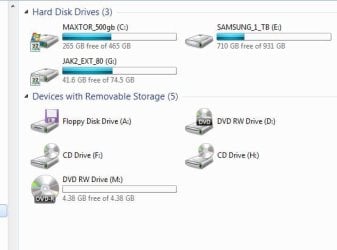
My drives are not showing up in Windows Explorer.

Balian

New member
Local time
1:07 PM
Messages
11
Just like the title says, I can't see any of my drives in Windows Explorer and I can't figure out why. The Disk Manager knows they are there and they are even labeled properly (the hard drive as C; and the dvd drive as D:) but they won't show up in the Explorer window. I just recently switched from XP, so am I missing something or what? If you need any more information just ask. I dont know what else to provide right now.
 

My Computer My Computer

At a glance

Windows 7 32-bit Home Premium2.8 Ghz Dual-Core AMD Athlon 78502 GBNvidia Geforce 9600GT
Computer Manufacturer/Model Number
CyberPower
OS
Windows 7 32-bit Home Premium
CPU
2.8 Ghz Dual-Core AMD Athlon 7850
Motherboard
ASUS (can't remember the model)
Memory
2 GB
Graphics Card(s)
Nvidia Geforce 9600GT
Sound Card
Onboard
Monitor(s) Displays
Samsung SyncMaster 2033SW
Screen Resolution
Native is 1600x900 (can only get 1280x768 now)
Hard Drives
250 GB (don't know the manufacturer)
Case
CoolerMaster Elite 310
Keyboard
Gearhead Keyboard and Mouse Set
Mouse
Gearhead Keyboard and Mouse Set
Internet Speed
Fiber Optic (1 Mb/s)

Attachments

  • Drives_snip.JPG
    Drives_snip.JPG
    28.2 KB · Views: 35

My Computer My Computer

At a glance

Win7 Enterprise, Win7 x86 (Ult 7600), Win7 x6...AMD fx8350 4ghz, AMD-32 2400mhz, AMD-64 3200m...2gb, 4gb on the Ult 7600, 4gb on Technet RTM,...Draw my own Graphics, several nVidia cards
Computer type
PC/Desktop
Computer Manufacturer/Model Number
Built them myself, Science Experiments !
OS
Win7 Enterprise, Win7 x86 (Ult 7600), Win7 x64 Ult 7600, TechNet RTM on AMD x64 (2.8Ghz)
CPU
AMD fx8350 4ghz, AMD-32 2400mhz, AMD-64 3200mhz, AMDx64 2.8G
Motherboard
SIS 755, ECS-K8M890M-M (Ult 7600), GigaByte & others
Memory
2gb, 4gb on the Ult 7600, 4gb on Technet RTM, 32gb on FX8350
Graphics Card(s)
Draw my own Graphics, several nVidia cards
Sound Card
on motherboard
Monitor(s) Displays
19" flat scr, 28" I-Inc widescr,22" Emprex Widescr, 23" Acer
Screen Resolution
1280 x 1024, 1440 x 900, 1920 x 1080
Hard Drives
6 pata Ide HD's & 2 Sata HD's
added 80gb external on Ult 7600 computer,
numerous extra 1tb, 2TB, 3Tb SATA HD's
A collection of ext HD Docks w/ HDs
PSU
430w, 550w, 600w, 700, 800, etc
Case
All Generic Full Towers
Cooling
Open Air & a few fans, some w/ colored LEDs
Keyboard
Compaq & Dell recycled from GoodWill
Mouse
Made in China Optical Wired Mouse
Internet Speed
Fast Cable InterNet
Antivirus
AVG Free on 24 different Desktops, NO Problems!
Browser
IE 8 is preferred, but use FireFox sometimes
Other Info
Linksys Routers, switches, & Hubs
Too Many USB Flash Drives to count, Biggest is 64GB !
Eight computers in my home network.
Sixteen computers at my business network.
Linked via TeamViewer !
Lots of old used spare computer parts everywhere!
Hey, thanks for the interest in helping me but I had to reformat my hard drive last night and when everything got up and running again, the drives worked fine. Don't know why it wasn't working before but it's fine now. God that was one hell of a run-on sentence. lol
 

My Computer My Computer

At a glance

Windows 7 32-bit Home Premium2.8 Ghz Dual-Core AMD Athlon 78502 GBNvidia Geforce 9600GT
Computer Manufacturer/Model Number
CyberPower
OS
Windows 7 32-bit Home Premium
CPU
2.8 Ghz Dual-Core AMD Athlon 7850
Motherboard
ASUS (can't remember the model)
Memory
2 GB
Graphics Card(s)
Nvidia Geforce 9600GT
Sound Card
Onboard
Monitor(s) Displays
Samsung SyncMaster 2033SW
Screen Resolution
Native is 1600x900 (can only get 1280x768 now)
Hard Drives
250 GB (don't know the manufacturer)
Case
CoolerMaster Elite 310
Keyboard
Gearhead Keyboard and Mouse Set
Mouse
Gearhead Keyboard and Mouse Set
Internet Speed
Fiber Optic (1 Mb/s)
That was a really weird problem like I have not seen before and it would have been quite a learning experience finding a solution for it but since you fixed the problem with the re-install sledge hammer I guess everything is fine and that is all well and good and I hope that you do not have any more problems that would require still another format and reinstall because that would really suck.

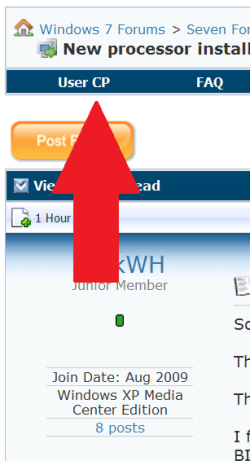
Welcome aboard.

.
 

Attachments

  • 0 UserCP1.PNG
    0 UserCP1.PNG
    10.8 KB · Views: 13
  • 0 UserCP2.PNG
    0 UserCP2.PNG
    7.3 KB · Views: 5
Well actually, I didn't reformat because of that. The reason I reformatted was because of a recurring vista problem that is apparently back in 7. The boot manager deleted itself so I had to reformat because I couldn't get back into 7.
 

My Computer My Computer

At a glance

Windows 7 32-bit Home Premium2.8 Ghz Dual-Core AMD Athlon 78502 GBNvidia Geforce 9600GT
Computer Manufacturer/Model Number
CyberPower
OS
Windows 7 32-bit Home Premium
CPU
2.8 Ghz Dual-Core AMD Athlon 7850
Motherboard
ASUS (can't remember the model)
Memory
2 GB
Graphics Card(s)
Nvidia Geforce 9600GT
Sound Card
Onboard
Monitor(s) Displays
Samsung SyncMaster 2033SW
Screen Resolution
Native is 1600x900 (can only get 1280x768 now)
Hard Drives
250 GB (don't know the manufacturer)
Case
CoolerMaster Elite 310
Keyboard
Gearhead Keyboard and Mouse Set
Mouse
Gearhead Keyboard and Mouse Set
Internet Speed
Fiber Optic (1 Mb/s)
I have this same issue. also, I see attachments that are no longer connected.
 

My Computer My Computer

At a glance

Windows 7 RTM 64 bitIntel Pentium D 3.00 GHz 2.99 GHz8 GigDual NVIDIA GeForce 7800 GTX
Computer Manufacturer/Model Number
Dell XPS 600
OS
Windows 7 RTM 64 bit
CPU
Intel Pentium D 3.00 GHz 2.99 GHz
Memory
8 Gig
Graphics Card(s)
Dual NVIDIA GeForce 7800 GTX
Sound Card
Realtek AC'97
Monitor(s) Displays
Dell
Hard Drives
Seagate SATA 3.5" Barracuda 1 TB ST310005 28AS /scsi
Back
Top